Monitor stands ranked by lift, load limit and VESA
Ergotron LX Desk Monitor Arm tops this list, carrying 25 pounds across 13 inches of lift. VIVO STAND-V001 covers a single 27 inch panel on a knob-set steel pole. Amazon Basics Monitor Stand fits anyone who needs a few fixed inches and has no VESA holes.
Ergotron LX Desk Monitor Arm suits anyone running a 27 to 34 inch screen on a crowded desk. Constant Force tension holds any position across 13 inches of travel, and the aluminium arm is rated to 25 pounds. Panels under roughly 7 pounds drift upward until you retension the spring with the supplied hex key.
Two unrelated products share the name monitor stand. Risers stack fixed height under a factory base; arms clamp to the desk and carry the screen on a VESA plate. We compared lift range, rated load, VESA patterns and clamp thickness, then weighed owner reports of sag, drift and desk edge marking.
The best picks, ranked

Ergotron LX Desk Monitor Arm
Constant Force tension replaces the gas cylinder used by most arms, so a screen stays exactly where you push it across 13 inches of travel. Ergotron rates the arm to 34 inches and 25 pounds, enough for ultrawides that overload lighter mounts. A 10 year warranty backs the aluminium extrusion, and both C-clamp and grommet hardware ship in the box.
Pros
- 25 lb ceiling clears most 34 in ultrawides
- 13 in of lift plus long horizontal extension
- Aluminium build covered for 10 years
Cons
- Light panels drift until the spring is retensioned
- Clamp needs clearance behind the desk edge

VIVO STAND-V001 Single Monitor Desk Mount
Steel pole and a sliding bracket carry one screen from 13 to 27 inches at up to 22 pounds. Height sets by loosening a knob rather than fighting a spring, so the panel never creeps downward under load. Tilt, swivel and full rotation come standard, and cable clips run the length of the pole.
Pros
- Knob-set height holds firm under a heavy 27 in panel
- Clamp and grommet hardware both included
- Pole clips route cables out of sight
Cons
- Changing height means loosening hardware
- Not rated beyond 27 in screens

HUANUO Dual Monitor Stand Mount
Two gas spring arms share a single clamp, each accepting a 13 to 32 inch panel at 19.8 pounds. Independent joints let you angle one screen inward and leave the other square to your chair. Both arms fold back toward the clamp when paperwork needs the desk.
Pros
- Each arm tilts and swivels on its own
- One clamp point keeps the desk edge footprint small
- Both 75×75 and 100×100 plates supplied
Cons
- A pair of 32 in panels overruns a narrow desk
- Gas tension needs dialling down for light screens

Amazon Basics Monitor Stand
Steel frame lifts one monitor and leaves a slot underneath where a keyboard parks. Nothing bolts to the screen, so any panel with a stable factory base sits on it. Height never changes, which works when your eye line is only two or three inches low.
Pros
- Works with screens that have no VESA holes
- Keyboard slides underneath between sessions
- Tool free assembly takes a couple of minutes
Cons
- No way to fine tune the height
- Tilt and swivel stay with the factory base

Humanscale M2.1 Monitor Arm
Mechanical spring counterbalance takes the place of a sealed gas cylinder, removing the slow fade that eventually ends a cylinder’s service life. Rated to 20 pounds, it targets 24 to 32 inch office panels rather than heavy ultrawides. Once tension matches your screen, one finger moves it through the whole range.
Pros
- Spring mechanism avoids cylinder fade over years
- One finger raises or lowers the panel
- Clamp, bolt-through and wall mounting all supported
Cons
- 20 lb ceiling rules out the heaviest ultrawides
- Setting the counterbalance takes trial and error
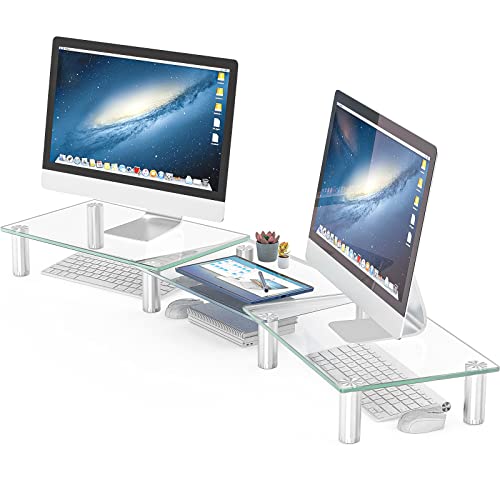
FITUEYES Glass Monitor Riser
Tempered glass top rated to 44 pounds rests on slim steel legs, so a shallow desk keeps most of its usable depth. Clearance underneath swallows a keyboard plus a small dock. Dust shows on glass faster than on wood, and nothing about the height adjusts.
Pros
- 44 lb top holds a monitor and a closed laptop
- Narrow legs suit desks under 24 in deep
- Wipes clean without polish or tools
Cons
- Fixed height cannot chase an exact eye line
- Fingerprints stay visible on the glass

SUPERJARE Monitor Stand Riser
MDF platform stacks to three heights and hides a pull out drawer for pens, dongles and spare cables. Load rating reaches 66 pounds, covering a monitor and a closed laptop together. Metal legs thread into the board during assembly, and owners report the drawer runs best on a level desk.
Pros
- Three stacking heights from one riser
- Drawer absorbs small desk clutter
- 66 lb rating handles monitor plus laptop
Cons
- Wood finish scratches under sliding gear
- Drawer binds on an uneven surface
How to choose
Riser or monitor arm: which one suits your desk Risers add a fixed block of height under a monitor’s own base. Arms clamp or bolt to the desk and carry the panel on a VESA plate, freeing every inch of surface below. Buy a riser when your eye line sits two or three inches low and a keyboard needs somewhere to live. Choose an arm when you share the desk, alternate sitting and standing, or want the screen pushed further back on a shallow surface. Arms also reset height in seconds, which matters when two people of different heights use one workstation.
How to match the weight limit and VESA pattern Weigh the monitor without its stand, because that is the load an arm actually carries. Most 24 to 27 inch panels land between 8 and 14 pounds. A 34 inch ultrawide often passes 20 pounds, which explains why the Ergotron LX and its 25 pound rating keep surfacing. VESA holes measure 75 by 75 or 100 by 100 millimetres and appear in the manual’s specification table. Curved backs and hole free designs need an adapter plate, so confirm that detail before ordering anything that clamps.
Best monitor stands for small desks and renters Shallow desks lose the most surface to a wide factory base. Clamping a VIVO STAND-V001 to the rear edge recovers that space and lets the panel sit further from your eyes. Renters and hot desk users who cannot clamp or drill do better with the FITUEYES glass riser, since it needs no hardware at all. Measure desk thickness first, because most clamps accept edges of roughly 2 to 3 inches and want a little clearance behind the screen. Glass tops belong to freestanding risers rather than clamps.
Dual screens and 34 inch ultrawides Two arms on one clamp save space but concentrate the whole load at a single point. HUANUO rates its dual mount at 19.8 pounds per arm, comfortable for two 27 inch panels and tight for two 32 inch curved ones. Measure combined width before committing, since curved screens need wider spacing than flat ones to avoid overlap. Thin laminate should take the grommet option through an existing cable hole rather than an edge clamp. Running a single heavy ultrawide instead? Skip dual mounts and put the weight allowance into lift range.
The lineup, side by side
| # | Model | Screen size | Best for | Score | Price |
|---|---|---|---|---|---|
| 1 | Ergotron LX Desk Monitor Arm | Up to 34 in | Best overall | 9.4 | Check price |
| 2 | VIVO STAND-V001 Single Monitor Desk Mount | 13 to 27 in | Best value | 9.1 | Check price |
| 3 | HUANUO Dual Monitor Stand Mount | 13 to 32 in each | Best for dual screens | 9.0 | Check price |
| 4 | Amazon Basics Monitor Stand | Fixed desktop riser | Best budget | 8.8 | Check price |
| 5 | Humanscale M2.1 Monitor Arm | Up to 20 lb | Best premium build | 8.6 | Check price |
| 6 | FITUEYES Glass Monitor Riser | Tempered glass with steel legs | Best for small desks | 8.4 | Check price |
| 7 | SUPERJARE Monitor Stand Riser | MDF board with metal legs | Best for desk storage | 8.0 | Check price |
Frequently asked questions
Do monitor stands work with any monitor?
Risers do, since the screen keeps its factory base. Clamp arms need VESA holes, normally 75 by 75 or 100 by 100 millimetres. Check the rear panel or the manual, then add an adapter plate if the holes are missing.
How high should a monitor sit on a desk?
Set the top of the screen at or just below eye level while you sit upright. That puts the panel centre a little under straight ahead. Arms fine tune this in seconds; a riser gives you one height and no more.
What is the difference between a gas spring and a mechanical spring arm?
Gas springs use a sealed cylinder and cover a wide weight range cheaply. Mechanical springs, like the one in the Humanscale M2.1, avoid the cylinder fade that shows up after years of daily use. Gas arms generally carry heavier screens.
Will a monitor arm damage my desk?
Clamps press hard on a narrow strip of the edge, so thin laminate and glass are the risk cases. Fit the supplied pad, or move to a grommet mount through an existing cable hole. Solid wood and steel desks take clamps without complaint.
Can one arm hold a 34 inch ultrawide?
Yes, as long as the rated load covers it. Many 34 inch ultrawides pass 20 pounds, which eliminates lighter mounts immediately. Ergotron rates the LX to 25 pounds and 34 inches, so it clears that bar.
Is a dual monitor arm better than two single arms?
Two singles place each screen freely and spread the load across two clamp points. A dual mount such as the HUANUO uses one clamp and one footprint, which reads tidier on a narrow desk. Pick singles when the two screens differ in size or weight.
Do monitor risers help with neck pain?
Lifting a screen removes the forward head tilt behind most complaints. A riser fixes it when the panel sits only a few inches low. Arms do more when you also need the screen closer, further away or tilted.
What should I measure before buying a clamp arm?
Take desk thickness, desk depth and the clearance behind the monitor. Most clamps accept edges of roughly 2 to 3 inches. Then weigh the monitor without its base and match that figure to the arm’s rated range.
Which monitor stand is best for a small desk?
Clamp arms win on depth, because the base disappears from the surface. FITUEYES suits anyone who cannot clamp, since its legs take up little more space than the monitor foot. Avoid wide drawer risers like the SUPERJARE on desks under 24 inches deep.
Our take
Ergotron LX Desk Monitor Arm earns the top spot because 25 pounds of capacity and 13 inches of lift cover everything from a 24 inch office panel to a 34 inch ultrawide. Anyone correcting a small eye line gap, with no VESA holes to work with, should buy the Amazon Basics riser and stop there. Two screen desks belong to the HUANUO dual mount, which puts both panels on one clamp and leaves the surface clear.
Marcus Chen
Marcus covered consumer electronics for enthusiast tech publications for six years before joining ChoiceCrest. He specializes in translating manufacturer spec sheets into plain-language buying advice, with a focus on audio, computing accessories and smart-home gear.