Ergonomic Monitor Stands That Save Your Neck and Desk Space
The VIVO Single Monitor Desk Mount stands out as the top pick for most users because it offers gas spring height adjustment, full articulation, and a clamp or grommet mount that fits nearly any desk. Its main limitation is that it requires a desk edge for mounting, so it won’t work on wall-mounted or glass desks.
Prolonged computer use often leads to neck and back pain, but an ergonomic monitor stand can position your screen at eye level to promote better posture. With countless options available, choosing the right one can feel overwhelming.
This roundup compares popular monitor stands that range from simple risers to full motion gas spring arms. We focus on real user experiences and specifications to help you make an informed choice.
The top picks, ranked

VIVO Single Monitor Desk Mount
A sturdy gas spring arm that holds monitors up to 20 pounds with smooth height adjustment and full tilt, swivel, and rotation. It mounts via clamp or grommet, saving desk space and improving ergonomics.
Pros
- Gas spring makes height adjustment effortless
- Full articulation for perfect screen positioning
- Cable management clips keep wires tidy
Cons
- Clamp may not fit very thick desks
- Arm can feel heavy for some users

HUANUO Dual Monitor Stand
A dual arm mount that supports two monitors up to 27 inches each, with independent height and tilt adjustments. It frees up desk space and allows you to align both screens for a seamless viewing experience.
Pros
- Independent adjustments for each monitor
- Frees up significant desk real estate
- Cables tuck neatly along the arms
Cons
- Requires a stable desk edge
- Setup may be time consuming

Ergotron LX Desk Monitor Arm
A high quality gas spring arm known for its durability and smooth motion. It supports monitors up to 34 inches and features a patented constant force technology that allows easy repositioning.
Pros
- Exceptional build quality and stability
- Smooth movements with constant force
- Supports larger and heavier monitors
Cons
- Premium price tag
- May be overkill for small monitors
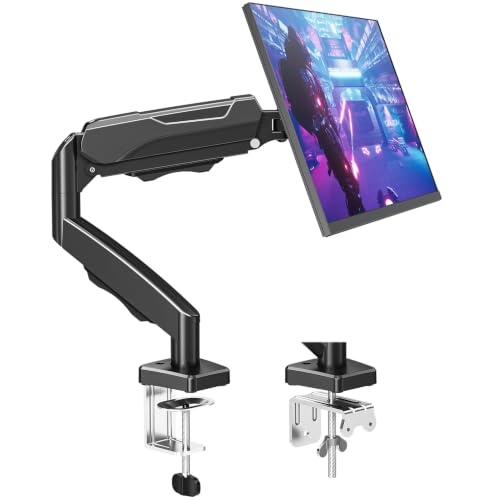
MOUNTUP Single Monitor Mount
An affordable gas spring arm that offers height adjustment, tilt, swivel, and rotation for monitors up to 32 inches. It provides solid ergonomics without breaking the bank.
Pros
- Excellent value for a gas spring arm
- Easy to install with included tools
- Full motion for versatile positioning
Cons
- Plastic components in the base
- Gas spring may lose strength over time

Amazon Basics Adjustable Monitor Stand
A lightweight aluminum riser that raises your monitor by about 6 inches. It has no moving parts but provides a stable platform that helps align your screen to eye level.
Pros
- Affordable and simple to set up
- Sturdy enough for most monitors
- Frees up desk space for keyboard and mouse
Cons
- No height adjustability
- Only supports a single monitor
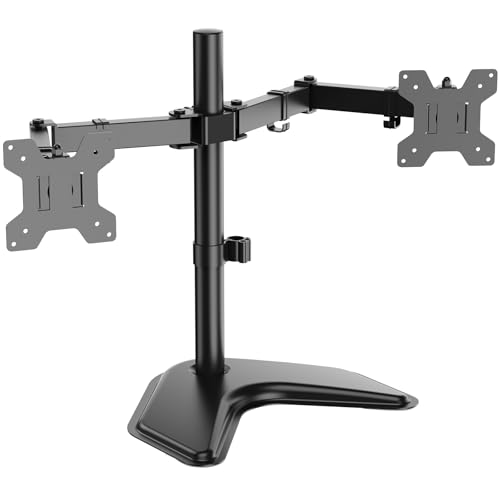
WALI Free Standing Dual Monitor Stand
A dual monitor stand that sits on the desk without clamping, making it ideal for glass desks or those with thick edges. It supports two monitors up to 27 inches each and provides height and tilt adjustments.
Pros
- Works on desks where clamps are not possible
- Stable base with non slip pads
- Independent adjustments for each monitor
Cons
- Takes up desk space
- Not as flexible as gas spring arms

ErGear Monitor Stand Riser
A compact riser that elevates laptops or small monitors by up to 6.3 inches. It features a ventilated aluminum surface to help keep your device cool.
Pros
- Adjustable height levels
- Ventilated surface prevents overheating
- Sleek and modern design
Cons
- Not intended for heavy desktop monitors
- Limited width for larger screens
What to look for
How they stack up
| # | Model | Max Monitor Size | Best for | Score | Price |
|---|---|---|---|---|---|
| 1 | VIVO Single Monitor Desk Mount | Up to 32 inches | Best overall for most users | 9.4 | Check price |
| 2 | HUANUO Dual Monitor Stand | Up to 27 inches each | Best for dual monitor setups | 9.1 | Check price |
| 3 | Ergotron LX Desk Monitor Arm | Up to 34 inches | Best premium choice | 9.2 | Check price |
| 4 | MOUNTUP Single Monitor Mount | Up to 32 inches | Best budget gas spring arm | 8.8 | Check price |
| 5 | Amazon Basics Adjustable Monitor Stand | 6 inches fixed | Best simple riser | 8.0 | Check price |
| 6 | WALI Free Standing Dual Monitor Stand | Up to 27 inches each | Best for desks without clamp support | 8.6 | Check price |
| 7 | ErGear Monitor Stand Riser | Adjustable up to 6.3 inches | Best for notebooks and small monitors | 8.2 | Check price |
Frequently asked questions
What is the ideal height for a monitor?
The top of the screen should be at or just below eye level. This allows you to look slightly downward at the center of the screen, which reduces neck strain.
Can I use a monitor stand with a laptop?
Yes, many risers and arms can hold a laptop tray. However, you will also need an external keyboard and mouse to maintain proper ergonomics.
How do I know if my monitor is VESA compatible?
Check the back of your monitor for four screw holes arranged in a square or rectangle pattern, usually 75×75 or 100×100 mm. If present, it is VESA compatible.
Are gas spring arms better than mechanical arms?
Gas springs provide smoother and easier height adjustment, making them more user friendly. Mechanical arms are often cheaper but require more effort to adjust.
Can a monitor stand hold a curved monitor?
Yes, as long as the stand’s weight and VESA pattern match the monitor’s specifications. Curved monitors may be heavier, so check the weight capacity.
What if my desk is glass or has a thick edge?
Consider a free standing monitor stand that sits on the desk surface, or a stand with a wide C clamp that can accommodate thick edges. Avoid clamp mounts on glass unless they are specifically designed for it.
Do monitor stands help with neck pain?
Yes, by raising the screen to eye level, they encourage a more upright posture. Many users report reduced neck and back discomfort after using an ergonomic stand.
Can I mount a monitor arm to a hollow core desk?
Hollow core desks may not support the clamp’s pressure. Using a grommet mount or adding a reinforcement plate is recommended.
How do I clean and maintain my monitor stand?
Wipe with a damp cloth and mild detergent. Periodically check screws and tighten them as needed. Avoid using harsh chemicals.
Are there stands that support three monitors?
Yes, there are triple monitor arms available. They require a sturdy desk and a large footprint. Make sure the combined weight is within the stand’s capacity.
The verdict
For most users, the VIVO Single Monitor Desk Mount offers the best balance of ergonomics, adjustability, and price. If you need a dual setup and have a standard desk, the HUANUO Dual Monitor Stand is a reliable choice. For premium quality and durability, the Ergotron LX is worth the investment, especially for heavy monitors. If you cannot clamp to your desk, the WALI Free Standing Dual Monitor Stand is the way to go. Choose the VIVO for a straightforward, effective upgrade to your workstation.
Marcus Chen
Marcus covered consumer electronics for enthusiast tech publications for six years before joining ChoiceCrest. He specializes in translating manufacturer spec sheets into plain-language buying advice, with a focus on audio, computing accessories and smart-home gear.


