Which Laptop Fits Your Work, Gaming or Budget
The Apple MacBook Air 13-inch (M3) is the strongest all-around pick, combining long battery life with enough power for everyday and creative work. Gamers should look at the ASUS ROG Zephyrus G14 instead, while IT-managed offices tend to prefer the Lenovo ThinkPad X1 Carbon for its durability and remote management features.
The Apple MacBook Air 13-inch (M3) stands out because it runs fanless yet handles everyday multitasking and light creative work while lasting up to 18 hours on a charge. Its main limitation is a base 256GB of storage, which fills quickly with large video or photo libraries.
We compared published processor benchmarks, display specifications, battery ratings and chassis build quality across each listing rather than running our own lab tests.
The best picks, ranked

Apple MacBook Air 13-inch (M3)
The M3 chip handles everyday multitasking, light photo editing and video calls without a fan, since the Air has no cooling vents at all. A 13.6 inch Liquid Retina display covers the P3 color gamut, useful for photo work beyond basic office tasks. Apple rates battery life at up to 18 hours of video playback, among the longest of any laptop here.
Pros
- Fanless design stays silent under normal workloads
- Long battery life suits a full day away from a charger
- Trackpad and keyboard quality lead the category
Cons
- Base 256GB storage fills quickly with large media files
- Only two Thunderbolt ports limit simultaneous accessories

Dell XPS 13 (9350)
Dell pairs an Intel Core Ultra 7 processor with a 13.4 inch InfinityEdge display, built for office work and light creative tasks rather than gaming. The zero-lattice keyboard and capacitive function row give the chassis a distinct look next to the MacBook Air. Windows 11 and the chip’s NPU support on-device AI features Apple’s ecosystem does not share.
Pros
- Thin, light chassis rivals the MacBook Air’s portability
- On-device NPU runs Windows AI features locally
- Capacitive function row keeps the deck uncluttered
Cons
- Haptic trackpad and edge-to-edge keyboard take adjustment
- Port selection relies heavily on USB-C with no USB-A

Lenovo ThinkPad X1 Carbon Gen 12
A carbon fiber chassis keeps the X1 Carbon under three pounds while still meeting military-grade durability testing, a priority for frequent travelers. The spill-resistant keyboard and dedicated TrackPoint nub carry over ThinkPad conventions IT departments already train staff on. Intel vPro support adds remote management features most consumer laptops skip.
Pros
- Military-grade durability testing suits frequent travel
- Intel vPro simplifies IT fleet management and security
- Keyboard remains among the best in any ultrabook
Cons
- Integrated graphics only, unsuitable for gaming or rendering
- Costs more than similarly specced consumer ultrabooks
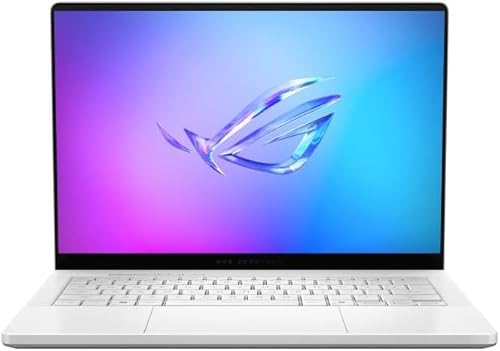
ASUS ROG Zephyrus G14
Inside a 14 inch chassis barely thicker than an ultrabook, the Zephyrus G14 fits a GeForce RTX 4070 and an AMD Ryzen 9 processor, enough for modern games at high settings. A 165Hz QHD+ display refreshes fast enough for competitive titles while staying sharp for everyday use. Select configurations add an AniMe Matrix lid design no business or productivity laptop offers.
Pros
- RTX 4070 handles modern games at high settings in a compact body
- 165Hz display suits fast-paced competitive games
- Runs noticeably cooler than most 14 inch gaming laptops
Cons
- Battery life drops sharply under gaming load
- Fan noise increases significantly in performance mode
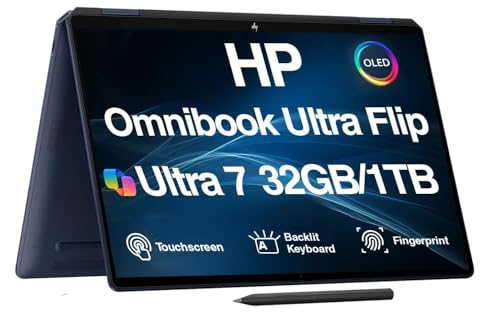
HP Spectre x360 14
A 360 degree hinge lets the Spectre x360 fold flat into tablet mode, useful for note-taking or presentations the other laptops here cannot match. Its 14 inch OLED touchscreen runs at up to 120Hz, with graphics strong enough for everyday creative work. HP bundles an active pen, a feature several competitors sell separately.
Pros
- 360 degree hinge adds real tablet and presentation flexibility
- OLED touchscreen stands out for color accuracy and contrast
- Bundled pen and sleeve add value most rivals charge extra for
Cons
- Heavier than standard clamshells once folded into tablet mode
- OLED panel drains battery faster than the MacBook Air’s screen

Microsoft Surface Laptop 7
Built around a Qualcomm Snapdragon X Elite chip, the Surface Laptop 7 runs fanless and silent while Microsoft rates it for up to 20 hours of typical use. Its ARM architecture runs most everyday Windows apps natively, though some older professional software still needs emulation. A 13.8 inch PixelSense touchscreen adds touch input the Dell XPS 13 does not offer.
Pros
- Fanless ARM chip delivers some of the longest battery life tested here
- Touchscreen adds input flexibility the Dell XPS 13 lacks
- Stays cool and silent even under sustained everyday use
Cons
- Some older Windows software still requires emulation
- Base storage configuration is limited for heavy media libraries
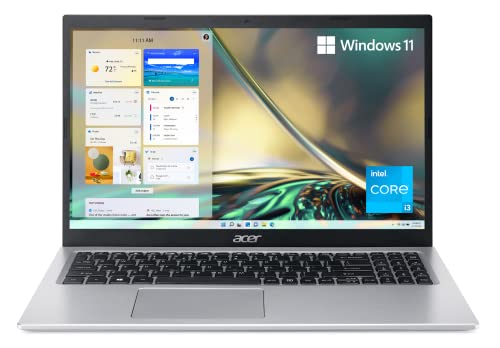
Acer Aspire 5
An AMD Ryzen 5 processor and 15.6 inch IPS display give the Aspire 5 enough power for browsing, office documents and streaming well below the cost of every other laptop here. It skips premium materials in favor of a plastic chassis, a reasonable tradeoff at this tier. A fingerprint reader and backlit keyboard are features budget laptops often cut first.
Pros
- Strong everyday performance for the price tier
- 16GB RAM and 512GB SSD beat many budget rivals’ base specs
- Fingerprint reader and backlit keys are rare at this price
Cons
- Plastic chassis feels less premium than pricier ultrabooks
- Display lacks the color accuracy of OLED competitors here
How to pick the right one
What actually separates one laptop from another Processor class decides how smoothly a laptop handles multitasking, from the efficient Apple M3 and Snapdragon X Elite to the higher-wattage AMD Ryzen 9 inside the Zephyrus G14. Display quality varies widely too, spanning standard IPS panels on the Acer Aspire 5 up to the OLED touchscreen on the HP Spectre x360. Battery life depends on both the chip and the screen, which is why fanless ARM and Apple silicon laptops post the longest runtimes here.
Matching a laptop to daily work Office tasks, email and video calls run comfortably on any laptop in this list, so business buyers gain more from durability and manageability than raw speed. The Lenovo ThinkPad X1 Carbon adds Intel vPro and military-grade testing aimed squarely at IT-managed fleets. The Dell XPS 13 and Microsoft Surface Laptop 7 suit solo professionals who want a premium Windows machine without enterprise management overhead.
Gaming and graphics-heavy tasks Only the ASUS ROG Zephyrus G14 here includes a discrete GPU, the GeForce RTX 4070, which separates it from every ultrabook on this list for modern games. Its 165Hz display matters for competitive titles where motion clarity affects reaction time. Buyers who edit video or render 3D work should treat discrete graphics as a requirement rather than a bonus.
Battery life, weight and 2-in-1 flexibility The Microsoft Surface Laptop 7 and Apple MacBook Air post the longest battery life thanks to fanless, low-power chips built for efficiency over peak speed. The HP Spectre x360 trades some battery life for a 360 degree hinge that converts into a tablet, a feature none of the standard clamshells here match. Weight stays under three pounds on the MacBook Air, XPS 13 and ThinkPad X1 Carbon, while the Zephyrus G14 and Acer Aspire 5 run heavier due to cooling hardware and a larger chassis.
Side by side
| # | Model | Display | Best for | Score | Price |
|---|---|---|---|---|---|
| 1 | Apple MacBook Air 13-inch (M3) | 13.6 inch Liquid Retina, 2560×1664 | Best Overall | 9.4 | Check price |
| 2 | Dell XPS 13 (9350) | 13.4 inch FHD+, InfinityEdge | Best Premium Windows Ultrabook | 9.1 | Check price |
| 3 | Lenovo ThinkPad X1 Carbon Gen 12 | 14 inch WUXGA IPS, 400 nits | Best for Business | 8.9 | Check price |
| 4 | ASUS ROG Zephyrus G14 | 14 inch QHD+, 165Hz | Best for Gaming | 8.8 | Check price |
| 5 | HP Spectre x360 14 | 14 inch 2.8K OLED touch, 120Hz | Best 2-in-1 Convertible | 8.6 | Check price |
| 6 | Microsoft Surface Laptop 7 | 13.8 inch PixelSense touch | Best Battery Life | 8.4 | Check price |
| 7 | Acer Aspire 5 | 15.6 inch FHD IPS | Best Budget | 8.1 | Check price |
Common questions
Is a MacBook better than a Windows laptop for most buyers?
For general use and battery life, the MacBook Air often wins, but Windows laptops like the Dell XPS 13 or Lenovo ThinkPad X1 Carbon remain necessary for software that only runs natively on Windows.
How much RAM does a laptop need in 2026?
16GB covers most everyday multitasking comfortably, which is why every laptop in this list ships with at least that much. Heavy video editing or running multiple virtual machines benefits from 32GB, as found on the ASUS ROG Zephyrus G14.
Do ARM laptops like the Surface Laptop 7 run all Windows software?
Most mainstream apps run natively on Snapdragon X Elite chips, but some older professional tools still rely on emulation, which can run slower than on an Intel or AMD chip.
What specs matter most for gaming on a laptop?
The GPU matters more than any other spec, since it directly determines frame rates. A high refresh display, like the Zephyrus G14’s 165Hz panel, matters next for smooth motion.
Is 8GB of RAM still enough for a new laptop?
Not comfortably for multitasking in 2026. Every laptop recommended here starts at 16GB, which handles browser tabs, office apps and video calls without slowdown.
Why do business laptops cost more than similar consumer models?
Durability testing, extended support and security features like Intel vPro on the ThinkPad X1 Carbon add cost that consumer laptops skip to hit a lower price.
How long should a laptop’s battery actually last on a charge?
Modern efficient chips like Apple’s M3 or Qualcomm’s Snapdragon X Elite can reach 18 to 20 hours of light use, while gaming laptops like the Zephyrus G14 often last only a few hours under heavy load.
Is a 2-in-1 laptop worth the extra cost over a standard clamshell?
It depends on whether the tablet mode gets used. The HP Spectre x360 earns its price for buyers who take notes by hand or present directly from the screen, but adds little for those who never fold it flat.
What is the real difference between integrated and discrete graphics?
Integrated graphics, like those in the ThinkPad X1 Carbon or Surface Laptop 7, share memory with the processor and suit office work. Discrete graphics, like the Zephyrus G14’s RTX 4070, have dedicated memory and far more power for games and rendering.
Our take
The Apple MacBook Air 13-inch (M3) is the strongest choice for most buyers, pairing long battery life with enough everyday performance across work and casual creative tasks. Anyone who games regularly should choose the ASUS ROG Zephyrus G14 instead, since its discrete RTX 4070 outperforms every other laptop here. Buyers shopping for an IT-managed office fleet should look past both and pick the Lenovo ThinkPad X1 Carbon for its durability testing and remote management support.
Marcus Chen
Marcus covered consumer electronics for enthusiast tech publications for six years before joining ChoiceCrest. He specializes in translating manufacturer spec sheets into plain-language buying advice, with a focus on audio, computing accessories and smart-home gear.


