How to Choose a Laptop That Fits Your Budget and Workload
Apple’s MacBook Air 13 inch with M4 is the best overall laptop for battery endurance, silent operation and everyday speed. ASUS’s Zenbook 14 OLED is the strongest value Windows pick. Acer’s Aspire 3 covers basic study and browsing needs at the lowest cost.
Apple’s MacBook Air 13 inch with M4 suits the widest range of buyers here, ASUS’s Zenbook 14 OLED is the Windows alternative, and Acer’s Aspire 3 covers tight budgets. Each targets a different priority without asking you to compromise on the basics.
Processor names change every year, yet screen quality, battery endurance, keyboard feel and whether memory can be upgraded decide daily satisfaction far more. Those details sit buried in spec tables rather than headline marketing. We compared published specifications, panel types, port layouts, manufacturer battery claims and consistent owner feedback, then ranked machines on how well they hold up for years rather than how they benchmark on day one.
The shortlist, ranked

Apple MacBook Air 13 inch (M4)
No fan means no noise, even under browsing, office work, photo editing or light video tasks. The M4 chip handles all of that while the battery lasts a full working day under normal use. Memory and storage cannot be upgraded later, so owners report configuration matters most at purchase.
Pros
- Completely silent with no fans
- Battery lasts a full working day
- Excellent display and trackpad
Cons
- Memory and storage fixed at purchase
- Limited port selection without a hub
ASUS Zenbook 14 OLED
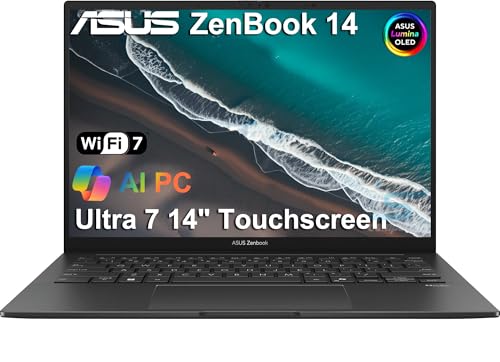
A genuinely excellent OLED panel pairs with a light chassis and a sensible port selection that includes full size HDMI and USB A. Most rivals at this level cut either the screen or the ports, rarely both at once. Battery life stays strong for a Windows machine, though brightness settings shift that considerably.
Pros
- OLED contrast is a clear upgrade over LCD
- Keeps useful legacy ports
- Light enough for daily commuting
Cons
- OLED panels can be affected by static elements over years
- Memory usually soldered, so configure carefully

Lenovo ThinkPad X1 Carbon Gen 12
A keyboard with real travel, a durable carbon chassis and hardware security features earn ThinkPads their reputation among IT departments. It stays under three pounds while passing military standard durability testing. Serviceability and long term parts availability are the reasons owners report buying them repeatedly.
Pros
- Best typing experience in this group
- Durable chassis with long support cycles
- Strong business security features
Cons
- Costs more than consumer equivalents
- Conservative styling and modest graphics

Dell XPS 13 9340
Thin bezels and a machined aluminium shell pack a 13 inch display into one of the smallest bodies available. Trains, cafes and small desks are where the size pays off most. Owners report the minimalist keyboard and touch function row divide opinion sharply, so trying it first is worthwhile.
Pros
- Very small for its screen size
- Premium build and display quality
- Excellent for cramped working spaces
Cons
- USB C only means carrying adapters
- Touch function row is divisive
ASUS ROG Zephyrus G14
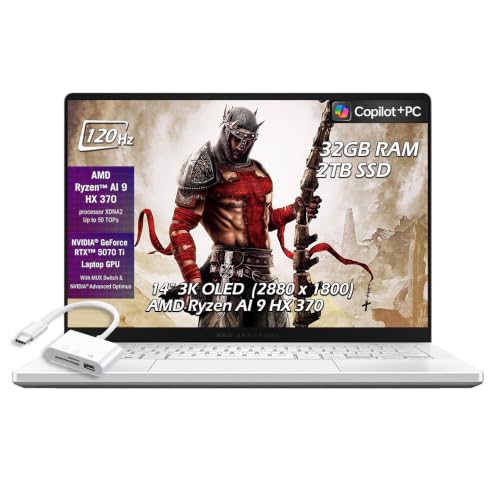
Discrete graphics for gaming, 3D or video editing fit into a 14 inch body instead of a bulky gaming chassis. A high refresh display pairs with serious cooling to keep performance steady. Battery life drops sharply under load here, which owners report is true of every discrete graphics laptop.
Pros
- Real gaming and rendering performance
- Compact for a machine with discrete graphics
- High refresh screen benefits both work and play
Cons
- Fans are audible under load
- Battery drains fast when the GPU is working
HP Pavilion Aero 13
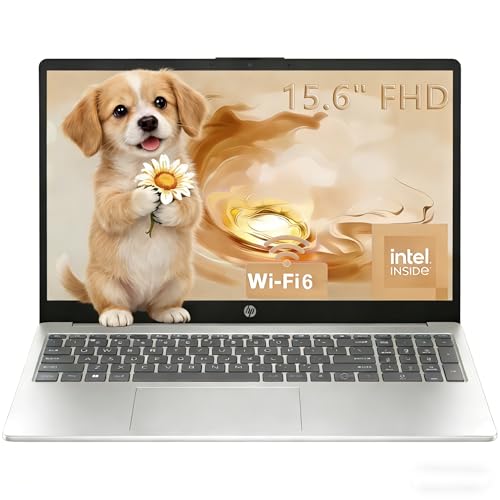
A magnesium alloy chassis keeps this well under three pounds without a premium price tag. A taller 16 to 10 display shows more of a document than a widescreen panel at the same diagonal size. Owners report it suits students who carry a laptop all day but cannot justify flagship spending.
Pros
- Genuinely light for the money
- Taller screen suits documents and web pages
- Retains full size USB A and HDMI
Cons
- Display brightness is modest
- Speakers are unremarkable

Acer Aspire 3
Browsing, streaming, email and coursework are covered without pretending to be anything more, which fits what many households need as a second machine. Storage and memory are often upgradeable, so a slow configuration can improve later. A plastic body and modest screen are the obvious tradeoffs owners report for the cost.
Pros
- Lowest cost of entry here
- Frequently upgradeable after purchase
- Large screen for the money
Cons
- Plastic chassis flexes
- Dimmer, lower contrast display
What to look for
Why memory matters more than the processor name 16GB of memory is often the difference between a laptop that feels fine for five years and one that stutters within two, especially with browser heavy work. Processor generations improve slowly year over year. Running out of memory is immediate and obvious the moment it happens. Check whether memory is soldered, since most thin laptops cannot be upgraded later.
The screen you stare at all day Panel quality affects daily satisfaction more than any benchmark, and resolution, brightness and aspect ratio move the needle more than refresh rate. OLED delivers deeper contrast and richer color. A taller 16 to 10 or 3 to 2 panel shows more of a document than a widescreen at the same size. Brightness in nits matters more than color gamut for anyone working near windows or outdoors.
What manufacturer battery claims actually mean Those figures come from light video playback at moderate brightness, so real mixed use runs roughly a third shorter. Efficient chips without discrete graphics deliver the longest real world endurance. Gaming machines rarely last a full working day away from power. Weight paired with battery life is the combination to optimize for anyone working away from outlets regularly.
Ports and repairability shape the years ahead A USB C only laptop means carrying a dongle for monitors, memory cards and older peripherals, fine if planned for and irritating if not. Business lines often include replaceable batteries, upgradeable storage and longer parts availability. Check whether the model has accessible screws and a published service manual before buying, since that decides whether a failed battery ends the machine.
The lineup, side by side
| # | Model | Chip | Best for | Score | Price |
|---|---|---|---|---|---|
| 1 | Apple MacBook Air 13 inch (M4) | Apple M4 with unified memory | Best overall | 9.4 | Check price |
| 2 | ASUS Zenbook 14 OLED | 14 inch OLED, high contrast | Best value Windows laptop | 9.2 | Check price |
| 3 | Lenovo ThinkPad X1 Carbon Gen 12 | Carbon fibre reinforced chassis | Best for business use | 9.0 | Check price |
| 4 | Dell XPS 13 9340 | 13.4 inch with slim bezels | Best compact design | 8.8 | Check price |
| 5 | ASUS ROG Zephyrus G14 | Discrete GPU with high refresh display | Best for gaming and creation | 8.6 | Check price |
| 6 | HP Pavilion Aero 13 | Magnesium alloy | Best lightweight budget option | 8.3 | Check price |
| 7 | Acer Aspire 3 | Everyday browsing and study | Best budget | 8.0 | Check price |
Questions worth asking
How much memory does a laptop need?
8GB is a workable minimum for light browsing and documents, but 16GB is the sensible target for anything else and for keeping a laptop useful for years. Memory is soldered on most thin models, so it cannot be added later.
Is a MacBook better than a Windows laptop?
It depends on the software you rely on daily. Apple machines lead on battery life and silent operation, while Windows offers wider hardware choice, gaming support and specific professional applications.
Do I need a laptop with discrete graphics?
Only for gaming, 3D work or heavy video rendering. Integrated graphics handle office work, streaming and photo editing well while using far less power.
What screen size is best for a laptop?
13 to 14 inches suits people who carry a laptop daily, while 15 to 16 inches works better as a mostly desk based machine. Aspect ratio matters too, since a taller panel shows more text at the same diagonal size.
How long should a laptop last before replacing it?
Four to six years is realistic for a well specified machine, with the battery usually being the first part needing attention. Choosing enough memory at purchase is the single biggest factor in longevity.
Is upgrading the SSD worth it?
Yes, if the model allows it, since storage speed and capacity affect daily responsiveness noticeably. Many budget laptops have an accessible drive slot even when memory is soldered.
Should I buy the current generation or the previous one?
Previous generation models often represent much better value, since year on year performance gains tend to be modest. Confirm the older model still receives operating system and driver support before buying.
Do OLED laptop screens suffer burn in?
Static elements shown for very long periods can cause wear over years, though modern panels include mitigation such as pixel shifting. For most users the contrast advantage outweighs that risk.
What is the best laptop for college students?
A light 13 to 14 inch model with all day battery matters most for carrying between classes. The MacBook Air and HP Pavilion Aero 13 both fit that use case at different price points.
MacBook Air vs Windows ultrabook: which should I buy?
Choose the MacBook Air for silence, battery life and a polished trackpad. Choose a Windows ultrabook like the Zenbook 14 OLED for legacy ports, gaming compatibility and a lower entry price with comparable screen quality.
Our pick
Apple’s MacBook Air 13 inch with M4 suits most buyers, combining silence, endurance and a display that makes daily work pleasant. Windows users get the closest equivalent in ASUS’s Zenbook 14 OLED, while the Lenovo ThinkPad X1 Carbon Gen 12 is worth the extra for anyone typing all day. Configure enough memory at purchase, since that decision cannot be undone on most modern laptops.
Marcus Chen
Marcus covered consumer electronics for enthusiast tech publications for six years before joining ChoiceCrest. He specializes in translating manufacturer spec sheets into plain-language buying advice, with a focus on audio, computing accessories and smart-home gear.
You might also need
How to Choose the Right Tempered Glass Screen Protector

How to Choose a 50mm Lens for Sharper Portraits
