Compact Power: Top Mini PCs for Serious Gaming
The ASUS ROG NUC 970 is the top pick for gamers who want desktop-class performance in a tiny chassis. It pairs an Intel Core Ultra 9 processor with an RTX 4070 GPU, delivering smooth 1440p gameplay. Its main limitation is the high price, making it a premium investment.
Mini PCs have evolved from basic office boxes to formidable gaming machines. Today’s models pack dedicated graphics and powerful processors into cases that sit unobtrusively on a desk. For gamers with limited space or a preference for minimalist setups, these compact systems offer a compelling alternative to traditional towers.
Our selection covers a range of performance tiers and budgets. From the top-tier ASUS ROG NUC to the budget-friendly Beelink SER5, there is a mini PC to match your gaming ambitions. We focused on models with real gaming capability, not just integrated graphics, to ensure a satisfying experience.
The best picks, ranked

ASUS ROG NUC 970
The ASUS ROG NUC 970 is a powerhouse in a compact form. It features an Intel Core Ultra 9 processor and an NVIDIA RTX 4070 GPU, offering exceptional performance for demanding titles. Its advanced cooling system keeps thermals in check during intense sessions, and the customizable RGB lighting adds a gamer aesthetic.
Pros
- Top-tier gaming performance
- Compact and stylish design
- Good port selection with Thunderbolt 4
Cons
- Premium price point
- Upgrade options limited for GPU

MINISFORUM Neptune HX99G
The MINISFORUM Neptune HX99G combines an AMD Ryzen 9 6900HX with an RX 6650M GPU. This pairing delivers smooth frame rates at 1080p and handles 1440p well. It offers dual PCIe 4.0 slots for storage expansion and dual 2.5G Ethernet ports, making it a versatile option for gamers and creators.
Pros
- Strong performance for the price
- Dual 2.5G Ethernet ports
- Upgradeable RAM and storage
Cons
- GPU performance trails high-end options
- Cooling fan can be audible under load

GEEKOM A8
The GEEKOM A8 is a sleek mini PC that prioritizes quiet operation without sacrificing performance. It is equipped with an AMD Ryzen 9 8945HS and integrated Radeon 780M graphics, which can handle eSports and light gaming at 1080p. Its efficient cooling system ensures low noise levels, making it ideal for shared spaces.
Pros
- Very quiet operation
- Compact aluminum build
- Great for productivity and casual gaming
Cons
- Integrated graphics limit AAA gaming
- No dedicated GPU for high settings

Beelink GTR7
The Beelink GTR7 is built around the AMD Ryzen 9 7940HS processor, which provides excellent single-core and multi-core performance. Although it relies on integrated Radeon 780M graphics, it can run many games at 1080p with medium settings, especially when paired with fast dual-channel memory. Its compact design and robust build make it a reliable choice.
Pros
- High-performance CPU
- Supports up to 4 displays
- Tool-free access to internals
Cons
- Integrated graphics limit demanding games
- No Thunderbolt support
ASUS PN53
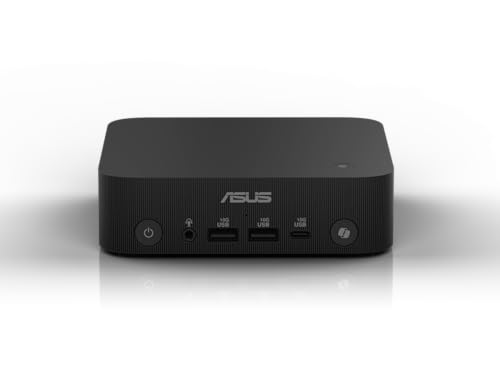
The ASUS PN53 is one of the smallest mini PCs on the market, yet it packs an AMD Ryzen 7 7735HS with Radeon 680M graphics. This combination can handle 1080p gaming on many titles, especially with FSR enabled. Its tiny footprint makes it easy to mount behind a monitor or carry in a bag.
Pros
- Extremely compact design
- Decent integrated graphics for the size
- Two HDMI ports and USB4 support
Cons
- Limited upgradeability
- Performance may require lower settings for new games

MSI Cubi NUC 13
The MSI Cubi NUC 13 is a budget mini PC that uses Intel Iris Xe graphics. It handles classic and indie games at 1080p with ease, and can run some modern titles with reduced settings. Its small size and low power consumption make it an energy-efficient choice for casual gamers.
Pros
- Affordable price
- Energy efficient
- Quiet operation
Cons
- Integrated graphics are not for AAA gaming
- Limited to 1080p low to medium settings

Beelink SER5
The Beelink SER5 is a budget-friendly mini PC with an AMD Ryzen 5 5600H and Radeon Vega graphics. It competently runs eSports titles like League of Legends and CS:GO at 1080p with high settings. For more demanding games, it will handle them at lower settings. Its compact design fits easily into any setup.
Pros
- Very affordable
- Good for eSports gaming
- Easy to upgrade RAM and storage
Cons
- Limited to lighter games
- No Thunderbolt support
How to pick the right one
How they compare
| # | Model | Processor | Best for | Score | Price |
|---|---|---|---|---|---|
| 1 | ASUS ROG NUC 970 | Intel Core Ultra 9 185H | High-end 1440p and 4K gaming | 9.4 | Check price |
| 2 | MINISFORUM Neptune HX99G | AMD Ryzen 9 6900HX | Balanced performance for 1080p and 1440p | 9.1 | Check price |
| 3 | GEEKOM A8 | AMD Ryzen 9 8945HS | Quiet operation and efficient cooling | 8.8 | Check price |
| 4 | Beelink GTR7 | AMD Ryzen 9 7940HS | Powerful CPU performance for gaming and multitasking | 8.6 | Check price |
| 5 | ASUS PN53 | AMD Ryzen 7 7735HS | Portable gaming with solid iGPU performance | 8.4 | Check price |
| 6 | MSI Cubi NUC 13 | Intel Core i5-1340P | Entry-level gaming and HTPC use | 8.2 | Check price |
| 7 | Beelink SER5 | AMD Ryzen 5 5600H | Lightweight and budget 1080p gaming | 8.0 | Check price |
Questions worth asking
Can mini PCs really handle gaming?
Yes, many modern mini PCs are equipped with dedicated GPUs that can run AAA games at 1080p or higher resolutions. Models like the ASUS ROG NUC are comparable to full-sized desktops in performance.
What is the difference between integrated and dedicated graphics in mini PCs?
Dedicated GPUs have their own memory and processing power, providing significantly better performance for gaming. Integrated GPUs share system memory and are suitable for light gaming and everyday tasks.
How much RAM do I need for gaming on a mini PC?
For modern games, 16GB is the minimum recommended. 32GB provides headroom for multitasking and future-proofing. Some mini PCs allow RAM upgrades, so consider that when choosing.
Can I upgrade the GPU in a mini PC?
Most mini PCs do not have upgradeable GPUs because they are soldered or use proprietary connectors. However, some models, like the ASUS ROG NUC, may allow GPU upgrades in the future, but it is not common.
Are mini PCs noisy under load?
Noise levels vary by model. Some mini PCs with efficient cooling fans operate quietly under load, while others may produce noticeable fan noise. User reviews often mention noise levels, so check those for your chosen model.
Do mini PCs support 4K gaming?
Some high-end mini PCs with dedicated GPUs like the RTX 4070 can handle 4K gaming at playable frame rates, but may require lowering settings for the most demanding titles. Integrated graphics are not suitable for 4K gaming.
Can I use a mini PC for VR gaming?
VR gaming requires a powerful GPU. Mini PCs with dedicated GPUs equivalent to an RTX 2060 or better may support VR. Check the system requirements of your VR headset and the mini PC’s specifications.
What is the lifespan of a gaming mini PC?
With proper care, a mini PC can last several years. However, as games become more demanding, you may need to lower settings. Some components like RAM and storage are upgradeable, which can extend usability.
Are mini PCs good for streaming games?
Yes, if the mini PC has a strong CPU and GPU. Streaming uses CPU resources, so a powerful CPU like a Ryzen 9 or Core i7 is beneficial. Ensure you have a good internet connection and the necessary ports.
How do mini PCs compare to gaming laptops?
Mini PCs are often more powerful than laptops at the same price point because they have better cooling and can house desktop components. They are not portable but are easier to upgrade and connect to external displays.
Our pick
For the best overall gaming performance in a small form, the ASUS ROG NUC 970 is the clear winner. Its combination of a powerful CPU and dedicated RTX 4070 GPU makes it capable of high-refresh 1440p gaming and even 4K at adjusted settings. If you want a balance of performance and value, the MINISFORUM Neptune HX99G is a smart alternative, offering solid 1080p and 1440p gaming at a more accessible price. For those on a tight budget, the Beelink SER5 provides a cost-effective entry into gaming, handling eSports titles admirably. Choose based on your performance needs and budget, but the ASUS ROG NUC stands as the benchmark.
Marcus Chen
Marcus covered consumer electronics for enthusiast tech publications for six years before joining ChoiceCrest. He specializes in translating manufacturer spec sheets into plain-language buying advice, with a focus on audio, computing accessories and smart-home gear.


