Seven NVMe Drives Fast Enough for PS5 Storage
The WD_BLACK SN850X with Heatsink is the safest all-around pick for PS5 storage, the Samsung 990 PRO edges it out on raw speed, and the Corsair MP600 PRO LPX costs less while still clearing Sony’s speed requirement. Any drive below 5500 MB/s sequential read will not work in the console’s expansion slot.
Sony requires at least 5500 MB/s sequential read speed for any drive installed in the PS5’s expansion slot, which rules out most SATA and older Gen3 drives entirely. The WD_BLACK SN850X with Heatsink clears that bar with room to spare and ships with a low profile heatsink sized for the console’s tight compartment. The Samsung 990 PRO reads slightly faster on paper, though the real world difference in game load times is small enough that most owners will not notice it.
Picking a PS5 drive gets complicated because the heatsink matters as much as the drive itself, and a heatsink built for a desktop motherboard often will not fit inside the console’s storage expansion cover. We compared listed sequential read and write speeds, heatsink dimensions, and capacity options, then checked owner reports on installation fit and thermal throttling under extended play.
What to look for
What the PS5 actually requires from an internal SSD Sony’s expansion slot requires a PCIe Gen4 NVMe M.2 2280 drive rated for at least 5500 MB/s sequential read speed, along with a heatsink that fits within the console’s limited clearance. A drive that meets the speed requirement but lacks a properly sized heatsink can still overheat and throttle performance during long play sessions. Capacity, interface, and heatsink fit all matter together, not any single spec alone.
Why heatsink design varies so much between drives Some manufacturers, like WD and Samsung, sell a dedicated heatsink version of their drive sized specifically for console installation. Others, like Sabrent, replace the PS5’s own slot cover with a custom shaped heatsink instead of bolting one onto the drive. Crucial’s P5 Plus ships with no heatsink at all, leaving the buyer to source a compatible one separately, which adds a step but allows more choice.
Matching capacity to how many games are installed at once A library of a few large titles fits comfortably on a 1TB drive, but modern game installs frequently exceed 50 to 100 gigabytes each, so a household with several active titles benefits from 2TB or larger. Buying a 4TB drive up front, where available from brands like WD, Samsung, or Sabrent, avoids a second purchase later for a growing library.
When sustained write speed matters more than peak numbers Peak sequential read numbers look similar across most Gen4 drives, but sustained write speed during a very large game install or transfer can drop more on DRAM-less or budget tier drives like some lower capacity Crucial variants. A DRAM-equipped drive like the PNY XLR8 CS3140 holds its write speed more consistently during those longer transfers.
The top picks, ranked

WD_BLACK SN850X NVMe SSD with Heatsink
WD built a version of the SN850X specifically with a heatsink sized to fit the PS5’s expansion slot without modification. Sequential read speed reaches up to 7300 MB/s, well above Sony’s 5500 MB/s minimum requirement. It is widely cited as a safe, reliable default pick for PS5 storage expansion.
Pros
- Heatsink pre-sized for PS5 installation
- Read speed well above PS5 minimum requirement
- Widely reported as reliable for console use
Cons
- Costs more than non-heatsink drives of the same capacity
- Heatsink version only needed for console use, not PCs with their own cooling

Samsung 990 PRO with Heatsink
The 990 PRO posts some of the highest sequential read and random IOPS numbers in the consumer NVMe category, exceeding the SN850X on paper. A separate heatsink version is sold specifically for console and tight clearance installs. Real world game load time differences against the SN850X are typically under a second, despite the spec sheet gap.
Pros
- Highest sequential read speed in this comparison
- High random IOPS for fast game loading
- Heatsink version fits console installs
Cons
- Priced at a premium over the SN850X
- Non-heatsink version will not fit PS5 without an add-on
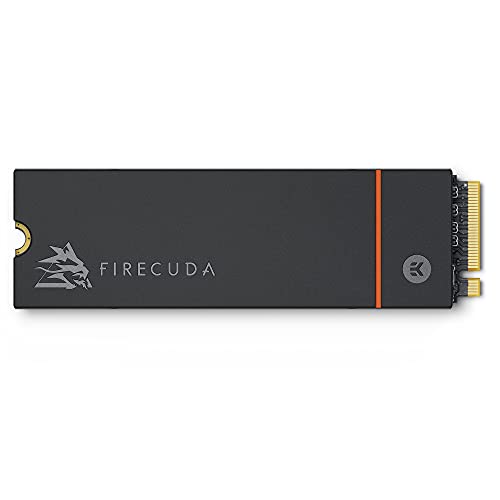
Seagate FireCuda 530 with Heatsink
FireCuda 530 matches the SN850X and 990 PRO closely on speed while posting a high terabytes written endurance rating, appealing to buyers who install and reinstall large game libraries often. The heatsink version is built with console clearance in mind. Seagate backs the drive with a longer warranty than some competitors in this category.
Pros
- High endurance rating for heavy install and uninstall cycles
- Speed on par with top competitors
- Longer warranty coverage than some rivals
Cons
- Pricing sits close to the Samsung 990 PRO
- Non-heatsink version needs a separate add-on for PS5
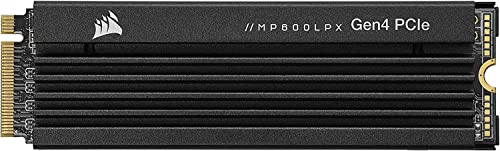
Corsair MP600 PRO LPX
Corsair designed the MP600 PRO LPX specifically with console compatibility in mind, including a low profile heatsink built into the drive itself rather than sold as a separate accessory. Sequential read speed clears Sony’s requirement comfortably at up to 7100 MB/s. It is frequently cited as one of the more affordable options that still meets every PS5 requirement.
Pros
- Built-in heatsink designed for console fit
- Comfortably clears PS5 speed requirement
- Generally lower cost than Samsung or WD options
Cons
- Slightly lower peak speed than the 990 PRO
- Fewer capacity options at the high end

Sabrent Rocket 4 Plus
Sabrent’s heatsink design replaces the PS5’s metal expansion slot cover rather than sitting on top of the drive, which Sabrent states improves airflow in the compartment. Sequential read and write speeds both clear Sony’s requirements with room to spare. Installation differs slightly from drives with a bolted-on heatsink, so following Sabrent’s specific instructions matters.
Pros
- Unique heatsink design built for airflow
- Speeds comfortably clear PS5 requirements
- Available across multiple capacities
Cons
- Installation process differs from standard heatsink drives
- Heatsink is specific to this drive, not interchangeable
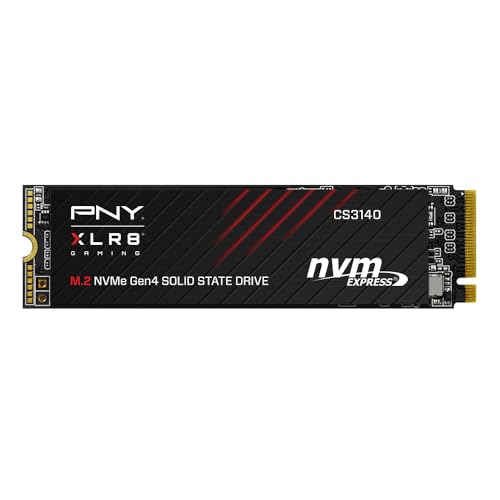
PNY XLR8 CS3140
PNY’s CS3140 includes a DRAM cache, which generally sustains performance better during large file transfers than DRAM-less budget drives. A custom heatsink is sized for tight enclosures, including the PS5. It typically costs less than the WD, Samsung, or Seagate options above while still exceeding the console’s minimum speed requirement.
Pros
- DRAM cache supports sustained performance
- Generally lower cost than top-tier competitors
- Heatsink sized for tight enclosures
Cons
- Less established track record in console use than WD or Samsung
- Sustained write speeds can drop on very large transfers

Crucial P5 Plus
The P5 Plus does not ship with a heatsink, so PS5 installation requires buying a separate compatible one before the drive fits the console’s cooling requirements. Some lower capacity variants in Crucial’s lineup use DRAM-less controllers, so checking the specific capacity’s spec sheet matters before buying for console use. Once paired with a proper heatsink, it clears Sony’s speed requirement without issue.
Pros
- Lower upfront cost than heatsink-included drives
- Clears PS5 speed requirement with a proper heatsink added
- Flexible heatsink choice for buyers with a preference
Cons
- Needs a separately purchased heatsink for PS5 use
- Some capacity variants are DRAM-less, lowering sustained performance
Side by side
| # | Model | Sequential Read | Best for | Score | Price |
|---|---|---|---|---|---|
| 1 | WD_BLACK SN850X NVMe SSD with Heatsink | Up to 7300 MB/s | Best Overall | 9.5 | Check price |
| 2 | Samsung 990 PRO with Heatsink | Up to 7450 MB/s | Best Raw Performance | 9.4 | Check price |
| 3 | Seagate FireCuda 530 with Heatsink | Up to 7300 MB/s | Best Endurance Rating | 9.1 | Check price |
| 4 | Corsair MP600 PRO LPX | Up to 7100 MB/s | Best Value | 9.0 | Check price |
| 5 | Sabrent Rocket 4 Plus | Up to 7000 MB/s | Best Heatsink Design for Tight Installs | 8.8 | Check price |
| 6 | PNY XLR8 CS3140 | Up to 7500 MB/s | Best Budget High-Performance Option | 8.6 | Check price |
| 7 | Crucial P5 Plus | Up to 6600 MB/s | Best for Buyers Adding Their Own Heatsink | 8.3 | Check price |
Common questions
What SSD speed does the PS5 require?
Sony specifies a minimum sequential read speed of 5500 MB/s for any internal expansion drive, along with the PCIe Gen4 NVMe M.2 2280 form factor.
Does every PS5-compatible SSD need its own heatsink?
Yes. Sony requires a heatsink on any installed expansion drive, though some drives include one built in while others, like the Crucial P5 Plus, require buying one separately.
Can I use a drive without a heatsink in the PS5?
No, not without adding one. The console’s firmware and physical slot design both expect a heatsink equipped drive to manage heat in that enclosed compartment.
Is the Samsung 990 PRO noticeably faster than the WD_BLACK SN850X in real use?
On paper the 990 PRO reads slightly faster, but real world game load time differences between the two are typically under a second, smaller than the spec sheet gap suggests.
What capacity SSD should I get for PS5 storage expansion?
A 2TB drive suits most households with a handful of actively installed games, while a 1TB drive fits a lighter library and 4TB suits someone keeping many large titles installed at once.
Will a PCIe Gen3 SSD work in the PS5?
No. Gen3 drives generally fall below the 5500 MB/s sequential read requirement, so only Gen4 or faster drives meeting that spec will function in the expansion slot.
Does a higher-endurance drive matter for gaming use?
It matters more for someone who frequently installs and uninstalls large games, since that cycle writes more data over time. The Seagate FireCuda 530’s high TBW rating suits that pattern better than a lower endurance budget drive.
Can I use a PS5 internal SSD in a PC later?
Yes, these are standard PCIe Gen4 NVMe drives and will work in any compatible PC motherboard slot, heatsink included or not, once removed from the console.
Is a DRAM-equipped SSD worth the extra cost for PS5 use?
DRAM helps sustain performance during very large transfers, such as installing a huge game file, but for typical PS5 use most DRAM-less Gen4 drives still clear Sony’s requirement comfortably.
Final word
For most PS5 owners, the WD_BLACK SN850X with Heatsink remains the safest pick thanks to its console sized heatsink and speed well past Sony’s requirement. A buyer chasing the highest benchmark numbers should step up to the Samsung 990 PRO instead, accepting a higher price for a gain most people will not notice in actual load times. Anyone watching cost closely should look at the Corsair MP600 PRO LPX, which clears every PS5 requirement at a lower price than the top two picks.
Marcus Chen
Marcus covered consumer electronics for enthusiast tech publications for six years before joining ChoiceCrest. He specializes in translating manufacturer spec sheets into plain-language buying advice, with a focus on audio, computing accessories and smart-home gear.


