Gaming Mouse Shopping Guide: Grip, Weight and DPI
Logitech’s G Pro X Superlight leads for competitive players, combining a sub-63 gram body with Lightspeed wireless and a HERO sensor. Razer’s DeathAdder V3 suits palm grips with its refined ergonomic shape. SteelSeries Rival 3 delivers solid tracking and durable switches for shoppers on a tighter budget.
Grip style and hand size decide comfort more than any spec on the box. Logitech’s G Pro X Superlight tops this list for its featherweight build and steady wireless tracking. Seven real models follow, ranked so you can match shape, weight, and connection type to how you actually play.
Picking a mouse gets tricky because shape preference is personal and DPI numbers get oversold. We compared published specs, including sensor type, weight, and connectivity, against grip style compatibility and owner feedback from verified buyers. That approach favors mice that perform consistently over models that only look impressive on a spec sheet.
The top picks, ranked

Logitech G Pro X Superlight
Weight drops below 63 grams on this Logitech flagship, thanks to a solid shell with no honeycomb cutouts. A HERO sensor tracks up to 25,600 DPI with low click latency over Lightspeed wireless. Battery life comfortably outlasts long multi-day sessions, and the ambidextrous shape suits both palm and claw grips.
Pros
- Sub-63 gram body without cutout holes
- HERO sensor tracks up to 25,600 DPI
- Lightspeed wireless keeps input lag low
Cons
- Skips onboard RGB lighting to save weight
- Side buttons ship on one side only

Razer DeathAdder V3
Razer reshaped its longest-running mouse line into a lighter, more contoured body. A Focus Pro sensor tracks up to 30,000 DPI, well beyond what any game setting needs. Owners report the sculpted right-handed shell cradles the palm through multi-hour sessions better than flatter, symmetrical designs.
Pros
- Contoured shape built for palm grip
- Focus Pro sensor tracks up to 30,000 DPI
- Available in both wired and wireless versions
Cons
- Right-handed shape excludes left-handed players
- Wireless version costs more than the wired model

Glorious Model O
Glorious cuts weight with a honeycomb shell full of cutout holes, not a smaller frame. An ambidextrous shape keeps side buttons within reach for claw and fingertip grips. A braided paracord-style cable adds so little drag that owners often describe it as feeling wireless.
Pros
- Honeycomb shell keeps weight near 67 grams
- Paracord cable glides with almost no drag
- Ambidextrous shape works for either hand
Cons
- Open shell lets in dust and debris
- Cutout design looks polarizing to some buyers

Razer Basilisk V3
Razer stacks the Basilisk V3 with programmable buttons and a tilt-scroll wheel that switches to a free-spin mode. MMO players and streamers lean on the extra inputs for macros and quick scene changes. A rubberized thumb rest and ergonomic shell add bulk, pushing weight to roughly 101 grams.
Pros
- Tilt wheel switches to a free-spin scroll mode
- Extra programmable buttons handle macros easily
- Padded thumb rest supports long sessions
Cons
- Heaviest mouse on this list at 101 grams
- No wireless option, wired USB only

Logitech G502 Hero
Logitech’s G502 Hero has stayed on shelves for years thanks to its adjustable weight system. Five removable weights let players fine-tune balance from light to heavy. Eleven programmable buttons cover macros, DPI shifts, and a sniper-button toggle that palm-grip shooters use often.
Pros
- Adjustable weight system with removable weights
- Eleven programmable buttons for macros and DPI
- Reliable HERO sensor shared with premium models
Cons
- Weighs about 121 grams before adding weights
- Wired connection only, no wireless version
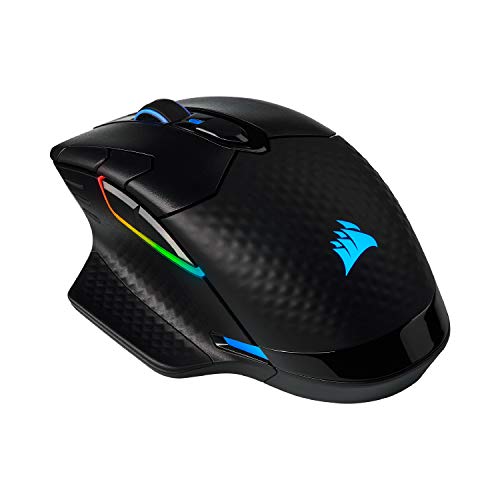
Corsair Dark Core RGB Pro
Corsair built the Dark Core RGB Pro around hand-size flexibility rather than raw weight savings. Interchangeable side grips adjust the shape for small, medium, or large hands. Qi wireless charging works with compatible pads, and Slipstream or Bluetooth cover both gaming and everyday desktop use.
Pros
- Swappable side grips fit different hand sizes
- Supports Qi wireless charging on compatible pads
- Switches between Slipstream and Bluetooth connections
Cons
- Heaviest wireless option here at 133 grams
- Bulkier shell suits larger hands better

SteelSeries Rival 3
SteelSeries keeps the Rival 3 simple to hit a lower price point without cutting core performance. A TrueMove Core optical sensor tracks up to 8,500 DPI, plenty for most game genres. Mechanical switches are rated for tens of millions of clicks, and the symmetrical shape suits either hand.
Pros
- Switches rated for tens of millions of clicks
- Symmetrical shape works for left or right hands
- Strong tracking accuracy for its price tier
Cons
- Lower peak DPI than premium sensors offer
- Fixed rubber cable is stiffer than braided options
What matters most
What Sensor and DPI Range Do You Actually Need? Most players game between 400 and 1,600 DPI, far below the 25,000-plus ceilings printed on mouse boxes. A high DPI number sells hardware, but tracking consistency at your actual setting matters more. Every mouse on this list uses a modern optical sensor with negligible acceleration or jitter at normal speeds. Pick based on stable performance at the DPI you already use, not the highest figure on the spec sheet.
How Much Does Mouse Weight Affect Gameplay? Competitive mice have dropped from around 100 grams to under 65 grams over the past few years. Lighter bodies flick faster and cause less wrist fatigue during long ranked sessions. Feature-heavy mice like the G502 Hero and Basilisk V3 trade that speed for buttons, weight tuning, or a thumb rest. Decide whether raw speed or extra controls matter more for the games you play.
Which Grip Style Fits Which Shape? Palm grip covers the whole hand across the shell, and it favors contoured shapes like the DeathAdder V3. Claw grip arches the fingers and works well with flatter, ambidextrous shells such as the Model O. Fingertip grip barely touches the shell and often pairs with lighter mice for quick, low-effort flicks. Larger hands generally lean toward bulkier bodies like the Dark Core RGB Pro, regardless of grip style.
Is a Wireless Gaming Mouse Worth It? Latency between wired and modern wireless mice is now measured in single-digit milliseconds, close enough that most players cannot feel a difference. Logitech Lightspeed and Corsair Slipstream both run at rates comparable to a wired connection. Wireless adds a battery to manage and, in some models, more weight than wired equivalents. Choose wired if you want the lowest cost and never want to think about charging.
The lineup, side by side
| # | Model | Sensor / DPI | Best for | Score | Price |
|---|---|---|---|---|---|
| 1 | Logitech G Pro X Superlight | HERO, up to 25,600 DPI | Best overall | 9.4 | Check price |
| 2 | Razer DeathAdder V3 | Focus Pro, up to 30,000 DPI | Best ergonomic shape | 9.2 | Check price |
| 3 | Glorious Model O | Optical, up to 12,000 DPI | Best lightweight | 9.0 | Check price |
| 4 | Razer Basilisk V3 | Focus+, up to 26,000 DPI | Best for extra buttons | 8.8 | Check price |
| 5 | Logitech G502 Hero | HERO, up to 25,600 DPI | Best for customization | 8.6 | Check price |
| 6 | Corsair Dark Core RGB Pro | Optical, up to 18,000 DPI | Best wireless value | 8.4 | Check price |
| 7 | SteelSeries Rival 3 | TrueMove Core, up to 8,500 DPI | Best budget | 8.0 | Check price |
Frequently asked questions
What is the best gaming mouse overall?
Logitech’s G Pro X Superlight ranks highest here. It combines a sub-63 gram body with a HERO sensor and Lightspeed wireless. Owners report steady tracking and long battery life across daily use.
Does a higher DPI mean better aim?
Not directly. Aim accuracy depends more on sensor tracking consistency than on the maximum DPI a mouse supports. Most players set their DPI between 400 and 1,600, well under the 25,000-plus ceilings brands advertise.
How much does gaming mouse weight matter?
Weight changes how fast you can flick the mouse and how tired your wrist gets over long sessions. Lightweight models like the G Pro X Superlight and Model O sit near 63 to 67 grams. Heavier mice such as the G502 Hero trade that speed for extra buttons and adjustability.
Which grip style works best with an ergonomic mouse?
Palm grip pairs best with contoured, right-handed shapes like the Razer DeathAdder V3. Claw and fingertip grips generally suit flatter, ambidextrous shells such as the Glorious Model O instead.
Is a wireless gaming mouse good enough for competitive play?
Yes, current wireless protocols close most of the latency gap with wired connections. Logitech Lightspeed and Corsair Slipstream both perform closely enough to wired that pro players use them. A battery to charge is the main tradeoff.
What is the best gaming mouse for MMO or productivity use?
Both the Razer Basilisk V3 and Logitech G502 Hero carry extra programmable buttons for macros and shortcuts. A tilt-scroll wheel on the Basilisk V3 adds free-spin scrolling, while the G502 Hero focuses on adjustable weight and mapping.
Can a budget gaming mouse still perform well?
Yes. The SteelSeries Rival 3 uses a TrueMove Core optical sensor and switches rated for tens of millions of clicks. It costs less than premium models but still tracks accurately for everyday and competitive gaming.
Are honeycomb mice with cutout holes durable?
Structurally, yes, for normal desk use. The open shell on mice like the Glorious Model O is less sealed against dust and spilled liquid than a solid shell, so care around drinks matters more.
Gaming mouse vs regular mouse, what is different?
Gaming mice use higher-precision optical sensors, faster polling rates, and more durable switches rated for millions of clicks. Regular office mice prioritize low cost over tracking accuracy or click durability.
How do I keep a gaming mouse tracking accurately over time?
Wipe the sensor lens and glide feet regularly to remove dust buildup. Keep firmware updated through the maker’s software, and avoid letting a wireless model sit fully drained for long stretches.
Final word
Logitech’s G Pro X Superlight earns the top spot for combining low weight, dependable wireless, and a sensor that tracks cleanly at any realistic DPI. Choose the Razer DeathAdder V3 for a contoured palm-grip shape, or the SteelSeries Rival 3 if budget matters more than extra features.
Marcus Chen
Marcus covered consumer electronics for enthusiast tech publications for six years before joining ChoiceCrest. He specializes in translating manufacturer spec sheets into plain-language buying advice, with a focus on audio, computing accessories and smart-home gear.
You might also need
Fixing the Most Common Gaming Headset Issues
