How to Pick a Mechanical Keyboard for Gaming or Typing
The Keychron K2 leads for hot-swappable switches, a compact 75 percent layout and wireless flexibility that suits both work and play. The Logitech G Pro X wins for gaming with fast, swappable switches, and the SteelSeries Apex Pro stands out for per-key adjustable actuation.
Splitting time between typing and gaming points toward the Keychron K2, thanks to hot-swappable switches, a space-saving layout and Bluetooth support. Competitive players lean toward the Logitech G Pro X, and anyone chasing per-key tuning wants the SteelSeries Apex Pro. Seven real models are ranked below to match one to how you actually type and play.
Switch feel is personal, and marketing terms like tactile and linear only hint at the real experience. To rank these seven, we compared published specifications, switch options, layouts, build materials and connectivity, then weighed them against how owners report each board feels and holds up over long typing sessions.
The best picks, ranked

Keychron K2 (Version 2)
A full set of keys fits into a compact 75 percent layout here, and the hot-swappable version lets switches change without soldering. Bluetooth and USB-C both work across Mac and Windows, according to the listing, which makes it a flexible all-rounder for people who split time between work and gaming.
Pros
- Hot-swappable switches with no soldering
- Compact 75 percent layout saves desk space
- Works wirelessly on Mac and Windows
Cons
- Tall profile may need a wrist rest
- No companion software for remapping

Logitech G Pro X
Competitive play shaped this tenkeyless board, which pairs hot-swappable switches with a detachable cable for easy transport between events. Fast, consistent actuation and a compact footprint free up room for wide mouse movements. Wired-only connection is the tradeoff, ruling out the desk cleanliness of Bluetooth rivals.
Pros
- Hot-swappable switches for quick tuning
- Compact tenkeyless design frees mouse space
- Detachable braided cable for transport
Cons
- Wired connection only
- Fewer dedicated media keys
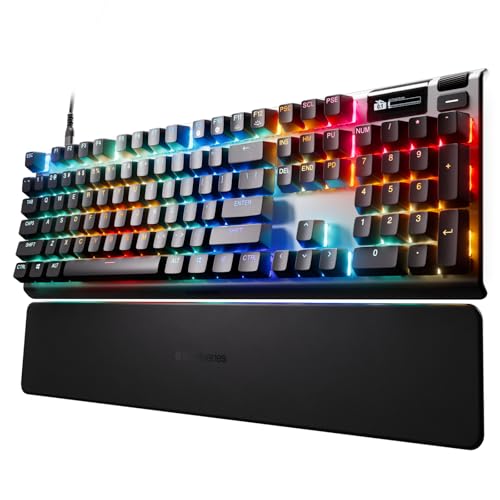
SteelSeries Apex Pro
Magnetic OmniPoint switches set actuation depth per key, so gaming keys can go hair-trigger sensitive while typing keys stay firmer. An onboard OLED display and a sturdy aluminum frame add a premium feel that full-size boards at this price rarely match. Unlocking the deeper per-key settings requires the companion software, though.
Pros
- Adjustable actuation depth on every key
- Sturdy aluminum top plate
- Onboard OLED display for quick settings
Cons
- Advanced features need the software
- Full-size footprint takes more desk space

Corsair K70 RGB Pro
Brushed aluminum frames Cherry MX switches here, paired with a detachable USB-C cable and a rock solid feel on the desk. Dedicated media controls and a high polling rate round out a durable full-size board for anyone who wants a traditional layout. Switches are soldered in, so there is no hot-swapping down the line.
Pros
- Brushed aluminum frame feels solid
- Dedicated media and volume controls
- High polling rate for responsive input
Cons
- Switches are not hot-swappable
- Larger footprint than compact boards

Razer BlackWidow V4
Programmable macro keys, a command dial and doubled RGB lighting around the edge make this the loaded option for people who want every extra. Razer Green switches feel clicky and tactile according to the listing, satisfying for anyone who likes an audible response. Extra features and a full-size layout mean it takes real desk space.
Pros
- Dedicated macro keys and command dial
- Bright underglow and per-key RGB
- Tactile, clicky switch feel
Cons
- Clicky switches are loud for shared spaces
- Feature-heavy layout takes more space

Ducky One 3
Enthusiasts favor this one for its clean design, hot-swappable switches and thick doubleshot PBT keycaps that resist shine over years of use. Quality stabilizers under the larger keys give a satisfying, consistent typing feel. No companion software ships with it, and connectivity stays wired-only, which keeps things simple.
Pros
- Doubleshot PBT keycaps resist shine
- Hot-swappable switches and quality stabilizers
- Clean, understated design
Cons
- No companion software for remapping
- Wired connection only

Royal Kludge RK61
Stripping the function row and number pad entirely gives this 60 percent board the smallest footprint here at the lowest cost. Solid hot-swap sockets and triple-mode connectivity punch above the price point. Function-layer shortcuts replace the missing keys, and that takes a few days to learn.
Pros
- Very compact 60 percent footprint
- Triple-mode wired and wireless connection
- Hot-swappable switches at a low cost
Cons
- No dedicated arrow or function keys
- Learning curve for layer shortcuts
How they stack up
| # | Model | Switch type | Best for | Score | Price |
|---|---|---|---|---|---|
| 1 | Keychron K2 (Version 2) | Hot-swappable Gateron | Best overall | 9.4 | Check price |
| 2 | Logitech G Pro X | Hot-swappable GX | Best for gaming | 9.2 | Check price |
| 3 | SteelSeries Apex Pro | Magnetic OmniPoint, adjustable | Best adjustable actuation | 9.0 | Check price |
| 4 | Corsair K70 RGB Pro | Cherry MX | Best build quality | 8.8 | Check price |
| 5 | Razer BlackWidow V4 | Razer Green tactile | Best for RGB and macros | 8.6 | Check price |
| 6 | Ducky One 3 | Hot-swappable Cherry MX | Best for typing | 8.4 | Check price |
| 7 | Royal Kludge RK61 | Hot-swappable | Best compact value | 8.1 | Check price |
How to choose
What is the difference between linear, tactile and clicky switches? Linear switches move smoothly with no bump and suit fast gaming. Tactile switches add a noticeable bump partway down for typing feedback. Clicky switches layer an audible click on top of that bump. Tactile is a common middle ground for anyone who both types and games on the same board.
How do keyboard sizes affect desk space and features? Full-size boards like the Corsair K70 include a number pad, tenkeyless boards such as the Logitech G Pro X drop it to free mouse room, and compact 75 percent or 60 percent layouts like the Keychron K2 and RK61 shrink further using function layers. Number pad use should decide which size fits, not looks alone.
What separates a well-built keyboard from a cheap one? A metal top plate, found on the Corsair K70 and SteelSeries Apex Pro, resists flex and feels more solid than plastic. Doubleshot PBT keycaps, like those on the Ducky One 3, resist the greasy shine that develops on cheaper ABS over time. Well-tuned stabilizers under the larger keys also change how consistent and quiet a board feels.
Wired vs wireless: which connectivity should gamers pick? Wired boards deliver the lowest latency and never need charging, which is why several gaming picks here stay wired. Wireless models like the Keychron K2 and Royal Kludge RK61 add Bluetooth for cleaner desks and multi-device use. Companion software from Corsair, SteelSeries and Razer unlocks macros, lighting and per-key actuation for anyone who wants that depth.
Good to know
What is the best mechanical keyboard overall right now?
Based on specifications and owner feedback, the Keychron K2 ranks first. Hot-swappable switches, a compact 75 percent layout, and both Bluetooth and USB-C connectivity make it flexible for typing and gaming on Mac or Windows alike.
What does hot-swappable mean and why does it matter?
A hot-swappable board has sockets that let switches come out and go back in by hand, no soldering required. Trying different switch feels or replacing a failed switch becomes trivial. The Keychron K2, Logitech G Pro X, Ducky One 3 and Royal Kludge RK61 all support it.
Which keyboard size should I choose for my desk?
Full-size boards include a number pad, tenkeyless boards drop it to free mouse space, and 75 percent or 60 percent layouts shrink further using function layers. Heavy number entry favors full size, while more mouse room favors a compact layout.
Are wireless mechanical keyboards good enough for gaming?
Modern wireless boards perform well, though many competitive players still prefer wired connections for the lowest possible latency and zero charging concerns. The Logitech G Pro X and SteelSeries Apex Pro here stay wired, while the Keychron K2 offers wireless for mixed everyday use.
PBT vs ABS keycaps: which lasts longer?
Doubleshot PBT keycaps, like those on the Ducky One 3, resist the greasy shine and legend fade that develop on cheaper ABS caps and often feel more textured. ABS still performs fine for lighter use, but PBT generally lasts longer under heavy daily typing.
Are mechanical keyboards too loud for an office?
It depends on the switch. Clicky switches like the Razer Green on the BlackWidow V4 are genuinely loud, while linear and many tactile switches stay much quieter. Shared spaces call for a linear or silent switch, and hot-swappable boards allow changing to quieter switches later.
Do I need the companion software that comes with these boards?
Software from Corsair, SteelSeries and Razer unlocks macros, lighting effects and per-key actuation on models like the Apex Pro. That customization is worth installing if you will use it, though boards like the Keychron K2 and Ducky One 3 work fully without any software at all.
Are pricier mechanical keyboards actually worth it?
Higher-priced boards like the SteelSeries Apex Pro and Corsair K70 justify their position through metal builds, adjustable actuation and richer software. Value picks such as the Royal Kludge RK61 still offer hot-swap sockets and wireless, so the right call depends on which features actually get used.
Keychron K2 vs Logitech G Pro X: which fits me better?
Choose the K2 for wireless flexibility and mixed typing and gaming use across Mac and Windows. Choose the G Pro X for wired, low-latency competitive play and a tenkeyless footprint that frees up mouse space.
Can a mechanical keyboard help with typing speed or comfort?
Tactile and clicky switches give feedback that helps many typists find a rhythm faster than flat membrane keys allow. Comfort depends more on the keyboard’s height and hand position than the switch itself, so a wrist rest often matters as much as switch choice.
The bottom line
For most people, the Keychron K2 is the mechanical keyboard to buy, given its hot-swappable switches, space-saving layout and wireless flexibility across Mac and Windows. Choose the Logitech G Pro X if competitive gaming is the priority, or the SteelSeries Apex Pro for fine-tuning actuation on every key.
Marcus Chen
Marcus covered consumer electronics for enthusiast tech publications for six years before joining ChoiceCrest. He specializes in translating manufacturer spec sheets into plain-language buying advice, with a focus on audio, computing accessories and smart-home gear.
You might also need

How to Pick a WiFi Router That Actually Covers Your Home
Gaming Headset or Earbuds: Which Should You Pick?

How to Choose a Laptop Stand for All Day Typing
