Powerful Gaming Desktop PCs Worth Your Money
For most gamers, the Skytech Chronos is the best overall pick. It delivers a balanced mix of CPU and GPU power for 1080p and 1440p gaming, and it comes in a clean, compact case. While it is not the cheapest option, it offers reliable performance for its price.
Choosing a gaming desktop can be overwhelming with so many configurations available. You need a machine that balances CPU, GPU, and RAM to handle the latest titles without bottlenecking.
We compared seven current models from trusted brands like Skytech, CyberpowerPC, and HP. Each system is available on Amazon and has been selected for its performance, build quality, and user satisfaction.
The shortlist, ranked
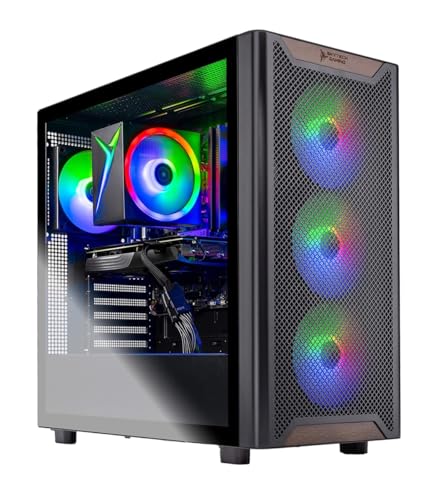
Skytech Chronos Gaming Desktop
The Skytech Chronos is a well-rounded gaming PC that excels at 1080p and 1440p gaming. It pairs an Intel Core i5-12600K with an RTX 3060 Ti, providing smooth frame rates in demanding titles. The case is sleek with tempered glass, and the system runs cool and quiet.
Pros
- Excellent 1080p and 1440p performance
- Clean cable management and airflow
- Includes keyboard and mouse
Cons
- Not ideal for 4K ultra settings
- Limited upgrade space for custom cooling

CyberpowerPC Gamer Xtreme VR Gaming PC
The CyberpowerPC Gamer Xtreme is a budget-friendly gaming desktop that still delivers solid performance. With an Intel Core i5-13400F and RTX 3050, it handles most modern games at high settings in 1080p. It is a great entry point for new PC gamers.
Pros
- Affordable entry-level gaming
- Upgradeable RAM and storage
- Compact and sturdy case
Cons
- Only 8GB RAM, may need upgrade
- Not for high-refresh 1440p gaming

HP OMEN 25L Gaming Desktop
The HP OMEN 25L is a stylish and reliable gaming desktop from a major manufacturer. It features an AMD Ryzen 7 5700G and RTX 3060, providing strong performance for gaming and productivity. The OMEN software allows easy overclocking and system monitoring.
Pros
- Trusted brand with good warranty
- Quiet operation
- Tool-less access for upgrades
Cons
- Proprietary motherboard limits upgrades
- Average airflow for high-end components

iBUYPOWER Yeehaw Gaming Desktop
The iBUYPOWER Yeehaw is a powerful gaming desktop that can handle 4K gaming with its AMD Ryzen 7 5800X and RTX 3070. It comes with 16GB of RAM and a fast 1TB SSD. The RGB lighting and tempered glass panel give it a gamer aesthetic.
Pros
- Great 4K performance for the price
- Fast NVMe storage
- Easy to upgrade
Cons
- CPU can run hot under load
- No included Wi-Fi adapter

ASUS ROG Strix GA35 Gaming Desktop
The ASUS ROG Strix GA35 is a premium gaming desktop designed for competitive gaming. It boasts an AMD Ryzen 9 5900X and RTX 3080, offering exceptional frame rates in esports titles and smooth 4K gameplay. The build quality is top-notch with advanced cooling.
Pros
- Blazing fast performance
- Excellent cooling system
- Premium build quality
Cons
- Very expensive
- Large footprint

Corsair Vengeance i7200 Gaming PC
The Corsair Vengeance i7200 is a high-end gaming PC that also excels at content creation. It features an Intel Core i9-12900K and RTX 3080 Ti, making it a powerhouse for gaming, streaming, and video editing. The liquid cooling keeps it quiet even under heavy loads.
Pros
- Top-tier gaming and productivity
- Plenty of RAM and fast DDR5
- Liquid cooling for quiet operation
Cons
- Premium price tag
- May be overkill for casual gamers

Alienware Aurora R14 Gaming Desktop
The Alienware Aurora R14 is a stylish and powerful gaming desktop with an AMD Ryzen 9 5900 and RTX 3080. It features Alienware’s Legendary design and tool-less access for easy upgrades. It is ready for VR and high-refresh gaming.
Pros
- Unique and attractive design
- Good upgradeability
- Strong performance for 4K
Cons
- Proprietary power supply
- Can be loud under load
What to look for
Side by side
| # | Model | Processor | Best for | Score | Price |
|---|---|---|---|---|---|
| 1 | Skytech Chronos Gaming Desktop | Intel Core i5-12600K | Best overall for most gamers | 9.4 | Check price |
| 2 | CyberpowerPC Gamer Xtreme VR Gaming PC | Intel Core i5-13400F | Best value for budget-conscious gamers | 9.1 | Check price |
| 3 | HP OMEN 25L Gaming Desktop | AMD Ryzen 7 5700G | Best for reliability and customer support | 9.0 | Check price |
| 4 | iBUYPOWER Yeehaw Gaming Desktop | AMD Ryzen 7 5800X | Best for 4K gaming on a budget | 8.8 | Check price |
| 5 | ASUS ROG Strix GA35 Gaming Desktop | AMD Ryzen 9 5900X | Best for high-end performance and esports | 9.2 | Check price |
| 6 | Corsair Vengeance i7200 Gaming PC | Intel Core i9-12900K | Best for content creators who game | 9.0 | Check price |
| 7 | Alienware Aurora R14 Gaming Desktop | AMD Ryzen 9 5900 | Best for future-proofing and aesthetics | 8.7 | Check price |
Common questions
What is the best gaming desktop for 1080p gaming?
The Skytech Chronos is an excellent choice for 1080p gaming. It includes an RTX 3060 Ti, which can handle most games at ultra settings with high frame rates.
How much RAM do I need for gaming?
16GB is the recommended amount for modern gaming. It allows you to run games and background applications without issues. 8GB is the minimum, but you may experience stuttering in some titles.
Should I buy a gaming desktop or a gaming laptop?
If you need portability, a laptop is better. If you want maximum performance for your money and easier upgrades, a desktop is the way to go. Desktops also run cooler and can be quieter.
Can I upgrade the graphics card later?
Yes, in most prebuilt desktops, you can replace the GPU. However, you must ensure the power supply has enough wattage and connectors. Also, check if the case has enough space for the new card size.
What is the difference between an SSD and an HDD?
An SSD (Solid State Drive) is much faster than an HDD (Hard Disk Drive). It provides quicker boot times and game load times. For gaming, an SSD is highly recommended.
Do I need a Wi-Fi card for a gaming desktop?
Most desktops come with an Ethernet port. If you cannot use a wired connection, you will need a Wi-Fi adapter. Some models like the ASUS ROG Strix GA35 include built-in Wi-Fi 6.
What is the best gaming desktop under current price?
The CyberpowerPC Gamer Xtreme is a solid option under current price. It offers a balanced configuration for 1080p gaming and is a great starting point.
Are gaming desktops loud?
It depends on the cooling system and components. Many modern desktops are designed to be quiet under normal load. Liquid-cooled systems like the Corsair Vengeance i7200 tend to be quieter than air-cooled ones.
Can I use a gaming desktop for work and productivity?
Absolutely. Gaming desktops are powerful computers that can handle video editing, programming, and other intensive tasks. They often come with high-end CPUs and plenty of RAM.
What is the lifespan of a gaming desktop?
With proper care, a gaming desktop can last 5-7 years before you need to upgrade the GPU or other components. Upgrading parts can extend its life further.
Our pick
For most gamers, the Skytech Chronos is the best pick due to its balanced performance and reasonable price. If you want top-tier 4K performance and have a bigger budget, the ASUS ROG Strix GA35 is worth the investment. For tight budgets, the CyberpowerPC Gamer Xtreme offers good value.
Marcus Chen
Marcus covered consumer electronics for enthusiast tech publications for six years before joining ChoiceCrest. He specializes in translating manufacturer spec sheets into plain-language buying advice, with a focus on audio, computing accessories and smart-home gear.