Finding the Right Joystick for Your Flight Sim Cockpit
The Thrustmaster T.16000M FCS suits most simmers, combining magnetic sensor precision with a modular base that expands into HOTAS. The Logitech Extreme 3D Pro offers the best value for casual flying, and the VKB Gladiator NXT EVO gives combat pilots contactless hall-effect precision and a rugged build.
The Thrustmaster T.16000M FCS suits most home simmers, pairing 16-bit magnetic precision with an expandable base, though its grip feels light for hardcore combat pulls.
DCS module bindings demand more from a stick than Microsoft Flight Simulator’s simpler needs, so we compared axis sensor type, button layout, and mounting options across current Amazon listings.
The shortlist, ranked

Thrustmaster T.16000M FCS
Magnetic H.E.A.R.T sensors give this stick smooth, drift-resistant axis readings year after year. Its detachable base accepts the TWCS throttle or a second stick for twin-engine cockpits. Sixteen action buttons plus a rotating handle cover most MSFS and DCS bindings without touching a keyboard.
Pros
- Magnetic sensors avoid the drift that potentiometer sticks develop over time
- Detachable base grows into a full HOTAS system later
- Broad compatibility spans MSFS, DCS, and X-Plane out of the box
Cons
- Grip feels light for hardcore combat sim pulls
- No built-in force feedback
Logitech Extreme 3D Pro
A twist-handle rudder axis removes the need for pedals during casual flying sessions. Twelve programmable buttons and a weighted base keep this stick planted through hard maneuvers. General aviation pilots in MSFS get by without a separate throttle unit.
Pros
- Twist-rudder axis skips the cost of separate pedals
- Weighted base resists tipping during sharp turns
- Plug and play drivers need no extra setup
Cons
- Potentiometer axes can develop deadzone wear after years of use
- Throttle slider is shorter than dedicated HOTAS units

Thrustmaster T.Flight Hotas X
This kit bundles a separate throttle lever, giving two-hand control without T.16000M pricing. Twelve action buttons and eight-way hat switches keep the layout simple for arcade-style flying. PC and PlayStation both run it without extra drivers.
Pros
- Bundled throttle lever adds two-hand control at a budget price
- Cross-platform support covers PC and PlayStation
- Compact footprint suits small desks
Cons
- Plastic construction feels less durable under heavy combat sim use
- Fewer programmable buttons than mid-range sticks
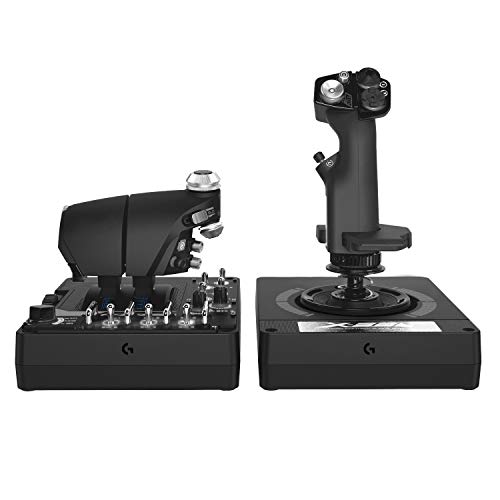
VKB Gladiator NXT EVO
Contactless hall-effect sensors mean no physical wear point develops after years of dogfighting. Interchangeable grips let DCS and IL-2 pilots swap in F-16 or Su-27 style handles. Stiffer spring options suit pilots who want more resistance during hard turns.
Pros
- Hall-effect sensors skip the contact wear potentiometer sticks develop
- Interchangeable grips match specific aircraft cockpits
- Spring tension adjusts to personal feel
Cons
- Calibration and grip swaps carry a steeper learning curve
- Some grip bundles sell the base separately

CH Products Fighterstick USB
Metal internal shaft construction and long-travel throw have kept this stick in production for decades. Four hat switches and sixteen buttons cover complex DCS modules without menu diving. Stiff spring centering suits pilots flying multi-hour sessions.
Pros
- Metal shaft construction holds up through years of daily flying
- Four hat switches split trim, view, and POV controls
- Long stick throw improves fine aiming control
Cons
- Industrial design looks dated next to newer sticks
- Configuration software feels outdated

Thrustmaster T.16000M FCS HOTAS Dual
Bundling the T.16000M stick with a matching TWCS throttle saves buyers from ordering the two separately. A mini stick on the throttle frees a hand for camera panning, and a rotary knob speeds trim adjustments. Twenty-seven buttons across both units suit pilots moving to a two-hand cockpit.
Pros
- Stick and throttle ship matched and pre-tested together
- Mini stick on the throttle frees a hand for camera control
- Rotary knob speeds trim changes mid-flight
Cons
- Desk space needed exceeds a single-stick setup
- Throttle detent lacks a hard afterburner stop

Honeycomb Aeronautical Alpha Flight Controls
Honeycomb built this as a yoke, matching the control feel of a Cessna or airliner cockpit rather than a center stick. A built-in LCD panel displays trim and autopilot readouts without a mouse click. General aviation pilots get input closer to a real cockpit than any center stick offers.
Pros
- Yoke input matches real general aviation aircraft handling
- Built-in LCD tracks trim and radio settings at a glance
- Solid desk clamp keeps it steady during turns
Cons
- Not suited to fighter jet or aerobatic flying
- Larger footprint needs more desk clearance
How to choose
What to look for in a flight sim joystick Axis sensor type matters more than raw button count. Magnetic and hall-effect designs resist the drift that potentiometer sticks develop over a few years. Check whether the base is fixed or expandable before buying, since some models grow into a full HOTAS setup later. Matching button and hat switch count to your simulator matters more than what the box promises.
MSFS versus DCS control needs General aviation pilots in Microsoft Flight Simulator often prefer a yoke, since it mirrors real Cessna and airliner handling. Center sticks with hall-effect sensors suit DCS and combat sim pilots who need repeatable fine aiming. Module-heavy DCS aircraft also reward extra hat switches, since trim, view, and countermeasures each want a dedicated control point.
Building a HOTAS setup over time Many pilots start with a single stick and add a throttle later instead of buying a full rig upfront. A detachable base avoids replacing the whole unit when that expansion happens. Bundled HOTAS kits cost less than buying stick and throttle separately, but only when both halves fit the available desk space.
When a yoke beats a center stick Airline and general aviation flying benefits from yoke-style input, since pitch and roll feel different than a spring-centered stick. Dogfights and aerobatic maneuvers favor a center stick for faster, more precise inputs. Some pilots keep both, swapping based on which aircraft they are flying that session.
Compared at a glance
| # | Model | Sensor type | Best for | Score | Price |
|---|---|---|---|---|---|
| 1 | Thrustmaster T.16000M FCS | Magnetic (H.E.A.R.T) | Best overall | 9.4 | Check price |
| 2 | Logitech Extreme 3D Pro | Potentiometer | Best value | 8.9 | Check price |
| 3 | Thrustmaster T.Flight Hotas X | Joystick and throttle unit | Best budget | 8.3 | Check price |
| 4 | VKB Gladiator NXT EVO | Contactless hall-effect | Best for combat sim precision | 9.2 | Check price |
| 5 | CH Products Fighterstick USB | Metal | Best for build durability | 8.7 | Check price |
| 6 | Thrustmaster T.16000M FCS HOTAS Dual | T.16000M stick plus TWCS throttle | Best for a full HOTAS rig | 9.0 | Check price |
| 7 | Honeycomb Aeronautical Alpha Flight Controls | Yoke, not center stick | Best for civil aviation realism | 8.8 | Check price |
Frequently asked questions
What is the best joystick for Microsoft Flight Simulator?
Magnetic sensors make the Thrustmaster T.16000M FCS a strong match for most MSFS aircraft, though general aviation pilots often prefer the Honeycomb Alpha yoke for its realistic handling.
Do I need a separate throttle for flight simulator games?
Casual flying works fine with a single stick, but DCS and airliner simulation benefit from independent throttle control since it frees the stick hand for pitch and roll alone.
Are hall-effect sensors worth the extra cost?
Hall-effect and magnetic sensors skip the physical wear that potentiometer axes accumulate over years, so calibration holds longer for pilots flying daily.
Can flight sim joysticks work on console as well as PC?
PlayStation support ships with select models like the Thrustmaster T.Flight Hotas X, while higher-end sticks such as the VKB Gladiator NXT EVO stay PC only.
What is the difference between a joystick and a HOTAS?
A joystick is a single stick unit, while HOTAS pairs a stick with a matching throttle lever so each hand controls a separate set of inputs.
How many buttons does a DCS setup actually need?
Complex DCS modules can use over 100 bindings, so a stick with 16 or more buttons plus multiple hat switches cuts down on keyboard reaching.
Is a yoke better than a joystick for beginners?
Beginners flying general aviation aircraft in MSFS often find a yoke more intuitive, since it matches real cockpit controls, while arcade-style or combat flying favors a center stick.
Do flight sim joysticks need extra software to calibrate?
Most ship with a driver utility for button mapping and axis curves, and simulators such as DCS and MSFS include their own in-game calibration menus too.
Is a full HOTAS rig worth it over a single stick?
A full rig adds independent throttle control that speeds up complex checklists, but single-stick setups still cover casual and general aviation flying well.
Final word
The Thrustmaster T.16000M FCS earns the top spot since its magnetic sensors and expandable base suit both new pilots and growing HOTAS setups. Combat sim pilots chasing long-term precision should look at the VKB Gladiator NXT EVO instead. Buyers focused on general aviation realism get more accurate input from the Honeycomb Alpha yoke.
Marcus Chen
Marcus covered consumer electronics for enthusiast tech publications for six years before joining ChoiceCrest. He specializes in translating manufacturer spec sheets into plain-language buying advice, with a focus on audio, computing accessories and smart-home gear.


