How to Pick the Right Streaming Device for Your TV
Roku Streaming Stick 4K leads this roundup for its neutral app store, Dolby Vision support and low cost. The Fire TV Stick 4K Max adds Wi-Fi 6 for faster menus, and Apple TV 4K suits households already using iPhones, iPads and AirPlay across multiple rooms.
Start with the Roku Streaming Stick 4K if you want broad app support without a confusing menu. Pick the Fire TV Stick 4K Max when speed matters more than platform neutrality. Apple TV 4K makes the most sense once AirPlay and iCloud photos already run your household.
Every platform pushes its own subscriptions and voice assistant, so specs alone do not tell the full story. We compared published resolution and HDR support, cross-checked processor and Wi-Fi generation claims, and weighed owner feedback on remote reliability and app slowdowns.
The shortlist, ranked

Roku Streaming Stick 4K
This stick supports 4K HDR with Dolby Vision and HDR10 plus, matching most current TVs. Its channel store treats every streaming service equally instead of pushing one brand. A dual-band Wi-Fi radio keeps the picture stable in rooms far from the router.
Pros
- Neutral app store with no platform favoritism
- Dolby Vision and HDR10 plus playback
- Long-range dual-band Wi-Fi antenna
Cons
- Home screen displays sponsored tiles
- No remote finder on this base model

Amazon Fire TV Stick 4K Max
Wi-Fi 6 support keeps this stick responsive even on crowded home networks. A faster processor than the standard Fire TV Stick shortens app load times noticeably. Alexa is built into the remote, so voice search and smart-home commands need no extra hardware.
Pros
- Wi-Fi 6 for congested networks
- Faster app launches than the base Fire TV Stick
- Alexa voice remote included
Cons
- Home screen promotes Amazon content first
- Many features assume a Prime subscription

Apple TV 4K
An A-series chip gives this box more processing headroom than any stick in this lineup. AirPlay lets iPhone and Mac screens mirror instantly without extra apps. Thread support also lets it double as a smart-home hub for HomeKit accessories.
Pros
- Fast, clutter-free tvOS interface
- Seamless AirPlay and iCloud integration
- Doubles as a Thread and HomeKit hub
Cons
- Costs more than every other device here
- Fewer free casual channels than Roku or Fire TV
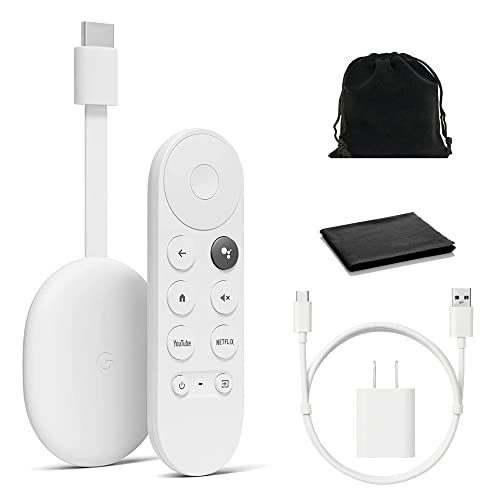
Google Chromecast with Google TV (4K)
Google TV layers a recommendation feed across Netflix, Prime Video and other installed apps into one watchlist. A physical remote replaces the phone-only casting of earlier Chromecast models. Google Assistant handles voice search and basic smart-home control.
Pros
- Cross-app recommendation feed saves browsing time
- Includes a dedicated remote, not just phone casting
- Google Assistant voice search built in
Cons
- Limited onboard storage for extra apps
- Interface can lag after months of heavy use

Roku Ultra
An Ethernet port gives this box a wired option that sticks cannot offer. Its rechargeable remote includes a headphone jack for private late-night listening. A lost-remote finder pairs well with home-theater cabinets where remotes slide out of sight.
Pros
- Ethernet port avoids Wi-Fi dropouts
- Remote finder plus headphone jack
- Snappier menus than Roku’s stick models
Cons
- Higher cost than most streaming sticks
- Larger footprint than a stick behind the TV
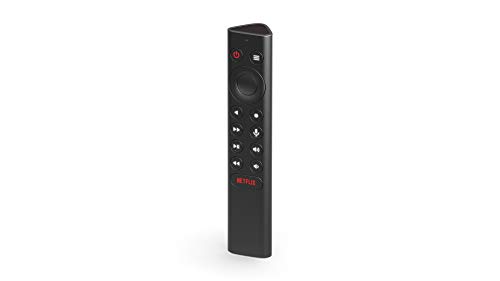
NVIDIA Shield TV Pro
A Tegra processor and onboard storage handle emulators, cloud gaming and Android TV apps that overwhelm typical sticks. Built-in AI upscaling sharpens older HD shows on 4K panels. Two USB ports let it run as a Plex media server for a home library.
Pros
- Handles gaming and Plex server duties
- AI upscaling improves older HD content
- USB ports support external storage
Cons
- Pricier than devices aimed at casual viewers
- Android TV menus suit tinkerers more than beginners

Amazon Fire TV Cube
Far-field microphones let this Cube hear Alexa commands from across a noisy room, no remote required. Built-in IR control also switches a compatible TV and soundbar on with one phrase. An Ethernet port ships in the box for a wired connection.
Pros
- Hands-free voice control across the room
- Built-in IR control for TV and soundbar
- Ethernet port included in the box
Cons
- Priced above every Fire TV Stick model
- Home screen still leans heavily on Amazon content
What matters most
Streaming stick or box: which fits your TV setup Sticks tuck behind the TV and draw power from a USB port or included adapter. Boxes sit on a shelf and often add an Ethernet jack for wired reliability. A spare room or guest bedroom rarely needs more than a stick. Main home theaters benefit from a box like the Roku Ultra, Apple TV 4K or Shield TV Pro, where wired stability and extra processing power matter more.
What 4K and HDR support actually means for picture quality Every device in this roundup outputs 4K resolution. HDR formats differ more than resolution does, and that gap shows up on screen. Dolby Vision adjusts brightness scene by scene, while HDR10 plus does something similar without per-frame licensing fees. Match your TV’s supported format to the device, since pairing HDR10 content with a non-HDR panel adds no visible benefit.
Which app ecosystem matches your current subscriptions Roku’s channel store treats Netflix, Prime Video and Disney Plus equally, without steering you toward one service. Fire TV promotes Amazon content and Prime perks on its home screen. Apple TV integrates tightly with an iPhone, iPad or Mac through AirPlay and shared photo libraries. Check that your must-have apps, especially smaller regional or sports channels, are listed before buying.
Best streaming device for gaming, Plex or hands-free voice control Households running a Plex media server or cloud gaming service need the extra RAM and USB ports on the Shield TV Pro. Voice-first households benefit more from the Fire TV Cube’s far-field microphones than from a standard remote. Neither use case applies to most buyers, so weigh them only if gaming or hands-free control already matters to you.
How they compare
| # | Model | Max resolution | Best for | Score | Price |
|---|---|---|---|---|---|
| 1 | Roku Streaming Stick 4K | 4K HDR | Best overall | 9.4 | Check price |
| 2 | Amazon Fire TV Stick 4K Max | 4K HDR | Best for speed and Wi-Fi 6 | 9.2 | Check price |
| 3 | Apple TV 4K | 4K HDR | Best for Apple households | 9.0 | Check price |
| 4 | Google Chromecast with Google TV (4K) | 4K HDR | Best for personalized recommendations | 8.7 | Check price |
| 5 | Roku Ultra | 4K HDR | Best for wired home theater setups | 8.5 | Check price |
| 6 | NVIDIA Shield TV Pro | 4K HDR | Best for gaming and Plex servers | 8.3 | Check price |
| 7 | Amazon Fire TV Cube | 4K HDR | Best for hands-free voice control | 8.0 | Check price |
Common questions
Do I need a 4K streaming device for a 1080p TV?
No. A 4K device still plays on a 1080p screen, just without the extra resolution. Buying 4K now avoids replacing the device if you upgrade your TV later.
What is the difference between a streaming stick and a streaming box?
A stick plugs directly into an HDMI port and usually skips Ethernet. A box sits nearby, often adds a wired connection, and typically runs a faster processor for smoother menus.
Which streaming device works best with Alexa?
The Fire TV Stick 4K Max and Fire TV Cube both build Alexa into the remote or hardware. The Cube adds far-field microphones so commands work without pressing a button.
Is Roku or Fire TV better for someone who is not tech-savvy?
Roku’s simpler menu and neutral app layout make it easier for first-time cord-cutters. Fire TV works fine too, but its home screen pushes Amazon content more aggressively.
Can a streaming stick replace a smart TV’s built-in apps?
Yes. External sticks and boxes often update faster than a TV’s built-in software and support more services. Many owners prefer a separate device even on smart TVs for that reason.
How much internet speed does 4K streaming need?
Most services recommend at least 25 Mbps for stable 4K playback. Slower connections still work but may drop to a lower resolution during peak hours.
Apple TV vs Roku: which is worth the higher price?
Apple TV 4K makes sense once AirPlay, HomeKit or iCloud photos already run your household. Roku costs less and covers the same major streaming apps without that ecosystem lock-in.
Do streaming devices need a monthly subscription to work?
The hardware itself needs no subscription. Paid apps like Netflix or Disney Plus still charge separately, though free ad-supported channels exist on every platform here.
What is the best streaming device for gaming or a Plex server?
The Shield TV Pro pairs a Tegra processor with USB ports built for cloud gaming and Plex duties. It handles emulators and media libraries that overwhelm a typical streaming stick.
The verdict
Roku Streaming Stick 4K remains the easiest recommendation for most living rooms, balancing price, app neutrality and 4K HDR support. Choose the Fire TV Stick 4K Max when Wi-Fi 6 speed matters, or the Apple TV 4K when AirPlay and HomeKit already anchor your household. Gamers and Plex users should look at the Shield TV Pro instead of a standard stick.
Marcus Chen
Marcus covered consumer electronics for enthusiast tech publications for six years before joining ChoiceCrest. He specializes in translating manufacturer spec sheets into plain-language buying advice, with a focus on audio, computing accessories and smart-home gear.


