Home Garage OBD2 Scanners: Code Readers to Tablets
Autel MaxiCOM MK808S leads for a home garage, reading every available module and commanding components from a 7 inch tablet. BlueDriver Bluetooth Pro fits owners happy to use a phone as the screen. Foxwell NT301 covers check engine faults alone, with live graphing on a 2.8 inch display.
Autel MaxiCOM MK808S suits a garage that sees more than one car, because it reaches ABS, SRS, transmission and body modules and can command parts rather than only read codes. Updates run one year before a renewal fee starts, and that is the ongoing catch. Anyone who just wants the check engine light explained gets there with a Foxwell NT301.
Scan tool listings blur the difference between reading a generic code and diagnosing a system, and that gap decides whether a tool earns its shelf space. We compared stated module coverage, bidirectional capability, live data sampling, service reset lists and update terms. Owner reports on vehicle compatibility gaps and app reliability broke the close calls.
What we recommend

Autel MaxiCOM MK808S
Android runs on a 7 inch touchscreen, and its menus reach every module the vehicle exposes, not just the powertrain. Active tests command a fuel pump, cooling fan or window motor on demand, which separates a dead part from a broken circuit. Service routines cover oil reset, electronic parking brake retraction, steering angle calibration, throttle relearn and battery registration.
Pros
- Reads body, chassis and powertrain modules
- Active tests prove whether a part or its wiring failed
- Handles the resets that follow brake and battery work
Cons
- Renewal fee applies once the first update year ends
- Coverage depth shifts by make and model year
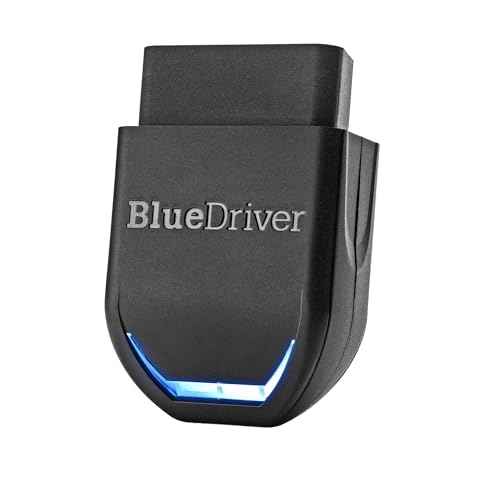
BlueDriver Bluetooth Pro OBDII Scan Tool
Pairing happens over Bluetooth to an iPhone or Android handset, so nothing extra needs charging. Enhanced diagnostics reach ABS, airbag and transmission codes on many makes instead of stopping at generic powertrain faults. Each report ties the stored code to fixes recorded on the same vehicle, which shortens the list of suspect parts.
Pros
- One less device to keep charged in the garage
- Repair reports name the likely cause, not just the code
- App updates arrive without a renewal fee
Cons
- Cannot command components or run active tests
- Useless if the phone battery dies mid job

LAUNCH CRP129E
Four systems sit in scope: engine, transmission, ABS and airbag. Eleven service routines handle the jobs that follow a repair, among them oil light reset, electronic parking brake, steering angle sensor, throttle body and battery registration. Wi-Fi updates land straight on the 5 inch Android screen, so no laptop enters the picture.
Pros
- Free updates remove the renewal question entirely
- Service routines match common DIY maintenance jobs
- Touchscreen menus move faster than button driven readers
Cons
- Four systems only, not full module coverage
- Bidirectional testing is limited compared with a tablet

OBDLink MX+ Bluetooth OBD2 Scanner
Sampling runs faster than most dongles, which counts when a misfire shows for two seconds and disappears. Ford MS-CAN and GM single wire CAN buses are both supported, opening modules cheaper adapters never see. Software choice stays open, since it talks to several third party apps across iOS, Android and Windows.
Pros
- Sample rate suits chasing intermittent faults
- Reaches Ford and GM buses other dongles miss
- Sleep mode stops it draining a parked battery
Cons
- Capability rises or falls with the app you pair it to
- No screen of its own, so a phone is mandatory

Innova 5610 OBD2 Scanner
Everything happens on the handheld itself, with ABS and airbag codes sitting alongside engine faults. Battery and charging system tests help sort a genuine no start from a fault misread as an engine problem. Oil light and battery resets close out routine service, and the onboard library defines codes without a data connection.
Pros
- Runs with no phone, app or pairing involved
- Charging system test catches a failing alternator
- Code definitions load offline from onboard memory
Cons
- Button menus feel dated beside touchscreen tools
- Cannot command components or run active tests

Foxwell NT301 OBD2 Scanner
Engine diagnostics get proper treatment: live data graphing, freeze frame capture and an O2 sensor test on a 2.8 inch colour screen. I/M readiness status answers the emissions question in seconds, before a test appointment rather than after. ABS and airbag modules fall outside its scope, so treat this as a check engine light tool.
Pros
- Graphs live data, which most cheap readers cannot
- Flags emissions readiness before a state inspection
- Rugged handheld with no pairing step
Cons
- Skips ABS, SRS and transmission modules
- Long data lists get tedious on a 2.8 inch screen
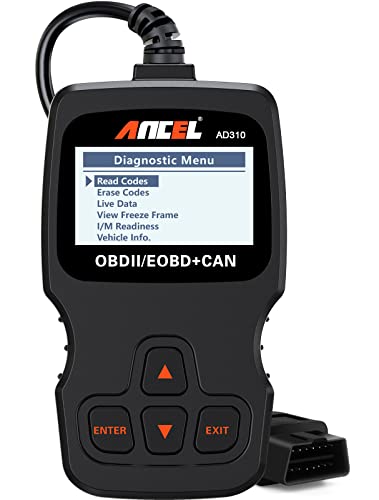
ANCEL AD310 Classic Enhanced OBD II Scanner
Codes read and clear on any 1996 or newer US market vehicle, with freeze frame data and I/M readiness alongside. Power arrives through the OBD2 port, so no battery or charger is involved. Anything past basic engine work, ABS included, is absent by design, and the two and a half foot lead keeps it close to the dash.
Pros
- Nothing to charge, pair or install
- Quick enough for a roadside code check
- Cable and housing survive glovebox knocks
Cons
- No ABS, SRS or service reset functions
- Monochrome screen shows very little at once
Side by side
| # | Model | Interface | Best for | Score | Price |
|---|---|---|---|---|---|
| 1 | Autel MaxiCOM MK808S | 7 in Android touchscreen tablet | Best overall | 9.4 | Check price |
| 2 | BlueDriver Bluetooth Pro OBDII Scan Tool | Bluetooth to iOS and Android | Best for phone based diagnostics | 9.2 | Check price |
| 3 | LAUNCH CRP129E | Engine, transmission, ABS and SRS | Best for service resets | 9.0 | Check price |
| 4 | OBDLink MX+ Bluetooth OBD2 Scanner | Bluetooth to iOS, Android and Windows | Best for live data logging | 8.8 | Check price |
| 5 | Innova 5610 OBD2 Scanner | Engine, ABS and SRS | Best handheld for ABS and SRS | 8.6 | Check price |
| 6 | Foxwell NT301 OBD2 Scanner | Engine only | Best value | 8.3 | Check price |
| 7 | ANCEL AD310 Classic Enhanced OBD II Scanner | Engine only | Best budget | 8.0 | Check price |
Before you buy
What generic OBD2 covers and what it misses Every car sold in the US since 1996 answers generic OBD2 requests. Those requests cover emissions related engine faults and stop there. Manufacturer specific modules such as ABS, airbag, transmission and body control need enhanced coverage, which each tool licenses make by make. If the warning light on your dash is not the check engine light, a basic reader returns nothing at all. Check the maker’s vehicle list for your brand before assuming a scanner reaches those systems.
Handheld, dongle or scan tablet? Handhelds draw power from the port and work with a flat phone, which suits a glovebox tool. Dongles such as BlueDriver and OBDLink MX+ borrow your phone screen, so capability tracks app quality more than hardware. Tablets like the MK808S carry deeper menus, their own battery and bidirectional control. Decide by how many systems you expect to touch. Screen size is the least useful way to choose.
Live data, freeze frame and what to read first A stored code names a symptom, never a failed part. Freeze frame records engine conditions at the instant the code set, revealing whether the fault appears cold, hot or under load. Graphing fuel trims, O2 sensor voltage and misfire counters over time is where the diagnosis actually lands. Without graphing you are picking between parts by guesswork. Read freeze frame before clearing anything, because clearing erases it.
Best for DIY brakes, batteries and alignment work Retracting an electronic parking brake caliper needs a tool that can drive the motor, which rules out plain code readers. Steering angle calibration after an alignment and battery registration on BMW, Mercedes and many VW Group cars sit in the same category. Bidirectional control goes further by firing a component directly, proving whether the part or its wiring failed. Home mechanics doing their own brakes should treat those functions as requirements. Owners who only clear codes can skip them and buy a smaller tool.
Frequently asked questions
What can an OBD2 scanner not tell you?
It reports what a module measured, not which part failed. A lean code might mean a vacuum leak, a tired fuel pump or a drifting sensor. Freeze frame and live data narrow the field, but the final call comes from testing the circuit.
Do you need a bidirectional scan tool at home?
Only if you plan to command components or service electronic parking brakes. Active tests save real time on fuel pump, cooling fan and injector work. For reading and clearing codes, bidirectional control adds nothing.
Will an OBD2 scanner work on any car?
Generic OBD2 works on any US market vehicle from 1996 onward. Enhanced coverage depends on the tool and the badge. European models in particular need a scanner that lists your brand before ABS or airbag modules open up.
Which OBD2 scanners read ABS and airbag codes?
BlueDriver, LAUNCH CRP129E, Innova 5610 and Autel MaxiCOM MK808S all reach ABS and SRS on many vehicles. ANCEL AD310 and Foxwell NT301 stay on engine codes. Confirm your make against the maker’s published vehicle list.
Is a Bluetooth OBD2 dongle better than a handheld scanner?
For code reading and live data, often yes, since a phone screen shows more rows at once. Handhelds win when the phone is dead, the garage is cold or gloves are on. Dongles also depend on an app that has to keep being maintained.
Can clearing a code fix the problem?
No. Clearing switches the light off and resets readiness monitors, which can fail an emissions test that same week. If the fault is still there, the code comes back. Clear after the repair, not before.
How do you read live data on an OBD2 scanner?
Pick the live data menu, then select a short list of parameters rather than everything. Fuel trims, coolant temperature, O2 voltage and misfire counters cover most drivability faults. Graphing tools such as the Foxwell NT301 and OBDLink MX+ let you watch those values change while the engine runs.
Do OBD2 scanners drain a car battery?
A dongle left plugged in keeps drawing current. OBDLink MX+ sleeps to limit that draw. Unplug any adapter if the car will sit for more than a few days.
Are OBD2 scanner updates worth paying for?
Updates mainly add newer model years and extra service routines. An older tool stays useful on an older fleet, so a lapsed Autel subscription is not a dead tool. LAUNCH bundles free lifetime updates on the CRP129E, which removes the question.
What is the best OBD2 scanner for a beginner?
Foxwell NT301 gives a first time user graphing and freeze frame without menus full of unfamiliar module names. ANCEL AD310 goes simpler still for anyone who only wants a code and a definition. Move up to the MK808S once you start replacing parts rather than identifying them.
Our pick
Buy the Autel MaxiCOM MK808S if your garage sees several vehicles and you want active tests instead of parts swapping. BlueDriver Bluetooth Pro answers better for one or two cars, where a phone screen is fine and no renewal fee is welcome. Owners who only want the check engine light explained should stop at the Foxwell NT301 and put the rest toward parts.
Tony Russo
Tony trained as an automotive technician and spent years in service and parts retail before moving into writing. He focuses on garage tools, car care products and accessories from a hands-on maintenance perspective.