How to Keep Desk Cables Tidy With an Under Desk Tray
VIVO Under Desk Cable Management Tray DESK-AC01B tops this list for rigid steel construction and mounting flexibility. Stand Up Desk Store Under Desk Cable Management Tray suits wide sit-stand frames best. Delamu J Channel Cable Raceway is the simplest no-drill option for a small desk.
VIVO Under Desk Cable Management Tray DESK-AC01B is the safest first choice for most desks. Stand Up Desk Store Under Desk Cable Management Tray works better across very wide sit-stand frames. Delamu J Channel Cable Raceway skips drilling entirely for renters.
Cable trays look interchangeable in listings, yet usable length and mounting hardware differ sharply between models. Some trays screw into wood, others clamp onto steel frames, and a chunky power brick will not fit inside every basket. We compared published dimensions and mounting hardware, then weighted results toward trays that owners report staying put once loaded.
How to choose
How do you measure for an under desk cable tray? Clear span between leg brackets matters more than overall desk width. Many buyers order a 30 inch tray only to find a crossbar blocking it. Measure from obstruction to obstruction first. Subtract an inch for mounting flanges so the tray drops in without a fight.
Screw mount, clamp or adhesive: which mounting works best? Screw-mounted steel trays hold the most weight but need a wooden or composite underside thick enough for the screws. Clamp trays suit metal frames and rental units where drilling is off limits. Adhesive raceways route cable only and will not carry a power strip. Match the method to your desktop material before comparing capacity.
Why do power bricks matter more than the cables themselves? Most desk clutter comes from adapters, not the cables. A tray that fits eight cords but no laptop brick still leaves that brick swinging loose. Check internal depth and width against your largest adapter. Ventilated or open mesh designs stop bricks from overheating inside a sealed box.
How does a cable tray work on a sit-stand desk? Every cable has to travel its full range on a sit-stand desk without stretching or snagging. Mount the tray so the cable run leaves from the center of the desk. Leave a deliberate service loop in that run. Owners report that most sit-stand cable failures trace back to slack that had nowhere to go.
The top picks, ranked

VIVO Under Desk Cable Management Tray DESK-AC01B
Powder-coated steel construction resists sagging even under a surge protector plus several adapters. Open mesh sides let heat escape from warm power bricks. Owners report the basket stays rigid where thinner plastic trays start to bow.
Pros
- Steel construction holds a full power strip
- Mesh sides vent heat from adapters
- Length fits most standard desktops
Cons
- Screw mounting struggles on metal or glass tops
- Fixed length cannot be trimmed to fit

Stand Up Desk Store Under Desk Cable Management Tray
Height-adjustable frames get a tray built specifically to span the wide leg gap on sit-stand desks. Cable bundles travel with the desktop rather than pulling loose at full extension. Included hardware covers both wood and composite surfaces.
Pros
- Built for adjustable-height desk frames
- Hardware covers common desktop materials
- Deep basket contains slack cable
Cons
- Too wide for compact writing desks
- Visible from the side in open layouts

Delamu J Channel Cable Raceway
Adhesive J channel sections clip along a desk’s back edge without a single screw. Renters and glass-desk owners get a tidy result with zero drilling. Adhesive grips clean, smooth surfaces well but loses hold on textured laminate over time.
Pros
- Installs with no drilling required
- Trims to length with a utility knife
- New cables clip in without full disassembly
Cons
- Will not support a power strip’s weight
- Needs a clean surface for adhesive to hold

Yecaye Under Desk Cable Management Tray
A shorter basket fits home offices where a full-length tray overhangs the desk edge. Single-monitor setups get enough room for a small surge protector and two adapters. Rolled edges stop cable jackets from chafing against raw metal.
Pros
- Shorter length fits compact and corner desks
- Rolled edges protect cable insulation
- Two-bracket installation takes minutes
Cons
- Capacity falls short for large adapters
- Short length forces cable to coil tightly

Baskiss Under Desk Cable Management Tray
Extra basket depth swallows a docking station, a power strip and multiple laptop bricks at once. Cables sit below the frame line instead of bulging over the rim. Heavier wire gauge resists bending under that added weight.
Pros
- Handles a dock plus several adapters
- Heavier wire resists bending under load
- Depth hides slack cable loops well
Cons
- Reduces legroom on shallower desks
- Wire mesh collects dust over time

FLEXISPOT Under Desk Cable Management Tray
Finish and sizing match FLEXISPOT frames closely, so the tray blends in rather than looking bolted on. A plain screw mount keeps installation straightforward. Owners note the color match holds up even when the tray is visible from a doorway.
Pros
- Finish matches popular FLEXISPOT frame colors
- Installation stays simple with no surprises
- Capacity suits a single-user desk setup
Cons
- Fewer mounting positions than universal trays
- Offers little advantage without a matching desk
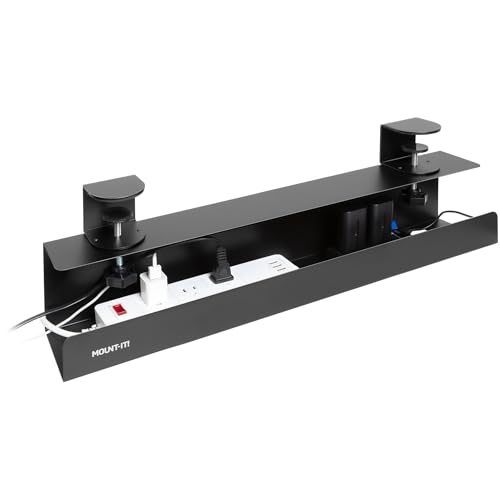
Mount-It! Under Desk Cable Management Tray
Open side access lets a single cable swap in or out without unloading the whole bundle. Hot desks and shared benches benefit from that speed during the workday. Cables can enter from either end, which suits desks used by more than one person.
Pros
- Cables add or remove quickly at hot desks
- Accepts cables entering from either direction
- Low profile clears most desktop drawers
Cons
- Open sides let thin cables slip free
- Load capacity trails behind deep baskets
Compared at a glance
| # | Model | Material | Best for | Score | Price |
|---|---|---|---|---|---|
| 1 | VIVO Under Desk Cable Management Tray DESK-AC01B | Powder-coated steel | Best overall | 9.4 | Check price |
| 2 | Stand Up Desk Store Under Desk Cable Management Tray | Steel with black coating | Best value | 9.2 | Check price |
| 3 | Delamu J Channel Cable Raceway | Flexible PVC channel | Best budget | 9.0 | Check price |
| 4 | Yecaye Under Desk Cable Management Tray | Coated steel | Best for small desks | 8.8 | Check price |
| 5 | Baskiss Under Desk Cable Management Tray | Welded steel wire | Best for heavy loads | 8.5 | Check price |
| 6 | FLEXISPOT Under Desk Cable Management Tray | Steel | Best for standing desk owners | 8.2 | Check price |
| 7 | Mount-It! Under Desk Cable Management Tray | Powder-coated steel | Best for shared workstations | 8.0 | Check price |
Common questions
Do cable trays fit any desk?
Most fit standard wood or composite desktops. Glass, thin metal and desks with deep drawer rails often need a clamp-on tray or adhesive raceway instead. Check the clear span under your desktop before ordering.
Can a cable tray hold a surge protector?
Steel basket trays generally can, which is the main reason to pick one over a raceway. Adhesive J channel products are built for cable only and will not support a strip’s weight.
Will screwing a tray into my desk cause damage?
Small holes appear on the underside, invisible during normal use. Renters or anyone planning to resell the desk should choose a clamp tray or adhesive channel instead.
How long should an under desk cable tray be?
A single monitor and laptop need only 16 to 20 inches. Dual monitors, a dock and a desktop tower call for a 30 inch tray.
Do cable trays work on sit-stand desks?
Yes, and they help considerably. The tray keeps the bundle attached to the moving top so cables rise and fall together. Leave a service loop down to the wall outlet.
Is a mesh tray better than a solid tray?
Mesh lets heat escape from power adapters and makes threading a zip tie easier. Solid trays hide contents more completely. Anything holding a power brick favors mesh.
How do you stop cables slipping out of an open tray?
Group them with reusable hook and loop ties every foot or so. Bundled cables behave like one thick cable and stay seated far better than loose individual cords.
Can a tray be combined with cable sleeves?
That pairing gives the tidiest result. The tray carries hardware and slack, while a sleeve handles the vertical run to the floor, leaving nothing visible from the front of the desk.
Our pick
VIVO Under Desk Cable Management Tray DESK-AC01B remains the safest all-round choice, rigid enough for a full load and long enough for most desktops. Owners with wide sit-stand frames should step up to the Stand Up Desk Store tray. Anyone unable to drill into their desktop gets a surprisingly tidy result from the Delamu J Channel Cable Raceway.
Marcus Chen
Marcus covered consumer electronics for enthusiast tech publications for six years before joining ChoiceCrest. He specializes in translating manufacturer spec sheets into plain-language buying advice, with a focus on audio, computing accessories and smart-home gear.
You might also need
6 Desk Phone Holders That Keep Screens at Eye Level
7 Smart Ways to Organize Cables on a Home Office Desk

How to Choose a Desktop Computer That Fits Your Budget
