Beginner Robot Building Kits Compared by Age and Coding Level
LEGO BOOST Creative Toolbox 17101 leads because it turns motorized building into real app based coding across five separate models. Elegoo Smart Robot Car Kit V4.0 delivers the strongest value for kids ready for actual Arduino programming. VEX Robotics 123 Robot Kit fits the youngest builders through screen free coding cards.
LEGO BOOST Creative Toolbox 17101 sits at the top for combining five buildable models with genuine coding practice. Families on a budget who want real programming should look at the Elegoo Smart Robot Car Kit V4.0 instead. Younger builders start best with the VEX Robotics 123 Robot Kit, since its coding cards need no screen at all.
Listings rarely say whether a kit needs batteries, a paired app, a separate Raspberry Pi board or nothing extra at all. That gap between the product photo and the actual box makes robot kits hard to compare quickly. We weighed piece count, age recommendations, power source and coding requirements, then checked owner feedback on how long assembly really takes.
The best picks, ranked

LEGO BOOST Creative Toolbox 17101
Five different models come from one box of 847 pieces here. A Bluetooth Move Hub pairs with a free app, letting kids drag coding blocks together to run motors and a colour sensor. Vernie the robot walks, talks and reacts to touch once a program runs.
Pros
- Five buildable models share one set of parts
- App teaches real coding logic through blocks
- Motors and sensor respond the moment code runs
Cons
- App needs a nearby tablet or phone
- Small pieces need sorting before each new build

Elegoo Smart Robot Car Kit V4.0
An Arduino Uno board anchors this build, so assembly doubles as a first lesson in circuit boards. Owners report the printed manual walks through wiring the motor driver, ultrasonic sensor and line tracking module step by step. Once code uploads, Bluetooth lets a phone drive the finished car.
Pros
- Real Arduino programming experience from the start
- Ultrasonic and line tracking sensors included in the box
- Bluetooth app control works once coding is done
Cons
- Batteries and a screwdriver ship separately
- Wiring mistakes can stall a first time build

VEX Robotics 123 Robot Kit
No screen is needed to start coding here. Kids press physical buttons on the robot itself, or slot in coding cards, to sequence moves before graduating to the VEXcode app. According to the listing, the base connects with popular building bricks so a child can customize the look.
Pros
- Coding starts before a child reads fluently
- Rechargeable battery skips buying AA batteries
- Compatible with brick sets many families already own
Cons
- Fewer advanced features than kits built for older kids
- USB charging cable runs short for some outlets

Sunfounder PiCar-X 2.0
Mechanical assembly meets real Python programming in this kit, built around a Raspberry Pi board sold separately. A wide angle camera and ultrasonic sensor let the finished car dodge obstacles and follow lines. Sunfounder’s app adds block coding first, so Python arrives after a gentler start.
Pros
- Genuine Python coding runs on real hardware
- Camera module opens up computer vision projects
- Detailed online guide covers each build step
Cons
- Raspberry Pi board is a separate purchase
- Learning curve runs steeper than block only kits

Thames & Kosmos Remote Control Machines
One motor and remote unit powers several different builds here, so a finished vehicle can be taken apart and rebuilt as something else. Assembly leans on a printed manual instead of an app, which suits kids who prefer a wrench over a tablet. Owners report the gearbox teaches basic mechanics along the way.
Pros
- Rebuildable design stretches out play value
- No app or account needed to get started
- Remote control adds instant feedback during play
Cons
- No coding practice for a kid ready for it
- AA batteries drain faster with heavy remote use

Sillbird STEM 12-in-1 Solar Robot Kit
A single solar panel replaces batteries entirely on this kit, so the finished robot only moves in decent light. Twelve different models come from the same parts bag, from a walking beetle to a windmill. Based on specifications, gear ratios vary by model, which changes how fast each build scoots across a table.
Pros
- No batteries to buy or ever replace
- Twelve models stretch play time across a season
- Teaches basic gear ratios and solar concepts
Cons
- Needs bright light or direct sun to move
- Small gears are easy to lose track of
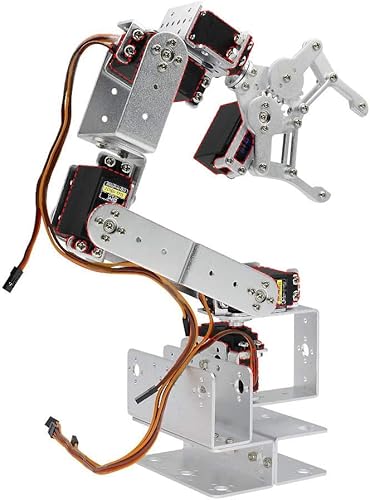
OWI Robotic Arm Edge
Five motors move this arm through grabbing, lifting and rotating motions without a single line of code. A wired control pad handles every motion, which keeps the price point down compared to app controlled kits. Owners report the gripper struggles with anything heavier than a small eraser.
Pros
- Lowest cost entry point into robot kits
- Wired pad needs no app or Bluetooth pairing
- Assembly itself teaches basic mechanical concepts
Cons
- Grip strength stays limited to light objects
- No app, coding or wireless remote control here
How to choose
What to look for in a beginner robot building kit Power source marks the first fork in the road. Battery powered and solar kits need no extra hardware. Boards like Arduino or Raspberry Pi call for separate batteries or a computer to program. Age numbers on the box reflect fine motor skill and reading level, not just interest. Coding requirement varies just as much, from physical buttons to real Python or C plus plus. Assembly time runs from thirty minutes to several hours, so check owner reviews before promising a kit will be ready by dinner.
Best robot kits for ages 6 to 8 Screen free coding and fewer loose pieces suit younger builders best. VEX Robotics 123 Robot Kit fits this age band directly, since its coding cards and buttons need no reading fluency. Arduino and Raspberry Pi based kits ask for patience and fine motor control most six year olds have not developed yet. Adult supervision still helps with battery installation and the first few builds.
Robot kits for older kids and tweens Tweens often want a project that looks like a real machine, not a toy. Thames & Kosmos Remote Control Machines lets a builder swap one motor unit between several models, rewarding patience with mechanics over app taps. Sunfounder PiCar-X 2.0 pushes further into Python scripting for a tween already comfortable at a keyboard. Both ask for more sustained attention than a younger sibling would give.
Does a beginner robot kit need coding experience Prior experience needed varies widely between kits, and none require it outright. Solar and motorized builds like Sillbird’s 12 in 1 kit or the OWI Robotic Arm Edge involve zero code, just wiring, gears and a control pad. App based kits such as LEGO BOOST teach coding logic through drag and drop blocks with no typing involved. Only Arduino and Raspberry Pi kits expect a child to write actual code, and even those ship with sample programs to copy first.
How they compare
| # | Model | Piece count | Best for | Score | Price |
|---|---|---|---|---|---|
| 1 | LEGO BOOST Creative Toolbox 17101 | 847 pieces | Best overall | 9.4 | Check price |
| 2 | Elegoo Smart Robot Car Kit V4.0 | Clear acrylic frame with four wheel motors | Best value | 9.2 | Check price |
| 3 | VEX Robotics 123 Robot Kit | 4 to 8 years | Best for young kids age 6 to 8 | 9.0 | Check price |
| 4 | Sunfounder PiCar-X 2.0 | 14 years and up recommended | Best STEM and coding focused | 8.7 | Check price |
| 5 | Thames & Kosmos Remote Control Machines | Multiple machines from one motor and remote unit | Best for older kids and tweens | 8.5 | Check price |
| 6 | Sillbird STEM 12-in-1 Solar Robot Kit | 12 different solar powered builds | Best solar or motorized build | 8.3 | Check price |
| 7 | OWI Robotic Arm Edge | Five motors covering grip, wrist, elbow and base rotation | Best budget | 8.0 | Check price |
Good to know
What age is right for a first robot building kit?
Most beginner kits start around age 7 or 8. Screen free options like VEX Robotics 123 Robot Kit work from age 4. Check the coding requirement alongside the age range, since a kit built for fluent readers can frustrate a younger sibling.
How long does it take to build a beginner robot kit?
Simple solar or remote control builds take thirty minutes to an hour. Electronics heavy kits like the Elegoo Smart Robot Car Kit V4.0 or Sunfounder PiCar-X 2.0 can run several hours across more than one sitting.
Do robot kits need batteries?
Most do, and the type varies by kit. Solar kits skip batteries entirely. Arduino based builds often call for rechargeable 18650 cells that do not ship in the box. Check the listed power source before assembly day.
Which robot kit is best for coding beginners?
LEGO BOOST Creative Toolbox 17101 introduces coding through drag and drop app blocks with no typing required. Kids ready for real syntax move on to Arduino or Python based kits like the Elegoo Smart Robot Car Kit V4.0 or Sunfounder PiCar-X 2.0.
Can a beginner robot kit work without an app?
Yes. Thames & Kosmos Remote Control Machines and the OWI Robotic Arm Edge run on a wired control pad or remote. No phone, tablet or account gets involved.
Are solar robot kits worth it for kids?
They cut out the recurring cost of batteries and add a light lesson about solar power. Sillbird’s 12 in 1 solar kit only moves in decent light, so a shaded playroom may disappoint a builder expecting instant motion.
VEX 123 vs LEGO BOOST, which is better for a younger child?
VEX Robotics 123 Robot Kit suits a four to eight year old better, since it needs no reading and offers screen free coding cards. LEGO BOOST Creative Toolbox 17101 fits closer to age 7 and up once a child can follow app instructions.
Do robot building kits actually teach programming skills?
Kits with real Arduino or Python coding, like the Elegoo car kit or Sunfounder PiCar-X 2.0, teach transferable programming logic. Purely mechanical or remote control kits teach engineering and assembly skills instead, which still matter but sit outside programming.
What is the difference between Arduino and app based robot kits?
App based kits like LEGO BOOST use drag and drop blocks, so no typing is involved. Arduino kits like the Elegoo car require typed C plus plus code in the Arduino IDE, which teaches syntax an app cannot.
Is a robotic arm kit good for a first build?
The OWI Robotic Arm Edge works as an entry point since it needs no app or code, just a wired control pad. Five motors teach basic mechanics, though grip strength stays limited to light objects.
Final word
LEGO BOOST Creative Toolbox 17101 earns the top spot by pairing five buildable models with coding that stays approachable. Families wanting a lower cost path into real programming should look at the Elegoo Smart Robot Car Kit V4.0. VEX Robotics 123 Robot Kit remains the safer pick for a child still years away from an Arduino manual.
Rachel Simmons
Rachel previously worked in child-product retail and brings a practical, detail-first eye to gear reviews, focusing on safety standards, ease of use and the fine print that matters most for new caregivers.


