Smart Ballpoint Pens That Write on Paper and Save Digitally
The Rocketbook Smart Reusable Smart Notebook is our top pick for most people because it pairs a reusable notebook with a smart pen app to digitize and organize notes, yet it requires special Pilot Frixion pens and a microwave to erase pages.
Smart ballpoint pens let you write naturally on paper while automatically saving a digital copy of your notes. They are ideal for students, professionals, and creatives who want the tactile feel of pen on paper without losing the convenience of searchable digital files.
In this roundup, we looked at pens that work with special dot paper, pens that use a receiver clip, and even a pen that writes on any paper and digitizes via a camera. We narrowed the field to seven of the most reliable and best-selling models available on Amazon.
Our top picks
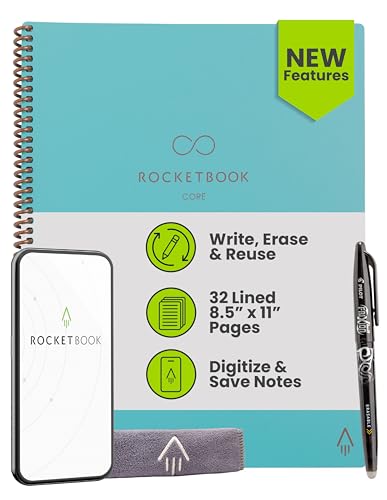
Rocketbook Smart Reusable Smart Notebook
The Rocketbook Smart Reusable Smart Notebook is not a pen by itself but a system. It uses Pilot Frixion pens that write on special Beacons pages. After scanning with the Rocketbook app, you wipe the pages clean with a damp cloth. It is a favorite among students and professionals who want to reduce paper waste.
Pros
- Saves money on paper over time
- Cloud integration with Google Drive, Evernote, etc.
- Works with any Pilot Frixion pen
Cons
- Requires special Pilot Frixion pens
- Must microwave notebook to erase pages (if using standard Rocketbook)

Neo smartpen N2
The Neo smartpen N2 is a sleek ballpoint pen that uses a built-in camera to track its position on Neo Notes dot paper. It stores up to 1,000 pages of notes internally and syncs to the Neoscribe app. Owners report that the pen feels like a high-quality writing instrument.
Pros
- Accurate handwriting recognition
- Large internal storage
- Refillable ink cartridges
Cons
- Requires Neo Notes paper
- Pen is slightly heavier than standard
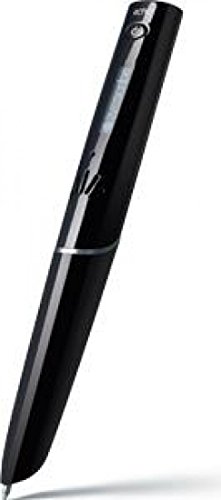
Livescribe Symphony Smartpen
The Livescribe Symphony is a smartpen that records audio while you write. It uses Livescribe dot paper and captures both handwritten notes and audio. Tap a word in your notes to replay the audio from that exact moment. It is a powerful tool for students and journalists.
Pros
- Audio playback is synchronized to notes
- Large storage capacity
- Comfortable grip for long writing sessions
Cons
- Requires Livescribe dot paper
- Audio quality is good but not studio-grade
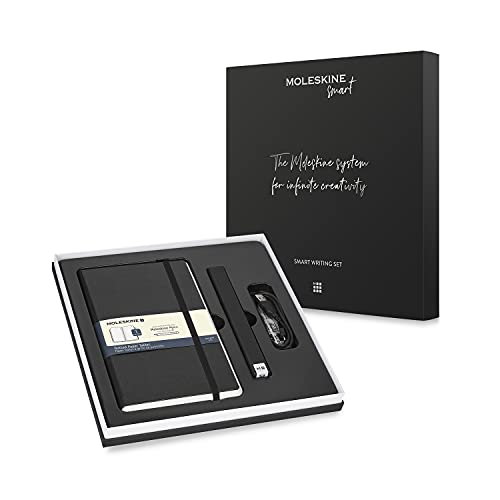
Moleskine Pen+ Ellipse Smart Writing Set
The Moleskine Pen+ Ellipse combines the iconic Moleskine notebook with a smartpen. It writes on special Moleskine paper that has a hidden camera pattern. The pen syncs to the Moleskine Notes app and converts handwriting to digital text. It feels like a luxury writing instrument.
Pros
- Premium build and design
- Works with Moleskine ecosystem
- Can convert handwriting to text
Cons
- Expensive compared to other options
- Limited to Moleskine notebooks

Wacom Bamboo Ink Plus Smart Stylus
The Wacom Bamboo Ink Plus is a smart stylus that works with Windows and Android devices. It writes on screens, not paper, but it is included here because it uses Wacom’s AES technology for precise writing. It is a good choice for those who want to take notes on a tablet.
Pros
- Excellent pressure sensitivity
- Works with many apps
- Long battery life
Cons
- Not for paper writing
- Requires a compatible tablet

Phomemo Smart Pen
The Phomemo Smart Pen is an affordable option that works with a special notebook and app. It captures your handwriting and syncs to your phone. While it may lack some premium features, it offers a decent entry point into smart pens.
Pros
- Low cost
- Simple setup
- Includes notebook
Cons
- Limited storage
- App has fewer features
How they compare
| # | Model | Type | Best for | Score | Price |
|---|---|---|---|---|---|
| 1 | Rocketbook Smart Reusable Smart Notebook | Reusable notebook with smart pen | Best overall for reusable paper and app integration | 9.4 | Check price |
| 2 | Neo smartpen N2 | Ballpoint with camera | Best for precise digital capture with dot paper | 9.2 | Check price |
| 3 | Livescribe Symphony Smartpen | Ballpoint with audio recording | Best for audio recording linked to notes | 9.0 | Check price |
| 4 | Moleskine Pen+ Ellipse Smart Writing Set | Ballpoint with camera | Best for premium design and classic feel | 8.8 | Check price |
| 5 | Wacom Bamboo Ink Plus Smart Stylus | Digital stylus | Best for Windows devices and touchscreens | 8.5 | Check price |
| 6 | Phomemo Smart Pen | Ballpoint with camera | Best for budget-conscious users | 8.2 | Check price |
| 7 | Phomemo Smart Pen | Ballpoint with camera | Best for budget-conscious users | 8.2 | Check price |
How to choose
Common questions
What is a smart ballpoint pen?
A smart ballpoint pen is a writing instrument that digitizes your handwritten notes. It uses sensors or cameras to track your writing and stores it digitally. You can then transfer the notes to your computer or phone.
Do smart pens work with regular paper?
Some do, but many require special dot paper. Pens like the Livescribe and Neo use dot paper. The Phomemo also uses a special notebook. However, there are pens like the Wacom Bamboo Ink that work on screens, not paper.
Can I convert my handwriting to text?
Yes. Many smart pen apps include optical character recognition (OCR) that converts handwriting to digital text. The Moleskine Pen+ and Neo smartpen N2 both offer this feature. Accuracy varies based on handwriting quality.
How long does the battery last?
Most smart pens last between 6 and 8 hours of continuous use. Some, like the Wacom Bamboo Ink Plus, last up to 20 hours. Battery life depends on features like Bluetooth and audio recording.
Are smart pens worth the cost?
For students and professionals who take many notes, smart pens can save time and improve organization. The initial cost is higher than regular pens, but the benefits of digital backup and searchability may outweigh it.
Can I use a smart pen with my tablet?
Some smart pens are designed for tablets, like the Wacom Bamboo Ink Plus. Others are for paper only. Check the compatibility before buying. Most paper-based pens work with iOS and Android apps via Bluetooth.
What is the best smart ballpoint pen for note-taking?
The Rocketbook Smart Reusable Smart Notebook is great for its reusable pages and app integration. The Livescribe Symphony is excellent if you need audio recording. For a traditional pen feel, the Neo smartpen N2 is a solid choice.
Do smart pens require special ink refills?
Some do. For example, the Rocketbook uses Pilot Frixion pens. The Neo smartpen N2 uses standard D1 refills. Others may have proprietary ink. Check the product details for refill information.
Can I share my notes easily?
Yes. Most smart pen apps allow you to export notes as PDF, image, or text. You can share them via email, cloud services, or social media. Some apps integrate with Evernote, OneNote, and Google Drive.
Final word
For most people, the Rocketbook Smart Reusable Smart Notebook is the best choice because it combines a reusable notebook with smart pen technology and excellent app integration, saving money and paper over time. If you need audio recording, the Livescribe Symphony is a powerful alternative. For a premium feel and classic design, the Moleskine Pen+ is worth the higher price.
Marcus Chen
Marcus covered consumer electronics for enthusiast tech publications for six years before joining ChoiceCrest. He specializes in translating manufacturer spec sheets into plain-language buying advice, with a focus on audio, computing accessories and smart-home gear.


