Which Smart Light Switch Fits Your Wiring and Smart Home Setup
The Lutron Caseta Smart Switch suits most homes since it skips the neutral wire many older houses lack. Budget shoppers get a simpler hub-free setup from the TP-Link Kasa Smart Switch HS200, while multi-ecosystem households should look at the Matter-certified Kasa KS225 dimmer instead.
The Lutron Caseta Smart Switch works in homes without a neutral wire behind the switch plate, a limitation that rules out several competitors on this list. Its small Pico-style hub bridges to Alexa, Google Home, and Apple Home at once. Anyone who already owns a Matter hub and wants to skip Lutron’s extra bridge should consider the TP-Link Kasa KS225 instead.
Wiring is the first filter for this category, since several switches here need a neutral wire that pre-1980s wiring often omits. Hub requirements split the rest, with some switches connecting straight to Wi-Fi and others routing through a dedicated bridge for more reliable range. We compared listed wiring requirements, hub dependencies, and assistant compatibility to match switches to real wall boxes.
Our top picks

Lutron Caseta Smart Switch (PD-6ANS-WH)
Lutron designed the Caseta line to handle both neutral and non-neutral wiring, which matters in older homes where electricians never ran a neutral to the switch box. The included Smart Bridge connects to Alexa, Google Assistant, and Apple Home simultaneously. Caseta’s RF protocol reports a wider usable range than many Wi-Fi switches crowded by household interference.
Pros
- Works in homes without a neutral wire
- Single bridge pairs with three major voice assistants
- Stronger range than typical Wi-Fi-only switches
Cons
- Requires buying the separate Smart Bridge to unlock app control
- Costs more upfront than hub-free Wi-Fi switches

Lutron Caseta In-Wall Smart Dimmer (PD-6WCL-WH)
This Caseta dimmer shares the same non-neutral wiring flexibility as the standard switch but adds smooth, flicker-free dimming across a wide range of LED bulbs. Lutron publishes a compatible bulb list that covers most major LED brands sold today. The same Smart Bridge used for Caseta switches also controls this dimmer in one app.
Pros
- Flicker-free dimming on a wide range of LED bulbs
- Shares a bridge and app with Caseta switches
- Works without a neutral wire present
Cons
- Dimming quality varies with off-brand LED bulbs
- Separate bridge purchase needed if starting from zero

TP-Link Kasa Smart Switch HS200
Kasa’s HS200 connects straight to a 2.4GHz Wi-Fi network, skipping the bridge that Lutron switches require. The Kasa app adds schedules, away mode, and voice control through Alexa or Google Assistant. A physical paddle keeps manual control working exactly like a standard switch during a Wi-Fi outage.
Pros
- No hub purchase needed to get started
- Lower price than bridge-based alternatives
- Manual paddle still works during a network outage
Cons
- Requires a neutral wire, which rules out some older homes
- No Apple Home support without a separate Matter hub

TP-Link Kasa KS225 Matter Smart Dimmer
The KS225 carries Matter certification, meaning it pairs directly with any Matter-compatible hub instead of locking into one assistant. That makes it a practical pick for households mixing Alexa, Google Home, and Apple Home devices. A standard rocker paddle with a side dimmer slider keeps the physical control familiar for anyone switching from a mechanical dimmer.
Pros
- Matter certification avoids ecosystem lock-in
- Works across Alexa, Google, and Apple Home setups
- Familiar paddle and slider control layout
Cons
- Needs a neutral wire for installation
- Matter setup can be fiddlier than a single-app pairing
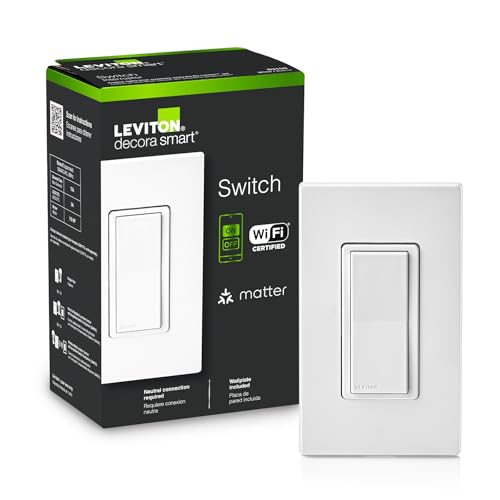
Leviton Decora Smart Wi-Fi Switch (D215S)
Leviton builds this switch to the same Decora form factor used across its standard and dimmer switches, so a whole-home upgrade keeps a consistent look on every wall. The My Leviton app adds scheduling and remote access without a separate bridge. Decora’s wide wall plate selection also makes color and finish matching easier than with proprietary paddle shapes.
Pros
- Matches standard Decora wall plates for a uniform upgrade
- No hub purchase required
- Wide plate and finish options available separately
Cons
- No Apple Home support without a third-party bridge
- Requires a neutral wire for installation

GE Cync Smart Switch
GE’s Cync switch keeps the feature set simple: on, off, scheduling, and voice control, without dimming or color options to configure. The Cync app also manages GE’s smart bulbs and plugs, useful for anyone building out a mixed Cync setup. A standard single-pole install keeps the wiring straightforward for most rooms.
Pros
- Lower price among Wi-Fi smart switches
- One app covers Cync bulbs, plugs, and switches
- Simple setup for a standard single-pole circuit
Cons
- No dimming function on this switch model
- No Apple Home support out of the box

Treatlife Smart 3-Way Switch
Treatlife designs this switch specifically to replace one half of a 3-way circuit, the kind of setup common in stairways and long hallways with two switches controlling one light. A companion switch at the second location pairs through the included wiring rather than a separate smart module. The Treatlife app covers scheduling and grouping with other Treatlife devices.
Pros
- Built specifically for 3-way stairway and hallway circuits
- No separate hub purchase needed
- Lower price than name-brand 3-way smart switches
Cons
- 3-way wiring setup is less forgiving for first-time installers
- No Apple Home support without a Matter bridge
How to choose
What to check before buying a smart light switch Wiring comes first, since a smart switch without neutral wire support will not install in a box that lacks one, a common situation in homes built before the 1980s. Hub requirements split the category next, with Lutron routing through its own bridge while most Wi-Fi switches connect directly to a router. Voice assistant support varies too, and Apple Home users specifically need either a Matter-certified switch or a bridge that translates to HomeKit.
Hub-based versus hub-free switches Lutron Caseta switches route through a dedicated Smart Bridge, which adds setup steps but gives a longer, more reliable range than crowded home Wi-Fi sometimes offers. TP-Link Kasa, Leviton Decora, GE Cync, and Treatlife switches skip the bridge and connect straight to a 2.4GHz network, which is simpler but ties reliability to your router’s signal strength at that wall box. Matter-certified models like the Kasa KS225 sit in between, connecting over Wi-Fi while remaining usable by any Matter hub instead of one proprietary app.
Best fit for homes without a neutral wire Older homes, especially ones wired before the 1980s, often skip running a neutral wire to light switches, which blocks most Wi-Fi smart switches from working at all. The Lutron Caseta Smart Switch and its dimmer counterpart are built to handle this exact gap, using the Smart Bridge to communicate instead of needing extra wiring. Anyone unsure whether their switch box has a neutral wire should check before buying any other switch on this list.
Best fit for 3-way circuits and multi-assistant homes Stairways and long hallways typically run a 3-way circuit with two physical switches controlling one light, a setup the Treatlife Smart 3-Way Switch is built around specifically. Households mixing Alexa, Google Home, and Apple devices get more flexibility from Matter-certified options like the TP-Link Kasa KS225, since Matter avoids locking the switch into one ecosystem. Single-assistant households can skip the Matter requirement and save money with a simpler switch like the GE Cync.
The lineup, side by side
| # | Model | Wiring | Best for | Score | Price |
|---|---|---|---|---|---|
| 1 | Lutron Caseta Smart Switch (PD-6ANS-WH) | Neutral wire not required | Best overall for homes without a neutral wire | 9.2 | Check price |
| 2 | Lutron Caseta In-Wall Smart Dimmer (PD-6WCL-WH) | Neutral wire not required | Best for dimmable LED and incandescent lighting | 9.0 | Check price |
| 3 | TP-Link Kasa Smart Switch HS200 | Neutral wire required | Best value hub-free single-pole switch | 8.6 | Check price |
| 4 | TP-Link Kasa KS225 Matter Smart Dimmer | Neutral wire required | Best for Matter and multi-ecosystem households | 8.8 | Check price |
| 5 | Leviton Decora Smart Wi-Fi Switch (D215S) | Neutral wire required | Best for matching a whole-home Decora wall plate look | 8.5 | Check price |
| 6 | GE Cync Smart Switch | Neutral wire required | Best budget straightforward Wi-Fi switch | 8.2 | Check price |
| 7 | Treatlife Smart 3-Way Switch | Neutral wire required, 3-way compatible | Best for existing 3-way circuit setups | 8.3 | Check price |
Common questions
Do smart light switches need a neutral wire?
Most Wi-Fi switches on this list, including the TP-Link Kasa HS200 and GE Cync Smart Switch, require a neutral wire, while the Lutron Caseta Smart Switch and its dimmer work with or without one.
What is the difference between a smart switch and a smart dimmer?
A smart switch like the TP-Link Kasa HS200 only turns a light on or off, while a smart dimmer such as the Lutron Caseta In-Wall Smart Dimmer adjusts brightness as well.
Can I use a smart light switch without a hub?
Yes, switches like the TP-Link Kasa HS200, Leviton Decora D215S, and GE Cync Smart Switch connect directly to Wi-Fi, while Lutron Caseta switches need their included Smart Bridge.
Does a smart light switch work with Apple HomeKit?
The Lutron Caseta Smart Switch supports Apple Home directly through its bridge, and the Matter-certified TP-Link Kasa KS225 works with Apple Home through any Matter hub.
How do I install a smart switch for a 3-way circuit?
A 3-way setup needs a switch designed for it, like the Treatlife Smart 3-Way Switch, since standard single-pole smart switches will not wire correctly into a two-switch circuit.
Are smart light switches hard to install?
Installation is similar to replacing a standard switch for single-pole models like the GE Cync Smart Switch, though 3-way wiring on switches like the Treatlife model takes more care matching wires correctly.
What is Matter and why does it matter for a smart switch?
Matter is a shared smart home standard that lets a switch like the TP-Link Kasa KS225 work with Alexa, Google Home, and Apple Home at once instead of locking into a single app.
Can a smart dimmer switch flicker with LED bulbs?
Flickering can happen with bulbs not on a dimmer’s compatibility list, which is why Lutron publishes a tested bulb list for the Caseta In-Wall Smart Dimmer.
Is Wi-Fi or a dedicated hub better for a smart switch?
A dedicated hub like the Lutron Smart Bridge tends to hold a more reliable connection across a larger home, while direct Wi-Fi switches such as the Leviton Decora D215S are simpler to set up in a smaller space.
Which smart switch matches standard wall plate styles?
The Leviton Decora Smart Wi-Fi Switch uses the common Decora paddle shape, making it easier to match existing wall plates across a whole-home upgrade.
Our take
Most households without confirmed neutral wiring should start with the Lutron Caseta Smart Switch, since it installs where several competitors on this list cannot. Anyone who has already confirmed a neutral wire and just wants simple on-off control should save money with the TP-Link Kasa HS200 instead. Skip the Caseta line if you specifically need Matter support across mixed Alexa, Google, and Apple devices, and choose the TP-Link Kasa KS225 for that case instead.
Marcus Chen
Marcus covered consumer electronics for enthusiast tech publications for six years before joining ChoiceCrest. He specializes in translating manufacturer spec sheets into plain-language buying advice, with a focus on audio, computing accessories and smart-home gear.