Why Do Some Webcams Perform Poorly in Low Light?
Most webcams perform poorly in low light because they use small, inexpensive image sensors that simply can’t gather enough light in dim conditions, and the camera compensates by boosting digital gain, which introduces visible noise and grain. A webcam’s sensor size and aperture matter far more to low-light performance than its advertised resolution does. Two webcams with identical resolution specs can perform very differently in a dim room purely because of differences in sensor size and lens aperture that don’t show up on a typical spec sheet.
Why sensor size is the real bottleneck
A webcam’s image sensor is physically tiny compared to even an entry-level standalone camera, which means it captures much less light per pixel in the same amount of time. In good lighting this limitation barely shows, but in dim rooms there simply isn’t enough light hitting the sensor to produce a clean image. Manufacturers rarely advertise exact sensor size for webcams the way camera makers do for standalone cameras, which makes it genuinely difficult to compare low-light performance across models without reading independent reviews or test footage.
What the camera does instead of getting more light
When there isn’t enough real light, the camera’s processor digitally amplifies the signal it did capture, called gain, to brighten the image artificially. That amplification also boosts the sensor’s natural electronic noise, which is why low-light webcam footage often looks grainy, blotchy, or has visible color speckling rather than smooth darkness. This is conceptually similar to raising the ISO setting on a standalone camera, pushing the signal higher to compensate for insufficient light, with the same fundamental tradeoff of introducing more visible noise into the image.
Why 1080p or 4K resolution doesn’t fix this
Resolution describes how many pixels the sensor has, not how much light each pixel can gather. A higher-resolution sensor often has smaller individual pixels packed into the same tiny sensor area, which can actually make low-light performance worse, not better, compared to a lower-resolution sensor with larger pixels. Some manufacturers specifically choose a lower megapixel count on purpose for exactly this reason, trading resolution for larger individual pixels that gather more light, a design priority sometimes called a larger pixel pitch.
How aperture and lens quality factor in
A wider aperture lets more light reach the sensor before any digital processing happens, so webcams with a wider lens opening tend to hold up better in dim rooms. Most basic webcams use fixed, fairly narrow apertures chosen for overall sharpness and depth of field rather than low-light gathering. Aperture is usually expressed as an f-number, and a lower f-number means a wider opening and more light reaching the sensor, though webcam manufacturers inconsistently publish this spec compared to camera makers.
Why some webcams include their own light source
Rather than fighting the sensor limitation, some webcams add a small ring light or LED array around the lens to physically add light to the scene, which is often more effective than relying on sensor and software improvements alone, since it addresses the actual root problem instead of compensating after the fact.
What software processing can and can’t fix
Modern webcam software can apply noise reduction and auto-exposure adjustments that smooth out some low-light grain, but this comes with its own tradeoff, usually softer detail and occasional motion blur or smearing, since the software is working with a fundamentally light-starved image to begin with.

Logitech Brio 4K Webcam
A higher-end webcam with HDR and a larger sensor that holds up noticeably better in dim rooms than typical budget webcams.
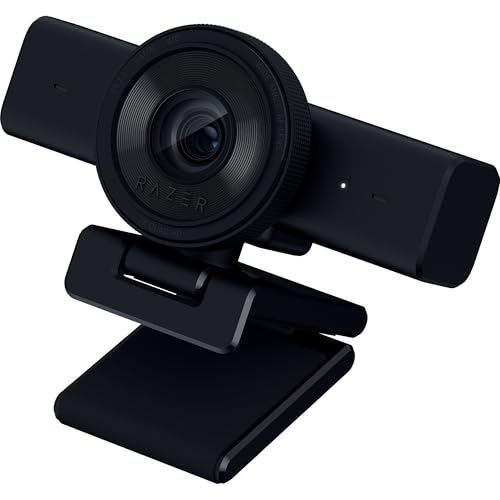
Razer Kiyo
A webcam built with an adjustable ring light attached directly around the lens specifically to address weak ambient lighting during calls.
Good to know
Does a more expensive webcam always perform better in low light?
Usually, but not purely because of price, higher-end models tend to use larger sensors and wider apertures, which are the specific factors that actually improve low-light performance.
Can adding a desk lamp fix a webcam’s low-light performance?
Often yes, and it’s usually the simplest fix, since it addresses the root cause, insufficient light reaching the sensor, rather than relying on the camera’s software to compensate after the fact.
Why does webcam footage sometimes look grainy even in a lit room?
If the room’s light isn’t directly facing the camera, or is dim relative to what the sensor needs, the camera can still be boosting gain to compensate, which produces visible grain even though the room doesn’t feel dark to your eyes.
Does webcam resolution matter at all for video call quality?
Yes, for detail and sharpness in good lighting, but resolution and low-light performance are largely separate qualities, a sensor can be high resolution and still perform poorly in dim conditions.
Can software settings improve a webcam’s low-light performance?
Some webcam software lets you manually adjust exposure, gain, or white balance, which can help to a degree, though it can’t substitute for insufficient actual light reaching the sensor.
Why do laptop built-in webcams usually perform worse than external ones?
Built-in webcams are constrained by extremely thin laptop lids, which forces manufacturers to use even smaller sensors and lenses than a dedicated external webcam can fit.
Does backlighting make low-light webcam performance worse?
Yes, a bright window or lamp behind you forces the camera’s auto-exposure to darken the overall image to avoid overexposing the background, which makes your face appear even dimmer by comparison.
Is a ring light actually better than relying on room lighting?
A ring light evenly illuminates the face from the camera’s own position, avoiding harsh shadows that overhead or side room lighting often creates, so it frequently produces a cleaner result than ambient room light alone.
Do webcams with HDR actually help in mixed lighting?
Yes, HDR on a webcam helps balance scenes with both bright and dark areas, like a sunlit window behind a dim room, though it doesn’t meaningfully improve performance in a uniformly dark room.
Why does video call software sometimes brighten a webcam feed automatically?
Many video conferencing apps apply their own auto-brightening and noise reduction on top of whatever the webcam outputs, which can help but sometimes introduces a slightly washed-out or soft look.
Can you use a phone camera instead of a webcam for better low-light performance?
Often yes, since modern phone camera sensors are considerably larger and more advanced than typical webcam sensors, and several apps let you use a phone as a webcam over USB or WiFi.
Does webcam frame rate get affected by low light?
Yes, in very dim conditions some cameras automatically lower the frame rate to let each frame gather more light, which can introduce visible motion blur or a slightly choppy look during movement.
Is autofocus affected by low light on a webcam?
Yes, autofocus systems rely partly on contrast and detail in the image to lock focus, so low light can make a webcam hunt for focus more or settle on a slightly soft result.
Do higher-end webcams use larger sensors than cheaper ones?
In most cases yes, sensor size is one of the more expensive components to upgrade, so premium webcams typically justify part of their price with a larger sensor rather than resolution alone.
Does a webcam’s low-light performance affect video call bandwidth usage?
Indirectly, since a noisier low-light image contains more random detail for the video codec to encode, which can slightly increase the data needed per frame compared to a clean, well-lit image at the same resolution.
Our take
Low-light weakness in a webcam almost always traces back to a small sensor trying to do a job it physically isn’t built for, and no amount of software polish fully substitutes for actual light reaching that sensor. If video calls happen in a dim room regularly, a cheap desk lamp or a webcam with a built-in light solves more of the problem than chasing a higher resolution spec ever will.
Marcus Chen
Marcus covered consumer electronics for enthusiast tech publications for six years before joining ChoiceCrest. He specializes in translating manufacturer spec sheets into plain-language buying advice, with a focus on audio, computing accessories and smart-home gear.
You might also need

Why Do Some Portable Monitors Need Two Cables Instead of One?

Picking a Charger That Won’t Slow Down Your Fire Tablet

Why Does My Wireless Mouse Lag Even With Fresh Batteries?
