Is a Rotary Tool Good for Engraving Metal?
Yes, a rotary tool is a genuinely capable and common choice for engraving metal, especially softer metals like aluminum, brass, and stainless steel, as long as it is fitted with the correct engraving or carbide bit and run at the right speed for the material. The tool itself matters less than picking the right bit and keeping speed and pressure controlled, which is where most engraving mistakes actually happen. Hobbyists use rotary tools for everything from marking tools and personalizing knife blades to etching small decorative designs into sheet metal, and the results scale almost entirely with technique rather than how much the tool itself cost.
Why rotary tools work well for engraving despite being general-purpose
Rotary tools spin a small interchangeable bit at high speed, and that same mechanism that lets them grind, cut, and polish also makes them effective for engraving, since a diamond or carbide engraving bit at the tip can etch a controlled line into metal when guided steadily by hand.
The bit matters more than the tool’s horsepower
A diamond-tipped or tungsten carbide engraving bit is specifically shaped to etch rather than grind away bulk material, and using the wrong bit, like a general-purpose grinding stone, produces a rough, uncontrolled mark instead of a clean engraved line regardless of how powerful the rotary tool itself is.
Speed control changes the result dramatically
Metal engraving generally wants a lower to mid speed setting rather than the tool’s maximum RPM, since excessive speed on a small engraving tip tends to skip, chatter, or burn a line rather than cut it cleanly. Variable speed rotary tools give far more control over this than fixed-speed models.
Which metals engrave easily versus which resist it
Softer metals like aluminum, brass, and copper engrave smoothly with light, steady pressure. Hardened steel and stainless steel are workable but require a genuinely diamond-tipped bit and more patience, since a standard carbide bit wears down faster against harder metal surfaces.
Technique issues that cause more problems than tool choice
Pressing too hard, moving too fast, or trying to freehand a precise design without a steady hand rest or guide are the most common reasons engraving on metal comes out uneven, and these issues persist even with an expensive rotary tool if technique is not adjusted. Bracing the tool against a steady surface, resting the wrist rather than holding the whole arm unsupported, and letting the bit do the cutting instead of pushing down on it all noticeably improve line consistency.
When a dedicated engraving tool makes more sense
For production-level or very fine detail engraving work, a purpose-built engraving pen or a laser engraver offers more precision and consistency than a general rotary tool, but for one-off personalization, marking tools, or hobbyist projects, a rotary tool with the right bit covers the job well. A rotary tool also remains useful for cleanup and finishing afterward, since the same tool can swap to a polishing or fine abrasive bit to smooth the engraved area once the design is cut.
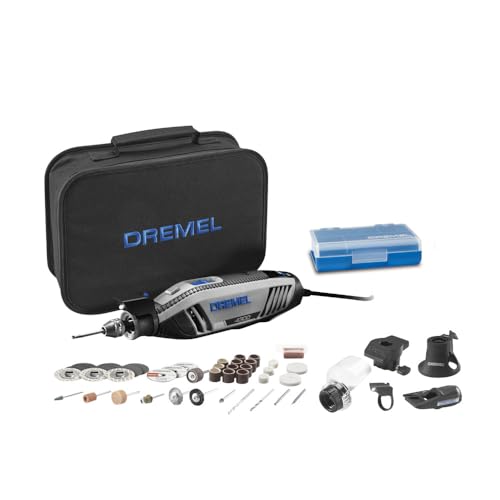
Dremel 4300 Rotary Tool
A variable speed corded rotary tool commonly used for engraving, cutting, and grinding tasks including metal personalization work.

Dremel 8220 Cordless Rotary Tool
A cordless rotary tool offering variable speed control, often used for engraving and detail work without a power cord getting in the way.
Common questions
What kind of bit should be used to engrave metal with a rotary tool?
A diamond-tipped or tungsten carbide engraving bit, specifically shaped for etching rather than bulk grinding, produces the cleanest controlled line on metal.
Does a more powerful rotary tool engrave metal better?
Not necessarily. Bit choice and speed control matter more for engraving quality than raw power, since engraving relies on precision rather than material removal rate.
Can a rotary tool engrave hardened steel?
Yes with a genuinely diamond-tipped bit and patience, though hardened steel wears down standard carbide bits faster and engraves more slowly than softer metals like aluminum or brass.
What speed setting works best for metal engraving?
A lower to mid speed setting generally gives better control for engraving than the tool’s maximum RPM, since high speed on a small tip tends to skip or chatter rather than cut cleanly.
Is freehand engraving with a rotary tool hard to do well?
It takes practice, since a steady hand and consistent light pressure are needed for even lines, and many users start with a stencil or guide before attempting freehand designs.
Can a rotary tool engrave stainless steel appliances or knives?
Yes, with the right diamond bit and controlled speed, stainless steel is a workable surface for personalization engraving, though it engraves more slowly than softer metals.
Does engraving metal with a rotary tool create sharp edges or burrs?
Light burring along the engraved line can occur, especially on softer metals, and lightly smoothing it afterward with a fine abrasive or polishing bit is a common finishing step.
Is it necessary to secure the metal piece before engraving?
Yes, clamping or securing the workpiece prevents it from shifting mid-engrave, which is one of the more common causes of a wandering or uneven line.
Can a cordless rotary tool engrave metal as well as a corded one?
Yes for most engraving tasks, as long as the cordless model offers adequate variable speed control, though very long engraving sessions may be limited by battery runtime compared to a corded tool.
Do rotary tool engraving bits wear out quickly on metal?
Diamond bits last considerably longer than standard carbide bits on hard metal, though any bit will eventually dull with heavy repeated use, especially on harder steel surfaces.
Is a laser engraver better than a rotary tool for metal?
For production work or very fine, repeatable detail, yes a laser engraver offers more precision, but for occasional personalization or hobbyist projects, a rotary tool with the correct bit is a practical and far less expensive option.
Can engraving with a rotary tool damage the metal’s finish beyond the engraved area?
Only if pressure or speed is poorly controlled and the bit slips outside the intended line, which is why starting with light passes and building up depth gradually reduces the risk of stray marks.
Does practicing on scrap metal first actually help?
Yes, practicing on a scrap piece of the same or similar metal lets you dial in the right speed and pressure before committing to the actual workpiece, which avoids costly mistakes on a finished item.
Can a rotary tool engrave curved or rounded metal surfaces?
Yes, the handheld nature of a rotary tool makes it well suited to curved surfaces that a fixed engraving machine might struggle to access, though steady hand control becomes even more important on a curve.
Is it worth buying a flex-shaft attachment for metal engraving work?
For detailed or precision engraving, a flex-shaft attachment can offer finer control than holding the main tool body directly, since it reduces the weight and bulk at the actual engraving point.
Does engraving depth affect how long the mark lasts on metal?
Yes, a deeper engraved line resists wear and polishing over time better than a very shallow surface scratch, though going too deep on thin metal risks weakening the material at that point.
Can a rotary tool engrave straight lines or text accurately without a steady guide?
Freehand straight lines and legible text are genuinely difficult without some kind of guide, which is why many users tape down a straightedge or use a stencil for anything beyond simple decorative marks.
Does the thickness of the metal piece matter for engraving with a rotary tool?
Very thin metal can flex or vibrate under the bit, which makes clean engraving harder, so backing thin sheet metal with a solid, flat support surface during the cut improves control and line consistency.
The bottom line
A rotary tool handles metal engraving well once the right bit and a sensible speed are in play, which matters far more to the result than the tool’s price tag or motor rating. Most disappointing engraving results trace back to the wrong bit or rushing the pass, not a rotary tool being the wrong choice for the job. Patience and a scrap test piece will do more for the final result than any upgrade to the tool itself.
Jake Monroe
Jake worked as a residential contractor for over a decade before shifting to full-time writing. He evaluates power tools, hand tools and workshop gear through the lens of someone who has actually used them on job sites, not just read the box.


