How Often Should a Smart Home Hub’s Firmware Be Updated?
Most smart home hubs should be left on automatic firmware updates, which typically push minor security and bug-fix updates every few weeks and larger feature updates every few months. Manually checking for an update is mainly useful if automatic updates have been disabled, or if a specific device integration suddenly starts failing after a platform-wide change, since that is usually a sign the hub is running outdated firmware relative to what newer connected devices expect.
Why hubs need firmware updates at all
A smart home hub’s firmware handles security patching, communication protocol updates for standards like Zigbee, Z-Wave, and the newer Matter standard, and compatibility fixes for specific devices that behave differently than expected. Because the smart home device ecosystem keeps evolving with new products and protocol revisions, a hub’s firmware is never really finished, it is maintained on an ongoing basis similar to how a phone’s operating system keeps receiving updates.
Automatic versus manual update settings
Nearly every major hub platform, including SmartThings, Aqara, and Hubitat, defaults to automatic background updates that install during low-activity hours like the middle of the night. This is generally the safer choice for most households, since it ensures security patches get applied promptly without anyone needing to remember a manual check, and most users never interact with the update process at all under this default.
Risks of delaying updates too long
A hub running significantly outdated firmware can develop real security vulnerabilities, since security researchers and manufacturers both publicly disclose fixed issues over time, and an unpatched hub becomes an increasingly known target the longer it goes without updating. Outdated firmware can also simply lose compatibility with newer smart devices that expect a more current protocol implementation, causing pairing failures or unreliable device behavior.
Risks of updating at the wrong time
The practical downside to firmware updates is a brief interruption, typically a few minutes, where the hub restarts and automations temporarily stop working. This is why automatic update schedules are generally set for overnight hours, and why manually forcing an update right before an important automation-dependent event, like an alarm system test, is usually not the ideal timing.
How to tell if a manual firmware check is needed
Signs worth investigating include a specific new device failing to pair or behaving erratically after a manufacturer states it requires a certain firmware version, the hub’s companion app showing an update available notification that has not installed after several days, or persistent connectivity issues that a basic restart does not resolve.
The Matter transition made this more relevant recently
The rollout of the Matter smart home standard required many existing hubs to receive substantial firmware updates to add Matter controller or bridge functionality, which is a good example of why staying current on firmware matters beyond routine security patching, since skipping those updates meant missing out on cross-brand compatibility improvements the hub was otherwise capable of supporting.
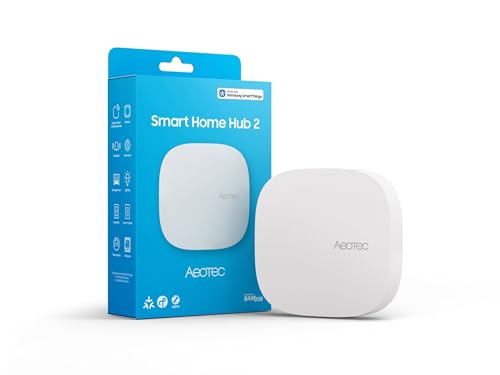
Samsung SmartThings Hub
A widely used smart home hub that received major firmware updates to add Matter support, illustrating how significant some firmware revisions can be beyond routine bug fixes.

Aqara Hub M3
A newer Zigbee and Matter-capable hub that pushes regular firmware updates for both security patches and expanding device compatibility.
Questions worth asking
Can a firmware update break existing automations on a smart home hub?
Occasionally a major update changes how certain integrations behave, which can require re-checking automations afterward, though most routine updates do not disrupt existing setups.
Is it safe to update hub firmware while people are actively home using smart devices?
It is generally safe since the interruption is brief, typically a few minutes of the hub being offline, but scheduling updates for overnight or low-activity periods avoids any noticeable disruption.
Does disabling automatic updates on a hub create a security risk?
Yes, over time an un-updated hub misses security patches that address known vulnerabilities, which is why most manufacturers and security guidance recommend leaving automatic updates enabled.
How do you check what firmware version a smart home hub is currently running?
Most hub companion apps have a settings or device information section showing the current firmware version number, often alongside an option to manually check for a newer version.
Do all connected smart devices need updating at the same time as the hub itself?
Not necessarily, since many smart devices like bulbs, plugs, and sensors have their own separate firmware that updates independently through the hub or directly through the manufacturer’s app.
Can an outdated hub firmware prevent new smart devices from pairing?
Yes, newer devices sometimes require a minimum firmware version on the hub to support the communication protocol or security features they use, so pairing failures are a common symptom of outdated hub firmware.
Does every firmware update improve hub performance, or can updates introduce new bugs?
Most updates are genuine improvements, but like any software, an update can occasionally introduce a new bug, which is part of why manufacturers typically roll updates out gradually rather than to every device simultaneously.
Is there a way to roll back a hub to a previous firmware version if an update causes problems?
Some platforms support this through advanced settings or manufacturer support channels, but it is not universally available and is generally treated as a last resort rather than a routine option.
Do firmware updates on a hub affect battery-powered sensors connected to it?
Not directly, since sensor firmware is typically separate, though a hub update that changes how it communicates with battery devices could occasionally require those devices to reconnect or briefly show as offline.
How long does a typical smart home hub firmware update take to install?
Most updates install within a few minutes, though larger feature updates, like a Matter controller rollout, can occasionally take longer and may require the hub to restart more than once.
Should you manually trigger an update the moment one becomes available rather than waiting for the automatic schedule?
For routine updates there is little urgency, since automatic scheduling will apply it within a reasonable window, but for updates explicitly addressing a security vulnerability, manually triggering it sooner is a reasonable precaution.
Does a hub stop receiving firmware updates eventually?
Yes, manufacturers eventually end support for older hub models, after which no further security patches or compatibility updates are released, which is worth checking if a hub has been in use for several years.
Can a firmware update change the hub’s app interface or settings layout?
Occasionally, particularly with larger feature updates, though most routine security and bug-fix updates do not noticeably change the user-facing app experience.
Is it necessary to back up hub settings before a firmware update?
Most platforms handle updates without data loss, but for hubs managing complex automations, checking whether the app offers a backup or export feature beforehand is a reasonable precaution, especially before a major version update.
Does a hub need to be connected to the internet for firmware updates to download?
Yes, nearly all current hubs require an active internet connection to check for and download firmware, though the hub typically continues running existing local automations normally if that connection briefly drops.
Can firmware updates fix a hub that is randomly dropping connected devices?
Sometimes, if the dropped connections are caused by a known bug the update specifically addresses, though persistent dropouts can also stem from wireless interference or hardware issues that a firmware update alone will not resolve.
Do budget smart home hubs receive firmware updates as consistently as premium ones?
Not always, since some lower-cost hubs receive less frequent manufacturer support over their lifespan, which is worth checking before buying a hub meant to stay in service for many years.
Final word
For the vast majority of households, the right approach is simply leaving automatic updates on and not thinking about it further. Manual attention is really only warranted when a specific device stops working as expected or when a hub has gone noticeably quiet on updates, since that usually points to either a disabled setting or a hub nearing the end of its supported life.
Marcus Chen
Marcus covered consumer electronics for enthusiast tech publications for six years before joining ChoiceCrest. He specializes in translating manufacturer spec sheets into plain-language buying advice, with a focus on audio, computing accessories and smart-home gear.


