Do Graphics Tablets Need Screen Calibration?
Pen display tablets with a built-in screen, like a Wacom Cintiq or Huion Kamvas, generally do need occasional calibration to keep the pen tip aligned with where it actually touches on screen, especially at the edges. Non-screen drawing tablets, like a Wacom Intuos that you use alongside a separate monitor, don’t need visual calibration in the same way, though they can still need pressure sensitivity and pen mapping adjustments.
Two very different kinds of graphics tablets
A pen display, sometimes called a pen tablet monitor, has a screen built into the drawing surface so you draw directly on what you see, while a non-display drawing tablet is a separate flat surface that maps your pen movement onto a monitor elsewhere. Calibration needs differ significantly between these two categories, which is a common source of confusion.
Why pen displays develop a visible offset over time
On a pen display, parallax, the visual gap between the glass surface and the actual digitizer sensor beneath it, combined with viewing angle, can cause the cursor to appear slightly offset from where the pen tip physically touches, especially near the screen edges or corners. Manufacturers include a calibration tool specifically to correct this offset.
Non-screen tablets need mapping, not visual calibration
A tablet without its own screen doesn’t have a parallax problem since you are looking at a separate monitor, but it still needs its active drawing area correctly mapped to the monitor’s resolution and aspect ratio, and that mapping can shift if monitor settings, resolution, or multi-monitor setups change.
Pressure sensitivity calibration is a separate adjustment from screen alignment
Most drawing tablets let you adjust how much physical pressure corresponds to how dark or thick a stroke appears, separate from any screen alignment. Artists coming from a different tablet brand often need to adjust this pressure curve since brands vary in how firm or light their stock pressure response feels.
When recalibration becomes necessary
Switching to a new monitor, changing display resolution, rotating the tablet’s orientation, or simply noticing the cursor consistently appears a few millimeters away from the pen tip are all signs that running the manufacturer’s calibration utility will help, and most driver software includes this as a built-in, usually free, five minute process.
Software side calibration versus hardware side drift
Occasional recalibration through software fixes the vast majority of alignment issues, but a tablet that needs recalibrating frequently, or one where the offset is severe and inconsistent, can point to a hardware or digitizer issue rather than something settings alone will fix long term.

Wacom Cintiq 16
A pen display tablet that includes a built-in calibration utility specifically to correct the parallax offset between the glass surface and the pen’s actual contact point.
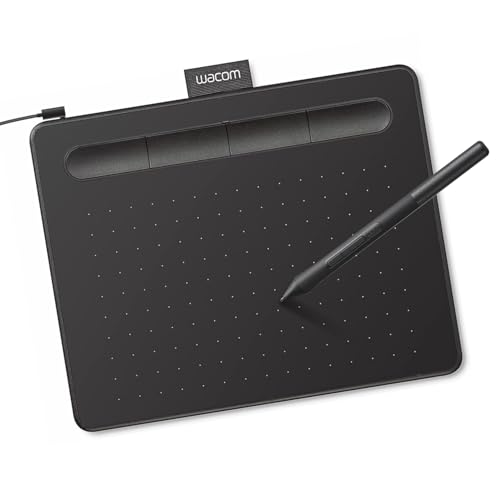
Wacom Intuos
A non-screen drawing tablet that maps pen movement to a separate monitor, needing display area mapping rather than visual screen calibration.
Questions worth asking
How do I know if my graphics tablet needs recalibrating?
A cursor that consistently appears offset from where the pen tip physically touches, especially near the edges of a pen display, is the clearest sign recalibration is needed.
Does a non-screen drawing tablet ever need calibration at all?
It needs its active area mapped correctly to the monitor rather than visual calibration, since there is no parallax between a separate monitor and the drawing surface.
Why does the cursor drift away from my pen tip near the edges of a pen display?
This is typically parallax, the visual gap between the display glass and the sensor layer beneath it, which becomes more noticeable at steeper viewing angles near the edges.
Is calibration a one-time setup, or does it need repeating over time?
It is usually needed again after changes like a new monitor, a resolution change, or a tablet orientation change, rather than on a fixed recurring schedule.
Does changing monitors affect a drawing tablet’s calibration?
Yes, for non-screen tablets especially, switching monitors often requires remapping the active area to the new display’s resolution and aspect ratio.
Can pressure sensitivity settings fix a cursor offset issue, or are they unrelated?
They are unrelated adjustments; pressure sensitivity affects how strokes respond to force, while calibration affects where the cursor appears relative to the pen tip.
Why does my pen display feel less accurate in the corners than in the center?
Parallax effects are generally more pronounced at steeper viewing angles toward the corners and edges of the screen compared to looking straight down at the center.
Do multi-monitor setups complicate drawing tablet calibration?
Yes, with multiple monitors the tablet’s active area needs to be correctly assigned to the intended screen, and calibration or mapping settings may need adjusting if monitor arrangement changes.
Is parallax the same thing as miscalibration?
Parallax is the underlying visual phenomenon causing the offset, while calibration is the process used to correct for it, so they are related but not identical terms.
Can a glass screen protector on a pen display affect calibration accuracy?
An added layer can sometimes introduce a small amount of additional parallax or change pen glide feel, so recalibrating after adding one is a reasonable step.
Does rotating a drawing tablet’s orientation require recalibrating it?
Yes, changing orientation, such as rotating a pen display for left handed use, typically requires running calibration again to match the new physical orientation.
How long does recalibrating a pen display tablet usually take?
Most manufacturer calibration utilities take only a few minutes, usually involving tapping a handful of on screen target points with the pen.
Can software updates to tablet drivers reset calibration settings?
Occasionally a major driver update can reset calibration to default, so checking alignment after a significant software update is a reasonable habit.
Is a persistent, uneven offset a sign of a hardware problem rather than a software one?
If the offset remains severe and inconsistent even after running calibration multiple times, it can indicate a digitizer or hardware issue rather than something software calibration alone will resolve.
Do different pen nib types affect how calibration feels during drawing?
Nib type affects glide and tactile feel more than positional accuracy, though a worn down nib can occasionally make contact point perception feel slightly less precise.
Does calibration differ between Windows and Mac versions of the same tablet driver?
The underlying calibration process is usually similar across operating systems, though the exact menu location and driver interface can differ between Windows and Mac versions.
Does calibration differ between a small pen display and a large one?
The calibration process itself is similar, though larger displays can show a more noticeable parallax offset at the far edges simply because there is more physical distance across the screen.
Can using the tablet at a steep angle on a stand affect how well it stays calibrated?
Viewing angle affects how parallax appears in the moment rather than the stored calibration itself, though some artists recalibrate after settling into a long term stand angle for the most accurate feel.
Is it normal for calibration to feel slightly different after a graphics driver update?
Occasionally yes, since display driver changes can subtly affect how the tablet’s digitizer and the screen’s rendering line up, making a quick recalibration a reasonable check after major updates.
Do budget pen displays need calibration more often than premium ones?
Budget models can sometimes show a more noticeable parallax offset due to a thicker glass layer between the sensor and surface, which may make recalibration feel more necessary over time compared to thinner, premium panel designs.
Can left handed users calibrate a tablet differently than right handed users?
The calibration process addresses screen alignment rather than handedness directly, though left handed users often also adjust orientation and button mapping settings alongside calibration for a more comfortable setup.
Where this leaves you
If your tablet has its own screen, expect to run its calibration tool occasionally, especially after a new monitor or orientation change. If it doesn’t have a screen, what you actually need is correct display mapping and a pressure curve that feels right, since there is no visual offset to correct in the first place.
Marcus Chen
Marcus covered consumer electronics for enthusiast tech publications for six years before joining ChoiceCrest. He specializes in translating manufacturer spec sheets into plain-language buying advice, with a focus on audio, computing accessories and smart-home gear.


