Picking the Right Xbox for Your Budget and Games
Most buyers get the best long term value from the Xbox Series X, which renders native 4K and includes a disc drive. The Xbox Series S covers digital only households on a tighter budget. Collectors chasing older exclusives should look at a Renewed Xbox 360 instead.
The Xbox Series X suits most households that want native 4K rendering and a disc drive for physical games or 4K Blu rays. Budget minded or digital only buyers should choose the Xbox Series S instead. Collectors chasing exclusives that never left older hardware are better served by a Renewed Xbox One S or Xbox 360.
Microsoft currently sells several Xbox generations side by side, which makes storage, resolution and disc drive support the real differences rather than brand loyalty. We compared specifications, digital versus disc tradeoffs and owner feedback across current and legacy hardware before narrowing this list to seven.
The best picks, ranked

Xbox Series X 1TB
Series X runs a custom AMD Zen 2 CPU paired with an RDNA 2 graphics core rated at 12 teraflops, Microsoft’s most powerful console to date. It ships with a 1TB custom NVMe SSD and a 4K UHD Blu ray disc drive for physical media. Quick Resume lets you jump between several suspended games without a full reload.
Pros
- Most powerful current Xbox for native 4K gaming
- Disc drive supports physical games and 4K movies
- Quick Resume holds multiple games in standby
Cons
- Storage fills quickly with modern game install sizes
- Larger and heavier than the Series S

Xbox Series X 1TB Digital Edition
This Digital Edition strips the disc drive from the standard Series X while keeping the same Zen 2 CPU and RDNA 2 GPU inside. Every game installs from the Microsoft Store or a Game Pass subscription instead of a disc. Removing the drive makes the unit slightly quieter during long sessions.
Pros
- Full Series X performance without the disc drive cost
- Runs marginally quieter without a spinning drive
- Simplifies setup for an all digital game library
Cons
- No path to play physical discs or rip personal media
- Resale value typically lower than disc equipped models
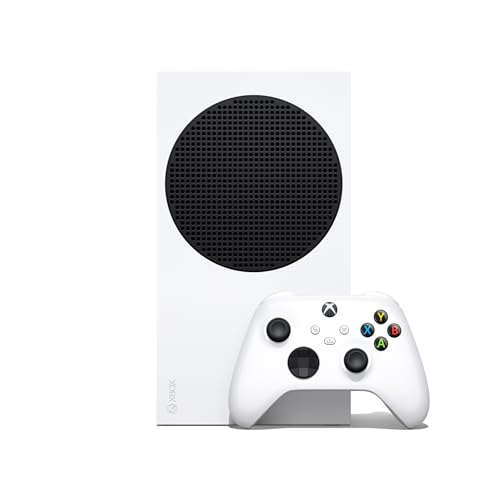
Xbox Series S 1TB
This version of the Series S doubles the base storage to 1TB while keeping the same digital only, disc free design. Microsoft sells it in a Robot White finish distinct from the Carbon Black Series X. The extra storage matters most for players who install several large open world titles at once.
Pros
- Doubled storage over the base 512GB Series S
- Still priced below the Series X
- Same compact footprint as the smaller model
Cons
- Rendering power unchanged from the 512GB version
- No disc drive for physical game collectors
Xbox Series S 512GB
Series S targets 1440p rendering upscaled to 4K rather than native 4K, which keeps its price well below the Series X. Microsoft drops the disc drive entirely, so every game and movie comes through digital download or streaming. Its smaller RDNA 2 GPU still supports up to 120fps in supported titles.
Pros
- Lowest price point in the current Xbox lineup
- Compact size fits easily in small media cabinets
- Same Game Pass and online library access as Series X
Cons
- 512GB fills up fast with current game install sizes
- Rendering resolution is lower than the Series X in demanding titles

Xbox Series S Starter Bundle 512GB
Microsoft packages this bundle with a 512GB Series S console and a limited trial of Xbox Game Pass Ultimate included at setup. It suits a first Xbox purchase for someone who has not decided which subscription tier to keep long term. Hardware inside matches the standalone 512GB Series S exactly.
Pros
- Game Pass trial gives immediate access to a large library
- Lower entry cost than buying console and subscription separately
- Same hardware as the standalone Series S
Cons
- Trial subscription eventually converts to a paid renewal
- Storage limit matches the base 512GB model

Xbox One S 1TB
Xbox One S predates the current generation but still plays the full library of Xbox One and most Xbox 360 backward compatible titles. Microsoft fits it with a 1TB hard drive and a 4K Blu ray disc drive for movies, though games render at up to 1080p rather than native 4K. It remains one of the cheapest ways into the Xbox ecosystem for backward compatible play.
Pros
- Lowest entry cost into the Xbox hardware ecosystem
- Plays a large backward compatible game library
- 4K Blu ray playback for movies despite 1080p gaming
Cons
- No native 4K or high frame rate gaming support
- Mechanical hard drive is slower than current SSD based consoles

Xbox 360 (Amazon Renewed)
Microsoft discontinued new production of the Xbox 360 years ago, so current Amazon listings are almost entirely Renewed or used units from third party sellers. It still runs the original Xbox 360 library natively, including disc based games that never got a backward compatible patch on newer hardware. Collectors buy it specifically for games the newer consoles never carried forward.
Pros
- Plays Xbox 360 exclusives that never reached newer consoles
- Lower cost than any current generation console
- Appeals directly to collectors of the original disc library
Cons
- Hardware reliability depends entirely on the individual used unit
- No manufacturer warranty on a discontinued console
How to pick the right one
Xbox Series X vs Series S: what actually changes Series X renders games at native 4K using a more powerful RDNA 2 GPU, while Series S targets 1440p and upscales to 4K on a smaller chip. Series X keeps a disc drive for physical media; every Series S variant drops it entirely. Storage differs too, running from 512GB on the base Series S up to 1TB on both the upgraded Series S and every Series X. Price and size follow the same pattern, with Series S staying smaller, lighter and cheaper throughout.
How much storage do you actually need Modern open world and multiplayer titles frequently install well past 50GB each, so a 512GB drive fills up after just a handful of games. Players who stick to one or two active titles at a time can manage fine on the base Series S. Anyone juggling several large games, or who rarely uninstalls anything, benefits from the 1TB Series S or the standard 1TB Series X. External expansion cards and USB drives can add more room later on either console.
Digital only vs disc drive consoles Dropping the disc drive, as Microsoft does on every Series S and the Series X Digital Edition, lowers cost and cuts a small amount of noise and bulk. It also means no option to buy, sell or lend physical copies, and no way to play movie discs. A drive equipped console like the standard Series X or Xbox One S keeps that flexibility, along with 4K Blu ray movie playback. Shoppers who already buy everything through digital storefronts lose little by skipping the drive.
Older Xbox consoles and backward compatibility An Xbox One S still runs most Xbox 360 and original Xbox games through Microsoft’s backward compatibility program, at a fraction of a current console’s price. A small number of older titles never received that compatibility patch, which is where a working Xbox 360 still matters to collectors. Both older consoles cap out well below current generation resolution and frame rates, so they suit a secondary or retro setup rather than a primary gaming system.
Side by side
| # | Model | CPU/GPU | Best for | Score | Price |
|---|---|---|---|---|---|
| 1 | Xbox Series X 1TB | AMD Zen 2 CPU, RDNA 2 GPU, 12 teraflops | Best overall | 9.4 | Check price |
| 2 | Xbox Series X 1TB Digital Edition | Same as standard Series X | Best for a digital only library | 9.0 | Check price |
| 3 | Xbox Series S 1TB | 1TB custom SSD | Best value storage upgrade | 8.8 | Check price |
| 4 | Xbox Series S 512GB | RDNA 2, lower teraflop rating than Series X | Best budget | 8.6 | Check price |
| 5 | Xbox Series S Starter Bundle 512GB | 512GB custom SSD | Best for new players | 8.4 | Check price |
| 6 | Xbox One S 1TB | 1TB hard disk drive | Best for backward compatible play | 8.2 | Check price |
| 7 | Xbox 360 (Amazon Renewed) | Amazon Renewed or used, no new retail stock | Best for retro Xbox 360 collectors | 8.0 | Check price |
Good to know
What is the difference between Xbox Series X and Series S?
Series X renders games natively at 4K using a more powerful GPU and includes a disc drive. Series S upscales to 4K from a lower native resolution, skips the disc drive, and costs less.
Do I need the Series X for 4K gaming or is Series S enough?
Series X renders true native 4K, while Series S upscales from 1440p. Series S still looks sharp on most TVs, but detail oriented players on a large 4K display will notice the difference.
Can Xbox Series X and Series S play Xbox 360 games?
Both support backward compatibility with a large portion of the Xbox 360 library through Microsoft’s compatibility program, though a handful of older titles were never added.
Is the Xbox Series X Digital Edition worth buying over the standard model?
It makes sense if you only buy digital games and movies. Buyers who want physical discs or 4K Blu ray playback should stick with the standard Series X.
How much storage comes with each Xbox console?
The base Series S ships with 512GB, an upgraded Series S model offers 1TB, and every current Series X variant includes 1TB of custom SSD storage.
Is Xbox One S still worth buying today?
Mainly for budget shoppers who want backward compatible Xbox One and Xbox 360 games cheaply. It cannot match current generation resolution or frame rates for newer titles.
Can I still buy a new Xbox 360 in 2026?
No, Microsoft ended Xbox 360 production years ago. Current Amazon listings are Renewed or used units sold by third party sellers rather than new retail stock.
Does Xbox Game Pass work on every Xbox console?
Yes, Game Pass runs on Series X, Series S, and the older Xbox One family, though install speed and loading times vary with each console’s hardware.
Can I add external storage to a Series S or Series X?
Yes, both support Microsoft’s storage expansion cards and most external USB drives for additional game storage beyond the built in SSD.
Our pick
The Xbox Series X is the right pick for most households that want native 4K and a disc drive for physical games. Budget minded or digital only buyers should choose the Xbox Series S instead, stepping up to the 1TB version if storage runs tight. Collectors chasing exclusives that never left the original hardware are the only shoppers who should consider a Renewed Xbox 360.
Marcus Chen
Marcus covered consumer electronics for enthusiast tech publications for six years before joining ChoiceCrest. He specializes in translating manufacturer spec sheets into plain-language buying advice, with a focus on audio, computing accessories and smart-home gear.


