Smart LED strip lights ranked on zones and reach
Govee’s RGBIC LED Strip Light M1 wins on colour depth per foot and joins Matter homes without a bridge. Philips Hue Lightstrip Plus V4 makes more sense where a Hue Bridge already runs. For Thread networks and low standby draw, pick the Nanoleaf Essentials Matter Lightstrip.
Most people should buy the Govee RGBIC LED Strip Light M1. Fifty segments hold separate colours across a 16.4 ft run, and Matter support keeps it usable in Alexa, Google Home and Apple Home alike. Trimming is where it falls down, because cutting the tape breaks segment addressing for good.
Brands quote lumens, zones and lengths that rarely line up, so a spec sheet alone will mislead you. We compared published specifications, control protocols, extension limits and voice platform support. Owner reports on adhesive failure, app outages and heat at full white decided the rest. Strips that keep working when a maker changes its app ranked higher.
The best picks, ranked

Govee RGBIC LED Strip Light M1
Fifty addressable segments let one run carry a gradient instead of a single flat colour. Matter over Wi-Fi puts it in Alexa, Google Home, SmartThings and Apple Home without a Govee-only bridge. Mounting clips ship in the box, which matters because tape alone slides off textured paint within weeks.
Pros
- Per-segment RGBIC colour across the full run
- Matter support avoids single-app lock-in
- Mounting clips included, not just adhesive
Cons
- Cutting the strip breaks segment addressing
- Wi-Fi radio draws more standby power than Thread

Philips Hue Lightstrip Plus V4
A 6.6 ft base run extends to 33 ft on add-on sections, so one product covers a shelf or a whole ceiling cove. Rated at 1600 lumens, it washes a wall rather than merely glowing behind it. Scenes, routines and entertainment sync all need the Hue Bridge, since Bluetooth mode handles only basic control.
Pros
- Extends to 33 ft from one power supply
- Bright enough for indirect wall washing
- Zigbee mesh keeps response fast and local
Cons
- Bridge needed for scenes and sync features
- Extensions must be Hue branded

Nanoleaf Essentials Matter Lightstrip
Commands travel over a low-power Thread mesh here, leaving your Wi-Fi channel alone. White tuning spans 1200K to 6500K, so one strip covers warm evening light and cold task light. A border router such as a HomePod mini or a fourth generation Echo has to be present for the mesh to form.
Pros
- Very low standby draw on Thread
- Wide 1200K to 6500K white tuning
- Sets up directly in Apple Home and Google Home
Cons
- Needs a Thread border router to reach full speed
- Fewer colour zones than RGBIC rivals

LIFX Z LED Strip
Eight controllable zones per meter produce real gradients from a strip that joins Wi-Fi by itself. Renters gain here, since no gateway has to sit on a shelf near the router. Heat is the tradeoff at 1400 lumens of full white, so mount it on an aluminium channel or a metal shelf edge.
Pros
- No bridge or gateway to buy
- Eight zones per meter for smooth gradients
- Extensions push the run past the starter length
Cons
- Runs warm at full white output
- Each strip occupies a Wi-Fi client slot
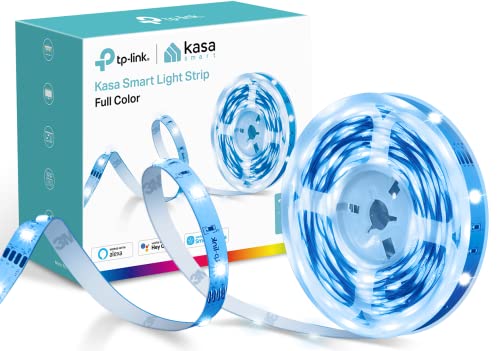
TP-Link Kasa Smart Light Strip KL430
Sixteen independent colour zones across 16.4 ft put effect quality close to pricier RGBIC tape. Kasa’s app is among the steadier ones for schedules, away modes and firmware updates. Apple Home is the gap, so Siri households should look at the Nanoleaf Essentials instead.
Pros
- Sixteen zones from a mid-range strip
- Reliable scheduling and vacation mode
- Extension strips available in the same line
Cons
- No Apple Home or Siri support
- 2.4 GHz only, so crowded channels can slow it

Govee Neon Rope Light 2
Silicone housing bends into letters, arcs and gaming-desk outlines that flat tape cannot hold. An IP67 rating opens up balconies, covered porches and bathroom splash zones. Bending works cleanly in one axis only, so plan sharp corners around the supplied clips rather than forcing the tube.
Pros
- Bends into custom shapes and lettering
- IP67 rating allows damp and covered outdoor use
- Diffused tube hides individual diodes
Cons
- Bends cleanly in one direction only
- Shorter run than flat strips of similar standing

Lepro Smart LED Strip Lights
Two 25 ft runs cover a large bedroom perimeter or a basement ceiling line in a single purchase. Colour applies to the whole strip at once, which rules out gradients and chase effects. Behind crown moulding, where nobody sees individual zones, that limit costs you nothing.
Pros
- Longest total run in this group
- Music sync through the phone microphone
- Simple app with no account gate for local control
Cons
- One colour at a time across the whole strip
- Adhesive needs clips on textured walls
How they compare
| # | Model | Length | Best for | Score | Price |
|---|---|---|---|---|---|
| 1 | Govee RGBIC LED Strip Light M1 | 16.4 ft | Best overall | 9.4 | Check price |
| 2 | Philips Hue Lightstrip Plus V4 | 6.6 ft | Best for existing smart homes | 9.2 | Check price |
| 3 | Nanoleaf Essentials Matter Lightstrip | 16.4 ft | Best for Thread networks | 9.0 | Check price |
| 4 | LIFX Z LED Strip | 6.6 ft | Best for brightness without a hub | 8.8 | Check price |
| 5 | TP-Link Kasa Smart Light Strip KL430 | 16.4 ft | Best value | 8.6 | Check price |
| 6 | Govee Neon Rope Light 2 | 10 ft | Best for shapes and wall art | 8.3 | Check price |
| 7 | Lepro Smart LED Strip Lights | 50 ft in two 25 ft runs | Best budget | 8.0 | Check price |
How to pick the right one
What to look for in a smart LED strip Length comes first. Measure the run, then add 20 percent for corners and the return to an outlet. Zones decide what the strip can show: single-zone tape holds one colour, while RGBIC and multi-zone strips paint gradients along the length. Brightness is quoted in lumens, and anything under roughly 1000 lumens reads as accent glow rather than usable light. Check which end takes power, because most strips feed from one side only. Finally, look at what ships in the box, since clips and an aluminium channel do more for the finished look than any app feature.
Matter, Thread, Zigbee or plain Wi-Fi: which protocol fits Matter strips such as the Govee M1 pair with Apple Home, Google Home and Alexa from the same hardware. Thread models like the Nanoleaf Essentials go further on efficiency, though a border router has to exist first. Zigbee through the Hue Bridge answers fastest and survives router reboots, at the cost of one more box on the shelf. Wi-Fi-only strips such as the Kasa KL430 need no extra hardware, yet each one takes a client slot, which adds up in a flat holding a dozen smart devices. Match the protocol to what your home already runs, then choose the brand.
TV walls, desks and kitchen cabinets Behind a television, zone count does the work. A multi-zone strip on a matte wall spreads colour evenly, while a single-zone run just tints the whole area one shade. Desks favour silicone rope like the Neon Rope Light 2, since spilled drinks and moving cables destroy thin tape. Under kitchen cabinets, warm white near 2700K looks right and the controller box needs somewhere to hide in the recess. Aluminium channels cost little and remove the dotted hotspot look from every strip here. Cove lighting is the one place to save money, because hidden diodes make gradients invisible.
Bathrooms, balconies and outdoor runs Nothing below IP65 belongs where water reaches. Govee’s Neon Rope Light 2 is the only IP67 option in this group, which covers a covered porch or a splash zone beside a shower. Indoor tape exposes solder joints, and those corrode within a season outdoors. Keep the power brick inside regardless of the strip rating, and pass low-voltage cable through the wall instead of the adapter. Temperature swings matter too, since adhesive lets go on cold glass and hot conservatory frames alike, so clip anything mounted outside.
Common questions
Do smart LED strip lights need a hub?
Most do not. Govee, LIFX, Kasa and Lepro strips join Wi-Fi on their own. Philips Hue wants the Hue Bridge for scenes and sync, and Nanoleaf Essentials needs a Thread border router such as a HomePod mini to run at full speed.
Can you cut a smart LED strip light?
Flat tape carries marked cut lines every few inches, and cutting there is safe. On RGBIC strips like the Govee M1, a cut shortens the addressable chain and the trimmed section stops working. Silicone rope lights generally cannot be cut at all.
What is RGBIC and how does it differ from RGB?
RGB shows one colour along the whole run. RGBIC adds a control chip per segment, so a single strip can display a gradient, a chase effect or several colours at once. Govee’s M1 carries 50 of those segments.
How much power does a smart LED strip use?
A 16 ft indoor strip typically pulls 12 to 24 watts at full white, and far less on dim coloured scenes. Standby costs roughly 0.5 watt on Wi-Fi models. Thread devices like the Nanoleaf Essentials sit lower again.
Which smart LED strip light works with Apple HomeKit?
Nanoleaf Essentials, Philips Hue Lightstrip Plus V4 and the Matter-enabled Govee M1 all appear in Apple Home. Kasa’s KL430 does not, so choose one of the other three where Siri control matters.
Can smart LED strips be used outdoors?
Only with IP65 or better. Govee’s Neon Rope Light 2 carries IP67 and suits covered outdoor areas. Indoor tape leaves solder joints open to moisture and usually fails within a season on an exposed balcony.
Why does my LED strip peel off the wall?
Adhesive gives up on textured paint, wallpaper and any surface warmer than room temperature. Owners report better results after wiping the surface with isopropyl alcohol, then fitting the supplied clips or a short aluminium channel every couple of feet.
Govee vs Philips Hue: which is better for a TV wall?
Govee gives more zones per foot, which spreads a wider gradient behind a large panel. Hue answers faster and holds longer app support, and its entertainment sync covers lamps as well as the strip. Choose Hue only when a Bridge already sits on the network.
Is a longer strip better than a brighter one?
Not for most rooms. Coverage fails first when a run is too short to reach the far corner, so measure before comparing lumens. Once length is settled, brightness decides whether the strip lights the room or just outlines it.
Our pick
Buy the Govee RGBIC LED Strip Light M1 unless a Hue Bridge is already running in your home. It covers a long wall, holds separate colours per segment and joins Matter setups with no extra hardware. Hue owners should stay with the Lightstrip Plus V4 for its 1600 lumens and 33 ft extension ceiling. Anyone with a Thread border router gets quicker, lower-power response from the Nanoleaf Essentials, and cove lighting behind moulding needs none of that, so the 50 ft Lepro kit is enough.
Marcus Chen
Marcus covered consumer electronics for enthusiast tech publications for six years before joining ChoiceCrest. He specializes in translating manufacturer spec sheets into plain-language buying advice, with a focus on audio, computing accessories and smart-home gear.


