WiFi Adapters That Fix a Weak Desktop Connection
TP-Link’s Archer TX20U Plus is the top pick, pairing WiFi 6 speeds with folding high gain antennas. ASUS’s PCE-AX58BT suits desktops with a spare PCIe slot better. TP-Link’s Archer T3U Plus is the value choice for everyday browsing and streaming.
TP-Link’s Archer TX20U Plus leads this roundup, bringing WiFi 6 over USB without opening the case. Its folding high gain antennas make a real difference when the router sits a floor away. Desktops with a free PCIe slot do better with the ASUS PCE-AX58BT instead.
Listings advertise combined band speeds no single connection will ever hit, so an AX1800 adapter delivers 574 on 2.4 gigahertz plus 1201 on 5 gigahertz, never 1800 on either. Driver support is the other trap: a card that installs instantly on Windows can be a research project on Linux. We compared standard and band support, antenna design, interface throughput ceiling, driver availability by operating system, and heat behavior under sustained transfer, then weighed owner reports on dropped connections.
How to choose
What do the WiFi adapter speed numbers actually mean? An adapter sold as AX1800 isn’t capable of 1800 megabits on one connection. That figure adds the theoretical maximum of the 2.4 gigahertz radio to the 5 gigahertz radio’s maximum, and only one radio connects at a time. Real throughput is also capped by your router, channel width, interference, and distance. Treat the number as a rough class indicator, and compare adapters within the same class rather than across them.
USB or PCIe: which interface fits your desktop? A PCIe card is generally the better choice for desktops with a free slot, since it has no USB bandwidth ceiling, dissipates heat properly, and lets you place antennas on a magnetic base above the desk. USB adapters win on convenience, portability between machines, and laptop compatibility. Choose USB 3.0 over USB 2.0 if you do go that route, since USB 2.0 caps throughput low enough to bottleneck any modern WiFi standard.
Why antenna placement beats specifications A high-spec adapter plugged into a rear port behind a metal desktop case, under a desk, will often perform worse than a modest one on a cradle at desk height. Metal blocks and reflects radio waves. Use the extension cradle if your adapter includes one. Point external antennas perpendicular to the router’s antennas rather than aiming them like a directional aerial, since these are omnidirectional designs.
Check driver support before you buy Windows drivers are usually the best supported, often installing automatically. macOS support is patchy on third party adapters, and some manufacturers have stopped updating drivers entirely, so verify current compatibility with your macOS version. Linux support depends on the chipset rather than the brand: adapters using well-supported chipsets work immediately, while others need out-of-tree kernel modules. Research the specific chipset first if you run anything other than Windows.
Our top picks

TP-Link Archer TX20U Plus AX1800 USB WiFi Adapter
This is the sensible default for adding WiFi 6 to a desktop or older laptop. Folding external antennas give it a real edge over flat dongles when the signal crosses walls. USB 3.0 supplies enough bandwidth for its 5 gigahertz link rates, though the bulky body wants a rear port rather than a crowded front panel.
Pros
- External antennas noticeably improve range
- WiFi 6 support without opening the case
- USB 3.0 avoids the bandwidth ceiling of USB 2.0
Cons
- Bulky next to other USB devices
- Linux support depends on third party drivers

ASUS PCE-AX58BT WiFi 6 PCIe Adapter
An internal card is simply a better engineering answer than a dongle when a spare PCIe slot exists. Heat dissipates properly, the interface isn’t a bottleneck, and the magnetic antenna base can sit on the desk where signal is cleaner. Bluetooth 5.0 comes along for free, though installation means opening the case.
Pros
- No USB bandwidth or thermal limitations
- Antenna base can be positioned for best signal
- Bluetooth included on the same card
Cons
- Requires opening the desktop case
- Desktop only, no use in laptops

TP-Link Archer T3U Plus AC1300 USB WiFi Adapter
WiFi 5 at AC1300 class speeds covers browsing, video calls, and streaming without a premium price. A high gain antenna folds flat when not needed. Setup on Windows is close to plug and play, though it won’t saturate a gigabit line on a busy network.
Pros
- Strong performance for everyday use at a low outlay
- Antenna folds flat for transport
- Straightforward setup on Windows
Cons
- WiFi 5 rather than WiFi 6
- Single antenna limits peak throughput
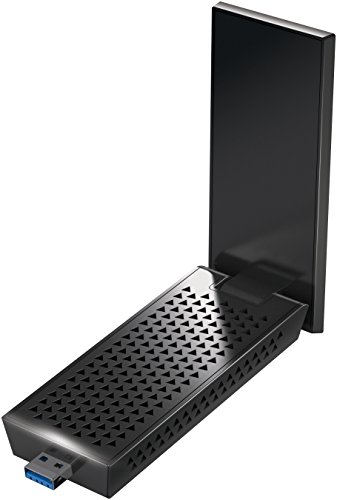
NETGEAR Nighthawk A7000 AC1900 WiFi USB Adapter
An included cradle lifts this adapter off the floor and away from a metal case, which often matters more than raw specifications. Dual high gain antennas and beamforming help it hold a link at distance. It’s a WiFi 5 device, and a physically large one, so it lives on a desk rather than a port.
Pros
- Cradle allows optimal placement away from the case
- Adjustable antennas hold distant signals
- Reliable throughput on WiFi 5 networks
Cons
- Large footprint on the desk
- No WiFi 6 support
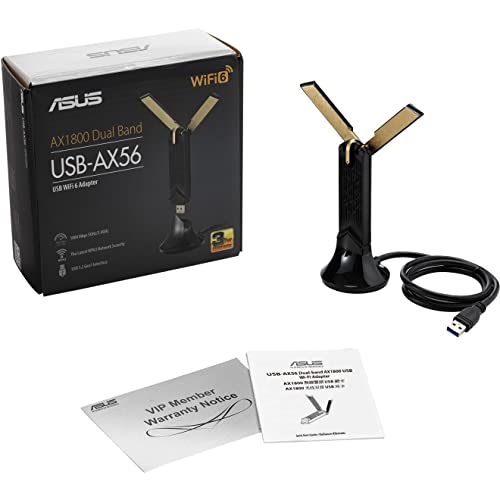
ASUS USB-AX56 AX1800 Dual Band USB Adapter
ASUS pairs WiFi 6 support with a docking cradle, combining modern standards with flexible antenna placement. That mix suits a machine used for high bitrate streaming or large file transfers. The cradle and cable add desk clutter, and the unit runs warm during sustained transfers.
Pros
- WiFi 6 with flexible antenna placement
- Holds high bitrate streams reliably
- External antennas fold for storage
Cons
- Runs warm under sustained load
- Cradle and cable add desk clutter

TP-Link Archer TXE75E WiFi 6E PCIe Adapter
The 6 gigahertz band is the real argument here, since it stays far less crowded than 2.4 or 5 gigahertz in a dense apartment block. A WiFi 6E router is required for any of it to matter. Range on 6 gigahertz runs shorter than 5, so it performs best within a room or one wall away.
Pros
- Access to the uncongested 6 GHz band
- Tri band flexibility as networks upgrade
- Internal card avoids USB limitations
Cons
- Needs a WiFi 6E router to be worth it
- 6 GHz range drops off quickly through walls

Panda Wireless PAU06 300Mbps Wireless N USB Adapter
Panda built its following on chipsets that Linux distributions support natively, so this connects without hunting for drivers or compiling modules. That reliability matters on a Raspberry Pi or an older machine running a lightweight distribution. It’s 2.4 gigahertz only at Wireless N speeds, better suited to compatibility than performance.
Pros
- Works on Linux without driver hunting
- Small and low power for single board computers
- Inexpensive backup adapter
Cons
- 2.4 GHz only, so speeds are limited
- Congested band in built up areas
How they stack up
| # | Model | Standard | Best for | Score | Price |
|---|---|---|---|---|---|
| 1 | TP-Link Archer TX20U Plus AX1800 USB WiFi Adapter | WiFi 6, AX1800 class | Best overall | 9.4 | Check price |
| 2 | ASUS PCE-AX58BT WiFi 6 PCIe Adapter | WiFi 6, AX3000 class | Best for desktops | 9.2 | Check price |
| 3 | TP-Link Archer T3U Plus AC1300 USB WiFi Adapter | WiFi 5, AC1300 class | Best value | 9.0 | Check price |
| 4 | NETGEAR Nighthawk A7000 AC1900 WiFi USB Adapter | WiFi 5, AC1900 class | Best for long range | 8.8 | Check price |
| 5 | ASUS USB-AX56 AX1800 Dual Band USB Adapter | WiFi 6, AX1800 class | Best for streaming | 8.6 | Check price |
| 6 | TP-Link Archer TXE75E WiFi 6E PCIe Adapter | WiFi 6E, tri band | Best for WiFi 6E | 8.3 | Check price |
| 7 | Panda Wireless PAU06 300Mbps Wireless N USB Adapter | Wireless N, 300 Mbps class | Best for Linux | 8.0 | Check price |
Frequently asked questions
Will a WiFi adapter make your internet faster?
It can improve the link between your computer and the router, which helps if that link was the bottleneck. It cannot exceed the speed your internet connection delivers.
Is a USB WiFi adapter as good as a PCIe card?
For most everyday use, yes. PCIe cards have the edge in sustained throughput, heat handling, and antenna placement, which shows up during large transfers. USB adapters stay more convenient and work with laptops, which PCIe cards cannot.
Do you need WiFi 6?
Only if your router supports it. WiFi 6 improves performance most in homes with many connected devices competing for airtime. On a WiFi 5 router, a WiFi 6 adapter simply connects at WiFi 5 speeds.
Why does a WiFi adapter keep disconnecting?
Common causes are USB power saving settings suspending the device, outdated drivers, USB 3.0 port interference on the 2.4 gigahertz band, or weak signal. Disabling USB selective suspend and moving the adapter onto an extension cable resolves many cases.
Can you use a WiFi adapter with a Mac?
Sometimes, but macOS support for third party adapters is inconsistent, and some manufacturers no longer update drivers for recent macOS versions. Check current compatibility before buying rather than relying on the packaging.
What is the difference between 2.4 GHz and 5 GHz?
2.4 gigahertz travels further and penetrates walls better but runs crowded and slower. 5 gigahertz is faster with less interference but has shorter range. Dual band adapters let you pick whichever suits your distance from the router.
Do WiFi adapters work with any router?
Yes, WiFi standards are backwards compatible, so a WiFi 6 adapter connects to an older router at the older standard. You only get newer features when both ends support them.
Should you use the included cradle or plug directly in?
Use the cradle when one is included. Getting the adapter away from the metal case and up to desk height often improves signal more than any specification difference between adapters.
The bottom line
The TP-Link Archer TX20U Plus is the right buy for most machines, giving WiFi 6 speeds and useful antenna gain without opening a case. Desktop owners with a spare slot should choose the ASUS PCE-AX58BT instead, since an internal card handles heat and bandwidth better. If the network only carries browsing and streaming, the TP-Link Archer T3U Plus does that job for far less.
Marcus Chen
Marcus covered consumer electronics for enthusiast tech publications for six years before joining ChoiceCrest. He specializes in translating manufacturer spec sheets into plain-language buying advice, with a focus on audio, computing accessories and smart-home gear.
