5 Powerline Adapters for Stronger Wifi Through Walls
TL-PA9020P leads for raw wired throughput, with two gigabit ports on each adapter. TL-WPA8631P adds dual band WiFi at the far end for rooms phones and laptops cannot reach. TL-PA4010P Nano covers light duty jobs like a smart TV or printer at the lowest cost.
TL-PA9020P kit wins for a wired connection to a distant room, thanks to two gigabit ports per adapter. TL-WPA8631P kit adds WiFi at that same far end. TL-PA4010P Nano handles light jobs like a smart TV or a printer without the extra cost.
Powerline gets tricky because the advertised speed is a theoretical ceiling reached only on ideal wiring, and few houses have that. Circuit breakers, spur sockets, extension leads and old cabling all cut throughput, sometimes badly, so two homes with identical adapters can see very different results. We compared rated standards, port counts, passthrough design, WiFi capability and what owners report about performance across different wiring setups.
How to pick the right one
Why powerline speed ratings rarely match reality An AV2000 label describes a theoretical link capacity on ideal wiring, not a guaranteed speed test result. Real houses rarely match a lab bench. Owners commonly report a fraction of the rated figure, and that is normal, not a defect. Compare the result against your broadband speed and the device at the far end. A 100 Mbps reading streams video comfortably even when the box promises 2000.
Plug into a wall socket, not an extension lead Powerline signals travel over mains wiring, and surge protected strips filter the exact frequencies they use. Plugging into a strip causes more support calls than any other single mistake. Choose a wall socket directly for best results. Need the socket back? Pick a kit with a filtered passthrough outlet, so the extension lead plugs into the adapter instead.
How circuits and consumer units limit performance Best results come when both adapters share the same ring circuit. Crossing the consumer unit to reach a second circuit drops throughput, sometimes to nothing. Separate phases, common in larger homes and some flats, can block the connection outright. This explains why identical kits perform differently house to house, and why an easy return policy matters more than usual here.
Do you actually need WiFi at the far end? A plain adapter hands you an ethernet port, ideal for a console, desktop or smart TV. Phones and laptops with no signal in that room need a kit with a built in access point, such as the TL-WPA8631P or a mesh capable devolo unit. WiFi models cost more and usually drop to a lower powerline class. Buy the wired only version when wireless coverage was never the real problem.
Our top picks

TP-Link TL-PA9020P KIT AV2000
TL-PA9020P leads the lineup on raw powerline throughput. Two gigabit ports per adapter let you wire a console and a set top box from one unit. A filtered passthrough socket returns the outlet you plugged into, and pairing needs only a button press.
Pros
- Two gigabit ports per unit skip the need for a switch
- Fastest common powerline class among the seven kits
- Passthrough socket keeps the wall outlet free for other plugs
Cons
- Bulky housing can crowd sockets on multi gang plates
- No built in WiFi, so far room wireless needs another device
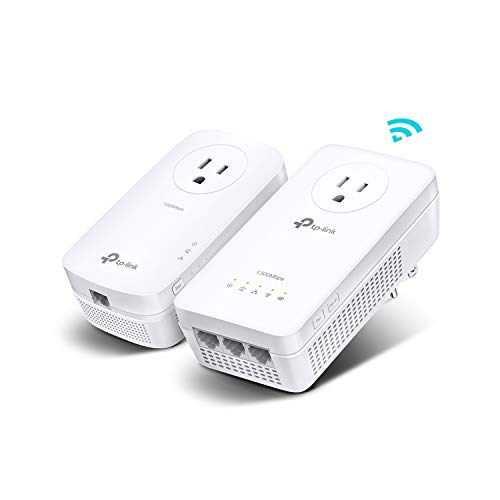
TP-Link TL-WPA8631P KIT AV1300
This kit carries your connection over mains wiring, then rebroadcasts it as dual band WiFi at the far end. Three gigabit ports on the remote unit handle wired gear too. OneMesh support merges it into one roaming network on compatible TP-Link routers, instead of a second SSID.
Pros
- Solves a dead bedroom and wired device needs together
- Three gigabit ports sit on the remote WiFi unit
- OneMesh keeps a single network name on supported routers
Cons
- Powerline speed class trails the AV2000 kit above
- Large WiFi unit needs a clear, unobstructed socket

devolo Magic 2 WiFi next
devolo runs on G.hn rather than HomePlug, and owners in older houses often find it handles noisy or aged wiring better. Mesh WiFi at the remote end supports roaming between units. Pricing sits above the TP-Link kits, so treat it as the fallback once HomePlug has already let you down.
Pros
- G.hn standard often copes better with old or noisy circuits
- Mesh WiFi hands off between adapters as you roam
- Long manufacturer support record backs the build quality
Cons
- Costs noticeably more than comparable HomePlug kits
- Will not pair with HomePlug adapters already in your house

Netgear Powerline 1200 PL1200
PL1200 keeps things simple: one gigabit port per adapter, no passthrough socket, minimal footprint. Small housings mean it rarely blocks neighbouring outlets on a crowded plate. A single push of the pairing button connects both units, with no app or software step.
Pros
- Compact housing fits tight or awkward socket positions
- Push button pairing needs no app or setup screen
- Delivers a stable single device wired link
Cons
- No passthrough socket, so the outlet stays occupied
- Only one ethernet port limits it to one device
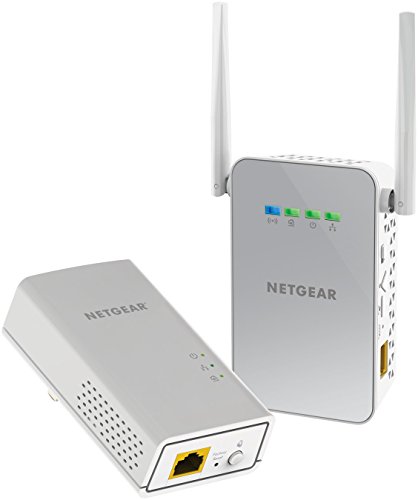
Netgear Powerline WiFi 1000 PLW1000
PLW1000 pairs a basic powerline adapter with a WiFi access point unit at the far end. Coverage reaches a garden office or loft conversion without premium kit pricing. Expect adequate wireless range rather than a speed boost, since this model prioritizes reach over throughput.
Pros
- Adds wireless coverage for less than mesh capable kits
- Setup needs no configuration beyond pairing the units
- Suits lofts, garages and converted outbuildings well
Cons
- WiFi performance trails dedicated mesh systems
- Remote unit carries only one ethernet port
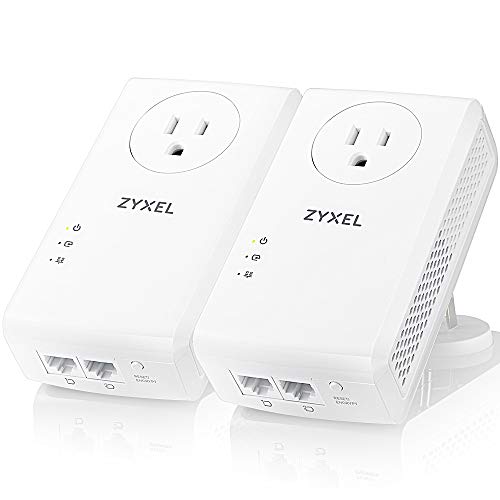
Zyxel PLA6456 AV2000
Zyxel’s PLA6456 matches the top TP-Link kit’s AV2000 class, with two gigabit ports per adapter and a passthrough socket. Choosing it avoids running every network device on one brand. Wiring still decides real throughput far more than any badge on the box.
Pros
- Matches the fastest powerline class in this lineup
- Filtered passthrough socket frees the outlet again
- Interoperates with other HomePlug AV2 adapters you own
Cons
- Fewer support articles exist than for TP-Link models
- Physical size takes up noticeable wall space

TP-Link TL-PA4010P KIT AV600 Nano
Nano trims cost and size, capping out at a 100 Mbps ethernet port. That ceiling still suits a streaming smart TV, a printer or a console downloading in the background. A passthrough socket ships with this version, so you keep the outlet.
Pros
- Cheapest route to a reliable connection in a distant room
- Small housing rarely blocks neighbouring plugs
- Passthrough socket included despite the low price
Cons
- 100 Mbps cap limits throughput regardless of your broadband plan
- Poor fit for large file transfers or serious home working
Compared at a glance
| # | Model | Standard | Best for | Score | Price |
|---|---|---|---|---|---|
| 1 | TP-Link TL-PA9020P KIT AV2000 | HomePlug AV2 MIMO, AV2000 class | Best overall | 9.4 | Check price |
| 2 | TP-Link TL-WPA8631P KIT AV1300 | HomePlug AV2, AV1300 class | Best for adding WiFi | 9.2 | Check price |
| 3 | devolo Magic 2 WiFi next | G.hn, up to 2400 Mbps class | Best for older wiring | 9.0 | Check price |
| 4 | Netgear Powerline 1200 PL1200 | HomePlug AV2, 1200 Mbps class | Best compact kit | 8.8 | Check price |
| 5 | Netgear Powerline WiFi 1000 PLW1000 | HomePlug AV2, 1000 Mbps class | Best value WiFi kit | 8.6 | Check price |
| 6 | Zyxel PLA6456 AV2000 | HomePlug AV2 MIMO, AV2000 class | Best alternative high speed kit | 8.3 | Check price |
| 7 | TP-Link TL-PA4010P KIT AV600 Nano | HomePlug AV2, 600 Mbps class | Best budget | 8.0 | Check price |
Common questions
Will a powerline adapter work in my house?
Depends on your wiring. Adapters perform best on the same circuit, plugged straight into the wall. Older cabling, split circuits and multiple consumer units all cut performance. Since results vary house to house, buy from a retailer with easy returns and test before adding more units.
Is powerline better than a WiFi extender?
Often yes for rooms behind thick walls, since wiring carries the signal instead of masonry blocking it. Single band extenders halve bandwidth while repeating a signal, and need a decent source signal to start with. A strong existing signal makes a mesh node or extender the simpler fix.
How much electricity do powerline adapters use?
Very little. Most units draw a few watts, similar to a phone charger, and drop into standby when idle. Running cost stays negligible next to the devices they connect.
Can I mix powerline adapters from different brands?
HomePlug AV2 units from different makers usually interoperate, so a TP-Link adapter can pair with a Zyxel one. G.hn models, including the devolo Magic range, will not talk to HomePlug gear. Check the standard, not just the speed class, before mixing brands.
How many powerline adapters can run on one network?
Most HomePlug networks support eight or more units, though bandwidth splits across every adapter added. Three or four units is a practical ceiling before performance noticeably thins out. Check the manufacturer limit for larger setups.
Are powerline adapters secure from neighbours?
Modern units encrypt traffic with AES and pair through a physical button, so a neighbour on the same supply cannot join automatically. Press the pair button on both units during setup instead of trusting the default name. Shared wiring in flats makes this step worth doing properly.
Why is my powerline connection slower than advertised?
Because the advertised number describes ideal wiring, not your house. Distance, circuit crossings, old cabling and appliance interference from chargers, dimmers and motors all cut throughput. Try a different socket on the same circuit first.
Do I still need a router with powerline adapters?
Yes, powerline extends an existing network rather than replacing it. One adapter connects to the router by ethernet near the modem, and the other creates a link at the far end. Routing, addressing and internet access still come entirely from the router.
Powerline vs mesh WiFi: which fixes a dead zone faster?
Mesh WiFi adds a wireless node that talks back to the main router over the air. Powerline instead threads the connection through mains wiring, which suits thick walls or long distances better. Pick mesh when walls are thin and signal already reaches decently. Pick powerline when WiFi simply cannot cross the space.
What is the best powerline adapter for a games console?
A wired console benefits most from a dedicated ethernet port and steady throughput, not WiFi. TL-PA9020P kit suits this with two gigabit ports per adapter. Skip WiFi kits here, since they add cost without helping a wired device.
The bottom line
TL-PA9020P kit wins for a fast wired link to a distant room, backed by its top speed class and two gigabit ports per adapter. Pick the TL-WPA8631P kit when that room also needs WiFi, the devolo Magic 2 WiFi next when older wiring has beaten HomePlug before, and the TL-PA4010P Nano when a TV or printer is all you need to reach.
Marcus Chen
Marcus covered consumer electronics for enthusiast tech publications for six years before joining ChoiceCrest. He specializes in translating manufacturer spec sheets into plain-language buying advice, with a focus on audio, computing accessories and smart-home gear.
You might also need

Nintendo Game & Watch: Super Mario Bros Review: Still Worth It as a Collectible?

Ray-Ban Meta (Gen 2) Wayfarer Smart Glasses: Worth $379 for Clear Lenses?
AlyKets Nikon UC-E6 Replacement USB Cable: Does a $7.95 Cord Work as Well as the Original?
