Which Wi-Fi Extender Actually Kills Dead Zones
Wi-Fi 6 radios and OneMesh roaming put the TP-Link RE705X ahead of this group, keeping one network name across the house. NETGEAR’s Nighthawk EAX15 fits better on an existing Nighthawk router, and the TP-Link RE315 clears a single weak room with less complexity.
Buy the TP-Link RE705X first if a fast connection needs to reach a distant room without losing half its speed. Wi-Fi 6 radios and OneMesh roaming handle that combination better than the other six models here. Homes already running a Nighthawk router should look at the NETGEAR EAX15 instead.
Extender boxes advertise speeds a unit rarely delivers in the room that actually needs coverage, since a repeater receives and resends on the same airwaves. Placement matters more than the model number printed on the box. We compared radio generation, mesh roaming compatibility with common router brands, wired port speed, and antenna design, then weighed those specs against what owners report about dropouts and setup friction.
The top picks, ranked

TP-Link RE705X AX3000 Wi-Fi 6 Range Extender
Four external antennas give this extender more reach than compact plug-in models. Wi-Fi 6 AX3000 radios leave enough capacity to rebroadcast a fast connection without cutting it in half. OneMesh support means devices switch to the extender automatically on a compatible TP-Link router.
Pros
- Handles a fast connection without major slowdown
- OneMesh keeps one network name on TP-Link routers
- External antennas suit awkward corners and hallways
Cons
- Takes up two outlet slots on a power strip
- OneMesh only works with compatible TP-Link routers

NETGEAR Nighthawk EAX15 AX1800 Wi-Fi 6 Mesh Extender
Pairing with a compatible Nighthawk router turns this extender into a mesh node instead of a basic repeater. Gigabit ethernet lets a nearby smart TV or console connect by wire. Setup runs through the Nighthawk app, though it nudges you toward creating a Netgear account.
Pros
- Joins an existing Netgear network as a mesh node
- Gigabit port supports a wired device at the far end
- App walks through setup step by step
Cons
- Full mesh behavior needs a compatible Nighthawk router
- Account signup is pushed during setup

TP-Link RE550 AC1900 Wi-Fi Range Extender
Three external antennas push signal further than smaller extenders manage. This model runs Wi-Fi 5 rather than Wi-Fi 6, so it suits older devices and modest internet plans well. A wide body works best on a shelf rather than a crowded power strip.
Pros
- Antennas extend range across long hallways
- Signal light shows when placement needs adjusting
- Gigabit ethernet port for a wired device
Cons
- Wi-Fi 5 radios instead of Wi-Fi 6
- Wide body covers neighboring outlets

TP-Link RE315 AC1200 Mesh Wi-Fi Extender
A garage, home office or spare bedroom is the target for this compact plug-in extender. Fast ethernet, not gigabit, still connects a printer or streaming stick. OneMesh support lets it share a network name with a compatible TP-Link router.
Pros
- Covers one problem room without extra features
- Small enough to disappear behind furniture
- OneMesh support on compatible routers
Cons
- Ethernet port tops out below gigabit speed
- Limited capacity for 4K streaming to multiple devices

ASUS RP-AX56 AX1800 Wi-Fi 6 Range Extender
An ASUS router turns this extender into a genuine AiMesh node rather than a standalone repeater. An audio output jack lets it stream to a powered speaker, a feature few extenders include. Outside an ASUS network, it still runs as a solid Wi-Fi 6 extender on its own.
Pros
- Becomes a true AiMesh node on ASUS routers
- Audio jack doubles as a speaker connection
- Wi-Fi 6 radios cover both bands well
Cons
- AiMesh features require an ASUS router
- Web interface has more settings than beginners need
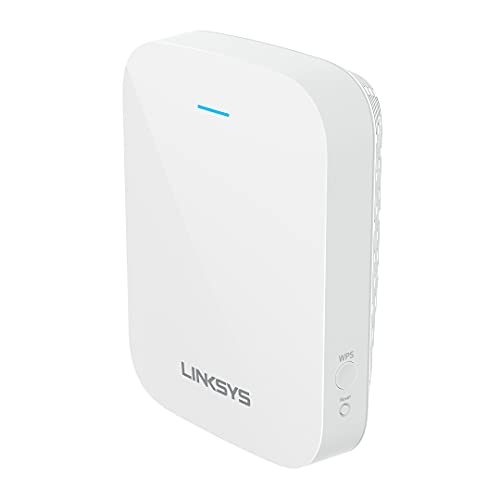
Linksys RE7310 AX1800 Wi-Fi 6 Extender
A physical WPS button pairs this extender without an app or account. A built-in spot finder light flags whether it sits too far from the router. Gigabit ethernet and Wi-Fi 6 radios cover the essentials without added mesh features.
Pros
- WPS button pairs it in seconds
- Spot finder light guides placement
- Works with routers from any brand
Cons
- No mesh roaming with a shared network name
- Fewer configuration options than TP-Link or ASUS models

NETGEAR EX3700 AC750 Wi-Fi Range Extender
Light browsing, video calls and smart home devices are what this compact extender handles well. Its plug-in form factor stays out of the way in a hallway or patio doorway. Fast ethernet connects a single wired device, such as a printer.
Pros
- Smallest and least costly option in this group
- Barely noticeable in an outlet
- Handles browsing and calls without issue
Cons
- Throughput drops fast under heavier use
- Creates a separate network name to manage
Side by side
| # | Model | Standard | Best for | Score | Price |
|---|---|---|---|---|---|
| 1 | TP-Link RE705X AX3000 Wi-Fi 6 Range Extender | Wi-Fi 6 AX3000 | Best overall | 9.4 | Check price |
| 2 | NETGEAR Nighthawk EAX15 AX1800 Wi-Fi 6 Mesh Extender | Wi-Fi 6 AX1800 | Best for Netgear routers | 9.2 | Check price |
| 3 | TP-Link RE550 AC1900 Wi-Fi Range Extender | Wi-Fi 5 AC1900 | Best for large homes | 9.0 | Check price |
| 4 | TP-Link RE315 AC1200 Mesh Wi-Fi Extender | Wi-Fi 5 AC1200 | Best for a single room | 8.8 | Check price |
| 5 | ASUS RP-AX56 AX1800 Wi-Fi 6 Range Extender | Wi-Fi 6 AX1800 | Best for ASUS AiMesh | 8.6 | Check price |
| 6 | Linksys RE7310 AX1800 Wi-Fi 6 Extender | Wi-Fi 6 AX1800 | Best for simple setup | 8.3 | Check price |
| 7 | NETGEAR EX3700 AC750 Wi-Fi Range Extender | Wi-Fi 5 AC750 | Best budget | 8.0 | Check price |
Before you buy
Where should a Wi-Fi extender go? Signal strength at the extender matters more than its specs sheet. Place it roughly halfway between the router and the weak room, where two or three bars still show. Every extender in this list includes a signal indicator or app reading for that exact reason. Moving a unit one outlet closer to the router often fixes more than switching hardware would.
Why does an extender cut my speed in half? A traditional repeater receives and resends on the same radio channel. That splits its airtime roughly fifty-fifty between listening and transmitting. Wi-Fi 6 models like the RE705X and Nighthawk EAX15 carry more headroom, so the penalty feels smaller. Running an ethernet cable to the extender avoids the problem completely, since wired backhaul frees the wireless radio for client devices only.
Mesh roaming vs a separate network name: what is the difference? Basic extenders broadcast their own network name, so a phone stays locked onto a weak signal until switched by hand. OneMesh and AiMesh models share one name with a compatible router and hand devices over automatically. Compatibility only works within the same brand, TP-Link with OneMesh and ASUS with AiMesh. Check the router model against the extender’s supported list before buying, rather than assuming the feature applies everywhere.
When should you replace extenders with a mesh system? Two extenders chained together usually signal a bigger problem than either can solve alone. Dense walls, multiple floors or a large square footage call for a purpose-built mesh system instead. Extenders work best as a targeted fix for one or two weak rooms. Owners report the most frustration when a single unit gets asked to cover an entire floor it was never designed for.
Questions worth asking
Does a Wi-Fi extender make my internet faster?
No. It spreads existing coverage into rooms the router cannot reach, but speed still comes from your internet plan. Expect a noticeably slower connection in the extended area than near the router itself.
Where exactly should I place a Wi-Fi extender?
Roughly halfway between the router and the dead zone, in a spot that still shows a strong signal. Check the indicator light or companion app before settling on an outlet. Avoid cabinets, thick walls and spots near a microwave.
Is Wi-Fi 6 worth it in an extender if my router is older?
A Wi-Fi 6 extender still works with an older router and adds headroom if you upgrade later. Owners with slower internet plans and older devices can get by with a Wi-Fi 5 model like the RE550 instead.
Why does my phone stay connected to a weak signal instead of switching?
Basic extenders create a separate network name, and phones hold onto a connection until it drops out completely. Mesh capable models such as the RE705X or RP-AX56 share one name with a compatible router and hand devices over automatically.
Can I connect a Wi-Fi extender to my router with an ethernet cable?
Yes, and it is the strongest setup available. Wired backhaul frees the extender’s wireless radio to serve nearby devices only, removing the usual speed penalty. Several models in this list support this wired access point mode.
Will any extender work with any router brand?
Basic range extending works with any router. Mesh roaming is the exception, since OneMesh requires a TP-Link router and AiMesh requires a supported ASUS router.
Extender vs mesh system: which one do I need?
An extender suits one or two weak rooms and adds less complexity. A mesh system handles roaming and backhaul better across a large or thick walled home. Chaining several extenders together is usually a sign a mesh system fits better.
What is the best Wi-Fi extender for a single room?
The TP-Link RE315 covers one weak room, garage or home office without extra features to configure. Its fast ethernet port still connects a printer or streaming stick nearby.
Do Wi-Fi extenders need their own power outlet?
Yes. Plug-in models occupy an outlet directly and can block the socket beside it. Desktop style units like the RE550 use a power adapter and cable instead, which suits a shelf better than a hallway wall.
The verdict
The TP-Link RE705X earns the top spot because its Wi-Fi 6 headroom and OneMesh roaming solve the two biggest extender complaints at once. Netgear owners should start with the Nighthawk EAX15 for the same mesh behavior inside that ecosystem. For a single stubborn room, the TP-Link RE315 handles it without extra cost or complexity.
Marcus Chen
Marcus covered consumer electronics for enthusiast tech publications for six years before joining ChoiceCrest. He specializes in translating manufacturer spec sheets into plain-language buying advice, with a focus on audio, computing accessories and smart-home gear.


