Which USB WiFi Adapter Actually Boosts Your Speed?
TP-Link’s Archer TX20U Plus leads this group, combining WiFi 6 with adjustable antennas for reliable range and speed. NETGEAR’s Nighthawk A8000 wins on raw throughput for owners with a WiFi 6E router. Need a budget option? The TP-Link Archer T3U Plus adds a real antenna without the higher cost of WiFi 6.
TP-Link’s Archer TX20U Plus suits most homes, since WiFi 6 and adjustable antennas balance speed with range. Want the fastest link possible? NETGEAR’s Nighthawk A8000 taps the open 6 GHz band on a WiFi 6E router. Budget matters more than the standard? The TP-Link Archer T3U Plus keeps a real antenna at a lower tier.
A rated speed assumes USB 3.0, a strong signal and a matching router working together. Plug a nano adapter into an older USB 2.0 port and its real ceiling drops near 480 megabits before WiFi overhead even applies. We compared standard support, interface generation, antenna design and band coverage, then weighed that against what owners report about driver stability on Windows, macOS and Linux.
The best picks, ranked

TP-Link Archer TX20U Plus
WiFi 6 pairs with two adjustable high gain antennas here, a combination that holds a stable link at distance rather than just posting a big number on the box. Aim the antennas toward the router and USB 3.0 keeps the interface from becoming the bottleneck. Bundled cradle lifts it off a metal case, though it stays too bulky for a laptop port.
Pros
- High gain antennas hold signal at distance
- WiFi 6 improves handling on crowded networks
- Cradle allows placement away from interference
Cons
- Too large to leave in a laptop port
- Windows driver install required before first use

NETGEAR Nighthawk A8000 AXE3000 WiFi 6E Adapter
6 GHz support sets this NETGEAR apart, a band still nearly empty in most apartment buildings. Paired with a WiFi 6E router and a clear line of sight, throughput here beats every other adapter on this list. It only makes sense for owners who already run 6E hardware, and the housing runs warm under load.
Pros
- 6 GHz band avoids neighborhood congestion
- Highest throughput ceiling in this comparison
- Magnetic cradle allows flexible desk placement
Cons
- Needs a WiFi 6E router to pay off
- Runs noticeably warm under sustained load

TP-Link Archer T3U Plus
A single external high gain antenna separates this AC1300 adapter from nano dongles that struggle two rooms from the router. USB 3.0 keeps the 5 GHz band from being throttled by an older interface. WiFi 5 replaces WiFi 6 here, a tradeoff that matters less than antenna gain for most homes.
Pros
- External antenna noticeably extends usable range
- USB 3.0 interface avoids an artificial bottleneck
- Priced well below the WiFi 6 models here
Cons
- Limited to WiFi 5 rather than WiFi 6
- Antenna juts out awkwardly on a laptop
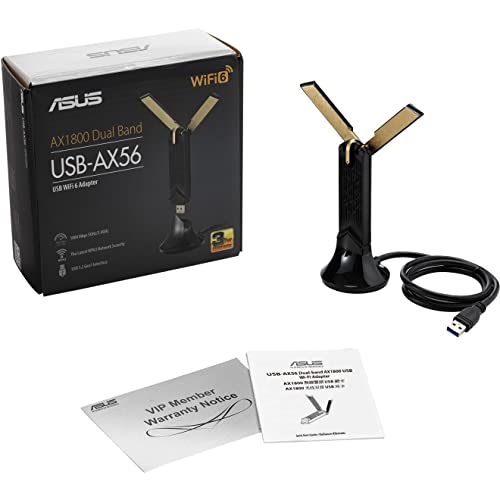
ASUS USB-AX56 Dual Band WiFi 6 Adapter
ASUS ships this with a heavy cradle and two external antennas built for a tower sitting under a desk, where signal usually suffers most. WiFi 6 with MU-MIMO helps when several devices share one access point. Portability was never the goal, and the setup makes that clear.
Pros
- Cradle raises the antennas above a metal tower
- MU-MIMO helps on networks with many devices
- Driver support on Windows is well documented
Cons
- Not practical to move between rooms
- macOS support remains limited

Alfa AWUS036ACH Dual Band USB Adapter
Two detachable high gain antennas make this a longtime favorite for reaching a distant access point, and larger or directional antennas can replace the stock pair. Linux driver support is thoroughly documented, which explains its popularity in networking and security circles. Size works against it near a router, where a smaller adapter does the job just as well.
Pros
- Antennas can be swapped for longer range models
- Linux driver documentation is extensive and current
- Reaches access points weaker adapters cannot see
Cons
- Bulky footprint stands out on a desk
- WiFi 5 only, with no WiFi 6 option
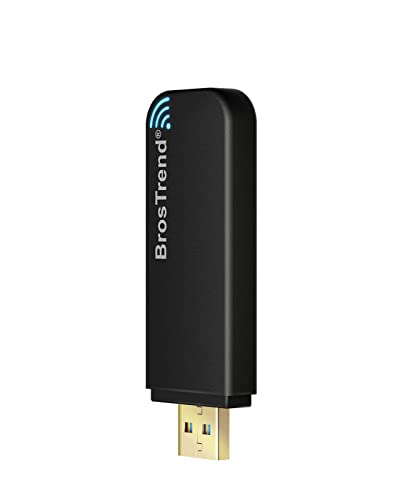
BrosTrend AC1200 Linux WiFi Adapter
BrosTrend targets Linux users directly, bundling an install script that covers common distributions and skips the usual search for an out of tree driver. Two high gain antennas give respectable range for a mid tier adapter. Windows works fine too, though nothing here beats TP-Link on that platform.
Pros
- Install script simplifies Linux setup considerably
- Dual high gain antennas add real range
- Documentation covers common distributions clearly
Cons
- Kernel updates sometimes require a driver rebuild
- No WiFi 6 support on this model

TP-Link Archer T2U Nano
Small enough to stay in a laptop port permanently, this AC600 class adapter trades top speed for size. Dual band support still beats a broken internal card, even without an external antenna. Range suffers as a result, so it fits light browsing better than streaming across a house.
Pros
- Compact enough to leave plugged in permanently
- Dual band despite its small footprint
- Affordable fix for a failing internal card
Cons
- USB 2.0 interface limits real throughput
- Range is weak without an external antenna
Compared at a glance
| # | Model | Standard | Best for | Score | Price |
|---|---|---|---|---|---|
| 1 | TP-Link Archer TX20U Plus | WiFi 6, AX1800 class | Best overall | 9.4 | Check price |
| 2 | NETGEAR Nighthawk A8000 AXE3000 WiFi 6E Adapter | WiFi 6E, AXE3000 class | Best for maximum speed | 9.2 | Check price |
| 3 | TP-Link Archer T3U Plus | WiFi 5, AC1300 class | Best value | 9.0 | Check price |
| 4 | ASUS USB-AX56 Dual Band WiFi 6 Adapter | WiFi 6, AX1800 class | Best for desktops | 8.8 | Check price |
| 5 | Alfa AWUS036ACH Dual Band USB Adapter | WiFi 5, AC1200 class | Best for long range | 8.6 | Check price |
| 6 | BrosTrend AC1200 Linux WiFi Adapter | WiFi 5, AC1200 class | Best for Linux | 8.3 | Check price |
| 7 | TP-Link Archer T2U Nano | WiFi 5, AC600 class | Best compact option | 8.0 | Check price |
What matters most
What actually determines USB WiFi adapter speed Two limits interact here: the USB port generation and the WiFi standard itself. USB 2.0 caps real throughput near 480 megabits per second, before WiFi overhead even applies. An adapter rated for gigabit class WiFi over USB 2.0 will never reach that number, no matter what the router supports. Check the adapter’s own interface first, then match it to a free USB 3.0 port on your machine.
WiFi 6 vs WiFi 6E: which standard actually helps Peak speed for a single device barely changes between WiFi 5 and WiFi 6. Efficiency is the real gain, through scheduling improvements like OFDMA that help when many devices share one access point. WiFi 6E adds the 6 GHz band, largely empty in most neighborhoods right now. Neither upgrade does anything without a matching router, so buying a 6E adapter for a WiFi 5 network wastes the extra cost.
Best USB WiFi adapter for range or a crowded building Signal strength governs the negotiated link rate more than any spec sheet number. Two rooms and a wall from the router, an antenna equipped adapter like the Archer T3U Plus regularly beats a nano dongle rated for a higher standard. External, detachable antennas let you swap in a larger pair later, which the Alfa AWUS036ACH supports directly. A USB extension cable helps too, moving the adapter away from a metal case or out from under a desk.
How to check driver support before buying Windows support is close to universal, though many adapters still need a driver installed from included media or the maker’s website. macOS coverage is patchier, especially on Apple silicon, and some popular chipsets have no current driver at all. Linux support ranges from instant recognition in the mainline kernel to an out of tree driver that needs rebuilding after updates. Search the exact chipset, not just the product name, before you order one.
Good to know
Will a USB WiFi adapter beat my laptop’s built in card?
Often yes, especially if the internal card predates WiFi 6 or uses a weak antenna in the screen bezel. A laptop already running WiFi 6 with good placement may see little improvement from an external adapter.
Is WiFi 6 worth it for home use?
For a single device on a quiet network, WiFi 5 already covers most home internet speeds. WiFi 6 pays off once several devices, phones, laptops, smart speakers, compete for the same access point at once.
Why is my adapter slower than advertised?
Common causes include a USB 2.0 port, distance and walls weakening signal, an older router standard, or a connection stuck on the 2.4 GHz band instead of 5 GHz.
Should I connect on 2.4 GHz or 5 GHz?
5 GHz gives more speed at closer range, while 2.4 GHz travels further through walls. Dual band adapters usually pick the stronger option automatically, though manual switching helps in tricky spots.
Do USB WiFi adapters work on macOS?
Support varies by chipset and macOS version, particularly on Apple silicon Macs. Check the manufacturer’s current driver page for your exact system before ordering, since several popular models lack a working driver on recent releases.
Does a USB extension cable actually improve signal?
Usually, yes. Moving the adapter away from a metal laptop case or out from under a desk often raises signal strength more than switching to a pricier adapter.
Is a nano adapter good enough for everyday use?
For light browsing close to the router, a nano model like the Archer T2U Nano works fine. Streaming, gaming, or any real distance from the access point calls for an adapter with an external antenna.
Can I use one of these with a Raspberry Pi or older PC?
Many work, though chipset driver support matters more than the brand name. Look up the exact chipset against your operating system’s supported device list first.
What is the difference between WiFi 6E and WiFi 6?
WiFi 6E adds the 6 GHz band on top of everything WiFi 6 offers on 2.4 and 5 GHz. That extra band stays nearly empty in most areas, which is why 6E adapters like the Nighthawk A8000 post such high real world throughput.
How much does antenna size matter for range?
A lot. External, adjustable antennas outperform internal ones at distance, and detachable designs like the Alfa AWUS036ACH let you upgrade to a larger antenna later without replacing the whole adapter.
Our take
TP-Link’s Archer TX20U Plus suits most setups, since WiFi 6 and adjustable antennas cover both speed and range without extra cost. Pick the NETGEAR Nighthawk A8000 only when a WiFi 6E router is already in place and the empty 6 GHz band is worth chasing. Need a simple, affordable upgrade over a failing internal card? The TP-Link Archer T3U Plus delivers that without the WiFi 6 premium.
Marcus Chen
Marcus covered consumer electronics for enthusiast tech publications for six years before joining ChoiceCrest. He specializes in translating manufacturer spec sheets into plain-language buying advice, with a focus on audio, computing accessories and smart-home gear.


