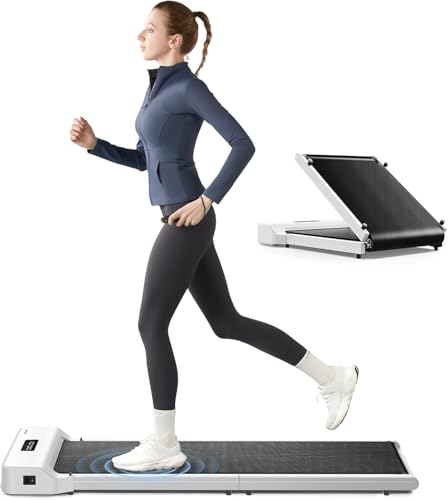
Under Desk Treadmills Quiet Enough for a Workday
The UREVO Under Desk Treadmill is the strongest overall pick, with a quiet motor and remote control that works through a full workday. The Egofit Walker Pro suits buyers who want app-connected tracking of steps and distance, while the LifeSpan TR1200-DT3 fits anyone who wants a commercial-grade motor built for all-day use.
The UREVO Under Desk Treadmill leads this list for keeping motor noise low enough for video calls while still offering a usable speed range for walking meetings. Its slim deck trades off some stability compared to the heavier LifeSpan model built for longer daily use. Buyers who want app tracking or commercial-grade durability should check the alternatives further down this list.
We compared motor noise level, deck dimensions, speed range and control method, remote or app, across seven under desk treadmills rather than ranking by brand alone.
The top picks, ranked

UREVO Under Desk Treadmill
A quiet motor keeps noise low enough to stay on a video call without the treadmill becoming a distraction. A remote control adjusts speed without needing to bend down or stop walking. A slim, low-profile deck slides under most standing desks without needing extra clearance.
Pros
- Quiet motor allows use during calls without distraction
- Remote control adjusts speed hands-free
- Low-profile deck fits under most standing desks
Cons
- Speed range tops out lower than some competitors
- No app connectivity for tracking walking data
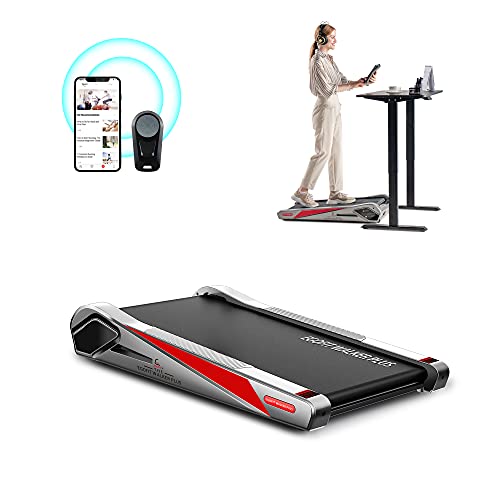
Egofit Walker Pro
A companion app tracks steps, distance and walking time over days and weeks rather than resetting after each session. Bluetooth connectivity lets the app adjust speed directly from a phone. A compact frame still fits under most adjustable-height desks.
Pros
- App tracking logs walking data over time automatically
- Bluetooth control adjusts speed from a phone
- Compact frame suits most adjustable-height desks
Cons
- App setup adds a step compared to simple remote models
- Bluetooth connection can occasionally need reconnecting

Goplus 2-in-1 Folding Treadmill
A removable handlebar converts this treadmill between a flat under-desk walking pad and a standard handrail-equipped treadmill. The handlebar mode suits faster walking or light jogging away from a desk. Folding hinges let the whole unit stand upright for storage.
Pros
- Handlebar mode adds faster walking or jogging capability
- Folds upright for storage away from the desk area
- Two use modes in one machine saves buying a separate treadmill
Cons
- Switching between modes takes a few minutes of setup
- Bulkier when folded than permanently flat under-desk models

LifeSpan TR1200-DT3
A commercial-grade motor is built for continuous all-day operation rather than short, occasional sessions. A wider deck than most under-desk models accommodates a more natural walking stride. Its higher weight capacity suits long-term daily use better than lighter consumer-grade decks.
Pros
- Commercial-grade motor holds up to continuous daily use
- Wider deck allows a more natural walking stride
- Higher weight capacity than lighter consumer treadmills
Cons
- Higher cost than consumer-focused under-desk treadmills
- Larger footprint than the most compact competitors

Superfit Under Desk Treadmill
A straightforward remote control covers speed adjustment without app setup or Bluetooth pairing. A compact, low-profile deck keeps the footprint small for shared home office spaces. Built-in wheels make repositioning the unit between rooms easier than lifting it fully.
Pros
- Lower cost than premium app-connected treadmills
- Built-in wheels simplify moving the unit between rooms
- Simple remote control needs no app setup
Cons
- No app tracking for logging walking data over time
- Speed range is limited compared to dual-mode treadmills

REDLIRO Under Desk Treadmill
A smaller overall footprint fits into tighter home office corners than bulkier under-desk models. A quiet motor keeps operation unobtrusive during calls, similar to pricier competitors. An LED display shows speed, time and step count without needing a connected app.
Pros
- Smallest footprint suits tight office corners
- Quiet motor matches pricier competitors on noise level
- LED display tracks basics without needing an app
Cons
- Narrower deck than wider models like the LifeSpan TR1200-DT3
- Lower weight capacity than commercial-grade options

ANCHEER Under Desk Treadmill
An extra-quiet motor design focuses specifically on minimizing noise for shared office or apartment settings. Shock-absorbing deck cushioning reduces joint impact during longer walking sessions. A simple LED display and remote cover the core controls without added complexity.
Pros
- Extra-quiet motor suits shared offices and thin-walled apartments
- Shock-absorbing deck reduces joint impact over longer sessions
- Simple controls avoid unnecessary complexity
Cons
- Speed range stays limited like most under-desk models
- No app connectivity included
Side by side
| # | Model | Motor Noise | Best for | Score | Price |
|---|---|---|---|---|---|
| 1 | UREVO Under Desk Treadmill | Low, call-friendly | Best Overall | 8.9 | Check price |
| 2 | Egofit Walker Pro | Bluetooth-connected tracking | Best App-Connected | 8.7 | Check price |
| 3 | Goplus 2-in-1 Folding Treadmill | Under-desk flat and handlebar | Best Dual-Mode with Handlebar | 8.5 | Check price |
| 4 | LifeSpan TR1200-DT3 | Commercial-grade, continuous duty | Best All-Day Commercial-Grade Use | 9.1 | Check price |
| 5 | Superfit Under Desk Treadmill | Remote control | Best Budget | 8.2 | Check price |
| 6 | REDLIRO Under Desk Treadmill | Compact, smallest on this list | Best Compact for Small Offices | 8.1 | Check price |
| 7 | ANCHEER Under Desk Treadmill | Extra-quiet | Best Quiet Motor | 8.3 | Check price |
How to choose
What matters most for a desk-friendly treadmill Motor noise decides whether a treadmill works during calls or becomes a distraction in a shared office. Deck size and height affect both walking comfort and whether the unit fits under a standing desk at all. Speed range should match actual use, since under-desk treadmills are built for walking pace, not running. Control method, remote, app or manual buttons, comes down to personal preference for tracking data over time.
Simple remote control versus app-connected tracking Superfit’s and ANCHEER’s treadmills rely on straightforward remote controls that need no setup beyond basic pairing. Egofit’s Walker Pro instead connects to a companion app that logs steps and distance automatically over days and weeks. Buyers who want to track walking data over time benefit from the app-connected approach, while those who just want simple operation may prefer a remote-only model.
When a dual-mode or commercial-grade treadmill makes sense Goplus’s 2-in-1 Folding Treadmill adds a removable handlebar for faster walking or light jogging away from the desk, useful for buyers who want one machine for two purposes. LifeSpan’s TR1200-DT3 instead focuses purely on withstanding continuous all-day use with a commercial-grade motor and wider deck. Choosing between these depends on whether versatility or long-term durability matters more.
Fitting a treadmill into a small home office REDLIRO’s Under Desk Treadmill keeps the smallest footprint on this list, suited to tight office corners where floor space is limited. UREVO’s model balances a compact size with a quiet motor for shared spaces. Measuring available floor space and desk clearance before buying avoids ordering a treadmill that cannot actually fit under a specific desk.
Frequently asked questions
How quiet are under desk treadmills during calls?
Quiet-motor models like the UREVO or ANCHEER treadmills are built to stay unobtrusive during video calls, though noise levels still vary by speed and floor type.
What speed should I walk at while working?
Most people walk comfortably at 1 to 2 mph while working at a desk, well within the 0.5 to 4 mph range offered by most treadmills on this list.
Can an under desk treadmill also be used for faster walking or jogging?
Only dual-mode models like the Goplus 2-in-1 Folding Treadmill, which adds a removable handlebar and higher top speed, are built for faster walking or light jogging.
Do I need an app to track my walking on an under desk treadmill?
Not necessarily. Models like the Egofit Walker Pro offer app tracking, while others like the Superfit or REDLIRO treadmills use a simple remote and built-in display instead.
How much floor space does an under desk treadmill need?
Compact models like the REDLIRO treadmill need less floor space than wider, commercial-grade options like the LifeSpan TR1200-DT3, so measuring the area under the desk first helps.
Is a commercial-grade motor worth it for home use?
A commercial-grade motor, like the one in the LifeSpan TR1200-DT3, suits buyers planning to walk for many hours daily, since it is built for continuous rather than occasional use.
Can I stand on an under desk treadmill without it running?
Yes, the deck on models like the UREVO or Superfit treadmills supports standing still, though the belt itself is designed for slow walking rather than standing-desk use alone.
Do under desk treadmills fold for storage?
Some do, like the Goplus 2-in-1 model, which folds upright, while low-profile models like the UREVO and REDLIRO stay flat and slide under furniture instead.
What weight capacity do under desk treadmills typically have?
Weight capacity varies, with commercial-grade models like the LifeSpan TR1200-DT3 generally rating higher than compact consumer models like the REDLIRO treadmill.
Final word
For most home offices that need a quiet, reliable walking pad, the UREVO Under Desk Treadmill is the strongest overall pick. Buyers who want automatic tracking of their walking habits should choose the Egofit Walker Pro instead, and anyone planning to walk for many hours each day should go with the LifeSpan TR1200-DT3 for its commercial-grade motor.
Derek Holt
Derek has a background coaching recreational and amateur athletes and has worked the sales floor at specialty fitness retailers. He focuses on equipment durability, ergonomics and realistic use cases rather than marketing claims.