Which Tablet Stand Actually Holds Steady at Your Desk?
The Lamicall Tablet Stand is the best overall pick, holding a tablet steady across a wide viewing angle range without tipping. Bedside and kitchen use calls for the OMOTON Adjustable Stand’s folding design instead, while anyone wanting an arm-mounted option should look at the Twelve South HoverBar Duo.
The Lamicall Tablet Stand handles most desk and kitchen counter use well, with a wide base that resists tipping even when a tablet is tapped firmly. Its fixed-angle design offers less flexibility than adjustable stands, so anyone who wants an arm that swings over a bed should consider the Twelve South HoverBar Duo instead. Cooks who need a stand that folds flat for storage will prefer the OMOTON Adjustable Stand.
Tablet stands differ most in base stability, angle adjustability, and whether a thick case still fits the holding mechanism. We compared published base dimensions, adjustment range, and owner feedback on tipping risk to match each stand to real use cases.
What we recommend
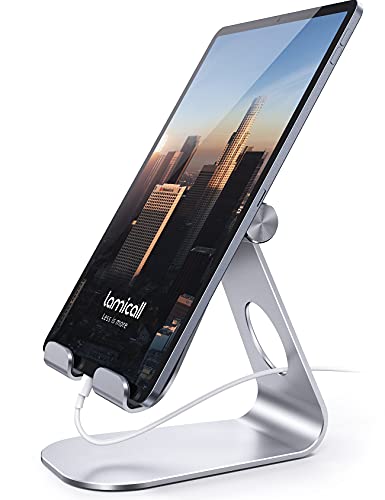
Lamicall Tablet Stand
Lamicall builds this stand with a wide aluminum base that keeps a tablet upright even when tapped firmly during typing. An adjustable cradle accommodates both phones and tablets within a stated width range. The fixed-angle design skips moving parts that could loosen over years of daily use.
Pros
- Wide base resists tipping during active touch use
- Aluminum build feels sturdier than plastic stands
- Fits a wide range of device widths
Cons
- Fixed angle offers less flexibility than adjustable arms
- Does not fold flat for travel storage

Twelve South HoverBar Duo
Twelve South attaches this stand to a weighted base or a desk clamp, letting the arm extend over a keyboard or bedside table. The adjustable arm positions a tablet at nearly any height or angle within its reach. A quick-release tablet holder swaps between a tablet and nothing attached without tools.
Pros
- Arm reach positions a tablet almost anywhere nearby
- Quick-release holder detaches without tools
- Works with either a weighted base or desk clamp
Cons
- Costs more than fixed desktop stands
- Arm needs occasional retightening after heavy use

OMOTON Adjustable Tablet Stand
OMOTON folds this stand flat for storage in a drawer, useful in a kitchen where counter space stays limited. Multiple notches let the viewing angle adjust for reading a recipe versus watching a video. A non-slip base pad keeps the stand from sliding on a counter during active cooking.
Pros
- Folds flat, saving drawer space when not in use
- Non-slip base resists sliding on kitchen counters
- Multiple angle notches suit reading and video
Cons
- Notched angles are less precise than a continuous arm
- Smaller footprint than wide-base desktop stands

Lisen Tablet Stand
Lisen widens this stand’s cradle opening to accommodate tablets still inside thicker protective cases. A silicone-lined grip prevents scratches that a bare metal cradle could cause over repeated use. The stand supports both portrait and landscape orientation without needing to be repositioned.
Pros
- Wide cradle fits tablets still in protective cases
- Silicone lining protects against scratches
- Supports both portrait and landscape without adjustment
Cons
- Bulkier footprint than minimalist stands
- Fixed cradle width still limits extremely thick cases
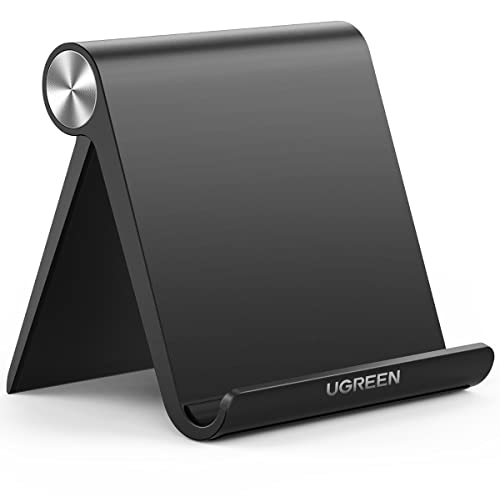
UGREEN Tablet Stand
UGREEN covers the core adjustable-angle function at a lower cost than premium arm-mounted stands. A foldable hinge collapses the stand for travel, fitting into a laptop bag side pocket. The aluminum build keeps weight down while still resisting tipping under normal use.
Pros
- Lower cost than premium arm-mounted stands
- Collapsible design travels well in a bag
- Lightweight without sacrificing basic stability
Cons
- Less stable on soft surfaces than wide-base stands
- Angle adjustment range is narrower than premium arms
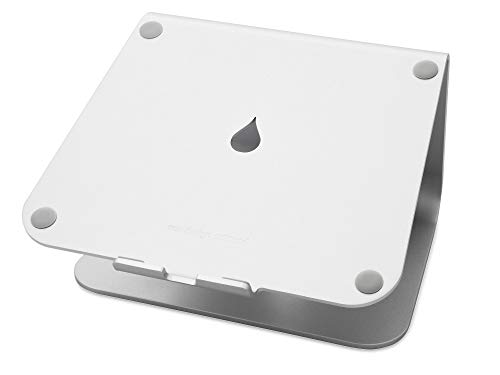
Rain Design iLevel2 Adjustable Tablet Stand
Rain Design raises this stand’s platform height specifically to bring a tablet closer to eye level, reducing neck strain during long reading sessions. A solid aluminum frame avoids the wobble some lightweight plastic stands show at taller heights. The design keeps a small footprint despite the added height.
Pros
- Raised height reduces neck strain during long use
- Aluminum frame stays stable at taller height
- Compact footprint despite the raised platform
Cons
- Taller profile can block a second screen behind it
- Costs more than low-profile fixed stands

Nulaxy Tablet Stand
Nulaxy angles this stand’s cradle for comfortable viewing from a reclined position, suited to bedside tables and nightstands. The compact base takes up minimal nightstand space compared to arm-mounted alternatives. A low price point makes it an easy secondary stand for a bedroom or guest room.
Pros
- Compact base fits easily on a nightstand
- Reclined angle suits viewing from bed
- Low cost makes it practical as a secondary stand
Cons
- Less sturdy than aluminum stands under active touch use
- Fixed angle range is narrower than adjustable arms
The lineup, side by side
| # | Model | Base Material | Best for | Score | Price |
|---|---|---|---|---|---|
| 1 | Lamicall Tablet Stand | Aluminum alloy | Best Overall | 9.0 | Check price |
| 2 | Twelve South HoverBar Duo | Weighted base or desk clamp | Best Arm-Mounted Option | 9.1 | Check price |
| 3 | OMOTON Adjustable Tablet Stand | Folds flat for storage | Best for Kitchen Use | 8.6 | Check price |
| 4 | Lisen Tablet Stand | Wide enough for most cases | Best for Thick Cases | 8.5 | Check price |
| 5 | UGREEN Tablet Stand | Aluminum alloy | Best Value | 8.4 | Check price |
| 6 | Rain Design iLevel2 Adjustable Tablet Stand | Raised platform for eye-level viewing | Best for Ergonomic Height | 8.7 | Check price |
| 7 | Nulaxy Tablet Stand | Reclined viewing angle | Best for Bedside Use | 8.3 | Check price |
How to choose
What to look for in a tablet stand Base stability matters most for anyone using the tablet’s touchscreen directly, since a narrow or light base tips under repeated tapping. Angle adjustability affects comfort differently depending on whether the tablet sits on a desk, counter, or nightstand. Case compatibility should be checked if the tablet usually stays in a thick protective case. Portability matters for anyone who travels with the stand regularly.
Tablet stands for arm-mounted and flexible positioning An adjustable arm, like the Twelve South HoverBar Duo’s, extends over a keyboard or bed, positioning a tablet somewhere a fixed stand cannot reach. A raised platform, offered by the Rain Design iLevel2, brings the screen closer to eye level without needing an extending arm. Fixed stands work fine for a stationary desk but limit position changes.
Tablet stands for kitchen and bedside use A folding design, found in the OMOTON Adjustable Stand, stores flat in a drawer when kitchen counter space runs short. Bedside stands, like the Nulaxy, angle the screen for comfortable viewing from a reclined position rather than an upright desk posture. Both use cases favor a compact footprint over a wide stable base.
Tablet stands for cases and budget considerations A wide cradle opening, used in the Lisen Tablet Stand, fits tablets that stay inside a protective case rather than requiring removal each time. The UGREEN Tablet Stand covers core adjustability at a lower cost, trading away the smooth arm mechanism premium options include. Thinner cases fit most standard cradles without needing a widened design.
Questions worth asking
What should I look for in a tablet stand?
Base stability and angle adjustability matter most, along with whether the cradle fits a tablet still inside its case.
Can a tablet stand hold a tablet in a thick case?
Stands with a wider cradle opening, like the Lisen Tablet Stand, accommodate thicker cases better than narrow-cradle designs.
Is an arm-mounted tablet stand better than a desktop stand?
An arm-mounted stand like the Twelve South HoverBar Duo reaches positions a fixed desktop stand cannot, though it costs more and needs a clamp or weighted base.
Do tablet stands work for video calls?
Yes, a stable stand at eye level, such as the Rain Design iLevel2, keeps the camera angle steady during a call without holding the tablet.
Can a tablet stand be used in the kitchen?
Foldable stands with a non-slip base, like the OMOTON Adjustable Stand, work well on kitchen counters for recipe viewing.
Does a tablet stand tip over easily during typing?
A wide, weighted base, like the Lamicall Tablet Stand’s, resists tipping during active touchscreen typing better than a narrow lightweight base.
Are foldable tablet stands sturdy enough for daily use?
Foldable stands with an aluminum frame, such as the UGREEN model, hold up to daily use, though they are generally less rigid than solid fixed stands.
Can a tablet stand be used on a nightstand?
Compact stands angled for reclined viewing, like the Nulaxy, fit nightstands better than larger desktop or arm-mounted stands.
Do tablet stands support both portrait and landscape orientation?
Many, including the Lisen Tablet Stand, support both orientations without needing to be repositioned or reclamped.
Is a tablet stand worth buying over just propping the tablet up?
Yes, a dedicated stand holds a consistent angle and resists tipping during touch use far better than improvised propping.
Our pick
The Lamicall Tablet Stand remains the strongest overall pick, with a wide base that stays steady through daily touchscreen use. Anyone wanting a stand that reaches over a keyboard or bed should choose the Twelve South HoverBar Duo instead. Kitchen use favors the OMOTON Adjustable Stand for its fold-flat storage and non-slip grip.
Jake Monroe
Jake worked as a residential contractor for over a decade before shifting to full-time writing. He evaluates power tools, hand tools and workshop gear through the lens of someone who has actually used them on job sites, not just read the box.