Standalone Keyboards That Turn a Tablet Into a Typewriter
Logitech’s Pebble Keys 2 K380s suits most people best, pairing with three devices on quiet scissor keys. The Logitech K480 adds a built-in tablet cradle for anyone tired of propping a screen up, and the Keys-To-Go 2 wins on travel with a covered, spill-resistant shell.
One keyboard serving several devices with real key travel beats a keyboard case for most desk and multitasking setups, and the Logitech K380s leads that field. The cradle equipped K480 and travel focused Keys-To-Go 2 round out the top three.
Choosing gets tricky because tablet keyboards trade key feel against weight and how the tablet actually stands up while typing. We compared switch types, pairing counts and battery specifications, then weighed owner reports on lag and dropouts to rank these seven boards.
Before you buy
How to pick a tablet keyboard Start with where you will type. Desk-bound users can carry weight for better key travel, while commuters should cap the package near a pound including a stand. Pairing count filters the field next, since three-device boards like the K380s replace separate keyboards for phone and laptop. Battery approach matters too: AAA and coin cell boards run for years, while rechargeables trade that runtime for backlights and lower weight. Layout compatibility with your operating system rounds out the checklist.
Standalone keyboard or keyboard case, which fits your setup? A standalone board wins when one keyboard must serve several devices, when real key travel matters, or when the tablet mostly lives at a desk. Keyboard cases win for lap typing and protection, since a folio holds the screen and keys together as one unit. Owners of a kickstand-equipped tablet, like a Surface, get the best of both by adding a K380s-class board on top.
Best tablet keyboards for travel and commuting Packed size and durability decide travel boards. The Keys-To-Go 2 leads with a built-in cover and spill resistance, while the iClever BK03 folds smaller than anything else here at the cost of key seams. A pocket tablet stand is worth adding unless the K480 and its cradle come along instead. On planes, compact boards fit tray tables where full folios overhang.
Heavy typing days, ergonomics and battery habits Writers logging thousands of words daily should favor full key spacing and quiet scissor switches, the territory of the K380s and Trio 500, and raise the tablet screen toward eye level to spare their neck. Backlit boards like the Arteck need their light managed, since it multiplies power draw. Battery-powered Logitech boards remove that worry entirely with claimed two to three year runtimes on standard cells.
The shortlist, ranked

Logitech Pebble Keys 2 K380s
Dedicated Easy-Switch keys hop this board between three paired devices, so one keyboard serves a tablet, phone and laptop. Round scissor keys type quietly at coffee-shop volume. Two AAA batteries last up to three years, removing charging from the routine entirely.
Pros
- Instant switching across three devices
- Multi-year battery life
- OS-aware layouts for iPadOS, Android, Windows
Cons
- No stand, the tablet needs its own
- No backlight

Logitech K480 Multi-Device Keyboard
A rubberized slot along the top edge holds a tablet and phone side by side at a readable angle, solving a problem most boards ignore. A rotary Easy-Switch dial flips between three paired devices. Full-size key spacing supports long typing sessions despite the chunky frame.
Pros
- No separate stand needed
- Holds a phone and tablet together
- Long AAA battery life
Cons
- Heavy and thick for commuting
- Loud, clacky keystrokes

Logitech Keys-To-Go 2
At about a third of an inch thick, this board disappears into a bag pocket. An integrated cover protects the keys in transit while doubling as a wedge, and the spill-resistant surface survives cafe accidents that kill ordinary keyboards. Three-device pairing and a 36-month coin cell battery match its bigger siblings.
Pros
- Lightest full-layout option here
- Cover protects keys in a bag
- Survives crumbs and splashes
Cons
- Shallow key travel takes adjustment
- No tablet stand included
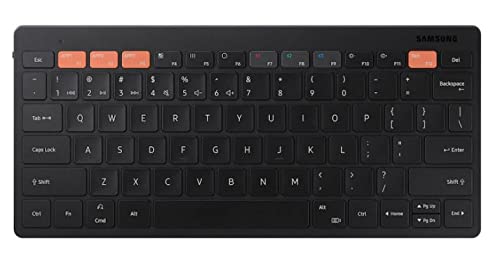
Samsung Smart Keyboard Trio 500
Dedicated keys launch Samsung DeX straight from this board, turning a Galaxy Tab into a desktop workspace. Slim pantograph keys mirror a laptop feel, and pairing covers three devices. Any Bluetooth host works with it, though the shortcut row makes the most sense inside the Galaxy ecosystem.
Pros
- One-key DeX entry on Galaxy Tabs
- Compact footprint for desks and bags
- Switches between phone and tablet fast
Cons
- Shortcut keys map oddly outside Samsung devices
- No included stand or backlight

Arteck HB030B Universal Bluetooth Keyboard
A seven-color backlight is rare at this price, and it undercuts nearly everything else here. A stainless frame keeps a 6 mm profile rigid, and the rechargeable battery runs about six months per charge at two hours of daily use with the light off. Pairing covers only one device at a time.
Pros
- Backlight at a bargain price
- Thin, rigid metal build
- Months of use per charge
Cons
- No multi-device switching
- Compact layout squeezes some punctuation keys

iClever BK03 Folding Bluetooth Keyboard
Folded in three, this board shrinks to roughly the size of a phone, then opens into a near-full layout with aluminum top plates. Opening it powers it on, and closing it disconnects, saving battery automatically. Commuters typing in snatched moments value the pocket portability more than the seamed layout costs them.
Pros
- Smallest packed size in this group
- Solid aluminum construction
- Auto power saves battery
Cons
- Seams split some keys awkwardly
- Requires a flat surface to sit stable

OMOTON Ultra-Slim Bluetooth Keyboard
This slim board sticks to basics: an iOS-oriented layout with a function row, scissor keys, and weeks of battery from two AAAs. Students wanting a cheap desk keyboard for an iPad get exactly what they need, especially paired with a case that already stands the tablet up. There is no backlight, cradle or multi-device switching.
Pros
- Very low cost
- Familiar layout for iPad users
- Light enough for any bag
Cons
- Single-device pairing only
- Plastic build flexes under firm typing
Compared at a glance
| # | Model | Pairing | Best for | Score | Price |
|---|---|---|---|---|---|
| 1 | Logitech Pebble Keys 2 K380s | 3 devices, Easy-Switch | Best overall | 9.4 | Check price |
| 2 | Logitech K480 Multi-Device Keyboard | Integrated, fits tablets to 10.5 in | Best with built-in stand | 9.2 | Check price |
| 3 | Logitech Keys-To-Go 2 | About 8.5 mm with cover | Best for travel | 9.0 | Check price |
| 4 | Samsung Smart Keyboard Trio 500 | 3 devices, hotkeys | Best for Samsung devices | 8.8 | Check price |
| 5 | Arteck HB030B Universal Bluetooth Keyboard | 7 colors, 2 brightness levels | Best budget backlit | 8.6 | Check price |
| 6 | iClever BK03 Folding Bluetooth Keyboard | Tri-fold, aluminum plates | Best folding design | 8.3 | Check price |
| 7 | OMOTON Ultra-Slim Bluetooth Keyboard | iOS function row | Best budget for iPad | 8.0 | Check price |
Questions worth asking
Do Bluetooth keyboards work with all tablets?
Nearly all. iPads, Galaxy Tabs, Fire tablets and Android slates accept standard Bluetooth keyboards. Function rows map differently by operating system, which is why boards with OS-specific layouts, like the K380s, feel more polished.
What is the best keyboard for an iPad that is not a case?
The Logitech K380s suits most iPad owners with its iPadOS layout and three-device pairing. Budget buyers get the essentials from the OMOTON slim board. Both still need a stand or a stand-style case.
Can one keyboard switch between a tablet and a phone?
Yes, multi-device boards store several pairings and swap on a keypress. The K380s, K480, Keys-To-Go 2 and Trio 500 all hold three devices. Single-pairing budget boards must be re-paired each time you switch.
How long do tablet keyboard batteries last?
Boards on AAA or coin cells, like the Logitech trio here, claim 24 to 36 months. Rechargeable boards run weeks to months per charge, and backlighting can cut that dramatically. Auto-sleep features stretch every type further.
Is a folding keyboard worth it?
For pocket-level portability, yes. The iClever BK03 packs to phone size and types acceptably on a desk. Accept the compromises: split key seams, a need for flat surfaces and less rigidity than one-piece boards.
Do tablet keyboards lag when typing?
Modern Bluetooth boards show no perceptible lag within normal range. Dropouts trace to low batteries, crowded 2.4 GHz environments or aggressive tablet sleep settings, rather than the keyboard hardware itself.
Which tablet keyboard is best for Samsung DeX?
Samsung’s Smart Keyboard Trio 500, thanks to a dedicated DeX key and Galaxy-tuned shortcuts. Any Bluetooth keyboard operates DeX, but generic boards make you enter it through settings instead of one keystroke.
Can I use a tablet keyboard with a laptop and PC too?
Yes, every board here speaks standard Bluetooth to Windows, macOS and Chromebooks. Multi-device models make this practical daily, holding a laptop on one slot and a tablet on another.
What is the best tablet keyboard for students on a budget?
The OMOTON Ultra-Slim covers the basics cheaply for iPad users, while the Arteck HB030B adds a backlight for evening study sessions without a big price jump.
Keyboard case versus standalone Bluetooth keyboard: which lasts longer?
Standalone boards generally outlast cases, since they are not glued to a specific tablet generation and can move to a new device when you upgrade. A case becomes obsolete the moment the tablet it was molded for gets replaced.
Our pick
The Logitech K380s is the safest buy, one quiet board that runs a tablet, phone and laptop for years on two AAAs. Pick the K480 for the built-in cradle, or the Keys-To-Go 2 if the keyboard lives in a bag. The Arteck HB030B covers backlit typing on a strict budget.
Marcus Chen
Marcus covered consumer electronics for enthusiast tech publications for six years before joining ChoiceCrest. He specializes in translating manufacturer spec sheets into plain-language buying advice, with a focus on audio, computing accessories and smart-home gear.


