Top Stylus Pens for Every Screen and Budget
The Adonit Pro 4 stands out for its precision and compatibility across all touchscreens, making it ideal for graphic designers and note-takers who need a reliable, no-frills stylus. Its main advantage is the fine point disc tip that allows for accurate drawing and writing, but it lacks palm rejection and is not suitable for modern tablets with palm rejection needs.
Finding the right stylus pen can transform how you interact with your tablet, phone, or touchscreen laptop. Whether you are an artist seeking pressure sensitivity or a student jotting notes, the market offers a variety of options to match your needs and budget.
We have analyzed top-selling models from trusted brands, focusing on real user feedback and technical specifications. Our comparisons highlight key differences in tip design, connectivity, and features, so you can choose the stylus that feels natural in your hand and works flawlessly with your device.
How to choose
The top picks, ranked

Adonit Pro 4
The Adonit Pro 4 features a precision disc tip that offers exceptional accuracy, making it a favorite among digital artists and note-takers who work across multiple devices. Its durable aluminum body and replaceable tip ensure long-lasting performance. While it lacks palm rejection, its responsiveness and fine point make it a top choice for detailed work.
Pros
- Very precise tip for fine details
- Works on any device without pairing
- No charging needed, always ready
Cons
- No palm rejection
- Disc tip may scratch screen protectors if not used carefully
MEKO Universal Stylus
The MEKO Universal Stylus is an affordable, passive stylus that works on all capacitive screens. It features a fine mesh tip that prevents scratches and provides a smooth glide. Ideal for browsing, gaming, and simple note-taking, it is a reliable backup or primary stylus for those who do not need advanced features.
Pros
- Very affordable
- Lightweight and portable
- Works instantly without setup
Cons
- No palm rejection
- Tip may wear out over time (replacements available)

Apple Pencil (2nd Generation)
The Apple Pencil 2 is the gold standard for iPad users, offering pixel-perfect precision, tilt sensitivity, and pressure sensitivity. It attaches magnetically to compatible iPads for wireless charging and pairing. With low latency and double-tap gesture support, it enhances productivity and creativity, though it only works with specific iPad models.
Pros
- Seamless integration with iPadOS
- Low latency and high accuracy
- Magnetic attachment and wireless charging
Cons
- Only works with select iPad models
- Premium price

Samsung S Pen Pro
The Samsung S Pen Pro is a versatile stylus that supports Bluetooth connectivity for remote controls and air actions. It offers pressure and tilt sensitivity, making it perfect for drawing on Galaxy Tab S series. It includes a rechargeable battery and can be used on multiple Samsung devices, but requires a compatible device for full functionality.
Pros
- Bluetooth remote features
- Excellent pressure and tilt
- Works across multiple Samsung devices
Cons
- Not compatible with non-Samsung devices
- Requires charging for Bluetooth features
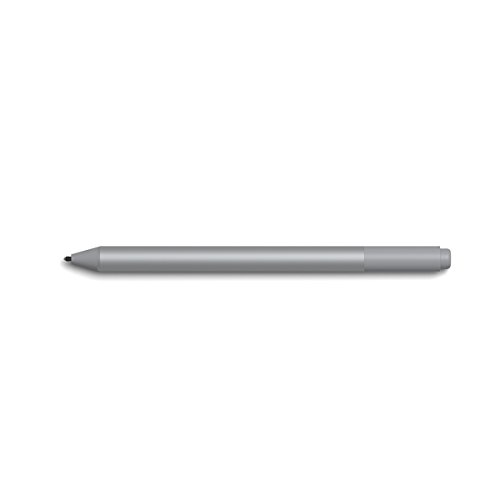
Microsoft Surface Pen
The Microsoft Surface Pen is engineered for Surface devices, featuring 4,096 levels of pressure sensitivity and tilt support. Its magnetic flat side attaches to the side of Surface devices, and it has a tail button that can be customized for shortcuts. It requires pairing via Bluetooth and uses a replaceable AAAA battery.
Pros
- Tail button for right-click or eraser
- Magnetic storage on Surface devices
- Comfortable grip
Cons
- Only fully works with Surface devices
- Battery needs replacement occasionally

Logitech Crayon
The Logitech Crayon is a reliable stylus for iPad models that support Apple Pencil. It offers pixel-perfect precision and tilt support, with no pairing required. Its flat design prevents rolling, and it has a 7-hour battery life on a single charge. It is a great choice for students and educators, though it lacks pressure sensitivity.
Pros
- No pairing needed, just turn on and use
- Durable design for classroom use
- Cheaper than Apple Pencil
Cons
- No pressure sensitivity
- Not compatible with newer iPad Pro models that use Apple Pencil 2

Wacom Bamboo Ink Plus
The Wacom Bamboo Ink Plus is designed for Windows devices that support active pens. It uses Wacom AES technology and offers 4,096 pressure levels, two customizable side buttons, and a replaceable tip. It connects via Bluetooth and has a rechargeable battery. Some users may need to check compatibility with specific models.
Pros
- Dual protocol support
- Two customizable buttons
- Comfortable grip
Cons
- Compatibility may be limited
- Requires Bluetooth for some features
How they stack up
| # | Model | Tip Type | Best for | Score | Price |
|---|---|---|---|---|---|
| 1 | Adonit Pro 4 | Fine point disc | Universal precision drawing and note-taking on any touchscreen | 9.4 | Check price |
| 2 | MEKO Universal Stylus | Fine mesh | Budget-friendly everyday use on phones and tablets | 8.4 | Check price |
| 3 | Apple Pencil (2nd Generation) | Fine precision tip | iPad Pro and iPad Air users needing full creative control | 9.6 | Check price |
| 4 | Samsung S Pen Pro | Fine tip with replaceable nibs | Samsung Galaxy tablet and phone users seeking advanced features | 9.2 | Check price |
| 5 | Microsoft Surface Pen | Fine tip with replaceable tips | Surface Pro, Laptop, and Book users needing precision and tilt | 9.0 | Check price |
| 6 | Logitech Crayon | Fine tip | iPad users who want a durable and affordable alternative to Apple Pencil | 8.8 | Check price |
| 7 | Wacom Bamboo Ink Plus | Fine tip (replaceable) | Windows Ink users seeking a stylus for note-taking and drawing | 8.6 | Check price |
Good to know
What stylus pens work with iPhone?
Passive styluses like the Adonit Pro 4 and MEKO Universal Stylus work with iPhones because they use capacitive technology. However, they lack precision features like pressure sensitivity. For more advanced use, consider an active stylus that supports iOS, but note that Apple Pencil does not work with iPhone. Some third-party active styluses may support iPhone, but check compatibility.
Can I use a stylus on any tablet?
Yes, passive styluses work on any capacitive touchscreen. Active styluses are often device-specific because they rely on specific protocols. For example, Apple Pencil only works with iPads that support it. Always check the stylus compatibility list before buying.
How do I know if my device supports active stylus?
Check your device’s specifications on the manufacturer’s website. Look for support for Apple Pencil, Samsung S Pen, Microsoft Pen Protocol (MPP), or Wacom AES. Many modern tablets and 2-in-1 laptops support active pens, but not all. If in doubt, a passive stylus is a safe fallback.
What is palm rejection and why is it important?
Palm rejection allows the device to ignore touches from your hand while using the stylus, preventing accidental marks. It is crucial for artists and note-takers who rest their hand on the screen. Active styluses with palm rejection usually require specific hardware support from the device.
Do stylus pens scratch screens?
Quality stylus tips are made of soft materials like mesh or conductive rubber, which are safe for glass screens. Some disc tips, like the Adonit Pro 4, have a fine point that is generally safe, but using a screen protector is recommended to avoid micro-scratches. Always avoid tips that are hard or have burrs.
How long does a stylus battery last?
It depends on the model. The Apple Pencil 2 lasts up to 12 hours of continuous use, while the Surface Pen can last months on a single AAAA battery. The Logitech Crayon offers about 7 hours of active use. Rechargeable styluses typically take 15-30 minutes for a quick charge. Passive styluses have no battery.
Can I use a stylus for note-taking?
Yes, many styluses are ideal for note-taking. For basic note-taking on any device, a passive stylus works fine. For handwritten notes that convert to text, you may need an active stylus that supports handwriting recognition, like the Apple Pencil on iPad or Surface Pen on Windows. Apps like GoodNotes and OneNote work well with these.
What is the difference between a stylus and a digital pen?
The terms are often used interchangeably, but digital pens usually refer to active styluses that have additional features like buttons, Bluetooth, and pressure sensitivity. They are designed for specific devices. Stylus is a broader term that includes simple capacitive pens. In practice, both are used for input on touchscreens.
Our take
For most users, the Adonit Pro 4 is the best overall stylus because it works on any device, offers precise control, and requires no charging. If you own an iPad and need professional-grade features, invest in the Apple Pencil 2. For budget-conscious buyers, the MEKO Universal Stylus is a reliable everyday choice. Ultimately, choose a stylus that matches your primary device and whether you need pressure sensitivity and palm rejection for creative work.
Marcus Chen
Marcus covered consumer electronics for enthusiast tech publications for six years before joining ChoiceCrest. He specializes in translating manufacturer spec sheets into plain-language buying advice, with a focus on audio, computing accessories and smart-home gear.


