Find Your Next Streaming Webcam: Top Picks Reviewed
For most streamers, the Logitech Brio 4K is the best overall streaming webcam, offering crisp 4K resolution, excellent low-light performance, and versatile mounting options. Its main limitation is the premium price, but for professional-level streams, it is hard to beat.
A great webcam can transform your streams from blurry and dull to sharp and engaging. With so many options, picking the right one can be tough.
We compared specs and owner feedback across popular models to find the best streaming webcams for different budgets and needs. Our top pick balances performance and value.
What matters most
The top picks, ranked

Logitech Brio 4K
The Logitech Brio 4K delivers stunning 4K video with HDR support, making it a top choice for professional streamers who need crisp detail and vibrant colors. Its autofocus is fast and reliable, and the wide field of view options are great for different setups.
Pros
- Exceptional 4K image quality
- HDR for better contrast
- Versatile mounting options
Cons
- Pricey compared to 1080p models
- Software can be overwhelming
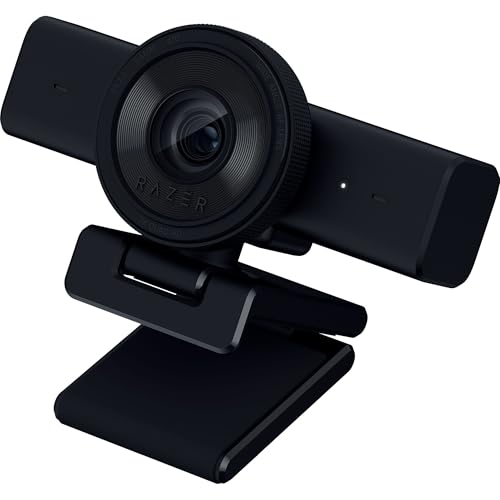
Razer Kiyo Pro
The Razer Kiyo Pro uses a high-performance sensor with STARVIS technology, which excels in low-light conditions. It streams at 1080p 60fps and offers HDR, ensuring your stream looks good even with dim lighting.
Pros
- Superb low-light performance
- Built-in HDR
- Wide dynamic range
Cons
- No 4K resolution
- Fixed focus requires manual adjustment

Elgato Facecam
The Elgato Facecam is designed for streaming, offering uncompressed 1080p60 video with excellent color accuracy. Its fixed focus lens is set to a sharp distance, and the Camera Hub software allows easy settings control.
Pros
- Uncompressed video for clarity
- Great color reproduction
- Solid build quality
Cons
- No autofocus
- Requires software for full control

Anker PowerConf C200
The Anker PowerConf C200 offers 2K resolution at an affordable price, making it a great choice for streamers on a budget. It has a dual mic array for clear audio and AI-powered framing to keep you centered.
Pros
- Great value for 2K
- AI framing feature
- Good audio quality
Cons
- Max 30fps at 2K
- Software is basic
AUKEY PC-LM1E
The AUKEY PC-LM1E is an affordable 1080p webcam that delivers decent video quality for streaming. It has a built-in privacy cover and dual noise-reducing mics, making it a practical choice for casual streamers.
Pros
- Very affordable
- Privacy cover included
- Plug and play
Cons
- No 60fps at 1080p
- Average low-light performance
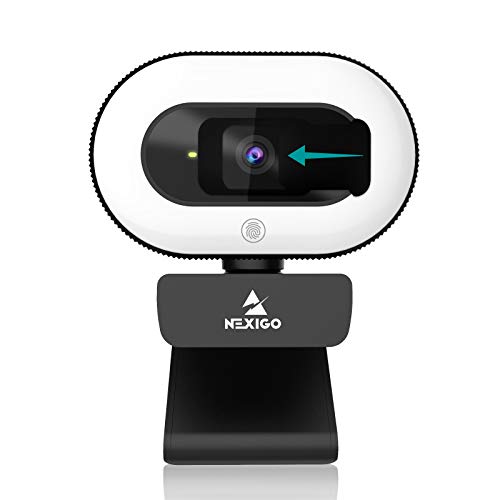
NexiGo N930E
The NexiGo N930E is a 1080p webcam with an adjustable ring light, perfect for streamers who need even lighting. It offers autofocus, a wide field of view, and a flexible mount for easy positioning.
Pros
- Built-in ring light with 10 brightness levels
- Smooth 60fps at 1080p
- Easy to adjust mount
Cons
- Ring light may not be enough for some rooms
- Software limited

Logitech StreamCam
The Logitech StreamCam is designed for modern content creators, offering 1080p60 video, smart autofocus, and the ability to stream vertically. Its compact design and versatile mounting make it a favorite for multi-platform streamers.
Pros
- Vertical video support
- Excellent autofocus
- Great software (Logitech Capture)
Cons
- No 4K
- USB-C only
Compared at a glance
| # | Model | Resolution | Best for | Score | Price |
|---|---|---|---|---|---|
| 1 | Logitech Brio 4K | 4K at 30fps, 1080p at 60fps | Best overall for high-quality 4K streaming | 9.4 | Check price |
| 2 | Razer Kiyo Pro | 1080p at 60fps | Best for low-light streaming environments | 9.2 | Check price |
| 3 | Elgato Facecam | 1080p at 60fps | Best for streamers who want uncompressed video | 9.0 | Check price |
| 4 | Anker PowerConf C200 | 2K at 30fps | Best budget 2K webcam | 8.7 | Check price |
| 5 | AUKEY PC-LM1E | 1080p at 30fps | Best budget 1080p webcam | 8.4 | Check price |
| 6 | NexiGo N930E | 1080p at 60fps | Best for streamers with a ring light | 8.8 | Check price |
| 7 | Logitech StreamCam | 1080p at 60fps | Best for vertical streaming and content creation | 8.9 | Check price |
Common questions
What is the best resolution for streaming?
1080p at 60fps is the standard for most streamers, offering smooth video. 4K is becoming popular but requires more bandwidth and processing power. For most, 1080p60 is sufficient.
Do I need a 4K webcam for streaming?
Not necessarily. 4K gives more detail but uses more upload bandwidth. If your internet is fast and you want future-proofing, 4K is nice, but 1080p60 is often enough.
Can I use a DSLR as a streaming webcam?
Yes, many DSLRs can be used as webcams via USB or HDMI capture cards, but they are more expensive and complex. Dedicated webcams are simpler and more affordable.
What is the best frame rate for streaming?
60fps is ideal for fast-paced games and smooth motion. If you have limited bandwidth, 30fps is acceptable for less dynamic content.
How important is autofocus?
Autofocus is important if you move around, lean in, or show objects to the camera. However, some streamers prefer fixed focus for consistent sharpness, especially if you stay in one spot.
What is the difference between fixed focus and autofocus?
Fixed focus lenses are set to a specific distance and remain sharp at that distance. Autofocus adjusts automatically to keep you sharp as you move, but can sometimes hunt for focus.
Do I need a separate microphone with a webcam?
Most webcams have built-in mics, but they are often of low quality. For better audio, a dedicated USB or XLR microphone is recommended for streaming.
What is the ideal field of view for streaming?
A field of view between 70 and 90 degrees is common. It shows your upper body and some background. Some webcams allow you to adjust FOV to fit your setup.
Can I use a webcam for both streaming and video calls?
Yes, all webcams work for video calls. Look for features like privacy shutters and good low-light performance if you use it for both.
What is the best webcam for low light?
Webcams with large sensors or special low-light technology, like the Razer Kiyo Pro, are best for low-light. They capture more light and reduce noise.
Our pick
If you want the best image quality and are willing to invest, choose the Logitech Brio 4K. For low-light environments, the Razer Kiyo Pro is unbeatable. Budget-conscious streamers will find the Anker PowerConf C200 offers excellent 2K performance, while the AUKEY PC-LM1E is a solid budget 1080p choice. Ultimately, the Elgato Facecam stands out for its uncompressed video, making it the top pick for those who prioritize pure image fidelity.
Marcus Chen
Marcus covered consumer electronics for enthusiast tech publications for six years before joining ChoiceCrest. He specializes in translating manufacturer spec sheets into plain-language buying advice, with a focus on audio, computing accessories and smart-home gear.



