Sticker Paper Compared: Vinyl, Clear and Holographic
Koala Printable Vinyl Sticker Paper Glossy White takes the top slot, pairing a waterproof vinyl face with dependable Print Then Cut reads. HTVRONT Printable Vinyl Sticker Paper Matte White offers the same build in bulk counts with less glare. Avery Printable Sticker Paper Matte White stays quickest for dry pantry and binder labels.
Koala Printable Vinyl Sticker Paper Glossy White fits most people making stickers at home. Its vinyl face will not pulp when wet, and registration marks scan cleanly for Print Then Cut. Colour stays saturated on dark artwork and photographs. One limit rules out some buyers: these sheets are inkjet only, so laser owners need a pack labelled for toner and heat.
Listings make sticker sheets look interchangeable, yet they behave nothing alike once ink hits the surface. Dye ink beads on vinyl and smears for minutes, while pigment ink locks down and shrugs off splashes. Gloss bounces room light back at a cutting sensor, which is where most failed reads come from. Adhesive strength decides whether a laptop sticker peels away clean or tears in half. We compared face material, stated printer compatibility, finish, adhesive type and sheet count, alongside owner reports on smearing and cut accuracy.
The best picks, ranked
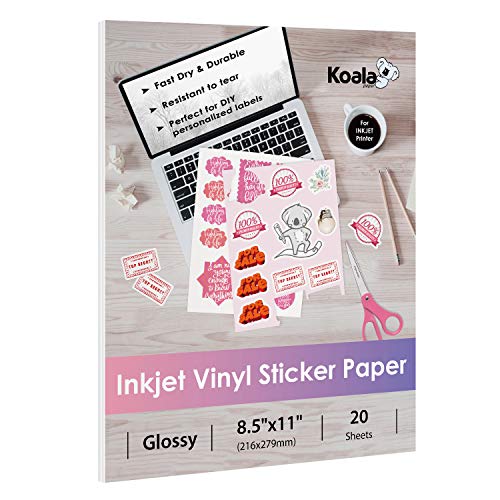
Koala Printable Vinyl Sticker Paper Glossy White
White vinyl, not coated paper, forms the face, so a splash cannot pulp the sheet. Glossy coating holds saturation on pigment ink, which matters on dark backgrounds and photo art. Owners report steady Print Then Cut reads once the sheet sits square against the mat guides.
Pros
- Vinyl face resists water once sealed or laminated
- Registration marks scan reliably on Cricut and Silhouette
- Dark and photographic designs keep their colour depth
Cons
- Inkjet only, so laser printers are out
- Dye ink smudges until the sheet is sealed

HTVRONT Printable Vinyl Sticker Paper Matte White
Larger sheet counts carry the same waterproof vinyl build, which suits a small shop printing every week. Matte face kills glare and accepts pen detailing over the print. Drying runs slightly longer than on coated paper, so plan a pause before the mat goes in.
Pros
- Bulk counts cut restocking for repeat batch printing
- Matte surface scans without glare under room lights
- Adhesive grips curved bottles and tumblers
Cons
- Matte finish mutes very dark colour blocks slightly
- Needs a full dry before cutting to avoid roller marks

Avery Printable Sticker Paper Matte White
Full sheet labelling with no die cut divisions leaves every shape up to you. Coated paper drinks ink and dries almost at once, which speeds up pantry jars and binder spines. Water is the hard limit, so keep these sheets away from sinks and drink bottles.
Pros
- Ink dries fast with almost no smudge risk
- Scissors and a craft knife cut it cleanly
- Avery Design and Print templates handle layout for free
Cons
- Paper face swells and tears once it gets wet
- Permanent adhesive leaves residue when peeled

Cricut Printable Vinyl
Cricut builds this sheet around its own sensor and blade pressure, so registration failures are rare. Design Space carries it as a named material, which takes test cuts out of the workflow. Pack counts run small next to third party vinyl.
Pros
- Named material setting skips trial cuts entirely
- Sensor reads stay consistent on Explore and Maker machines
- Adhesive rated for indoor use up to about three years
Cons
- Fewer sheets per pack than third party vinyl
- Outdoor use still needs a laminate or sealant

JOYEZA Premium Printable Vinyl Sticker Paper
High gloss coating deepens gradients and fine photographic detail. Pet portraits, character art and anything carrying skin tones gain the most from it. Reflection is the cost, and a sensor working under bright light sometimes needs a second pass.
Pros
- Gradients and skin tones print with real depth
- Tear resistant face survives peeling off the backing
- Sticks to laptops, water bottles and notebooks
Cons
- Glare can slow Print Then Cut sensor reads
- Fingerprints show on the glossy surface

TECKWRAP Printable Holographic Vinyl Sticker Paper
Artwork prints onto a holographic base, so the rainbow shift sits beneath the design. White areas turn into the shiniest parts, which is worth planning at the layout stage. Bold line art reads far better here than photographs do.
Pros
- Rainbow shift lifts plain line art and lettering
- Waterproof vinyl base matches the plain white sheets
- Cuts on standard Print Then Cut settings
Cons
- Photographs lose contrast against the reflective base
- Reflective surface can confuse cutting sensors

Silhouette Printable Clear Sticker Paper
Transparent film lets the surface underneath show through, which suits jars, windows and packaging. Ink lies on the film instead of soaking in, so pale shades look washed and white does not print at all. Bold outlines and dark fills give the cleanest result.
Pros
- No white border shows around cut shapes
- Glass, jars and window decals take it well
- Registers and cuts reliably on Silhouette machines
Cons
- White and light colours will not show on clear film
- Ink needs longer to dry on non absorbent film
Compared at a glance
| # | Model | Face material | Best for | Score | Price |
|---|---|---|---|---|---|
| 1 | Koala Printable Vinyl Sticker Paper Glossy White | White vinyl | Best overall | 9.3 | Check price |
| 2 | HTVRONT Printable Vinyl Sticker Paper Matte White | White vinyl | Best value | 9.1 | Check price |
| 3 | Avery Printable Sticker Paper Matte White | Coated paper | Best for everyday labels | 8.9 | Check price |
| 4 | Cricut Printable Vinyl | White vinyl | Best for Print Then Cut | 8.7 | Check price |
| 5 | JOYEZA Premium Printable Vinyl Sticker Paper | White vinyl | Best for photo style stickers | 8.5 | Check price |
| 6 | TECKWRAP Printable Holographic Vinyl Sticker Paper | Holographic vinyl | Best for holographic designs | 8.2 | Check price |
| 7 | Silhouette Printable Clear Sticker Paper | Clear film | Best for clear stickers | 8.0 | Check price |
How to pick the right one
What to look for in sticker paper Three decisions cover most of the choice. Face material sets durability, since vinyl shrugs off water and coated paper does not. Printer type is non negotiable, because inkjet sheets can curl or melt inside a laser fuser. Finish then changes both the look and the workflow: matte scans more reliably, gloss deepens photographic colour. Adhesive is the detail buyers skip. Removable adhesive belongs on planners, folders and laptops you will redecorate. Permanent adhesive belongs on jars, packaging and anything that should never come off in one piece.
Inkjet vs laser sticker paper Home inkjets do nearly all craft sticker work, and almost every vinyl sheet sold for it carries an inkjet rating. Pigment inks resist water and fading far better than dye inks, so a pigment printer removes a lot of sealing effort later. Laser owners need sheets labelled for toner and heat, usually paper faced rather than vinyl. Feeding inkjet vinyl through a laser risks a warped sheet stuck in the machine. Match the pack to the printer before buying, because no sealant fixes the wrong base material.
Best sticker paper for Cricut Print Then Cut Print Then Cut works by reading four black registration marks with a small sensor. Matte white sheets give the strongest contrast and the fewest failed reads, which is why HTVRONT and Avery scan so easily. Glossy and holographic faces bounce room light back, so move the machine away from direct sun and overhead spotlights. Load each sheet flush against the mat guides and keep the mat tacky, since any lift shifts where the blade lands. Cricut Printable Vinyl carries a named material setting in Design Space, worth the smaller pack count for anyone tired of test cuts.
How to make stickers that survive water bottles Vinyl only solves half the problem, because printed ink still sits on the surface. Laminate sheets or a clear sealant spray are what stop dishwasher water and hand oils lifting a design. Round the corners on tumbler and bottle shapes, since sharp points are where peeling starts. Anything living outdoors needs UV protection too, as unsealed dye ink fades within a season. Planner and binder crafters can skip every step here and buy paper faced sheets, which dry faster and cut more easily than vinyl they never needed.
Frequently asked questions
What is the best sticker paper for a Cricut?
Matte white printable vinyl gives the most reliable sensor reads. Koala and HTVRONT both perform well, and Cricut Printable Vinyl has a named setting in Design Space. Glossy and holographic sheets still cut, but need better light control.
Is printable sticker paper waterproof?
Vinyl faced sheets resist water, paper faced sheets do not. Even on vinyl, printed ink stays vulnerable until you laminate it or spray a clear sealant. Pigment inks survive splashes far better than dye inks.
Can I use sticker paper in a laser printer?
Only when the pack states laser compatibility. Laser fusers reach temperatures that warp inkjet vinyl inside the machine. Every sheet in this guide is inkjet rated, so read the listing before loading a tray.
Which is better, matte or glossy sticker paper?
Matte scans cleanly, resists glare and takes handwriting. Glossy deepens colour and suits photographic artwork. Under bright room lighting, matte is the safer default for Print Then Cut projects.
How do you stop ink from smearing on vinyl sticker paper?
Let sheets dry flat for several minutes, since film absorbs nothing. Printing in a higher quality mode lays down less pooled ink. Sealing with laminate or clear spray locks the surface permanently.
Does clear sticker paper print white?
No. Home printers carry no white ink, so white areas on clear film come out transparent. Design with dark fills and bold outlines, or move to white vinyl when the artwork depends on white.
How many stickers fit on one sheet?
Design size decides it, though a Print Then Cut job loses a margin to the registration marks. Owners commonly fit twenty to thirty small stickers around 1.5 in once that margin is accounted for.
Is vinyl sticker paper worth it over regular label paper?
For anything touching moisture, yes. Bottles, jars, bathroom labels and outdoor decals all need vinyl. Pantry labels, planners and binder tabs work better on paper, which dries faster and cuts more easily.
Can you make stickers without a Cricut or Silhouette?
Yes. Print a sheet, then cut shapes by hand with scissors or a craft knife. Avery paper cuts easiest of these picks. Simple outlines and rounded corners hide small wobbles in a hand cut edge.
How long do printable vinyl stickers last outdoors?
Sealed vinyl handles a season or more outside, while unsealed dye ink fades much sooner. Cricut rates its printable vinyl for roughly three years of indoor use. Sun exposure, not water, is what usually ends an outdoor sticker.
Our pick
Koala Printable Vinyl Sticker Paper Glossy White is the sheet to buy first, since it balances water resistance, colour depth and dependable Print Then Cut registration. Printing dozens of sheets a month shifts the answer to HTVRONT, whose bulk counts and matte face suit batch work. Anyone labelling pantry jars and planners should take Avery instead, where fast drying paper beats vinyl nobody needed.
Jake Monroe
Jake worked as a residential contractor for over a decade before shifting to full-time writing. He evaluates power tools, hand tools and workshop gear through the lens of someone who has actually used them on job sites, not just read the box.