Smart Power Strips That Simplify a Crowded Outlet
Kasa’s Smart Plug Power Strip KP303 is the most reliable overall pick for independent outlet control without a hub. Eve’s Energy Strip fits an Apple Home or Matter-based household, and Anker’s PowerExtend suits anyone who mainly needs surge protection and fast charging.
Kasa’s Smart Plug Power Strip KP303 leads here because each of its three outlets can be scheduled independently without needing a separate hub. It carries no listed surge protection rating, so households that need that specifically should look elsewhere on this list.
Outlet independence, smart home protocol support, and extras like energy monitoring or surge protection drove the comparison, since not every smart power strip prioritizes the same mix of features.
The top picks, ranked
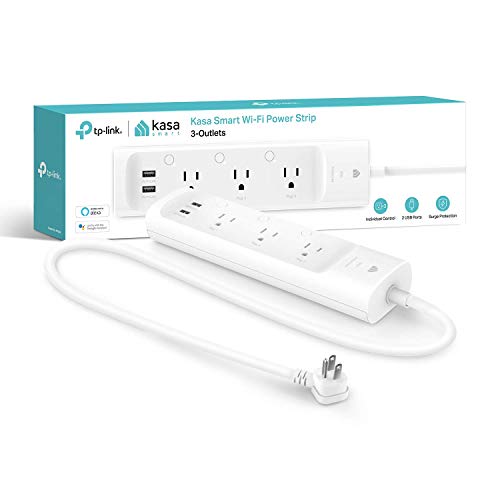
Kasa Smart Plug Power Strip KP303
Each of the three outlets can be scheduled and controlled independently rather than switching the whole strip at once. USB ports cover phone charging without an outlet.
Pros
- Independent control per outlet instead of one all-or-nothing switch
- No hub required, connects directly to home Wi-Fi
- Reliable Kasa app with scheduling, timers, and away mode
Cons
- Only 3 smart outlets, fewer than some higher-capacity competitors
- No surge protection rating listed, unlike dedicated surge protector strips

Amazon Basics Smart Power Strip
A lower price point than name-brand alternatives. Native Alexa support since it is an Amazon product, with a simpler feature set than third-party apps offer.
Pros
- Lower price than most competing smart power strips
- Native Alexa integration without extra setup steps
- Mix of smart and always-on outlets covers devices that shouldn’t lose power
Cons
- No Google Assistant support, Alexa only
- Fewer scheduling and automation options than Kasa or Govee

Govee Smart Power Strip
Govee’s app supports grouping outlets into scenes alongside its other smart lighting products. More individually switched outlets than Kasa’s 3-outlet strip.
Pros
- More individually switched outlets than Kasa’s entry-level strip
- Scene and grouping support ties into other Govee smart devices
- Flexible scheduling covers more complex routines than basic strips
Cons
- App can feel cluttered given Govee’s wide product catalog crossover
- Build quality on outlet switches feels less substantial than Kasa’s

Anker PowerExtend Strip
Prioritizes USB-C fast charging and surge protection over app-based smart control. A better fit for a desk or nightstand charging multiple devices than for remote scheduling.
Pros
- USB-C fast charging port is useful for modern phones and tablets
- Surge protection rating most Wi-Fi smart strips do not list
- Flat plug design fits behind furniture without blocking the outlet
Cons
- No Wi-Fi app control or voice assistant integration at all
- Positioned more as a charging and surge-protection strip than a true smart strip

Eve Energy Strip
Works natively in the Apple Home app without a separate bridge. Matter support extends compatibility beyond Apple, and per-outlet energy monitoring is uncommon at this tier.
Pros
- Native Apple Home integration without needing a separate bridge accessory
- Matter support extends usability beyond just Apple’s ecosystem
- Per-outlet energy monitoring tracks consumption most competitors don’t report
Cons
- Costs more than Kasa or Amazon Basics for the same outlet count
- Thread-based models need a Thread border router for full mesh benefits

Gosund Smart Power Strip
More individually switched outlets and USB ports than Amazon Basics at a similar price tier. Covers both major voice assistants unlike the Alexa-only budget option.
Pros
- Four individually controlled outlets plus four USB ports at a budget price
- Works with both Alexa and Google Assistant, unlike some cheaper rivals
- Compact strip design fits tighter spaces behind furniture
Cons
- App stability reports are mixed compared to Kasa’s more established platform
- No energy monitoring or surge protection rating

ConnectSense Smart Outlet 2
Fewer outlets than a true power strip but tracks detailed energy usage history per outlet. Aimed at users who want to monitor consumption of specific appliances.
Pros
- Detailed energy usage history helps identify which devices draw the most power
- Broad smart home compatibility across HomeKit, Alexa, and Google Assistant
- Compact two-outlet design fits where a full strip would be unnecessary
Cons
- Only 2 outlets, not a true multi-outlet power strip replacement
- Higher cost per outlet than strip-style competitors
What matters most
Individually Switched Outlets vs All-or-Nothing Strips Kasa’s, Govee’s, and Gosund’s strips let each outlet turn on or off independently, which matters when some plugged-in devices need to stay powered while others get scheduled off.
Smart Control vs Surge Protection and Fast Charging Anker’s PowerExtend trades Wi-Fi smart control for a surge protection rating and USB-C fast charging, a reasonable tradeoff for a desk or nightstand that doesn’t need remote scheduling.
Matching a Strip to Your Smart Home Platform Eve’s Energy Strip fits an Apple Home or Matter-based household with native integration, while Amazon Basics’ Alexa-only support suits a simpler, single-ecosystem setup.
When Energy Monitoring Is Worth Paying For ConnectSense’s Smart Outlet 2 and Eve’s Energy Strip both track per-outlet consumption, useful for identifying which specific devices are driving up an electricity bill rather than guessing.
How they stack up
| # | Model | Outlets | Best for | Score | Price |
|---|---|---|---|---|---|
| 1 | Kasa Smart Plug Power Strip KP303 | 3 individually controlled smart outlets | Best Overall | 9.0 | Check price |
| 2 | Amazon Basics Smart Power Strip | 3 smart outlets plus always-on outlets (model dependent) | Best Budget | 8.2 | Check price |
| 3 | Govee Smart Power Strip | 4 to 6 individually controlled outlets (model dependent) | Best for App Customization | 8.5 | Check price |
| 4 | Anker PowerExtend Strip | 6 AC outlets | Best for USB Charging Plus Surge Protection | 8.4 | Check price |
| 5 | Eve Energy Strip | 3 individually controlled outlets | Best for Apple HomeKit and Matter | 8.8 | Check price |
| 6 | Gosund Smart Power Strip | 4 individually controlled outlets | Best Budget Multi-Outlet | 8.1 | Check price |
| 7 | ConnectSense Smart Outlet 2 | 2 individually controlled outlets (single unit, not a strip) | Best for Energy Monitoring | 8.3 | Check price |
Questions worth asking
Can each outlet on a smart power strip be controlled separately?
On strips like Kasa’s KP303, Govee’s, and Gosund’s, yes, each outlet can be switched independently rather than all turning on or off together.
Do smart power strips offer the same surge protection as regular surge protectors?
Not always; several Wi-Fi smart strips in this lineup, including Kasa’s and Govee’s, don’t list a surge protection rating, while Anker’s PowerExtend specifically includes one.
Is a hub required to set up a Wi-Fi smart power strip?
No, all seven of these connect directly to home Wi-Fi without needing a separate smart home hub.
What is the benefit of Matter support on a smart power strip?
Matter support, found on Eve’s Energy Strip, lets the strip work across multiple smart home platforms rather than being locked into just one ecosystem’s app.
Do these strips work with both Alexa and Google Assistant?
Kasa, Govee, Gosund, and ConnectSense all support both, while Amazon Basics works only with Alexa.
Can a smart power strip track how much electricity each device uses?
Eve’s Energy Strip and ConnectSense’s Smart Outlet 2 both offer per-outlet energy monitoring; most budget strips in this lineup don’t track consumption at that level of detail.
Is USB-C fast charging available on smart power strips?
Anker’s PowerExtend includes a USB-C fast charging port, while most of the Wi-Fi smart strips here stick to standard USB-A charging ports.
Do smart power strips work during a Wi-Fi outage?
Outlets can typically still be switched manually at the strip itself, but remote app control and scheduling stop working until the Wi-Fi connection returns.
What is the difference between Apple HomeKit native support and a third-party bridge?
Native support, like Eve’s Energy Strip offers, connects directly to the Apple Home app without extra hardware, while some competing devices need a separate bridge accessory to work with HomeKit.
How many outlets does a typical household smart power strip need?
It depends on the setup, but three to four individually controlled outlets, as on Kasa’s or Gosund’s strips, cover most entertainment centers or desk setups without excess capacity.
The verdict
Kasa’s Smart Plug Power Strip KP303 is the most reliable overall pick for independent outlet control without a hub. Eve’s Energy Strip is the right call for an Apple Home or Matter-based household, and anyone who mainly needs surge protection and fast USB-C charging should consider the Anker PowerExtend instead of a Wi-Fi smart strip.
Marcus Chen
Marcus covered consumer electronics for enthusiast tech publications for six years before joining ChoiceCrest. He specializes in translating manufacturer spec sheets into plain-language buying advice, with a focus on audio, computing accessories and smart-home gear.