Smart Monitor Stands That Do More Than Hold Your Screen
The Ergotron LX Smart Monitor Stand tops our list for its sturdy build and integrated USB-C hub, ideal for professionals who need seamless connectivity. Its main advantage is effortless height adjustment and a 10-year warranty. The main limitation is the premium price, which may not suit budget buyers.
A smart monitor stand does more than elevate your screen. It can charge your phone, connect peripherals, and keep your desk tidy. We compared popular models to find the best for different needs.
Modern stands include USB hubs, Qi charging pads, and even ambient lighting. Whether you’re a gamer, a coder, or a home office worker, there’s a smart stand that fits your setup.
What matters most
What we recommend
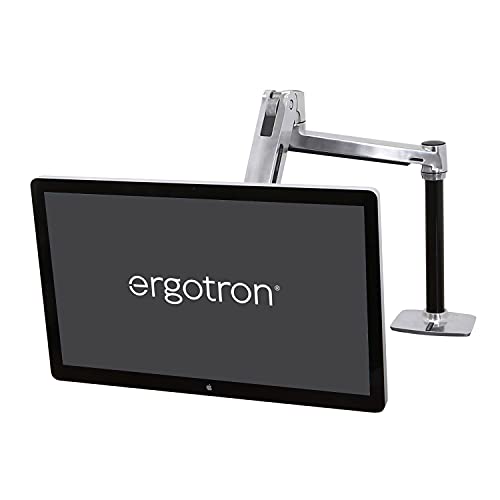
Ergotron LX Smart Monitor Stand
The Ergotron LX Smart Monitor Stand combines premium build quality with a built-in USB-C hub that supports data, video, and 90W power delivery. It offers smooth height adjustment and a 10-year warranty, making it a long-term investment for any workspace.
Pros
- Excellent build quality
- USB-C hub with power delivery
- Smooth gas spring adjustment
Cons
- Pricey
- Requires clamp or grommet mount

Wali Smart Monitor Stand with Wireless Charging
The Wali Smart Monitor Stand comes with a 15W Qi wireless charging pad built into its base. It holds monitors up to 27 inches and features a cable management tray. Owners report it’s a great value for basic needs.
Pros
- Very affordable
- 15W fast charging
- Easy to assemble
Cons
- No USB ports
- Limited height adjustment
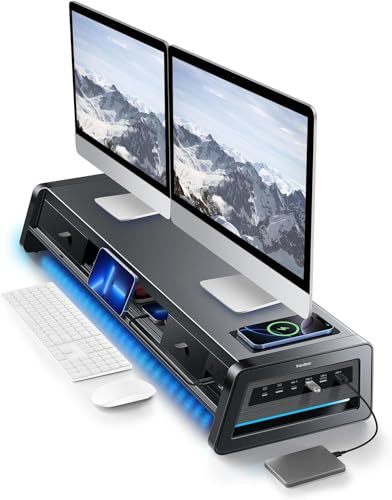
VIVO Smart Monitor Stand with USB Hub
The VIVO Smart Monitor Stand features a 4-port USB 3.0 hub, allowing you to connect multiple peripherals. It supports monitors up to 32 inches and offers adjustable height and tilt. The sturdy steel base keeps your desk organized.
Pros
- 4 USB 3.0 ports
- Stable base
- Easy cable management
Cons
- No wireless charging
- Height adjustment not as smooth

Amazon Basics Smart Monitor Stand with Qi Charging
The Amazon Basics Smart Monitor Stand includes a 10W wireless charging pad and a simple, elegant design. It fits monitors up to 24 inches, making it ideal for smaller setups. The stand is built with a solid aluminum base.
Pros
- Reliable brand
- Compact footprint
- Affordable price
Cons
- Smaller monitor support
- No USB ports
Soundance Smart Monitor Stand with RGB Lighting
The Soundance Smart Monitor Stand features customizable RGB lighting and a 15W wireless charging pad. It also includes a USB hub with 3 ports. The stand supports monitors up to 27 inches and adds a gaming flair to any desk.
Pros
- RGB lighting effects
- Fast charging
- USB hub included
Cons
- Lighting may distract
- Not as sturdy as premium stands

HUANUO Smart Monitor Stand with Clamp Mount
The HUANUO Smart Monitor Stand is a clamp-style arm with built-in cable management and a small USB hub. It offers full motion adjustments, including swivel and tilt. This stand frees up desk space and works with monitors from 17 to 32 inches.
Pros
- Saves desk space
- Flexible positioning
- Cable management
Cons
- Installation requires clamping
- USB hub only has 2 ports
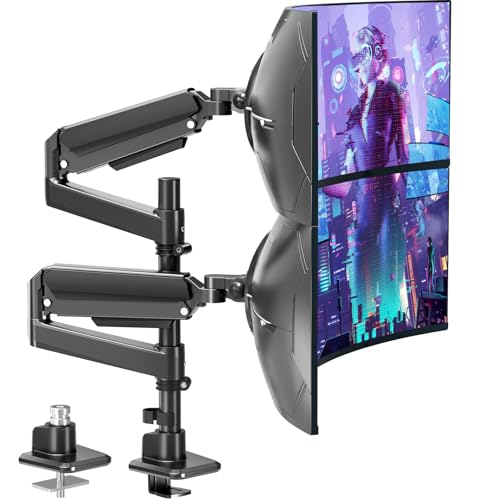
MOUNTUP Smart Monitor Stand with Power Outlets
The MOUNTUP Smart Monitor Stand integrates a power strip with two AC outlets and two USB ports, making it a complete power solution. It supports monitors up to 27 inches and has a sturdy steel base. The stand also includes a wireless charging pad.
Pros
- AC outlets and USB ports
- Wireless charging
- Stable construction
Cons
- Bulky design
- No height adjustment
How they compare
| # | Model | Monitor Size | Best for | Score | Price |
|---|---|---|---|---|---|
| 1 | Ergotron LX Smart Monitor Stand | Up to 34 inches | Professionals who need a robust, adjustable arm with USB-C connectivity | 9.4 | Check price |
| 2 | Wali Smart Monitor Stand with Wireless Charging | Up to 27 inches | Users who want a simple, affordable stand with phone charging | 8.7 | Check price |
| 3 | VIVO Smart Monitor Stand with USB Hub | Up to 32 inches | Multi-device users who need extra USB ports | 8.9 | Check price |
| 4 | Amazon Basics Smart Monitor Stand with Qi Charging | Up to 24 inches | Amazon shoppers looking for a reliable, no-frills stand | 8.5 | Check price |
| 5 | Soundance Smart Monitor Stand with RGB Lighting | Up to 27 inches | Gamers who want ambient lighting and charging | 8.8 | Check price |
| 6 | HUANUO Smart Monitor Stand with Clamp Mount | 17 to 32 inches | Desk space savers who want a fully adjustable arm | 8.6 | Check price |
| 7 | MOUNTUP Smart Monitor Stand with Power Outlets | Up to 27 inches | Users who need both USB and AC power | 8.4 | Check price |
Questions worth asking
Are smart monitor stands compatible with all monitors?
Most smart stands support monitors with VESA mounting holes (75×75 or 100×100). Check your monitor’s VESA pattern and weight. Also, verify the stand’s maximum monitor size and weight capacity.
Can I use a smart monitor stand with a laptop?
Some stands include a laptop tray or can support a laptop using a VESA adapter. However, not all stands are designed for laptops. Look for a stand that specifically mentions laptop compatibility if you plan to use it that way.
How does wireless charging work on a monitor stand?
The stand has a built-in Qi charging coil in the base. When you place a compatible phone on the designated area, it aligns with the coil and charges inductively. Ensure your phone supports Qi wireless charging.
Do I need to install additional software for the USB hub?
No, USB hubs on monitor stands are plug-and-play. Simply connect the stand to your computer via a USB cable, and the ports will be recognized immediately without extra drivers.
What is the benefit of a USB-C hub on a monitor stand?
A USB-C hub can carry data, video, and power through one cable. This means you can connect your laptop to the stand with a single USB-C cable and have your monitor, peripherals, and charging all working through that connection.
Can smart monitor stands support dual monitors?
Most smart stands are designed for a single monitor. However, you can purchase a dual-arm version or combine two separate stands. Check the product description for dual monitor compatibility.
Are these stands easy to assemble?
Yes, most smart monitor stands come with clear instructions and require basic tools like a screwdriver. Assembly typically takes 10 to 20 minutes. Some stands offer tool-free adjustments after setup.
Do smart stands come with a warranty?
Warranty lengths vary by brand. Many offer a 1 to 3 year warranty, while premium brands like Ergotron provide up to 10 years. Always check the product warranty before purchasing.
The verdict
For most users, the Ergotron LX Smart Monitor Stand is the best choice due to its exceptional build quality and USB-C hub. If you’re on a budget, the Wali Smart Monitor Stand offers solid value with wireless charging. Gamers will appreciate the RGB lighting on the Soundance stand, while those needing extra USB ports should consider the VIVO model. Ultimately, choose based on your desk space and connectivity needs, but the Ergotron stands out as a long-term investment.
Marcus Chen
Marcus covered consumer electronics for enthusiast tech publications for six years before joining ChoiceCrest. He specializes in translating manufacturer spec sheets into plain-language buying advice, with a focus on audio, computing accessories and smart-home gear.