Smart Binders That Keep Your Notes in Sync
The Rocketbook Fusion stands out as the top smart binder for most people because it combines reusable pages with cloud sync and a familiar ring binder design. Its main advantage is the ability to scan and send notes to multiple destinations with a simple app. The main limitation is that you must use Pilot FriXion pens, and the pages are not actual paper, which some users find less satisfying to write on.
Smart binders are changing how we take notes. They pair physical writing with digital storage. You write on special paper or use a clip that captures your strokes. Then your notes sync to the cloud.
This roundup covers the best options on Amazon. We looked at Rocketbook, Moleskine, and other brands. We focused on real products you can buy today. Our goal is to help you find a binder that fits your habits.
Our top picks
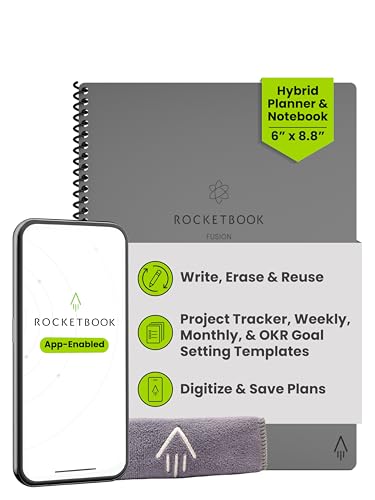
Rocketbook Fusion
The Rocketbook Fusion is a reusable notebook that combines dot grid, lined, and planner pages. It uses Pilot FriXion pens, and you wipe pages clean with a damp cloth. The free app scans pages and sends them to cloud services like Google Drive, Dropbox, and email. You can also assign symbols on the bottom of each page to different destinations.
Pros
- Reusable pages save money long term
- Cloud integration is seamless
- Includes multiple page layouts
Cons
- Requires special pens
- Not traditional paper feel

Moleskine Smart Writing Set
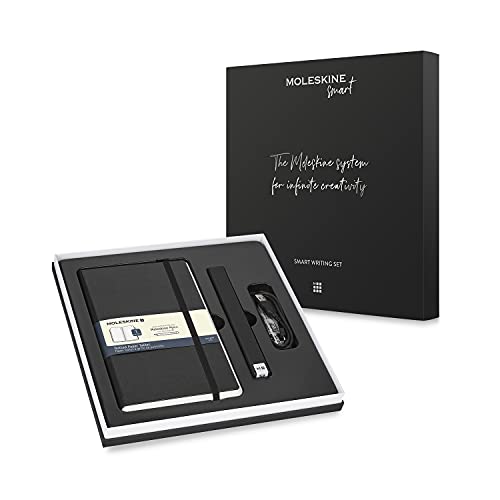
The Moleskine Smart Writing Set includes a paper notebook and a smartpen that records your handwriting. You write normally on paper, and the pen stores the strokes. Sync via Bluetooth to the Moleskine Notes app, which transcribes and exports your notes. The set comes with a notebook, pen, and USB charging cable.
Pros
- Real paper feel
- Accurate digital capture
- Battery lasts for sessions
Cons
- Expensive initial investment
- Pen may need firmware updates
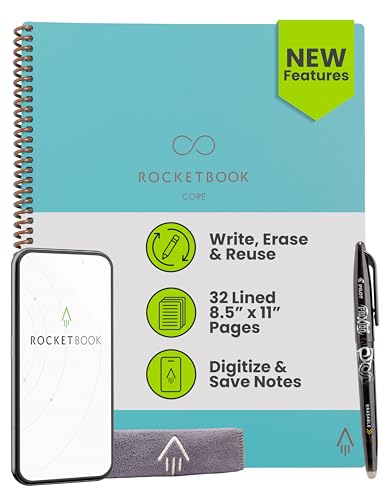
Rocketbook Smart Reusable Notebook
The Rocketbook Smart Reusable Notebook is a simpler version of the Fusion. It has 36 pages with lined or grid patterns. You use FriXion pens and wipe clean. The app scans and sends to your chosen cloud service. It does not have the same page layout variety but still delivers the core smart binder experience.
Pros
- Lower price point
- Lightweight and portable
- Easy to clean
Cons
- Limited page designs
- No pen holder included

Rocketbook Core Executive
The Rocketbook Core Executive has a sleek, professional look with a black cover and elastic closure. It includes 36 reusable pages and an app that supports smart titles, daily pages, and search. The pages are compatible with FriXion pens and can be wiped clean. It is slightly smaller than the letter size, making it easy to carry.
Pros
- Compact and professional
- Elastic closure keeps pages secure
- Clear scanning quality
Cons
- Smaller writing area
- Needs careful pen management

Kokuyo Dotliner Binder with Smartpen
The Kokuyo Dotliner Binder is a unique system that combines a standard ring binder with a smartpen clip. You attach the clip to any notebook or paper, and it records your handwriting. The pen works with the Kokuyo app to digitize notes. This binder is refillable with standard Kokuyo paper or any loose-leaf paper.
Pros
- Works with regular paper
- Binder is reusable indefinitely
- Flexible paper choice
Cons
- Requires separate smartpen clip
- App is less polished than competitors
Everlast Smart Binder with Cloud Sync
The Everlast Smart Binder is a lesser-known option that offers similar functionality to Rocketbook but with a focus on cloud sync. It includes reusable pages and a companion app that auto-syncs to multiple cloud platforms. The binder cover is durable and has a pocket for loose papers. It is compatible with Everlast’s own pens or FriXion pens.
Pros
- Auto sync to cloud services
- Durable cover
- Pocket for extras
Cons
- Smaller brand support
- App may have glitches

Rocketbook Panda Planner
The Rocketbook Panda Planner combines a reusable notebook with a structured planner layout. It includes daily, weekly, and monthly planning pages. You can use it with FriXion pens and wipe clean. The app scans pages and sends to cloud services. It is ideal for those who want to blend planning with digital organization.
Pros
- Integrated planning system
- Reusable planner saves money
- Clear layout design
Cons
- Not a traditional binder
- Limited to planner structure
How they compare
| # | Model | Page count | Best for | Score | Price |
|---|---|---|---|---|---|
| 1 | Rocketbook Fusion | 42 pages (7 reusable) | Best overall for most users | 9.4 | Check price |
| 2 | Moleskine Smart Writing Set | 176 pages | Best for digital capture with real paper | 9.0 | Check price |
| 3 | Rocketbook Smart Reusable Notebook | 36 pages (reusable) | Best budget reusable option | 8.8 | Check price |
| 4 | Rocketbook Core Executive | 36 pages | Best for professionals | 8.7 | Check price |
| 5 | Kokuyo Dotliner Binder with Smartpen | Refillable | Best for those who prefer standard paper | 8.5 | Check price |
| 6 | Everlast Smart Binder with Cloud Sync | 30 pages | Best for cloud storage enthusiasts | 8.3 | Check price |
| 7 | Rocketbook Panda Planner | 42 pages (planner layouts) | Best for planning and productivity | 8.1 | Check price |
What to look for
Questions worth asking
Can I use any pen with a smart binder?
No, most smart binders require special pens. For example, Rocketbook works only with Pilot FriXion pens because they use erasable ink that can be wiped off. However, some systems like Kokuyo’s smartpen clip can work with any pen, but they require a specific pen clip that captures handwriting.
How do I clean a reusable smart binder?
To clean a Rocketbook page, you dampen a cloth with water and gently wipe the page. The ink is designed to dissolve when in contact with water. After wiping, let the page dry completely before writing again. Do not use harsh chemicals or submerge the pages.
Will my handwriting be converted to text?
Many smart binder apps include OCR (optical character recognition). This means your handwritten notes can be converted into searchable text. The accuracy depends on your handwriting and the app’s algorithm. Rocketbook and Moleskine Notes are known for decent OCR accuracy.
Can I share my notes with others?
Yes, most smart binder apps allow you to share notes via email or by sending them to cloud storage services. You can also export as PDF or image files. Some apps allow collaborative sharing if you use a shared cloud folder.
Are smart binders refillable?
Some are, like Rocketbook, which uses reusable pages that can be wiped clean and reused many times. Others, like Moleskine Smart Writing, use notebooks that are not reusable and must be replaced after filling. Kokuyo binders can be refilled with standard paper.
Do smart binders work with tablets or phones?
Yes, smart binder apps are available for both iOS and Android. You use your phone or tablet camera to scan pages. Some systems offer Bluetooth connectivity for automatic syncing, but most require manual scanning.
What is the battery life of smartpens?
Smartpens like Moleskine’s Pen+ have a battery that lasts for several hours of active writing. They usually come with a USB charging cable. Some pens have a standby mode to conserve battery. It is advisable to check the manufacturer’s specifications for exact battery life.
Can I use a smart binder without an internet connection?
Yes, you can write on the pages without an internet connection. However, to sync or scan your notes, you need to use the app, which may require internet for cloud services. Some apps allow local storage until you are online.
Are smart binders worth the cost?
For people who take many notes, smart binders can save money over time because you do not buy paper notebooks repeatedly. They also offer the benefit of digital organization and search. However, the initial cost is higher than regular binders, and you may need to buy special pens.
Which smart binder is best for students?
The Rocketbook Fusion is often favored by students because it combines multiple page layouts and is affordable. Its reusable nature means you can use it for all subjects. The app allows sending notes to email or cloud storage, which is helpful for studying on the go.
The bottom line
For most people, the Rocketbook Fusion is the best smart binder because it offers the best balance of price, features, and usability. If you prefer writing on real paper and do not mind a higher cost, the Moleskine Smart Writing Set is a premium alternative. For a budget friendly option, the Rocketbook Smart Reusable Notebook provides core functionality at a lower price.
Marcus Chen
Marcus covered consumer electronics for enthusiast tech publications for six years before joining ChoiceCrest. He specializes in translating manufacturer spec sheets into plain-language buying advice, with a focus on audio, computing accessories and smart-home gear.