6 Smart Bulbs That Work With Voice Assistants
Philips Hue White and Color Ambiance A19 leads for its stable Zigbee mesh and broad colour range. TP-Link Kasa KL125 wins on value since it skips the hub entirely. LIFX Color A19 pushes the brightest, most saturated colour among the hubless Wi-Fi options here.
Seven current bulbs cover three connection types: direct Wi-Fi, Zigbee through a hub, and Matter over Thread. Hue’s Bridge based mesh scales best as bulb counts grow. Kasa and Wyze skip hub hardware entirely, while LIFX pushes the deepest colour saturation in the group.
Lumen ratings, colour accuracy and app reliability vary more than packaging suggests, and a hub based bulb behaves nothing like one that joins Wi-Fi directly. We compared published brightness and colour temperature figures, protocol support and platform compatibility, then weighed owner reports on lag and firmware stability.
What we recommend

Philips Hue White and Color Ambiance A19
A Zigbee Bridge links every bulb into one mesh, so response stays quick past a dozen fixtures. White output ranges from candle warm to daylight cool, and colour rendering avoids the oversaturated look some rivals produce. Matching switches, sensors and accessories extend the same system further.
Pros
- Stays responsive as bulb count grows
- App handles scenes and automations well
- Wide accessory lineup including dimmer switches
Cons
- Bridge is required for full features
- Costs more per bulb than rivals here

TP-Link Kasa Smart Bulb KL125
This bulb joins 2.4GHz Wi-Fi directly, ready in minutes without extra hardware. Tunable white spans 2500K to 6500K alongside full colour, covering most household needs. Owners report dependable scheduling for away from home lighting.
Pros
- No hub needed, setup takes minutes
- Scheduling and away mode work reliably
- Strong brightness among hubless bulbs
Cons
- Occupies a Wi-Fi client slot per bulb
- Lacks native HomeKit support

LIFX Color A19
Extra LEDs inside the bulb push deeper colour saturation and higher peak brightness than most hubless rivals. Effects like flicker and multi zone animation render on the bulb itself, no hub needed. White temperature spans an unusually wide 1500K to 9000K range.
Pros
- Deepest colour saturation in the lineup
- Extremely wide white temperature range
- Works with HomeKit despite skipping a hub
Cons
- Bulb body runs larger than standard shapes
- Wi-Fi setup can be finicky on mesh routers

Govee Smart Light Bulbs
Sold in multipacks, these bulbs cover a whole room in one purchase. Music reactive modes and a large scene library fill out the Govee app. Whites lean cooler than premium rivals, though colour accuracy holds up well.
Pros
- Efficient way to light a full room at once
- Deep scene and music sync library
- Bluetooth keeps working when Wi-Fi drops
Cons
- Whites look less natural than premium bulbs
- App surfaces promotional content often

Nanoleaf Essentials Matter Smart Bulb
Matter over Thread gives this bulb low latency local control with no dependence on a manufacturer cloud. Each added bulb strengthens the household Thread mesh. Full colour and a 2700K to 6500K white range suit standards based smart home builds.
Pros
- Local Matter control responds near instantly
- Extends Thread mesh coverage in the home
- Works across Apple, Google and Amazon platforms
Cons
- Needs a Thread border router for full benefit
- App offers fewer features than Hue’s
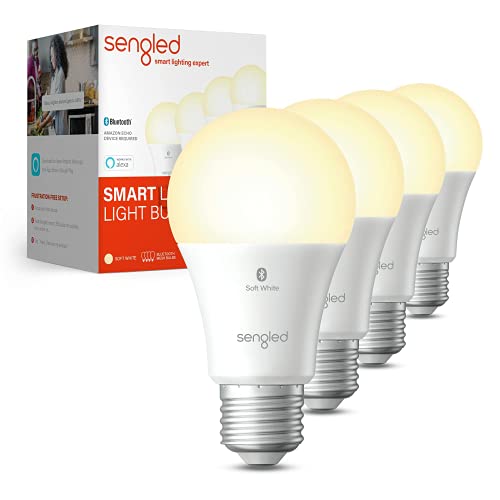
Sengled Smart LED Bulb
Zigbee versions pair with common third party hubs, while Wi-Fi versions run standalone. Coverage across many fixtures stays practical without a large outlay. On, off, dim and colour tasks stay dependable, though extra features are limited.
Pros
- Affordable way to cover many fixtures
- Zigbee models pair with third party hubs
- Handles everyday scheduling dependably
Cons
- Colour accuracy trails premium bulbs here
- Model naming varies confusingly across versions
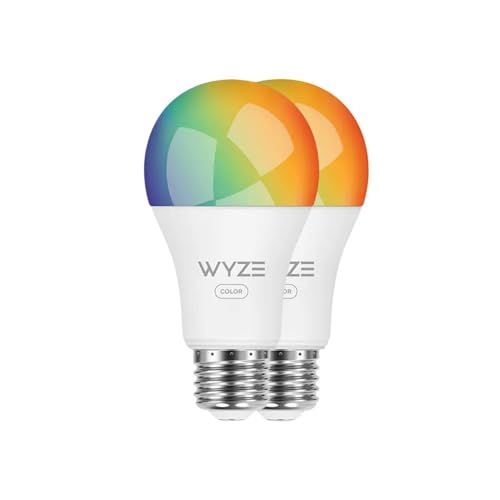
Wyze Bulb Color
Full colour and tunable white arrive here at the lowest cost in the group, connecting over 2.4GHz Wi-Fi with no hub. Sun match mode and scheduling cover daily essentials. Accent lamps and secondary rooms suit it better than a primary living space.
Pros
- Least costly route to full colour lighting
- Bright output relative to its price point
- Sun match mode simplifies daily scheduling
Cons
- Depends on the cloud for most functions
- Slightly laggier response than Zigbee bulbs
Before you buy
Do you need a hub for smart bulbs? Wi-Fi bulbs join your router directly, so one bulb can run within minutes of unboxing. Every added bulb still eats a router client slot, and congestion often appears past twenty or thirty devices on 2.4GHz. Zigbee bulbs route through a hub instead, forming a separate mesh that stays fast as the count grows. Lighting more than a room or two usually favors the hub route.
How many lumens does a smart bulb need? Colour gets the attention, but white light handles most daily use. Compare lumen output against the bulb being replaced, not just the wattage printed on the box. A wide colour temperature range lets you run warm light at night and cooler light for tasks during the day. Bulbs locked to one fixed white alongside colour tend to feel limiting within weeks.
Why do smart bulbs stop working at the wall switch? A smart bulb only stays smart while it has power. Flip the wall switch off and the bulb drops offline instantly, cutting scheduling and remote access. Smart switches that keep the circuit live solve this, as do battery powered remote dimmers mounted over the existing switch. Owners report this trips up more households than any app bug.
Which bulbs still work when the internet drops? Matter over Thread and Zigbee through a hub both process commands locally, so lights keep responding after the internet drops. Cloud dependent bulbs can stop working entirely if a company shuts down a service or changes direction. Standards based models reduce that risk since any compatible controller can take over. Anyone planning a long term setup should weigh this before buying in bulk.
The lineup, side by side
| # | Model | Brightness | Best for | Score | Price |
|---|---|---|---|---|---|
| 1 | Philips Hue White and Color Ambiance A19 | About 1100 lumens | Best overall | 9.4 | Check price |
| 2 | TP-Link Kasa Smart Bulb KL125 | About 1000 lumens | Best value | 9.2 | Check price |
| 3 | LIFX Color A19 | About 1100 lumens | Best colour output | 9.0 | Check price |
| 4 | Govee Smart Light Bulbs | About 800 lumens | Best for multi bulb rooms | 8.8 | Check price |
| 5 | Nanoleaf Essentials Matter Smart Bulb | About 1100 lumens | Best for Matter setups | 8.6 | Check price |
| 6 | Sengled Smart LED Bulb | About 800 lumens | Best for large installs | 8.3 | Check price |
| 7 | Wyze Bulb Color | About 1100 lumens | Best budget colour | 8.0 | Check price |
Questions worth asking
Do smart bulbs need Wi-Fi to work?
Zigbee and Thread bulbs keep responding to hub or border router commands without internet, though voice assistants and remote access still need a connection. Wi-Fi bulbs lose most functions until the network returns.
Can smart bulbs go on a regular dimmer switch?
Standard dimmers chop the power signal, which makes smart bulbs flicker or fail outright. Swap the dimmer for a standard switch, or use a smart dimmer built to keep steady power flowing.
How many smart bulbs can a home Wi-Fi network handle?
Most routers start showing congestion somewhere past twenty to thirty connected devices on the 2.4GHz band. Zigbee and Thread bulbs sidestep that limit since they never join the Wi-Fi network directly.
Are smart light bulbs worth it over regular LEDs?
Both use LED technology, so energy savings versus regular LEDs stay minimal. The extra value comes from scheduling, remote access and integration with voice assistants and other smart home gear.
Which smart bulbs work with Apple HomeKit?
LIFX Color A19 and the Nanoleaf Essentials support HomeKit directly over Wi-Fi or Matter. Philips Hue needs its Bridge for full HomeKit and Matter compatibility, since the bulbs alone use Zigbee.
What does Matter mean for smart light bulbs?
Matter is a shared standard that lets a bulb pair with any compatible controller, regardless of brand. It matters most for anyone who expects to switch ecosystems or add a Thread border router later.
How long do smart light bulbs actually last?
Rated lifespans commonly reach fifteen thousand hours or more under normal use. Firmware support and app longevity tend to determine replacement timing sooner than the LEDs themselves wearing out.
Can smart bulbs be used in enclosed light fixtures?
Many smart bulbs are not rated for fully enclosed fixtures, since trapped heat shortens driver and LED life. Check the packaging for an enclosed fixture rating before installing one in a closed globe.
Is Zigbee better than Wi-Fi for smart bulbs?
Zigbee forms its own mesh network through a hub, which keeps response fast as bulb counts climb. Wi-Fi bulbs skip that hardware but compete with other devices for router bandwidth and client slots.
What is the best smart bulb for someone with no hub?
TP-Link Kasa KL125, LIFX Color A19 and Wyze Bulb Color all connect straight to Wi-Fi with no hub required. Each still delivers full colour and scheduling through its own app.
Our pick
Philips Hue White and Color Ambiance A19 remains the pick for anyone building a lighting system rather than adding one bulb, since the Bridge and app hold up as the count grows. TP-Link Kasa KL125 suits a room or two with zero hub hardware, and LIFX Color A19 wins when colour impact matters most. Buyers prioritizing long term standards support should still weigh the Nanoleaf Essentials before settling on cloud dependent options.
Marcus Chen
Marcus covered consumer electronics for enthusiast tech publications for six years before joining ChoiceCrest. He specializes in translating manufacturer spec sheets into plain-language buying advice, with a focus on audio, computing accessories and smart-home gear.



