Smart Displays for Gamers: Top Picks to Level Up
The Echo Show 15 is our top pick for gaming because it offers a large 15.6 inch FHD screen with low latency and hands free Alexa control. Its main advantage is the ability to display game stats, walkthroughs, and video feeds while you play. The main limitation is that it is not a full gaming monitor, so expect some input lag compared to dedicated displays.
Smart displays have moved beyond simple kitchen timers. They now offer crisp visuals, voice control, and app support that can complement your gaming rig. Whether you want a second screen for walkthroughs or a hub to control smart lights, there is a model for you.
We focused on smart displays that have low latency modes, good resolution, and seamless assistant integration. We also considered size, portability, and how well they handle gaming related content. Here are the best options available on Amazon right now.
Before you buy
The best picks, ranked

Amazon Echo Show 15
The Echo Show 15 is a 15.6 inch smart display that can be mounted on a wall or used with a stand. It has a full HD screen and a powerful speaker. With Alexa built in, you can control your smart home, set timers, and access entertainment apps. For gamers, it offers a large screen to display walkthroughs or video feeds while you play. It also supports video calls and has a built in camera.
Pros
- Large screen is easy to see from across the room
- Can be wall mounted to save desk space
- Alexa skills allow voice commands for game info
Cons
- No native game streaming services
- Camera and mic raise privacy concerns

Lenovo Smart Display 8
The Lenovo Smart Display 8 has an 8 inch touchscreen with a 1280×800 resolution. It runs on Google Assistant and is great for quick lookups and smart home control. The display is sharp and bright, and the speaker is decent for its size. It fits easily on a crowded desk, making it a convenient second screen for gaming.
Pros
- Compact size fits on any desk
- Sharp display for its size
- Google Assistant integration is seamless with Android devices
Cons
- Screen is too small for detailed walkthroughs
- No camera for video calls
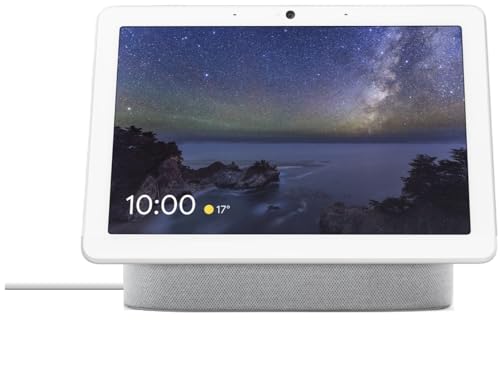
Google Nest Hub Max
The Google Nest Hub Max features a 10 inch HD screen and a built in Nest Cam. With Google Assistant, you can watch YouTube, stream shows, and control compatible devices. It has a stereo speaker system that sounds better than most smart displays. For gamers, it serves as a great device for watching tutorials or video chatting with friends while playing.
Pros
- Excellent speaker quality for music and videos
- Built in camera for video calls
- Google Duo support for easy calls
Cons
- No wall mount option
- Screen resolution is only HD, not full HD

Amazon Echo Show 8
The Echo Show 8 (2nd Gen) has an 8 inch HD display and improved speakers. It includes a built in Zigbee smart home hub, so you can control compatible lights and switches without an extra hub. Alexa can help you manage your gaming environment, like dimming lights or adjusting thermostats. The display is vibrant, and the camera is useful for video calls.
Pros
- Zigbee hub controls many smart devices
- Great sound for its size
- Privacy shutter for the camera
Cons
- Smaller screen than Echo Show 10 or 15
- No native game streaming

Echo Show 10 (3rd Gen)
The Echo Show 10 has a 10.1 inch HD display that rotates to follow you around the room. This makes it great for watching videos or video calling while moving. Alexa is built in, and it supports smart home control. The sound quality is rich with directional audio. For gaming, it can be positioned to show content while you sit at your desk or move around.
Pros
- Motorized base keeps screen facing you
- Excellent audio with room adaptation
- Built in camera with privacy shutter
Cons
- Larger footprint due to moving base
- Not ideal for wall mounting

Facebook Portal Plus
The Portal Plus has a 14 inch HD display that can tilt from landscape to portrait. It is designed for video calls using WhatsApp, Messenger, and Zoom. With Alexa built in, you can also control smart devices. For gamers, it is great for chatting with friends on multiple platforms. The camera has smart zoom to keep you in frame.
Pros
- Large screen with adjustable orientation
- Supports multiple video calling apps
- AI camera auto frames the user
Cons
- Limited app selection compared to Echo or Google
- No built in game streaming services

JBL Link View
The JBL Link View features an 8 inch HD display and powerful speakers tuned by JBL. It runs Google Assistant and supports Chromecast built in. The sound is clear and loud, making it excellent for music and videos. As a smart display, it works well for gaming as a secondary audio and video device.
Pros
- JBL audio quality is outstanding
- Chromecast support streams from many apps
- Simple design that fits any room
Cons
- No camera for video calls
- Software updates may be less frequent
Side by side
| # | Model | Display Size | Best for | Score | Price |
|---|---|---|---|---|---|
| 1 | Amazon Echo Show 15 | 15.6 inches | Best overall for gaming companion | 9.4 | Check price |
| 2 | Lenovo Smart Display 8 | 8 inches | Best compact option for small setups | 8.8 | Check price |
| 3 | Google Nest Hub Max | 10 inches | Best for video calls and streaming | 9.0 | Check price |
| 4 | Amazon Echo Show 8 | 8 inches | Best for smart home control while gaming | 8.7 | Check price |
| 5 | Echo Show 10 (3rd Gen) | 10.1 inches | Best for dynamic viewing angles | 8.6 | Check price |
| 6 | Facebook Portal Plus | 14 inches | Best for social gaming and video chats | 8.3 | Check price |
| 7 | JBL Link View | 8 inches | Best for superior sound quality | 8.0 | Check price |
Questions worth asking
Can I use a smart display as a primary gaming monitor?
No, smart displays are not suitable as primary gaming monitors. They have higher input lag and lower refresh rates than dedicated gaming monitors. They are best used as secondary screens for guides, chat, or video calls.
Do smart displays support game streaming services?
Most smart displays do not support cloud gaming services like Xbox Cloud Gaming or GeForce Now. They have limited app stores and browsers. However, some models may allow screen mirroring from a PC or phone.
Which smart display is best for watching gaming tutorials?
Amazon Echo Show 15 is ideal because of its large 15.6 inch Full HD screen. The Google Nest Hub Max is also good with its 10 inch screen and excellent speakers. For smaller budgets, the Echo Show 8 works well.
Can I connect a smart display to my gaming PC?
Some smart displays support HDMI input, but not all. For example, the Echo Show 15 does not have HDMI input. You can use screen mirroring or cast from your PC if supported, but it may not be as reliable.
Do smart displays have a gaming mode?
A few smart displays have a low latency mode, but it is not specifically labeled as a gaming mode. The Echo Show 15 has an option to reduce motion blur. Check the settings for any picture adjustments.
Can I use voice commands to control my game?
Voice commands are limited to the smart display’s assistant. You cannot control game actions on your console or PC directly. However, you can ask for game tips, set timers, or control smart lights around you.
Are smart displays worth it for gaming?
Yes, if you want a companion screen for gaming. They are great for displaying walkthroughs, video calls, and smart home controls. But they do not replace a dedicated gaming monitor.
What is the difference between Alexa and Google Assistant smart displays?
Alexa displays are built by Amazon and integrate with Amazon services and many smart home devices. Google displays use Google Assistant and work well with Android devices and Google services. Your choice depends on your ecosystem preference.
Can I watch gaming streams on smart displays?
Yes, you can watch YouTube or Twitch through the browser or apps if available. The Echo Show supports YouTube via the Silk browser. The Google Nest Hub has a dedicated YouTube app. However, Twitch support is limited.
Do smart displays have privacy concerns?
Many have camera and microphone, which can be a privacy concern. Look for models with physical camera shutters or mic off buttons. You can also disable the camera when not in use.
Our pick
For most gamers, the Amazon Echo Show 15 is the best smart display because of its large Full HD screen and Alexa integration. It provides an excellent secondary display for guides and entertainment. If you have a smaller budget or limited desk space, the Lenovo Smart Display 8 is a solid alternative. If you need video calling and sound quality, consider the Google Nest Hub Max. Ultimately, the Echo Show 15 offers the most versatile gaming companion experience.
Marcus Chen
Marcus covered consumer electronics for enthusiast tech publications for six years before joining ChoiceCrest. He specializes in translating manufacturer spec sheets into plain-language buying advice, with a focus on audio, computing accessories and smart-home gear.


