USB-C vs USB-A Ports: Choosing an SD Card Reader
SanDisk ImageMate PRO Multi-Card Reader leads for mixed formats and steady UHS-II speed on the SD slot. ProGrade Digital Dual-Slot SDXC UHS-II Card Reader suits photographers offloading two cards together. Anker USB-C 2-in-1 SD Card Reader fits everyday laptop and tablet use without extra cost.
SanDisk’s ImageMate PRO Multi-Card Reader suits most buyers, combining three card formats with real UHS-II speed on its SD slot. Photographers who clear two cards per shoot get more from ProGrade Digital’s dual-slot reader. Anker’s USB-C 2-in-1 covers simple laptop and tablet offloads at a lower cost.
Card readers look nearly identical on a product listing, yet interface class quietly caps speed. A UHS-I only reader holds a V90 card to roughly a third of its rated throughput regardless of price. We compared published interface specs, slot layouts, cable design and owner reports of overheating or dropped connections across seven current readers.
Our top picks

SanDisk ImageMate PRO Multi-Card Reader
SanDisk built this reader with SD, microSD and CompactFlash slots in one housing, useful for anyone shooting on more than one camera body. Its SD slot runs at UHS-II, so V60 and V90 cards hit near their rated read speed instead of a UHS-I ceiling. Owners report it stays cool through long card dumps, a point where cheaper readers tend to stall.
Pros
- Covers three card formats in one unit
- Reaches true UHS-II speed on the SD slot
- Stays stable through long transfers per owner reports
Cons
- Needs an adapter on USB-C only laptops
- Bulkier than pocket style dongle readers
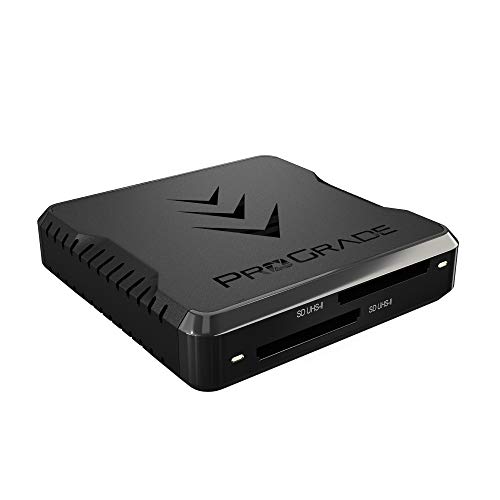
ProGrade Digital Dual-Slot SDXC UHS-II Card Reader
ProGrade pairs two full UHS-II SD slots that read simultaneously, cutting wait time roughly in half on a two card shoot. Its aluminium shell doubles as a heatsink, and a magnetic base keeps the unit anchored on a desk. Daily shooters get more value here than someone offloading cards a few times a year.
Pros
- Reads two cards at the same time
- Metal housing sheds heat efficiently
- Detachable cable is simple to replace
Cons
- Supports SD only, no microSD or CFexpress slot
- Priced above single slot readers

Anker USB-C 2-in-1 SD Card Reader
Anker’s compact reader plugs directly into a USB-C port and reads SD plus microSD without drivers on modern laptops, tablets or phones. Speed tops out at UHS-I, so it pairs best with everyday V30 cards rather than high bitrate video media. Most laptop bags only need this one reader.
Pros
- Compact and cable free design
- Works with phones and tablets, not just laptops
- Reads both SD and microSD sizes
Cons
- UHS-I ceiling limits fast V90 cards
- Short body can crowd thick phone cases
Lexar Professional Multi-Card 3-in-1 USB 3.2 Reader
Lexar’s three slot reader accepts SD, microSD and CompactFlash, letting owners copy files card to card without a computer in between. Both the SD and microSD slots run UHS-II, so modern cards avoid throttling. Anyone holding cards from several camera generations benefits from this spread of formats.
Pros
- UHS-II speed on two of three slots
- Copies files card to card without a host drive
- Reads legacy CompactFlash media
Cons
- Plastic shell warms up during long dumps
- Cable is captive on some versions

UGREEN USB 3.0 4-in-1 Card Reader
UGREEN keeps cost low while still using a genuine USB 3.0 controller instead of an aging USB 2.0 chip. Four slots cover SD, microSD, CompactFlash and Memory Stick, useful for rescuing files from older cards. UHS-II speed is absent, but backups and casual photo transfers run fine according to the listing.
Pros
- Four slots including legacy formats
- Genuine USB 3.0 controller
- Light enough to leave plugged in permanently
Cons
- No UHS-II support
- Shared bus slows parallel reads across slots

Kingston MobileLite Plus SD Reader
Kingston strips this reader to one UHS-II SD slot in a small ribbed housing with a short captive USB-A plug. Nothing dangles or snaps off inside a camera bag. Owners report steady transfer speeds across long sessions, the main requirement for a travel companion.
Pros
- UHS-II speed in a very small body
- No loose cable to pack or lose
- Textured housing resists scuffs
Cons
- Only one card slot
- Type-A plug can block a neighboring port

Transcend RDF9 UHS-II Card Reader
Transcend’s RDF9 skips extra features and focuses on quick UHS-II transfers for single format shooters. A standard USB-A connection and short attached cable keep setup simple. Long term owners describe it as a dependable desk fixture, based on product reviews.
Pros
- Delivers reliable UHS-II throughput
- Includes a clear activity LED
- Sets up as plug and play
Cons
- Skips a microSD slot
- Requires a hub on USB-C only laptops
Before you buy
What Makes an SD Card Reader Fast? UHS-I and UHS-II are not interchangeable specs on a spec sheet. A UHS-II card carries a second row of contacts and a much faster bus, but only a UHS-II reader can use that extra row. Drop a V90 card into a UHS-I reader and it still works, just capped near UHS-I speed. Matching reader class to card class returns the most time for photographers who paid for fast media.
USB-A or USB-C: Which Port Do You Need? Most laptops sold before 2020 still use USB-A ports, while many current ultrabooks ship with USB-C only. A USB-C reader skips the adapter and often works with tablets and USB-C phones too. Anyone switching between an older desktop and a newer laptop benefits from a reader with a detachable cable, since only the cable needs swapping.
Why Do Card Readers Overheat During Transfers? Long card dumps push a reader’s controller hard, and thin plastic housings trap that heat. Unbranded readers commonly show transfers slowing or dropping partway through, according to owner reports. Aluminium bodies and larger housings dissipate heat better, which explains why the ProGrade and SanDisk units hold speed on big offloads.
Do You Need a Multi-Slot or Dual-Slot Reader? Multi-format readers look like better value on paper, but slots typically share one USB bus. Reading two cards at once through a shared bus splits available bandwidth. Dedicated dual-slot readers avoid that bottleneck by design. Decide first whether simultaneous access matters or whether occasional access to a second format is enough, since the two needs point toward different products.
Compared at a glance
| # | Model | Card slots | Best for | Score | Price |
|---|---|---|---|---|---|
| 1 | SanDisk ImageMate PRO Multi-Card Reader | SD, microSD, CompactFlash | Best overall | 9.4 | Check price |
| 2 | ProGrade Digital Dual-Slot SDXC UHS-II Card Reader | Two SDXC UHS-II | Best for photographers | 9.2 | Check price |
| 3 | Anker USB-C 2-in-1 SD Card Reader | SD and microSD | Best value | 9.0 | Check price |
| 4 | Lexar Professional Multi-Card 3-in-1 USB 3.2 Reader | SD, microSD, CompactFlash | Best for mixed card collections | 8.8 | Check price |
| 5 | UGREEN USB 3.0 4-in-1 Card Reader | SD, microSD, CF, Memory Stick | Best budget | 8.6 | Check price |
| 6 | Kingston MobileLite Plus SD Reader | Single SD | Best for travel | 8.3 | Check price |
| 7 | Transcend RDF9 UHS-II Card Reader | Single SDXC | Best for fast single-card offloads | 8.0 | Check price |
Questions worth asking
Will a UHS-II reader speed up an older UHS-I card?
No. The card sets the real ceiling on speed. A UHS-II reader stays backward compatible with UHS-I cards, but higher throughput only appears when both card and reader support UHS-II.
Do SD card readers need drivers?
Rarely. Windows, macOS, ChromeOS and modern Linux all include standard mass storage drivers. Treat any reader that asks for a bundled install disc as a red flag.
Can I use a USB-C card reader with an iPad or Android phone?
Usually, if the device supports USB host mode. Anker’s USB-C reader works this way with compatible tablets and phones. USB-A readers need a separate adapter, and some compact phones cannot power multi-slot readers.
Why does a transfer start fast and then slow down?
Card write cache filling up is the common cause, alongside a reader’s controller heating up. Metal bodied readers hold speed longer during long copies. Copying thousands of small files also slows transfers more than a few large video clips would.
Is a dual-slot reader worth it for photographers?
Yes, for anyone offloading two cards after every shoot. A true dual-slot reader handles simultaneous reads instead of sharing one narrow bus. Occasional users get the same result from two inexpensive single readers.
How long do card readers typically last?
Slot contacts wear down after thousands of insertions, and captive cables can fray near the housing. Readers with detachable cables and metal bodies tend to outlast plastic ones, according to owner reports.
Can a card reader corrupt files on an SD card?
Pulling a card mid transfer causes most corruption, not the reader itself. Eject the card through the operating system before removing it. A worn or loose slot can also drop the connection partway through a copy.
Do I need CFexpress support in a card reader?
Only if your camera records to CFexpress, mostly recent professional mirrorless and cinema bodies. None of the readers here support CFexpress Type B. Check your camera’s card format before assuming a multi-format reader covers everything.
USB-A vs USB-C card readers: which should I buy?
Match the reader to your most used device. USB-C suits newer laptops, tablets and phones without an adapter. USB-A still covers desktops and older laptops, and remains common on budget readers like the UGREEN and Transcend models.
Our take
SanDisk’s ImageMate PRO Multi-Card Reader suits most buyers, spanning three formats with genuine UHS-II speed on its SD slot. Photographers clearing two cards per session get more from ProGrade Digital’s dual-slot reader. Anyone needing only occasional laptop offloads can stop at Anker’s USB-C 2-in-1.
Marcus Chen
Marcus covered consumer electronics for enthusiast tech publications for six years before joining ChoiceCrest. He specializes in translating manufacturer spec sheets into plain-language buying advice, with a focus on audio, computing accessories and smart-home gear.