9 Scrapbooking Tools That Make Layouts Easier
Fiskars SureCut Deluxe Craft Paper Trimmer fixes the most common layout flaw, an uneven cut, faster than any other tool here. Scotch ATG 714 Adhesive Applicator mounts photos without wrinkling or drying time. Cricut Explore 3 Cutting Machine adds custom titles and shapes once basic tools no longer satisfy.
Start with a rotary trimmer if only one purchase is allowed, since crooked cuts ruin more layouts than any other single mistake. Add an adhesive applicator once photo volume climbs past a few pages per project. A cutting machine earns its spot only after basic cuts and adhesive stop solving the problem.
Scrapbooking supply lists grow fast, because catalogs make every gadget look essential, yet most crafters settle on four or five tools they reach for weekly. We compared blade type, adhesive permanence, material capacity and archival labeling against what owners report using years after purchase, then ranked each tool by how directly it solves a recurring layout problem rather than by novelty.
The best picks, ranked
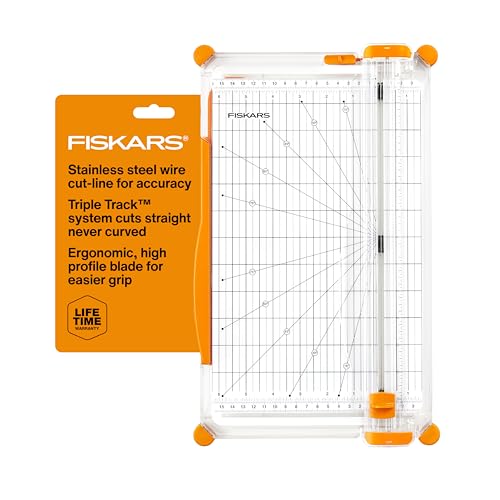
Fiskars SureCut Deluxe Craft Paper Trimmer
A wire cut line shows exactly where the blade will travel, so a photo mat lands square on the first pass. The swing arm extends support to twelve inch paper, keeping long sheets flat instead of sagging mid cut. Replacement blade cartridges are widely stocked, which keeps the trimmer useful for years.
Pros
- Wire guide removes guesswork on every cut
- Swing arm supports full twelve inch sheets
- Replacement blades are easy to find
Cons
- Occupies permanent desk space
- Blade wears faster on thick chipboard

Scotch ATG 714 Adhesive Applicator
A trigger squeeze lays an even line of adhesive with no wrinkling and no drying time. Framers and mounters relied on this style of gun long before scrapbookers adopted it. Refill rolls cost little when bought in bulk. The applicator itself costs more upfront than a handheld tape runner, and it bonds permanently only, with no repositioning.
Pros
- Applies adhesive far faster than tape runners
- Leaves a clean line with zero wrinkling
- Refill rolls are inexpensive in bulk
Cons
- Bonds permanently, with no repositioning option
- Higher upfront cost than a basic tape runner
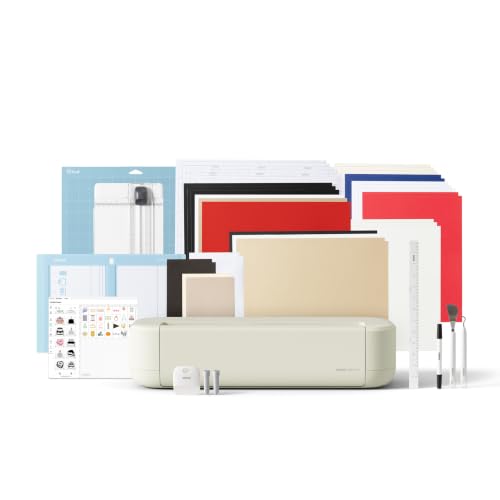
Cricut Explore 3 Cutting Machine
Titles, intricate borders and custom shapes get cut from your own cardstock instead of purchased as premade embellishments. Cutting speed on the Explore 3 beats earlier Cricut models noticeably. Matless cutting handles long strips of Smart Materials without a mat underneath. Design Space software has a real learning curve, and full pattern access needs an ongoing subscription.
Pros
- Cuts precise custom titles and intricate shapes
- Faster cutting speed than earlier Cricut models
- Matless cutting handles long material strips
Cons
- Design Space has a noticeable learning curve
- Full library access requires a subscription

Tonic Studios Tim Holtz Guillotine Comfort Trimmer
A long steel blade and spring loaded safety guard cut through chipboard, book board and several stacked cardstock sheets at once. Clearly marked measurements line up a cut without extra tools. Weight in the base keeps it still during the cut instead of sliding across the desk. Desk space disappears fast with this trimmer, and placement is slightly less precise than a wire guide on very thin paper.
Pros
- Cuts thick chipboard a rotary blade cannot
- Weighted base stays still during each cut
- Safety guard covers the blade between uses
Cons
- Bulky footprint on a small craft desk
- Less precise placement on thin paper

We R Memory Keepers Crop-A-Dile Eyelet and Snap Punch
Leverage built into the handle punches cardstock, chipboard, thin metal and even plastic with far less hand strain than a basic punch. The same tool sets eyelets and snaps afterward, so no second gadget is needed. Extended reach punches holes well inside a page, not only near an edge. Two hole diameters cover most standard eyelet sizes on the market.
Pros
- Low effort punching through tough materials
- Sets eyelets and snaps with the same tool
- Extended reach punches deep inside a page
Cons
- Limited to two hole diameters
- Bulky shape takes up drawer space

Sizzix Big Shot Plus Die Cutting Machine
A hand crank presses shapes through cardstock without electricity, software or a monthly subscription. The Plus size platform accepts wider dies, including twelve inch designs that will not fit a standard Big Shot. Embossing folders run through the same machine as cutting dies. Every shape still depends on owning the matching die, so a collection grows steadily over time.
Pros
- Runs entirely without power or software
- Cuts and embosses using the same machine
- Accepts dies from most major brands
Cons
- Limited to shapes you own dies for
- Heavy machine needs a sturdy surface

Xyron Creative Station Lite
A die cut, a photo or a scrap of patterned paper feeds through the hand crank and comes out backed with adhesive, ready to peel and place. No heat, power or wet glue enters the process, so paper never buckles. Cartridge options switch between permanent, repositionable and laminate finishes. A five inch feed width limits the machine to smaller embellishments rather than full page backing.
Pros
- Converts any cutout into a peel and stick piece
- No heat or wet glue to warp paper
- Cartridge choices cover permanent and repositionable needs
Cons
- Cartridge refills add an ongoing cost
- Narrow five inch feed limits piece size
Compared at a glance
| # | Model | Type | Best for | Score | Price |
|---|---|---|---|---|---|
| 1 | Fiskars SureCut Deluxe Craft Paper Trimmer | Rotary paper trimmer | Best overall | 9.4 | Check price |
| 2 | Scotch ATG 714 Adhesive Applicator | Trigger adhesive transfer gun | Best adhesive tool | 9.2 | Check price |
| 3 | Cricut Explore 3 Cutting Machine | Electronic cutting machine | Best cutting machine | 9.0 | Check price |
| 4 | Tonic Studios Tim Holtz Guillotine Comfort Trimmer | Guillotine trimmer | Best for thick materials | 8.7 | Check price |
| 5 | We R Memory Keepers Crop-A-Dile Eyelet and Snap Punch | Punches holes and sets eyelets | Best hole punch | 8.5 | Check price |
| 6 | Sizzix Big Shot Plus Die Cutting Machine | Manual die cutting and embossing | Best manual die cutting | 8.2 | Check price |
| 7 | Xyron Creative Station Lite | Cold adhesive applicator | Best for sticker making | 8.0 | Check price |
What to look for
Rotary trimmer or guillotine: which cuts better? A rotary trimmer runs a small circular blade along a track, guided by a wire line that marks the cut before it happens. Cardstock and photo paper slice cleanly with almost no tearing. Guillotine trimmers swing a long hinged blade instead, and that extra leverage cuts through chipboard, book board or several stacked sheets. Daily paper trimming favors rotary. Occasional thick material cuts favor guillotine. Many crafters eventually own both, but rotary earns the first purchase.
How to choose scrapbooking adhesive Wet glue buckles thin paper as it dries, so most crafters avoid it near photos entirely. Cheap tape yellows over time and can bleed adhesive through an image. Look for acid free and photo safe labeling on anything touching a photograph, since that testing protects the image over years. Tape runners suit small mounting jobs. Adhesive guns like the ATG 714 handle volume work faster. Foam squares and glue dots add dimension to embellishments instead of flat mounting. Keep one repositionable adhesive on hand for laying out a page before anything becomes permanent.
What acid free and photo safe actually mean Acid free means a material will not turn acidic and degrade what it touches over time. Lignin free matters specifically for paper, because lignin breaks down and yellows pages from the inside. Photo safe generally signals a product passed testing for direct contact with photographs. These labels matter most on album pages, page protectors and adhesives. They matter far less on decorative die cuts or embellishments that never touch an image directly. Spending slightly more on archival page protectors is the single highest impact purchase for anyone preserving printed photos long term.
Which scrapbooking tools are worth buying first New scrapbookers often buy a cutting machine or a large die collection before basic tools are even in place. Owners report that a reliable trimmer, one good adhesive, a bone folder and sharp scissors carry the majority of layouts on their own. Specialized punches, die machines and sticker makers earn their keep once a personal style solidifies. Add a tool when a specific frustration keeps repeating, not because a catalog suggests it. That approach keeps a craft desk useful instead of cluttered.
Questions worth asking
What tools does a beginner scrapbooker actually need?
A paper trimmer, an acid free adhesive, sharp scissors, a bone folder and a ruler cover almost every early layout. Page protectors and an album sized to your paper come next. Cutting machines, punch collections and die sets make more sense once a personal style and recurring frustrations become clear.
Do you need a Cricut for scrapbooking?
No single machine is required to make good pages. A Cricut expands what is possible, especially custom titles and intricate cuts, but plenty of strong layouts use only a trimmer and hand cut elements. Anyone unsure about the subscription can start with a manual die cutter like the Sizzix Big Shot Plus instead.
What adhesive is safe to use on photographs?
Anything labeled acid free and photo safe. Photo corners are the most conservative option, since they hold a photograph without adhesive ever touching the image and allow removal later. Ordinary office tape and rubber cement should stay away from photographs entirely.
Rotary trimmer vs guillotine: which cuts scrapbooking paper better?
Rotary trimmers suit everyday paper, cardstock and photos, since the wire guide gives accuracy and the blade leaves a clean edge. Guillotine trimmers handle chipboard, book board and stacked sheets that a rotary blade cannot manage. Many crafters keep both, and a rotary trimmer is the more useful single purchase.
How often should scrapbooking trimmer blades be replaced?
Replace a blade once cuts start tearing instead of slicing, or once the blade skips near the end of a stroke. Material matters more than calendar time here, since chipboard dulls a rotary blade far faster than plain cardstock. Keeping one spare cartridge on hand avoids stalling a project mid page.
What is a bone folder used for in scrapbooking?
A bone folder creases folds crisply and burnishes adhesive flat without leaving fingerprints or shine behind. It costs little, lasts indefinitely and noticeably improves card and pocket page work. Plastic versions perform as well as traditional bone for nearly every scrapbooking task.
Is a manual die cutting machine better than an electronic one?
Neither wins outright, since they solve different problems. A manual die cutter like the Big Shot Plus needs no power, software or subscription and handles wafer thin dies from many brands. An electronic machine like the Cricut Explore 3 cuts far more intricate custom shapes but adds a software learning curve and a possible subscription cost.
Can digital scrapbooking replace physical tools and supplies?
Digital scrapbooking is a different craft rather than a direct substitute. It skips consumable costs entirely and can still become a printed photo book. Physical scrapbooking adds texture, dimension and a tactile process that many crafters do this hobby for in the first place. Some people combine both by printing digital elements, then cutting and mounting them by hand.
What is the best scrapbooking tool for making stickers at home?
The Xyron Creative Station Lite turns any die cut, photo or scrap of patterned paper into a peel and stick sticker with a hand crank alone. No heat, power or wet glue enters the process, so paper never buckles. A five inch feed limits it to smaller embellishments rather than full page backing.
Our take
Fiskars SureCut Deluxe Craft Paper Trimmer earns the first spot on a craft desk, because straight cuts fix more layouts than any other single upgrade. Scotch ATG 714 Adhesive Applicator pairs well once photo mounting volume climbs, and Cricut Explore 3 Cutting Machine makes sense only after basic tools stop solving the problem. Buy for a frustration you already have, not one a catalog suggests you might.
Jake Monroe
Jake worked as a residential contractor for over a decade before shifting to full-time writing. He evaluates power tools, hand tools and workshop gear through the lens of someone who has actually used them on job sites, not just read the box.