Which Robot Building Kits Actually Teach Real Coding
LEGO Education SPIKE Prime ranks first, since one hub carries a student from Scratch-style blocks into Python. Makeblock mBot Neo reaches a working robot faster and costs far less. Elegoo Smart Robot Car Kit V4.0 fits teens ready to wire an UNO R3 board themselves.
LEGO Education SPIKE Prime suits families planning more than one project. Blocks, Python and several hundred Technic elements share a single hub, so the set outlives its first build. Cost is the real barrier for a one-off gift. Makeblock mBot Neo follows the same software path for much less.
Three different products hide behind one label: snap-together coding robots, screwdriver and wiring electronics kits, and single-build novelty models. Box ages skew optimistic across all three. Rankings below weigh part counts, sensor lists, the programming language on offer, how many alternative models each kit supports, and owner feedback on how long a build held a child’s attention.
What matters most
Matching a robot kit to age and patience Box ages run optimistic across this whole category. A confident eight year old manages mBot Neo or JIMU AstroBot, since both snap together without tools. Twelve is a realistic floor for the Elegoo kit, where one reversed jumper wire stops everything working. Patience counts as much as birthdays. Children who abandon long projects do better starting with the 4M Tin Can Robot, then moving up if the interest holds.
Block coding vs text-based programming Drag-and-drop blocks remove syntax errors, which is why Scratch-derived tools own the beginner end. Progress stalls eventually, because blocks hide the structures real code depends on. SPIKE Prime and mBot Neo both answer that by offering Python in the same app, with no new hardware to buy. Elegoo skips the ramp and starts at C++. Choose the transition path before the robot, since software outlasts plastic.
Which sensors actually matter Motors alone produce a remote-control toy. Reaction to surroundings is what makes a machine feel robotic. Ultrasonic modules measure distance and drive obstacle avoidance. Infrared arrays follow a line drawn on paper. Colour sensors trigger different behaviour on different surfaces, and SPIKE Prime adds a force sensor for pressure-triggered actions. Sensor-free kits, including Thames and Kosmos and the 4M model, can only replay what a child set up beforehand.
Kits that stay useful after the first build Most robot kits gather dust once the headline model is finished. Rebuild potential is the honest value test. SPIKE Prime supports dozens of designs and mixes with any Technic parts already in the house. Thames and Kosmos documents ten builds in its manual. Sphero RVR+ takes another route, staying current by accepting a micro:bit or Raspberry Pi on the expansion port. Single-model kits still work as gifts, but expect no second project from them.
The top picks, ranked

LEGO Education SPIKE Prime Set
Six ports on the programmable hub drive motors and sensors through the SPIKE app. Coding begins in Scratch-style blocks and switches to Python inside the same project. Distance, force and colour sensors arrive with several hundred Technic elements, which is why one set covers dozens of builds across a school year.
Pros
- Block coding and Python live in one app
- Technic elements mix with LEGO already at home
- Rechargeable hub replaces loose alkaline cells
Cons
- Costs far more than every rival listed
- Each session needs a tablet or computer

Makeblock mBot Neo
CyberPi controller carries a display, light sensor and speaker before any add-on arrives, so a first program runs on day one. mBlock software offers Scratch blocks and Python, matching what many classrooms already teach. Aluminium chassis parts survive crashes, while line following and obstacle avoidance work out of the box.
Pros
- Working robot after roughly an hour of assembly
- Same mBlock path many schools run
- Expansion packs add servos and extra sensors
Cons
- Base kit builds one chassis design only
- Several features require a Wi-Fi connection
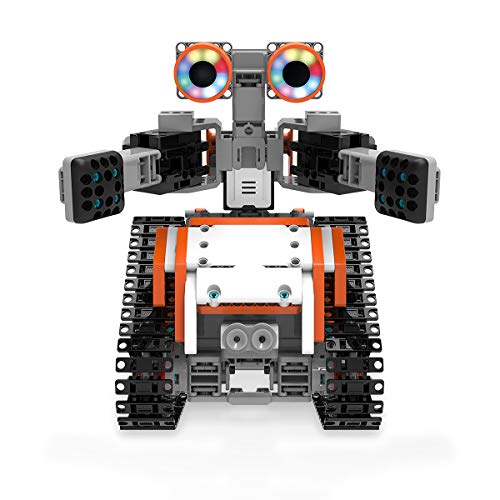
UBTECH JIMU Robot AstroBot Kit
Around 387 snap-fit parts assemble into a rover or a humanoid astronaut. Instructions appear as 3D models you rotate on screen rather than flat diagrams. Servos produce walking and posing motion that wheeled kits cannot match, and an infrared sensor handles obstacle detection. Blockly coding introduces sequences and loops without typing.
Pros
- Rotatable 3D steps beat printed diagrams
- Servo motion allows walking and posing builds
- One box supports several official models
Cons
- Building stops without the app running
- Servo cables need care during assembly

Sphero RVR+
Treads and a strong drivetrain cross grass and gravel where wheeled kits stall. A roll-top expansion port feeds power and data to a micro:bit, Raspberry Pi or Arduino, which is where older students take over. Sphero Edu handles blocks and JavaScript, and a colour sensor supports line and surface projects.
Pros
- Drives outdoors on terrain that stops rivals
- Expansion port keeps it relevant for years
- Battery is swappable and rechargeable
Cons
- Ships assembled, so no build phase exists
- Deeper projects need boards bought separately

Elegoo Smart Robot Car Kit V4.0
Genuine electronics work starts here: an UNO R3 board, jumper wiring, an ultrasonic module and infrared line sensors, assembled with a screwdriver. Elegoo supplies tutorials and sample sketches in editable C++ rather than a closed app. Finish the car and that same hardware reprograms for unrelated projects.
Pros
- Teaches wiring alongside embedded C++
- Parts carry over to other Arduino projects
- Lowest cost route into real electronics learning
Cons
- First build frustrates without adult help
- 18650 cells and a charger cost extra

Thames and Kosmos Robotics Workshop
Programming happens on a handheld control unit that records a movement sequence and replays it. No tablet, app or account enters the process at any point. Ten documented builds cover grabbers, walkers and vehicles, and a printed manual explains the gears and linkages behind each one.
Pros
- Runs fully offline with zero screen time
- Printed manual explains gears and linkages
- Ten distinct models come from one box
Cons
- Recorded sequences cannot match written code
- No sensors, so behaviour is never autonomous
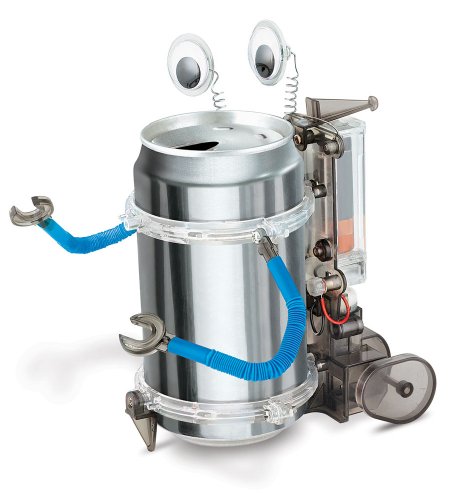
4M Tin Can Robot
An empty drinks can becomes the body, driven by a small motor and a single AA cell. Assembly fills an afternoon and demonstrates simple circuits, balance and offset weights. Coding never enters the picture, so treat this as a first taste rather than a learning path.
Pros
- Costs a fraction of every other kit listed
- Finished in one sitting, good for short attention spans
- Shows how a simple motor circuit works
Cons
- One fixed build with no reconfiguration
- No programming element at any stage
The lineup, side by side
| # | Model | Age | Best for | Score | Price |
|---|---|---|---|---|---|
| 1 | LEGO Education SPIKE Prime Set | 10 and up | Best overall | 9.4 | Check price |
| 2 | Makeblock mBot Neo | 8 and up | Best for coding beginners | 9.2 | Check price |
| 3 | UBTECH JIMU Robot AstroBot Kit | 8 and up | Best for app-guided building | 9.0 | Check price |
| 4 | Sphero RVR+ | 8 and up, with headroom for teens | Best for expandability | 8.8 | Check price |
| 5 | Elegoo Smart Robot Car Kit V4.0 | 12 and up | Best value for Arduino learners | 8.6 | Check price |
| 6 | Thames and Kosmos Robotics Workshop | 10 and up | Best screen-free | 8.3 | Check price |
| 7 | 4M Tin Can Robot | 8 and up | Best budget | 8.0 | Check price |
Common questions
What age is a robot building kit suitable for?
Snap-together coding robots work from about eight. Screwdriver and wiring kits such as the Elegoo car realistically start at twelve. Younger children manage those only with an adult working alongside them.
Which robot kit is best for learning to code?
LEGO Education SPIKE Prime, because one app carries a student from Scratch-style blocks into Python. Makeblock mBot Neo offers that same progression at a much lower outlay.
Do robot building kits need a tablet or computer?
Most do. SPIKE Prime, mBot Neo, JIMU AstroBot and Sphero RVR+ all program through an app. Thames and Kosmos Robotics Workshop and the 4M Tin Can Robot need no screen at all.
LEGO SPIKE Prime vs mBot Neo: which is better for beginners?
mBot Neo reaches a working robot faster and asks less of a first-time builder. SPIKE Prime offers far more building variety and a longer runway once early projects feel easy.
Are Arduino robot car kits too hard for kids?
For under-twelves, usually yes without help. Wiring mistakes fail silently, which frustrates quickly. Teens who enjoy troubleshooting get the most value, and the electronics knowledge transfers to other projects.
Can you rebuild a robot kit into different models?
Rebuild support varies widely. SPIKE Prime and JIMU AstroBot cover many alternative builds. Thames and Kosmos documents ten. 4M Tin Can Robot is one fixed design with nothing to reconfigure.
Do robot building kits come with batteries?
Rechargeable packs are built into SPIKE Prime, mBot Neo and Sphero RVR+. Elegoo needs 18650 cells plus a charger bought separately. 4M Tin Can Robot runs on a single AA cell.
Is a robot kit better than a coding app?
Physical robots give visible feedback, which holds a young learner’s attention longer. Apps cost less and travel easily. Many families run both and save the robot for weekend projects.
What is the best robot building kit for a classroom?
SPIKE Prime, since one set supports dozens of builds and a whole class can follow the same lesson path. mBot Neo works better where budget limits the number of sets on a shelf.
Our take
SPIKE Prime earns the top pick for any household or classroom planning more than one project, because blocks, Python and constant rebuilds all live in one box. Tighter budgets should go to the Makeblock mBot Neo, which follows the same learning path and builds faster on day one. Teens already comfortable with electronics will learn more from the Elegoo Smart Robot Car Kit V4.0 and its editable Arduino sketches. Skip every kit with no sensors if coding is the actual goal.
Rachel Simmons
Rachel previously worked in child-product retail and brings a practical, detail-first eye to gear reviews, focusing on safety standards, ease of use and the fine print that matters most for new caregivers.


