Robot Building Kits Kids Keep Using After Week One
Makeblock mBot2 suits most children aged eight and up, since one robot carries them from block coding into Python. UBTECH JIMU Robot AstroBot Series Cosmos Kit fits builders who want servo driven, articulated models. Under eight, Thames & Kosmos Kids First Coding & Robotics teaches sequencing with no screen.
Makeblock mBot2 is the kit to buy for a curious child of eight or older. Drag and drop blocks get a first program running within minutes, and the same CyberPi controller later accepts Python. First assembly still needs an adult at the table. Families with younger children should start with Thames & Kosmos Kids First Coding & Robotics, which uses no screen at all.
Robot kits fail two ways: the build is fiddlier than the age label suggests, or the finished robot does one trick and then sits on a shelf. We compared published age ranges, coding environments, sensor lists and the number of models each kit supports. Owner feedback about cracked plastic clips and abandoned apps shifted the order. Kits that stop working without a paid subscription were excluded.
The best picks, ranked

Makeblock mBot2
One robot covers years of learning, because the CyberPi controller runs mBlock drag and drop blocks and Python on identical hardware. Aluminium chassis parts survive drops that crack plastic rivals. Ultrasonic, line following and gyroscope sensors ship built in, so there is something to program on day one. Built in Wi-Fi lets several robots talk to each other in a classroom.
Pros
- Blocks and Python run on the same board
- Aluminium chassis handles rough treatment
- Sensors support real projects, not just driving
Cons
- First assembly needs adult help
- Most expansion arrives through add on packs
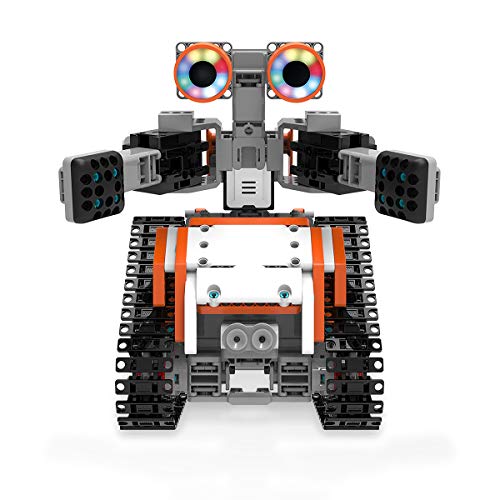
UBTECH JIMU Robot AstroBot Series Cosmos Kit
Around 387 snap together parts and a set of servo motors produce robots that walk, turn and gesture instead of simply rolling. Poseable programming records a limb moved by hand, which beats typing joint angles for a child. Three official models ship with instructions, each guided step by step in 3D inside the app.
Pros
- Walking and gesturing, not just driving
- Record a pose rather than code angles
- 3D instructions cut down adult help
Cons
- Snap connectors need firm hands
- Guided builds require the app

Thames & Kosmos Kids First Coding & Robotics
Children lay out physical coding cards, then a motorised mouse robot reads the sequence and drives the route. No tablet is involved anywhere, which suits families limiting screen time for younger kids. An illustrated story guide walks through progressively harder challenges. Most children outgrow it inside a year.
Pros
- Teaches sequencing without a device
- Large parts suit small hands
- Story format holds attention
Cons
- Short useful life past age eight
- Very little actual building involved

ELEGOO UNO R3 Smart Robot Car Kit V4.0
This is a genuine Arduino project rather than a toy, built around an UNO R3 compatible board, jumper wires and a motor driver shield. Wiring, sensor calibration and C syntax all come with the territory. Line tracking, obstacle avoidance and app driving arrive as sample sketches. Expect frustration unless an adult nearby can read a wiring diagram.
Pros
- Teaches wiring alongside real code
- Parts carry over into later Arduino projects
- Detailed tutorials included
Cons
- Steep for anyone under twelve
- Loose jumper wires pull out during driving

Snap Circuits Rover
Colour coded circuit modules snap onto a rover chassis, so a child builds working circuits with no soldering and no wiring errors. More than 30 guided projects cover lights, sound and motor control, all driven from a wired remote. Schematic symbols printed on each block introduce real notation early. Programming is absent from this one.
Pros
- Electronics without soldering
- Printed schematic symbols teach notation
- Instant results keep interest high
Cons
- No coding element at all
- Wired remote limits driving range

Sphero RVR+
Treads and a roll cage let this one cross grass, gravel and thick carpet where wheeled kits stall. Its universal expansion port accepts a micro:bit, a Raspberry Pi or third party sensors, so ambition rather than hardware sets the ceiling. Sphero Edu covers drawing, blocks and JavaScript in one app. Assembly is minimal, making it a programmable platform more than a construction kit.
Pros
- Drives outdoors on rough ground
- Expansion port invites real projects
- Three coding levels inside one app
Cons
- Almost no building involved
- Heavier than desk sized robots
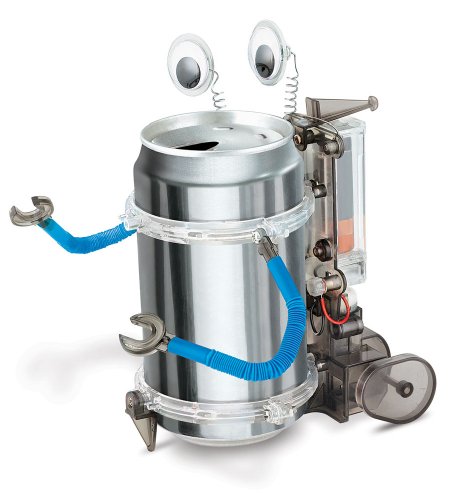
4M Tin Can Robot
An empty drink can becomes the body, and a small motor sends it skittering across a table on wire legs. Two AAA cells power it, sold separately. Building takes an afternoon and teaches motor and balance basics rather than coding. Use it to gauge interest before committing to a larger kit.
Pros
- Finished in a single sitting
- Reuses a household drink can
- Good test of a child’s real interest
Cons
- No programming or sensors
- Novelty fades within days
How they stack up
| # | Model | Age range | Best for | Score | Price |
|---|---|---|---|---|---|
| 1 | Makeblock mBot2 | 8 years and up | Best overall | 9.4 | Check price |
| 2 | UBTECH JIMU Robot AstroBot Series Cosmos Kit | 8 years and up | Best for articulated builds | 9.2 | Check price |
| 3 | Thames & Kosmos Kids First Coding & Robotics | 4 to 8 years | Best for ages 4 to 8 | 9.0 | Check price |
| 4 | ELEGOO UNO R3 Smart Robot Car Kit V4.0 | 12 years and up | Best for teens and Arduino | 8.8 | Check price |
| 5 | Snap Circuits Rover | 8 years and up | Best for electronics basics | 8.6 | Check price |
| 6 | Sphero RVR+ | 8 years and up | Best for outdoor robotics | 8.4 | Check price |
| 7 | 4M Tin Can Robot | 8 years and up | Best budget | 8.2 | Check price |
What matters most
What to look for in a robot building kit Three factors decide whether a kit stays in use: build difficulty, what the robot can do once finished, and whether it can be rebuilt into something else. One fixed model with no sensors becomes a shelf ornament fast. Published sensor lists matter, since ultrasonic and line following sensors turn plain driving into problem solving. Part material is the quiet detail. Aluminium and thick ABS survive the drops that crack thin snap clips, and a kit broken in week two teaches nothing.
Coding cards vs block coding vs typed code Reading ability predicts the right coding method better than age does. Children of four to eight get further with physical cards, as in the Thames & Kosmos set, because sequencing is the concept and typing is only friction. Around eight, block environments such as mBlock and Sphero Edu let a child drag loops and conditionals into place. Typed languages suit confident readers from about twelve, which is why the ELEGOO kit carries that rating. Kits bridging two stages, like the mBot2 with blocks and Python, stay useful longest.
Durability, spare parts and rebuild value Snap together plastic is the usual failure point, especially on servo driven models where torque loads every joint. UBTECH sells replacement JIMU parts, so one cracked bracket does not end a build. Expansion counts just as much. Sphero RVR+ accepts a micro:bit or Raspberry Pi through its universal port, and Makeblock sells sensor packs that bolt onto the mBot2 chassis. Without spares or expansion, a kit has a fixed lifespan however good the first build felt.
Matching a kit to age, patience and adult support A cautious six year old gets more from coding cards and a mouse robot than from 387 loose parts. Children who already finish long LEGO builds unsupervised are ready for the JIMU AstroBot Cosmos Kit. Teenagers curious about how machines actually work should skip app driven robots and take the ELEGOO UNO R3 car, provided somebody nearby can read a wiring diagram. Unsure whether the interest is real? 4M Tin Can Robot answers that in one afternoon, with no large kit gathering dust afterwards.
Questions worth asking
What age is right for a first robot building kit?
Four to eight year olds do best with screen free card coding, as in the Thames & Kosmos set. From eight, block coding kits like the mBot2 fit well. Typed code suits twelve and up.
Do robot building kits for kids need a tablet or phone?
Most block coding kits do, including mBot2, JIMU AstroBot and Sphero RVR+. Snap Circuits Rover and the Thames & Kosmos set run with no device involved. Check before buying if screen time is a concern.
Which robot kit teaches real programming?
Makeblock mBot2 moves from blocks into Python on the same controller. ELEGOO UNO R3 Smart Robot Car goes further, into Arduino C and physical wiring. Both build skills that transfer to other projects.
Robot kits vs LEGO sets: which teaches more?
Robot kits add sensors, motors and code, so a child programs behaviour rather than only assembling. LEGO wins on part count and open ended building. Many families keep both on the shelf.
How long does a robot kit hold a child’s interest?
Single model kits often fade within days. Kits with multiple builds, sensors or expansion ports run for months. mBot2 and Sphero RVR+ last longest, because the coding level can keep rising.
Can a child build these kits without adult help?
Guided app builds like the JIMU AstroBot are manageable alone from roughly ten. First assembly of the mBot2 usually needs an adult. Arduino kits need adult support from start to finish.
What happens if a part breaks?
UBTECH and Makeblock both sell replacement parts, so a cracked bracket is recoverable. Budget kits rarely offer spares at all. Check spare part availability before buying an expensive set.
Which robot kit works outdoors on grass?
Sphero RVR+ is the only one here built for it, thanks to treads and a roll cage. Wheeled kits such as the mBot2 need smooth indoor flooring. Gravel and lawn stall small plastic wheels.
Is a robot building kit worth it for a four year old?
Only the card based type. Thames & Kosmos Kids First Coding & Robotics teaches sequencing with large parts and no screen. Servo kits with hundreds of pieces frustrate that age and end up rebuilt by a parent.
What is the best robot kit for a teenager interested in electronics?
ELEGOO UNO R3 Smart Robot Car Kit V4.0, because the board, jumper wires and motor shield are genuine components. Sketches for line tracking and obstacle avoidance come included. Parts stay useful in later Arduino builds.
Our take
Makeblock mBot2 is the kit worth buying for a child of eight or older, since blocks, Python and a real sensor set keep it relevant for years instead of weeks. Households with a preschooler should pick Thames & Kosmos Kids First Coding & Robotics and revisit programmable robots later. A teenager who wants to understand the wiring, not just tap an app, belongs with the ELEGOO UNO R3 car.
Rachel Simmons
Rachel previously worked in child-product retail and brings a practical, detail-first eye to gear reviews, focusing on safety standards, ease of use and the fine print that matters most for new caregivers.