PS5 Cooling Stands With Real Airflow, Not Just RGB
OIVO’s Multifunctional Cooling Stand leads with three adjustable fans and dual controller charging built into one base. Tight budgets are served well by the simpler Subsonic stand instead. Households charging several controllers at once should look at the TOTOBAY dock, which adds a third port.
A PS5 running Warzone or Spider-Man for hours pushes its internal fan loud enough to hear across the room. OIVO’s Multifunctional Cooling Stand answers with three adjustable fans and dual controller charging in one base. Its footprint runs wider than a simple vertical stand, so measure your shelf first.
PS5 Slim and the original launch console differ in body shape, so a stand built for one often will not seat the other securely. We compared fan count, stated airflow, charging ports, and owner reports on rattling or overheating across seven current listings.
The top picks, ranked

OIVO PS5 Multifunctional Cooling Stand with Controller Charging Station
Three built-in fans pull air across the console body instead of relying on the internal fan alone. A speed dial trades noise for cooling depending on the game running. Two controller charging ports and slots for game discs sit built into the same base.
Pros
- Three fans cover more surface area than single-fan rivals
- Charges two controllers while the console cools
- Disc slots keep games within reach
Cons
- Fan noise rises noticeably at the highest speed setting
- Wider base than simple vertical stands

NexiGo PS5 Vertical Stand with Cooling Fan
One quiet fan sits under a stable vertical base, so the console stands upright without wobbling during disc swaps. Reported fan noise stays under the PS5’s own internal fan at load. Charging ports are absent entirely, keeping the design simple.
Pros
- Fan noise stays below the console’s own fan
- Wide non-slip base resists tipping
- Lower cost than multi-fan competitors
Cons
- No controller charging built in
- Single fan cools less area than triple-fan stands

JOYSHARK PS5 Cooling Stand with RGB Light
A remote-controlled RGB strip wraps the base for setups built around gaming lighting. Twin fans still handle the cooling job underneath the lighting. Two controller charging ports sit on the front edge for easy access.
Pros
- RGB lighting matches themed entertainment setups
- Dual fans plus charging in one unit
- Remote adjusts color without reaching behind the TV
Cons
- RGB adds no actual cooling benefit
- Bulkier footprint than plain vertical stands
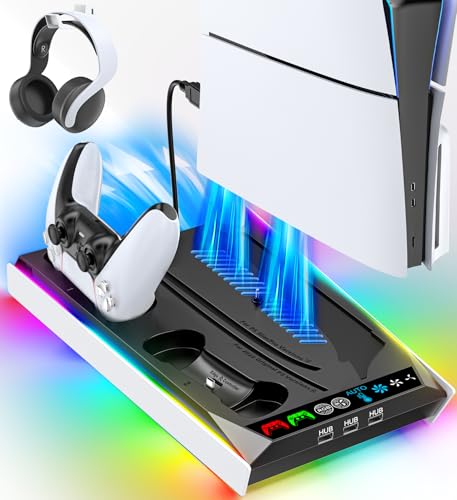
TOTOBAY PS5 Cooling Stand Charging Dock
Three controllers charge at once here, suiting households where siblings share one console. An adjustable twin fan sits beneath the console cradle. Fourteen slots hold game discs along the side, replacing a shelf’s worth of case storage.
Pros
- Three charging ports beat most rivals’ two
- Disc storage doubles as a shelf replacement
- Twin fan speed adjusts by hand dial
Cons
- Larger footprint needs more entertainment center space
- Fan hums audibly at top speed

Fyoung PS5 Slim Cooling Fan Stand
This cradle matches the shorter, narrower Slim console rather than the original launch shape. A dual fan with speed control sits under the base. Its stabilizer bar keeps the lighter Slim body from rocking during controller docking.
Pros
- Cradle matches the Slim body exactly
- Dual fan speed adjusts to game load
- Stabilizer bar prevents rocking
Cons
- Does not fit the original launch PS5
- No controller charging ports

Subsonic PS5 Cooling Stand
A single fixed-speed fan and an ABS plastic shell cover the basics without extras. USB passthrough ports on the front save owners from reaching behind the console. Buyers picking their first cooling stand often start here before upgrading.
Pros
- Lowest cost way to add active cooling
- Front USB ports save reaching behind the TV
- Compact footprint fits tight shelves
Cons
- Fixed fan speed cannot be lowered for quiet play
- No charging ports or disc storage
YUANHOT PS5 Cooling Stand with Controller Charger
One large-diameter fan moves more air per rotation, letting it run slower and quieter than small twin fans. Two controller charging ports sit built into the base. Slots along the side hold spare discs without a separate rack.
Pros
- Large fan runs quieter at equivalent airflow
- Includes charging and disc storage
- Stable base for vertical placement
Cons
- Single fan cools less evenly than triple-fan designs
- Plastic build feels lighter than metal-reinforced rivals
The lineup, side by side
| # | Model | Fans | Best for | Score | Price |
|---|---|---|---|---|---|
| 1 | OIVO PS5 Multifunctional Cooling Stand with Controller Charging Station | 3 built-in fans, adjustable speed | Best overall | 9.4 | Check price |
| 2 | NexiGo PS5 Vertical Stand with Cooling Fan | Vertical stand only | Best value | 9.2 | Check price |
| 3 | JOYSHARK PS5 Cooling Stand with RGB Light | Multi-color RGB with remote control | Best for RGB lighting | 9.0 | Check price |
| 4 | TOTOBAY PS5 Cooling Stand Charging Dock | Charges up to 3 controllers | Best for multiple controllers | 8.8 | Check price |
| 5 | Fyoung PS5 Slim Cooling Fan Stand | Designed for PS5 Slim disc and digital | Best for PS5 Slim | 8.5 | Check price |
| 6 | Subsonic PS5 Cooling Stand | Single fixed-speed fan | Best budget | 8.2 | Check price |
| 7 | YUANHOT PS5 Cooling Stand with Controller Charger | Single large-diameter low-noise fan | Best for quiet operation | 8.0 | Check price |
How to pick the right one
What to look for in a PS5 cooling stand Fan count and speed control matter more than marketing claims about temperature drops. Adjustable speed lets you trade noise for cooling during demanding games. Charging ports and disc storage add convenience, not cooling power. Check base width against your shelf before ordering, since triple-fan stands run wider.
PS5 Slim vs original PS5: stands are not interchangeable Sony shrank the console body for the Slim revision, so cradles sized for the original often sit loose. A loose fit blocks side vents and can trap heat instead of releasing it. Fyoung and similar Slim-specific stands solve this with a narrower cradle. Confirm your console generation before ordering any stand.
Best cooling stand for small entertainment centers Vertical-only stands like the NexiGo take the smallest footprint when shelf depth runs tight. Skip charging docks and disc slots if space, not features, is the real constraint. A single quiet fan still beats no active cooling at all. Measure shelf depth against the stand’s listed base dimensions first.
Is a PS5 cooling stand worth it for heavy daily use Consoles running several hours daily benefit most from active cooling, since dust buildup inside worsens over months. Short, occasional sessions see less benefit from a fan-equipped stand. No stand fixes a console already clogged with dust internally. Pair any stand with periodic vent cleaning for the best long-term result.
Questions worth asking
Do PS5 cooling stands actually reduce fan noise?
Reports vary by model. Multi-fan stands that pull air across the vents can let the internal fan ramp less under load, lowering overall noise. A stand alone will not silence a console already struggling with dust buildup inside.
Is a cooling stand necessary for PS5?
Not strictly, since Sony designed the internal cooling for normal use without one. Long sessions in a warm room or a console kept in an enclosed cabinet benefit most from added airflow.
Can I use a PS5 Slim cooling stand on the original PS5?
Usually not well. The Slim body runs shorter and narrower, so a Slim-specific cradle like the Fyoung will not seat the original console securely. Check the listing’s stated compatibility before buying.
How many controllers can PS5 charging stands charge at once?
Most stands offer two ports. The TOTOBAY dock in this comparison charges three, suiting households sharing one console among several players.
Do cooling stands void the PS5 warranty?
No, since they attach externally and do not open the console. Sony’s warranty covers internal hardware faults regardless of external accessories used.
Vertical vs horizontal: which orientation cools better?
Sony designed the PS5 to vent from the top when vertical, so a proper vertical stand with a stabilizer generally matches or slightly improves on flat horizontal placement for airflow.
Are RGB PS5 stands worth the extra cost?
RGB lighting adds no cooling benefit by itself. Pick one like the JOYSHARK stand only if the lighting fits your setup, and check fan specs separately for actual cooling needs.
How loud are aftermarket PS5 cooling fans?
It depends on fan size and speed setting. Larger single fans like the YUANHOT model tend to run quieter than small twin fans pushed to top speed for the same airflow.
Best PS5 cooling stand for a shared household?
The TOTOBAY dock charges three controllers at once, which suits siblings or roommates sharing one console. Its wider footprint needs more entertainment center space in return.
Our pick
Most households do best with the OIVO Multifunctional Cooling Stand, since three fans and dual charging cover cooling and convenience together. Shoppers on a tight budget should pick the Subsonic stand instead and skip the extras. Anyone with a PS5 Slim needs to check compatibility first, since the Fyoung stand fits that body while the original will not.
Marcus Chen
Marcus covered consumer electronics for enthusiast tech publications for six years before joining ChoiceCrest. He specializes in translating manufacturer spec sheets into plain-language buying advice, with a focus on audio, computing accessories and smart-home gear.


