Does a Cooling Stand Really Help Your Console Run Quieter?
The OIVO PS5 Slim Cooling Stand leads on airflow and stability, with quiet triple fans and dual controller charging. The NexiGo PS5 Slim Cooling Stand offers better value through storage slots and a USB hub. Xbox owners do well with the simpler PowerA Vertical Charging Stand.
Moving actual heat rather than just holding the console upright starts with the OIVO PS5 Slim Cooling Stand, followed by the NexiGo PS5 Slim Cooling Stand and the PowerA Vertical Charging Stand for Xbox Series X and S.
Nearly every cooling stand listing makes the same claims, and fan specifications alone rarely reveal how loud a unit sounds from the couch. We compared published airflow and fan sizes, power draw, charging contacts, base footprint and console compatibility, then weighed what owners report about rattle, fit and long-term fan noise.
The best picks, ranked

OIVO PS5 Slim Cooling Stand
A triple fan cooling module pairs with a dual controller dock and a broad weighted base, the most complete package here. Three speed control trades a little noise for extra airflow during long sessions. Owners report a snug fit on both the disc and digital Slim models without wobble.
Pros
- Three speed fan control
- Charges two controllers at once
- Wide stable base
Cons
- Highest fan speed is audible
- Slim models only

NexiGo PS5 Slim Cooling Stand
A small USB hub and game storage slots sit alongside a solid dual fan cooling base, making this the most useful stand for a cluttered console shelf. Pass-through contacts on the charging cradles let controllers drop straight in. It’s a sensible middle ground between features and footprint.
Pros
- Useful disc storage slots
- Extra USB ports
- Quiet at low speed
Cons
- Only two fans
- Cradles need a firm push

PowerA Vertical Charging Stand for Xbox Series X|S
Fit and finish stand out on this officially licensed Xbox option. A clean vented cradle keeps the console upright, and rechargeable battery packs charge two controllers at once. Steady airflow and a tidy setup matter more here than aggressive fan cooling.
Pros
- Officially licensed fit
- Charges two controllers
- Clean minimal look
Cons
- No active cooling fans
- Battery packs replace your own

DOBE PS5 Cooling Fan Stand
A straightforward fan base and vertical cradle skip the charging dock entirely, keeping things simple. That focus makes it one of the lighter, less cluttered options for a small TV stand. Power draws over USB according to the listing, so it runs straight from the console.
Pros
- Very simple setup
- USB powered from console
- Compact footprint
Cons
- No controller charging
- Plastic feels light

Mcbazel PS5 Cooling Stand
Headset hooks and game slots built into the column keep an entire setup in one place, leaning into organization over raw airflow. A dual fan base with a manual switch handles the cooling side. Crowded cabinets full of accessories suit this stand well.
Pros
- Headset hook included
- Good accessory storage
- Simple manual controls
Cons
- Taller than most stands
- Fan noise at full speed
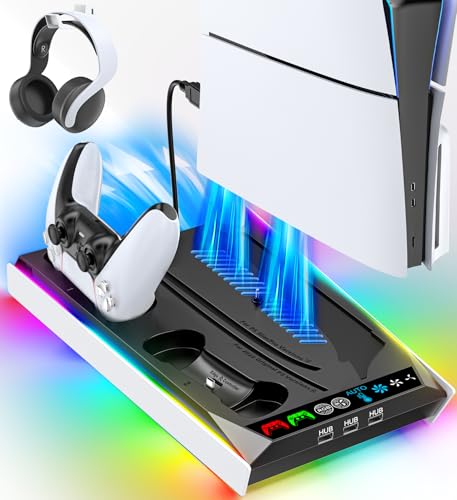
Skywin PS5 Cooling Fan Stand
Fans here tune for lower speed operation, which owners report as noticeably less intrusive than high output stands. Slightly less raw airflow under heavy load is the tradeoff. Living rooms where console noise already competes with the TV suit this stand best.
Pros
- Runs quietly
- Non slip base pads
- Easy assembly
Cons
- Less airflow than triple fan units
- No storage slots
AOLION PS5 Cooling Stand
A taller cooling column pushes air across more of the console shell rather than only from below. The charging dock handles two controllers and includes a status light. Assembly takes a few more minutes than the simpler stands in this lineup.
Pros
- Airflow across more of the shell
- Charge status lights
- Adjustable fan speed
Cons
- Fiddly assembly
- Bulky on small shelves
The lineup, side by side
| # | Model | Fans | Best for | Score | Price |
|---|---|---|---|---|---|
| 1 | OIVO PS5 Slim Cooling Stand | 3 cooling fans | Best overall | 9.4 | Check price |
| 2 | NexiGo PS5 Slim Cooling Stand | 2 cooling fans | Best value | 9.2 | Check price |
| 3 | PowerA Vertical Charging Stand for Xbox Series X|S | Xbox Series X and S | Best for Xbox Series X | 9.0 | Check price |
| 4 | DOBE PS5 Cooling Fan Stand | 2 turbo fans | Best budget | 8.7 | Check price |
| 5 | Mcbazel PS5 Cooling Stand | 2 base fans | Best for storage | 8.5 | Check price |
| 6 | Skywin PS5 Cooling Fan Stand | Dual low noise fans | Best for quiet running | 8.3 | Check price |
| 7 | AOLION PS5 Cooling Stand | 3 stacked fans | Best for long sessions | 8.0 | Check price |
What matters most
Do console cooling stands actually help? A cooling stand won’t rewrite a console’s thermal design, but it does change the air the console pulls in. Consoles sitting in enclosed cabinets or on carpet often recirculate their own warm exhaust, and a fan base breaks that cycle by pushing cooler room air past the intake. Warm rooms and tight media units see the largest benefit; a console standing in open air sees the smallest.
How much do fan count and size affect noise? More fans isn’t automatically better. Two larger fans spinning slowly often move similar air to three small fans running fast, with less high-pitched whine. Multiple speed settings let you run quiet during cutscenes and step it up during long online sessions. The top speed setting on cheaper stands draws the most owner complaints.
What should you know about charging docks and pass-through power? Most stands draw power over USB from the console itself, convenient but sharing the port budget. Charging two controllers while running fans at once means checking whether the stand includes a USB hub or needs a separate wall adapter. Docks with drop-in contacts beat ones requiring a cable plugged into each controller.
How do fit and model compatibility differ across consoles? The PS5 Slim, the original PS5 and the Xbox Series X all use different footprints, and a cradle sized for one rattles on another. Check listed compatibility carefully before buying, and favor a wide base with rubber feet around pets, kids or a lively floor. A heavier base beats a fancy light ring.
Questions worth asking
Will a cooling stand void my console warranty?
No. External stands don’t modify the console or require opening the case, so they sit outside warranty terms. Only internal modifications or third-party parts installed inside the machine would raise a warranty issue.
Does a vertical or horizontal position cool a console better?
Both orientations carry official support, and neither runs dramatically cooler on its own. Clearance around the vents matters more. A stand that lifts the console and keeps several inches of open space on every side helps in either position.
Do these stands work with the PS5 Pro?
Compatibility varies by model, and many stands get designed around the Slim or the original chassis. Always check the listing for explicit PS5 Pro support rather than assuming a universal fit.
Are cooling stands noisy?
At their lowest setting most run quieter than the console itself. Noise becomes noticeable at top speed, especially on stands using small high-speed fans. Multiple speed settings are the practical fix.
Can I leave the fans running all the time?
Yes, though there’s little point when the console sits idle. Many stands power on with the console over USB, so they naturally follow play sessions.
Do I need a cooling stand if my console already sits in the open?
Probably not for thermal reasons. In that case the real value shifts to the controller charging dock, storage slots and a tidier shelf rather than measurable cooling.
Which cooling stand is best for a console shared with kids or pets?
A wide weighted base with rubber feet and enclosed fan grilles suits that setup best, and a tall narrow column is worth avoiding. Enclosed grilles also keep small fingers away from open blades.
Cooling stand vs no stand, does it stop console fan noise?
A stand can reduce how often the internal fan ramps up in a warm or enclosed space, but it won’t silence a console that’s dusty inside or running a demanding game. Cleaning the vents matters just as much.
The bottom line
The OIVO PS5 Slim Cooling Stand stands as the most complete choice, combining real airflow, adjustable speeds and dual charging on a base that stays put. The same idea with more shelf organization for less money comes from the NexiGo PS5 Slim Cooling Stand. Xbox owners are better served by the officially licensed PowerA Vertical Charging Stand.
Marcus Chen
Marcus covered consumer electronics for enthusiast tech publications for six years before joining ChoiceCrest. He specializes in translating manufacturer spec sheets into plain-language buying advice, with a focus on audio, computing accessories and smart-home gear.
You might also need
What Does an Ergonomic Home Office Desk Setup Look Like?

Book Stands That Keep Pages Open and Posture Happy

GPS Running Watches Compared for Accuracy and Battery Life