Robot kits that keep teaching after the build ends
DJI RoboMaster S1 leads on capability, pairing 31 sensors with Scratch and Python on one chassis. LEGO Education SPIKE Prime fits classrooms better, thanks to lesson plans and parts that survive daily rebuilds. VEX Robotics IQ Super Kit is the pick for teams entering competition.
DJI RoboMaster S1 is the kit to buy when the goal is programming rather than assembly, since 31 sensors and Python support mean the work starts once 46 components are bolted together. Its limit is a fixed chassis, so you build inside DJI’s design instead of your own. Teams that need open mechanical freedom should take the VEX Robotics IQ Super Kit instead.
Advanced kits split into three camps: block coding apps, Python environments, and bare microcontrollers you wire yourself. We compared controller hardware, supported languages, sensor and part counts, expansion ports and how each ecosystem sells spares. Educator feedback on curriculum depth and replacement part availability shaped the final order.
The shortlist, ranked

DJI RoboMaster S1 Educational Robot
Assembly runs through 46 customisable components, and the finished robot carries 31 sensors including an FPV camera with vision marker recognition. Scratch 3.0 and Python share one app, so a student moves from blocks into text without changing hardware. Four mecanum wheels drive sideways as well as forward, which turns path planning into a genuine exercise.
Pros
- One machine covers block coding and Python syntax
- Marker and gesture recognition enable vision projects immediately
- Mecanum drive supports real motion planning assignments
Cons
- Fixed chassis leaves little room for original mechanical design
- Spare components come only from DJI stock

LEGO Education SPIKE Prime Set 45678
528 elements surround a hub with six input and output ports, a six axis gyro and a 5 by 5 light matrix. Coding starts in a Scratch based app and steps up to MicroPython without leaving that environment. Lesson plans and rebuild instructions carry the real weight here, because a teacher running thirty students needs structure more than horsepower.
Pros
- Ready lesson plans cut preparation time for a full class
- Elements survive daily disassembly by students
- Compatible with the wider LEGO Technic part library
Cons
- Hub processing falls short of a Raspberry Pi based kit
- Every student station needs its own set, which caps class size

VEX Robotics IQ Super Kit
Over 850 structural and motion parts pair with a brain offering 12 smart ports, all designed around VEX IQ competition rules. Snap together construction removes the screw and nut friction of older metal kits while leaving mechanical freedom intact. VEXcode handles blocks, Python and C++, so a team can graduate into text based code across seasons.
Pros
- Parts and brain match an established competition circuit
- Snap fit assembly speeds rebuilds between matches
- Three coding levels sit inside one environment
Cons
- Proprietary ecosystem locks you to VEX components
- More kit than a hobby builder needs outside competition

Makeblock mBot Ultimate 2.0 10-in-1 Robot Kit
Anodised aluminium beams and over 160 parts assemble into ten documented forms, among them a robotic arm and a camera trolley. Me Auriga sits at the centre and is Arduino compatible, so mBlock Scratch, Arduino C and Python all run on the same board. Every joint uses screws and nuts, which slows building and explains why the finished machines stay rigid.
Pros
- Metal beams hold alignment better than plastic frames
- Arduino compatible board accepts third party shields and sensors
- Ten build guides give a structured progression
Cons
- Each configuration takes hours of screw driving
- Small fasteners go missing without a parts tray

ELEGOO Smart Robot Car Kit V4.0
An Arduino UNO R3 and motor shield drive the chassis, wired to ultrasonic ranging, infrared line tracking and an ESP32 camera module. Full source sketches ship with the kit and stay editable, which is the whole point for anyone learning embedded code. Documentation runs unusually thorough, though the acrylic chassis is the weak link.
Pros
- Every sketch arrives open and commented for editing
- Lowest barrier here into genuine embedded programming
- Any Arduino shield or sensor bolts onto the same board
Cons
- Acrylic chassis cracks on a hard drop
- Some expansions require soldering

SunFounder PiCar-X Raspberry Pi Robot Car Kit
A Raspberry Pi, bought separately, runs the whole robot on full Linux with any Python library you care to install. Pan and tilt camera, ultrasonic sensor and line following module together support vision work microcontroller kits cannot reach. EzBlock offers a graphical route first, then hands beginners over to Python.
Pros
- Linux opens OpenCV, NumPy and TensorFlow Lite
- Pan and tilt mount suits object tracking projects
- Sensor set rivals closed kits without their ecosystem lock in
Cons
- Raspberry Pi and SD card are separate purchases
- Setup assumes comfort with Linux and a terminal
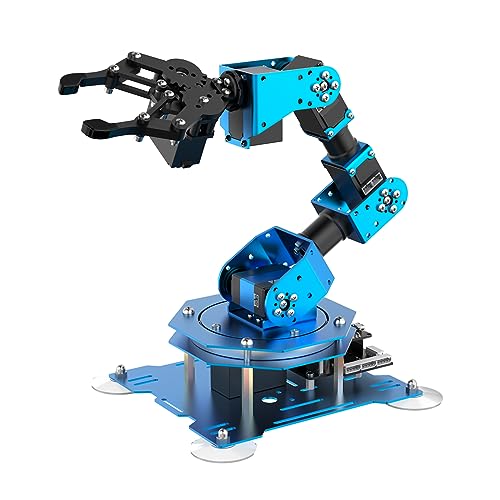
Hiwonder xArm 1S Robotic Arm Kit
Six serial bus servos with position feedback move an aluminium arm, a discipline apart from wheeled robots. Teaching mode records joint positions as you move the arm by hand, then replays or edits them in software. Inverse kinematics becomes practical work at this point, though payload suits light objects rather than tooling.
Pros
- Servo feedback makes repeatable positioning possible
- Teaching mode captures motion paths before any code
- Aluminium structure holds calibration over months
Cons
- Payload limits projects to light objects
- Documentation is thinner than LEGO or VEX provides
How to choose
What separates a professional robot kit from a toy Three markers settle it quickly. Open programming comes first, because a kit that only runs its own block app has a ceiling, while Python or C support does not. Sensor and port count comes second, since expansion decides how long the kit stays interesting after month one. Part availability comes third, as a stripped servo should not end a project. VEX, LEGO Education and Makeblock all sell components individually, which outweighs any number printed on the box.
Block coding, Python or bare metal Arduino Language support should match where a builder is now and where they will be in a year. Scratch style blocks teach sequence and conditionals without syntax errors getting in the way, which is why SPIKE Prime and RoboMaster S1 both begin there. Python is the natural next step, and both handle it inside the same app. ELEGOO and SunFounder skip blocks almost entirely, dropping you into Arduino C or Python on day one. Pick the kit that owns the next step, not only the current one.
Choosing a kit for a classroom or a competition team Institutional buying answers to different pressures than hobby buying. Classrooms want durability, lesson plans and a fast reset between periods, which describes LEGO Education SPIKE Prime exactly. Competition teams want contest legal parts and quick iteration between matches, which is the VEX IQ case. Budget per station matters as much as capability, since one RoboMaster S1 equips a demonstration while several ELEGOO kits put a whole class in build mode. Decide first whether you are funding one showcase robot or a room of builders.
Kits for computer vision and robotic arm projects Vision work demands processing that most microcontroller kits simply lack. SunFounder PiCar-X runs a full Raspberry Pi, so OpenCV, TensorFlow Lite and the rest of the Python ecosystem are available. DJI RoboMaster S1 does vision internally through marker and gesture recognition, but inside DJI’s framework rather than your code. Hiwonder xArm 1S shifts the axis entirely, letting vision output drive a physical gripper with repeatable positioning. Ask whether you want to use vision features or write them, because that single question sorts these three.
Compared at a glance
| # | Model | Programming | Best for | Score | Price |
|---|---|---|---|---|---|
| 1 | DJI RoboMaster S1 Educational Robot | Scratch 3.0 and Python | Best overall | 9.4 | Check price |
| 2 | LEGO Education SPIKE Prime Set 45678 | 528 elements | Best for classrooms | 9.2 | Check price |
| 3 | VEX Robotics IQ Super Kit | 850 plus structural and motion parts | Best for competition teams | 9.0 | Check price |
| 4 | Makeblock mBot Ultimate 2.0 10-in-1 Robot Kit | 160 plus aluminium mechanical parts | Best for mechanical variety | 8.8 | Check price |
| 5 | ELEGOO Smart Robot Car Kit V4.0 | Arduino UNO R3 with motor shield | Best value for Arduino coding | 8.5 | Check price |
| 6 | SunFounder PiCar-X Raspberry Pi Robot Car Kit | Raspberry Pi, sold separately | Best for Python and Raspberry Pi | 8.2 | Check price |
| 7 | Hiwonder xArm 1S Robotic Arm Kit | 6 serial bus servos with feedback | Best for robotic arm work | 8.0 | Check price |
Good to know
What is the best robot kit for learning Python?
SunFounder PiCar-X gives the most freedom, since a Raspberry Pi runs any library you install. DJI RoboMaster S1 and LEGO Education SPIKE Prime both support Python inside a friendlier environment, which suits students stepping up from blocks.
Are advanced robot building kits suitable for adults?
Yes, and several assume it. Makeblock mBot Ultimate 2.0, Hiwonder xArm 1S and the ELEGOO V4.0 kit expect mechanical and coding ability rather than supervision. LEGO Education SPIKE Prime is the one clearly built around school age users.
Which robot kit is used in competitions?
VEX Robotics IQ is the competition platform in this group, with parts and a brain designed to VEX IQ rules. Check the current season rule set before buying, since legal part lists change between years.
Do robot building kits need a computer?
A tablet or phone covers the minimum for most. ELEGOO and SunFounder need a computer for flashing sketches and configuring the board. SPIKE Prime and RoboMaster S1 both run happily from a tablet app.
LEGO SPIKE Prime vs VEX IQ: which should a school buy?
SPIKE Prime for general classroom teaching, on the strength of lesson plans and fast rebuilds. VEX IQ for a team entering competition, where legal parts and mechanical freedom decide placings. Schools running both use each for its own job.
Can you add your own sensors to a robot kit?
That depends on the controller. ELEGOO uses an Arduino UNO R3 and SunFounder uses a Raspberry Pi, so any compatible module works. VEX and LEGO restrict you to their smart port sensors. RoboMaster S1 allows limited expansion through its PWM ports.
How long does it take to build an advanced robot kit?
Snap together kits such as VEX IQ and SPIKE Prime reach a first working build in an hour or two. Screw based kits like the Makeblock mBot Ultimate 2.0 run several hours per configuration. ELEGOO’s car lands around two hours including wiring.
Is a robotic arm kit harder than a robot car kit?
Different rather than harder. Arms bring inverse kinematics and repeatable positioning, which is more mathematics. Cars bring navigation and sensor fusion. Hiwonder xArm 1S makes a reasonable entry point because teaching mode records motion before you write a line of code.
Which robot kit is best for a beginner moving beyond toys?
LEGO Education SPIKE Prime bridges the gap most gently, since block coding and MicroPython share one app and nothing needs wiring. Builders who already code should skip ahead to ELEGOO’s Arduino kit and edit the supplied sketches.
Can these kits be expanded after the first build?
Most can, within limits. Makeblock’s Arduino compatible Me Auriga and ELEGOO’s UNO R3 accept any standard shield or sensor. VEX IQ expands through 12 smart ports using VEX components. RoboMaster S1 and SPIKE Prime expand least, since both stay inside closed hardware.
The bottom line
Take the DJI RoboMaster S1 if the point is programming, because 31 sensors, mecanum drive and Python support mean the project begins once assembly finishes. Schools should spend on LEGO Education SPIKE Prime instead, where lesson plans and parts that survive thirty students matter more than raw sensor count. Anyone intending to write their own vision code belongs on the SunFounder PiCar-X with a Raspberry Pi supplied separately.
Rachel Simmons
Rachel previously worked in child-product retail and brings a practical, detail-first eye to gear reviews, focusing on safety standards, ease of use and the fine print that matters most for new caregivers.


