Coding Toys That Lead Kids Into Python and JavaScript
Sphero BOLT covers the widest age span, since one ball runs drag and drop blocks at eight and typed JavaScript at fourteen. Makeblock’s mBot2 suits older builders who want sensors and Python. Learning Resources Botley 2.0 teaches sequencing to young children with no tablet in the room.
Sphero BOLT fits families who want one robot to last several years, because its app steps from block coding into real JavaScript on the same hardware. An 8 by 8 LED matrix gives a child visible output beyond driving in circles. Runtime lands near two hours, so a long afternoon needs a charging break.
Listings use the word professional loosely, and most so called advanced kits stop at drag and drop blocks. What matters is whether a toy bridges into a text based language and real hardware. We compared supported languages, sensors, expansion ports and published age ranges, then weighed parent and teacher reports on durability and how long each toy held a child’s attention.
The shortlist, ranked

Sphero BOLT Coding Robot Ball
One robot spans years of learning, moving from drag and drop blocks to typed JavaScript inside the same app. Its programmable LED matrix displays animations, variables and live sensor readings, which turns abstract code into something a child can watch. A sealed polycarbonate shell shrugs off floor collisions and shallow puddles.
Pros
- One device carries a child from age eight into the teens
- LED matrix shows sensor data instead of hiding it in an app
- Sealed shell survives drops and wet kitchen floors
Cons
- Around two hours of runtime between charges
- No ports for adding extra sensors or motors

Makeblock mBot2 Coding Robot
CyberPi, the onboard controller, adds Wi-Fi, a small screen and Python support, so a project can pull live data rather than just follow a path. Ports along the chassis accept extra sensors and motors, letting one build grow over months. Assembly from an aluminium frame counts as part of the lesson.
Pros
- Python support bridges a toy robot and real programming
- Expansion ports keep projects growing for years
- Metal chassis holds up to classroom handling
Cons
- First assembly and setup need an adult
- Learning curve is steep for children under ten

Wonder Workshop Dash Robot
Dash answers voices, spots obstacles and reacts to being picked up, so younger children stay engaged between coding sessions. Several apps ladder upward, opening with a drawn path and finishing in Blockly. Around five hours of active use means it lasts a full afternoon away from a charger.
Pros
- Voice and touch reactions hold attention at six or seven
- App ladder runs from drawn paths to Blockly logic
- Five hour battery outlasts most rival robots
Cons
- Stops at block coding with no route into typed languages
- Launcher and bulldozer accessories are sold separately
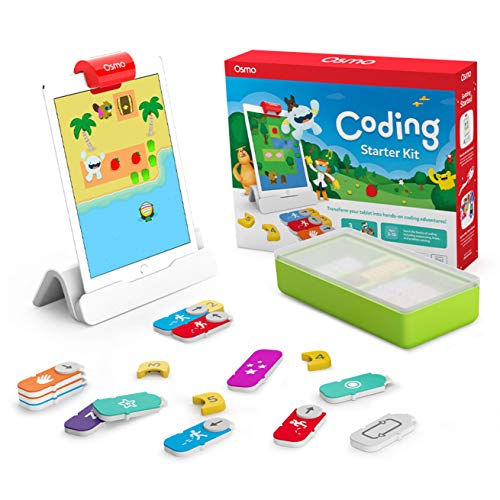
Osmo Coding Starter Kit
Children snap physical blocks together on the table while a mirror clipped over the tablet camera reads the sequence. Learning stays tactile and the feedback appears on screen a moment later. Three games cover sequencing, loops and music, though only supported iPad and Fire tablet models run them.
Pros
- Tangible blocks suit children who dislike typing
- Three games cover sequences, loops and collaboration
- Two player mode gets siblings solving together
Cons
- Useless without a supported tablet and the Osmo base
- Loose blocks disappear under furniture quickly

Learning Resources Botley 2.0 Coding Robot
Everything runs from a handheld remote, so a five year old learns sequencing with no screen anywhere in the room. Programs stretch to 150 steps, enough for genuine if then logic once object detection is switched on. Coding cards let a child plan a floor route before pressing a single button.
Pros
- Works with no tablet, phone or account setup
- Programs of 150 steps allow real multi stage sequences
- Coding cards turn planning into a physical activity
Cons
- Most children outgrow it by around age eight
- AAA cells are not rechargeable and drain fast

CanaKit Raspberry Pi 4 Starter Kit
Here the toys end and the tools begin: a full Linux computer with GPIO pins for electronics projects. Raspberry Pi OS arrives with Python, Scratch and Thonny already installed, so a teenager can start the same evening. Nothing is guided, which means the project idea or a course has to come from elsewhere.
Pros
- GPIO pins drive real sensors, motors and displays
- Runs the same Python toolchain used professionally
- Raspberry Pi Foundation publishes a large free project library
Cons
- No lessons or curriculum included in the box
- Needs a monitor, keyboard and mouse before anything happens
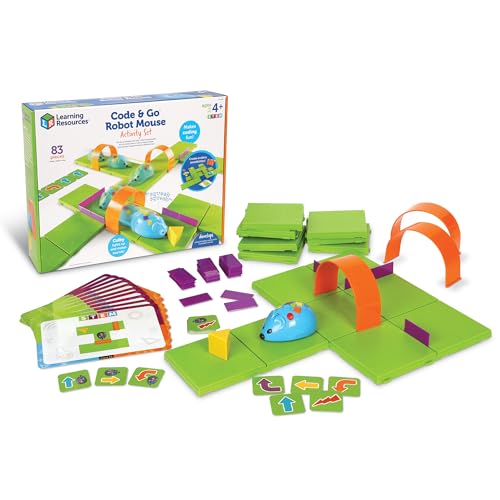
Learning Resources Code & Go Robot Mouse Activity Set
Children build a maze from grid tiles and walls, then press directional buttons on the mouse to program a route to the cheese. Mistakes show up immediately and cost nothing to fix, which is the whole lesson at four or five. Activity cards raise the difficulty once the basic idea clicks.
Pros
- Introduces sequencing and debugging at the lowest outlay
- Rebuilding the maze keeps the activity fresh for months
- Needs no app, account or tablet
Cons
- Program length is far shorter than Botley’s 150 steps
- Plastic maze pieces slide around on carpet
How they stack up
| # | Model | Programming | Best for | Score | Price |
|---|---|---|---|---|---|
| 1 | Sphero BOLT Coding Robot Ball | Block editor and JavaScript | Best overall | 9.4 | Check price |
| 2 | Makeblock mBot2 Coding Robot | CyberPi with Wi-Fi and onboard screen | Best for advanced builders | 9.2 | Check price |
| 3 | Wonder Workshop Dash Robot | 6 to 11 | Best for ages 6 to 11 | 9.0 | Check price |
| 4 | Osmo Coding Starter Kit | Physical coding blocks read by the tablet camera | Best for tablet learners | 8.8 | Check price |
| 5 | Learning Resources Botley 2.0 Coding Robot | None, remote programmer only | Best screen free option | 8.6 | Check price |
| 6 | CanaKit Raspberry Pi 4 Starter Kit | Raspberry Pi 4 Model B | Best for teens writing real code | 8.3 | Check price |
| 7 | Learning Resources Code & Go Robot Mouse Activity Set | 4 and up | Best budget starter | 8.0 | Check price |
How to choose
What makes a coding toy worth buying Look for a toy that teaches a transferable idea rather than one that performs a trick. Sequencing, loops, conditionals and debugging carry into every language a child will meet later. Check how long the toy stays useful, because a robot limited to blocks usually gets abandoned near age eleven. Sensors matter as well. Reading a light level or a distance is what makes a program feel purposeful instead of decorative.
Matching a coding toy to your child’s age Four to seven year olds learn fastest from screen free floor robots where cause and effect arrive instantly, which is Robot Mouse and Botley territory. From seven to eleven, block editors on a tablet add loops and conditionals, and Dash and Osmo sit in that band. Older children need typed languages and physical builds to stay interested. Buying above the age band tends to produce frustration rather than acceleration.
How kids move from blocks to Python and JavaScript Syntax is rarely the hard part. Losing the visual safety of snapped together blocks is what stalls a child. Toys showing block and text views side by side ease that handover, which is Sphero BOLT’s real advantage over Dash. Makeblock’s mBot2 goes further, running Python on hardware that also takes extra sensors and motors. Expect the jump to take weeks of small projects, not one afternoon.
When a coding toy should become a real computer Around thirteen or fourteen, most coding toys turn into a ceiling rather than a ladder. A Raspberry Pi 4 kit runs the genuine toolchain and exposes GPIO pins for electronics work. Buy it once a child already has project ideas of their own. Handed over cold, with no course and no goal, a Pi usually stays in its box. Classrooms face the same split, which is why teachers pair mBot2 sets with lesson plans.
Good to know
What age should a child start with coding toys?
Screen free sequencing toys work from about four, using directional buttons and a floor maze. Block coding on a tablet lands well from around seven. Text based languages suit most children from twelve upward.
Which coding toys teach real programming languages?
Sphero BOLT runs JavaScript alongside its block editor, and Makeblock’s mBot2 runs Python through mBlock. A Raspberry Pi goes furthest, handling Python and C directly on Linux. Almost every other coding toy stops at a block editor.
Do coding toys need a tablet or phone?
Botley 2.0 and the Code and Go Robot Mouse work entirely offline with no screen. Dash, BOLT and Osmo each need a compatible device, and Osmo also needs its camera base. Check the compatibility list first, since older tablets drop off it.
Are advanced coding kits worth it for beginners?
Usually not. A kit such as the mBot2 assumes a child already understands loops and variables, so it frustrates a true beginner. Start on a simpler robot, then upgrade once the basics feel comfortable.
Sphero BOLT vs Dash: which suits my child?
Dash is friendlier for six to ten year olds thanks to voice response and a five hour battery. BOLT lasts longer overall because it carries a child into JavaScript. Families with one younger child often choose Dash, while those buying once choose BOLT.
Can coding toys be used in a classroom?
Dash and the mBot2 both ship in class packs with teacher lesson plans behind them. Durability decides most of it, which favours a metal chassis or a sealed shell. Battery life then decides whether a set survives a full teaching day.
What is the best coding toy for a child who hates screens?
Botley 2.0 programs from a handheld remote with no display involved. For younger siblings, the Robot Mouse uses buttons on the robot itself. Both teach sequencing and debugging without an account or an app.
How long do children stay interested in a coding robot?
Screen free starters usually hold attention for a year or two before a child outgrows them. Robots with expanding software and sensor options last three to four years. Interest runs longest when the toy serves a project the child picked.
Is a Raspberry Pi too advanced for a child?
For a supported teenager with a project in mind, it is ideal and runs professional tools. Without guidance it tends to stall right after first setup. Pair it with a free Raspberry Pi Foundation project path rather than handing it over unopened.
Final word
Sphero BOLT is the strongest single purchase, since one ball serves a curious eight year old and a teenager typing JavaScript, with an LED matrix that keeps output visible throughout. Children under seven learn more from Botley 2.0, which needs no screen at all. Teenagers already fluent in blocks should skip toys and start on the Raspberry Pi 4 kit instead.
Rachel Simmons
Rachel previously worked in child-product retail and brings a practical, detail-first eye to gear reviews, focusing on safety standards, ease of use and the fine print that matters most for new caregivers.