Premium coding toys worth keeping past week one
Sphero BOLT leads on longevity. One robot runs drag and drop blocks at seven and JavaScript at thirteen. LEGO Education SPIKE Prime fits kids who want to design the machine, not just drive it. Wonder Workshop Dash starts children coding before they read fluently.
Sphero BOLT is the pick for most families. The same robot handles drag and drop blocks at age seven and real JavaScript at thirteen. Sensors, an 8 by 8 LED matrix and infrared messaging between two robots keep new projects arriving. Nothing builds or bolts on, which is the trade against a LEGO kit.
Coding toys stall when the software ceiling arrives before the child does. We compared supported languages, sensor hardware, construction systems and published age guidance. App ecosystems mattered too, specifically whether lessons continue past starter puzzles. Owner feedback covered the rest: durability, battery life and whether the toy still gets used six months later.
What we recommend

Sphero BOLT
Clear polycarbonate sphere carries a gyroscope, accelerometer, compass and light sensor. Sphero Edu switches one robot between draw, block and JavaScript modes, which is why it survives several school years. Building is the missing piece, so construction minded kids may want a kit instead.
Pros
- Ladder runs from blocks into a real text language
- Sealed shell handles water and outdoor surfaces
- Infrared lets two robots message each other
Cons
- No building or hardware customisation
- Every session needs a phone or tablet

LEGO Education SPIKE Prime Set
Six port hub, motors and sensors plug straight into standard LEGO Technic beams and pins. Children design a machine first, then program its behaviour in a Scratch based editor or in Python. Around 528 elements need sorting and shelf space, which is the real commitment here.
Pros
- Mechanical design and code taught side by side
- Python mode keeps older students going
- Works with Technic parts already in the house
Cons
- Largest storage footprint on this list
- Sorting several hundred small parts takes patience

Wonder Workshop Dash Robot
Rolls out of the box responding to voice, sound and obstacles, so a six year old sees results before reading fluently. Blockly based apps step up through loops, events and variables. Launchers, bulldozer bars and brick connectors extend play, though each accessory ships separately.
Pros
- Usable before a child reads confidently
- Several apps at increasing difficulty
- Chunky body handles drops and carpet
Cons
- Accessories sold separately add up
- Ceiling arrives around age eleven

Makeblock mBot Neo
Aluminium alloy chassis runs on the CyberPi controller, which carries Wi-Fi, Bluetooth and a small screen on the board itself. mBlock software handles Scratch 3.0 blocks and Python, and extra sensor modules plug in for competition builds. Assembly comes first, unlike a ready to roll robot.
Pros
- Add on sensor modules extend the same robot
- Software already used in many school programmes
- Metal chassis survives classroom handling
Cons
- Assembly required before the first run
- Steeper first hour than rivals
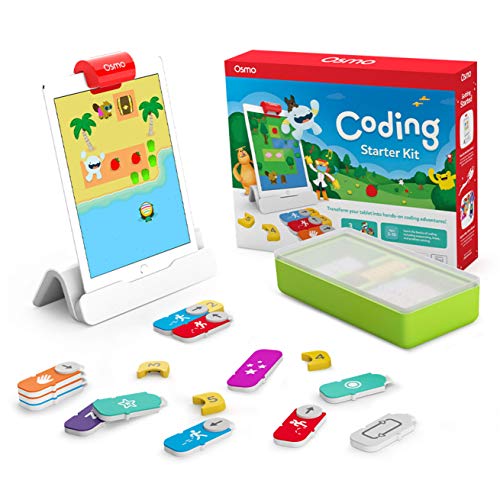
Osmo Coding Starter Kit
Magnetic command blocks sit on the table while a tablet camera reads them through a reflector base. Three games cover sequencing, loops and music composition for early primary ages. Check the compatibility list first, since it runs only on supported iPad and Fire tablet models.
Pros
- Hands stay on physical blocks, not the screen
- Three separate games in one kit
- Two player mode pushes shared problem solving
Cons
- Needs a supported tablet and the Osmo base
- Stops short of text based code

Learning Resources Botley 2.0 Coding Robot
Programs entirely from a handheld remote, so no phone or tablet enters the room. Kids chain up to 150 steps, add if then logic, and set the robot to follow black lines or dodge objects. Sequences disappear when the session ends, which caps longer projects.
Pros
- Runs with no screen involved at all
- Teaches sequencing and conditionals early
- Activity tiles supply ready made challenges
Cons
- Programs cannot be saved between sessions
- AAA batteries are an ongoing purchase
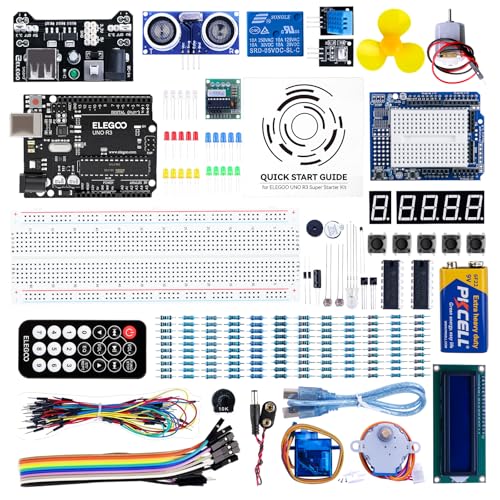
Arduino Starter Kit
Official kit pairs an Arduino UNO R3 with components and a project book covering fifteen builds. Projects run from a blinking LED to a light theremin and a motorised pinwheel, all written in the C based Arduino language. Wiring needs an adult alongside for younger builders.
Pros
- Circuits and programming taught together
- Huge community library of follow on projects
- One board serves years of separate builds
Cons
- Too advanced for primary school ages
- Loose components need careful storage
What to look for
What makes a premium coding toy last Longevity separates a premium toy from an expensive one. Look for a software ladder that starts in icons or blocks and ends in Python or JavaScript on the same hardware. Sensor count matters next. A robot reading distance, light and orientation supports far more projects than one that only drives. Check whether the app carries structured lessons or only free play. Device requirements deserve attention too, since several kits run on specific tablets.
Block coding vs text coding Block languages such as Scratch strip syntax errors out of the way. Children concentrate on sequence, loops, conditionals and events instead of semicolons. Text coding adds syntax, debugging and the vocabulary used in real work. Bridging both is what the strongest toys do. Sphero Edu flips one program between blocks and JavaScript, and SPIKE Prime carries its block editor into Python. Gradual handover beats a hard restart on an unfamiliar platform.
Should the child build the robot or drive it? Ready to roll robots deliver results in minutes, which protects momentum for younger or impatient children. Construction kits take longer and teach gearing, structure and sensor placement alongside code. Pick by the child, not the box art. A kid who already builds LEGO Technic gets more from SPIKE Prime. A kid who loses interest during assembly is better served by Dash or BOLT. Arduino sits at the far end, where wiring and code arrive together.
Which coding toy fits which age Five to seven year olds need the interface to carry the lesson. Botley 2.0 runs from a remote with no screen, and Osmo keeps hands on physical blocks. Eight to twelve is where Dash, BOLT and mBot Neo fit, with block editors that stretch into text. Teens ready for syntax and circuits belong on Arduino, or on SPIKE Prime in Python mode. Box ages are guidance only, so weigh reading level and patience more heavily.
The lineup, side by side
| # | Model | Programming | Best for | Score | Price |
|---|---|---|---|---|---|
| 1 | Sphero BOLT | Draw, Scratch style blocks and JavaScript | Best overall | 9.4 | Check price |
| 2 | LEGO Education SPIKE Prime Set | Around 528 elements | Best for building and coding together | 9.2 | Check price |
| 3 | Wonder Workshop Dash Robot | Wonder and Blockly apps | Best for younger children | 9.0 | Check price |
| 4 | Makeblock mBot Neo | CyberPi with built in screen and Wi-Fi | Best for classrooms and competitions | 8.7 | Check price |
| 5 | Osmo Coding Starter Kit | Coding Awbie, Coding Jam and Coding Duo | Best for tablet based learning | 8.5 | Check price |
| 6 | Learning Resources Botley 2.0 Coding Robot | Handheld remote programmer, up to 150 steps | Best screen free option | 8.3 | Check price |
| 7 | Arduino Starter Kit | Arduino UNO R3 | Best for teens ready for real code | 8.0 | Check price |
Good to know
What age should a child start with coding toys?
Screen free sequencing toys such as Botley 2.0 work from about age five. Block coding on a tablet suits six and up. Text languages like Python or JavaScript usually land from around age ten.
Do coding toys actually teach programming?
Good ones teach sequence, loops, conditionals, events and debugging. Toys limited to preset actions on a button teach cause and effect instead, which is useful but not programming.
Which coding toy works without a tablet?
Botley 2.0 programs from its own remote and needs no screen. Every other pick here relies on a phone, tablet or computer for its editor.
Is Sphero BOLT better than Wonder Workshop Dash?
BOLT reaches further, with JavaScript and a programmable LED matrix for older kids. Dash suits six to nine year olds better, because it reacts instantly and its apps assume limited reading.
Can a coding toy lead to real programming languages?
Yes, when the ladder lives inside one product. Sphero Edu moves blocks into JavaScript, SPIKE Prime moves into Python, and an Arduino kit starts in C style code on project one.
Are LEGO coding sets worth the extra outlay?
For a child who already builds, yes, since mechanical design and code reinforce each other. A child who wants to code without assembling parts will get more from a ready made robot.
How long do kids stay interested in a coding robot?
Interest holds while fresh challenges keep appearing. Structured lesson libraries, expandable sensors and construction parts stretch that window. Single mode robots often stall within a few weeks.
What is the difference between block coding and Scratch?
Scratch is one specific block based language from MIT. Block coding names the wider category, and many toys run a Scratch style editor built on similar drag and drop logic without being Scratch.
Which coding toy suits a classroom or competition team?
mBot Neo fits best, with a metal chassis, plug in sensor modules and mBlock software already used across school programmes. SPIKE Prime is the alternative where mechanical design is part of the brief.
The bottom line
Sphero BOLT is the buy for most families, since one robot carries a child from drawing paths at seven to writing JavaScript at thirteen. Its sensor set keeps supplying project ideas long after the novelty fades. Children already deep in LEGO Technic should take SPIKE Prime instead, because the mechanical half is where their time goes. For five to seven year olds, or homes limiting screens, Botley 2.0 teaches the same logic with no tablet involved.
Rachel Simmons
Rachel previously worked in child-product retail and brings a practical, detail-first eye to gear reviews, focusing on safety standards, ease of use and the fine print that matters most for new caregivers.


