Desk Calculators That Print a Usable Audit Trail
Casio HR-100TM Plus leads on flexibility: 12 digits, red negatives and a choice of AC or AA power. Sharp EL-1801V prints slightly faster and swaps ink rollers without threading. Canon P23-DHV-3 weighs under two pounds, so it moves between a home desk and a job site.
Casio HR-100TM Plus fits most bookkeepers, shop counters and freelancers who want tape beside them while they work. Twelve digits, tax and margin keys and dual power make it the flexible default. Print speed is the catch at 2.0 lines per second, and any long posting session will feel that pace.
Supplies and speed shape daily use more than key layout does. We compared published print speeds, digit capacity, ribbon versus ink roller systems, tax and currency functions and battery support. Owner reports about jammed feeds and hard to find refills settled the closer rankings.
What matters most
What to look for in a printing calculator Digit capacity sets the ceiling on totals, and 12 digits covers essentially every small business ledger. Print speed, quoted in lines per second, decides how long each batch ties up your hands. Supplies deserve a check before you buy, since ink rollers snap into a carrier while fabric ribbons thread onto spools. Tape width matters for stocking up, and 2.25 inch bond rolls are the shared standard across every model here. Power comes last but bites hardest, because an AC only unit is stuck wherever the outlet is.
Ink roller vs ribbon: which supply to choose Ink rollers win on effort. Pull the spent one out, press a fresh one in, done in seconds with clean hands. Ribbons carry more ink per unit and last longer between changes, though they fade gradually and owners report smudged tape once a spool dries out. Desks printing all day tend to favor ribbons for endurance. Occasional users almost always prefer rollers, and the Sharp EL-1801V is the clearest example of that convenience.
Best picks for home offices and mobile work Outlet access and desk space drive this branch of the decision. Dual power units such as the Casio HR-100TM Plus, HR-170RC Plus and Canon P23-DHV-3 run on four AA cells at a kitchen counter, a market stall or a client site. Compact bodies also leave room for a laptop alongside. One tradeoff shows up within a day: printing drains AA batteries quickly, so the adapter belongs in the bag. Anyone tallying receipts away from a desk should weight portability above raw speed.
When high volume posting justifies a faster machine Accounting teams entering hundreds of lines feel every fraction of a second. At 3.7 and 4.3 lines per second, the Sharp EL-2196BL and Victor 1225-3A finish batches that leave a 2.0 line per second unit still chattering. Both need a wall outlet, both run louder, and both take more desk. Below a few hundred entries a month, that speed buys almost nothing. Skip the upgrade and put the difference toward spare rolls and refills instead.
The shortlist, ranked
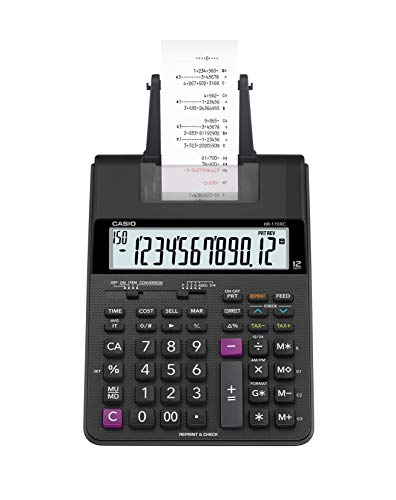
Casio HR-100TM Plus
Twelve digits and a two color ribbon give Casio the widest use case here, with negatives printing in red for fast scanning. Power arrives from the included AC adapter or four AA batteries, so a counter with no free outlet still works. Tax, cost, sell and margin keys cover retail markup and everyday bookkeeping math.
Pros
- Battery option keeps it running during outages
- Red negatives stand out on a long tape
- Tax, margin and currency keys built in
Cons
- 2.0 lines per second drags on long batches
- Ribbon cartridges need frequent replacement

Sharp EL-1801V
Sharp prints 2.1 lines per second through a two color ink roller instead of a threaded fabric ribbon. Rollers drop straight into the carrier, turning a refill into a ten second stop. A 12 digit fluorescent display stays legible under bright office lighting and from an angle across the desk.
Pros
- Ink roller swaps need no threading
- Fluorescent display readable off axis
- Grand total and item count keys
Cons
- No battery backup for power cuts
- Ink rollers fade before they truly run out

Canon P23-DHV-3
Under two pounds on the scale, this Canon slips into a bag between a home office and a client site. Black and red printing runs at roughly 2 lines per second off four AA batteries or the bundled adapter. Currency conversion and a built in clock extend it past plain arithmetic.
Pros
- Light enough to carry in a laptop bag
- Currency conversion and clock functions
- Paper roll loads from the top
Cons
- Narrow 2.25 inch tape fills quickly
- Keys sit smaller than desktop layouts
Casio HR-170RC Plus
Check and correct review is what separates this Casio from other compact printers. Scroll back through up to 150 entered steps, fix the mistyped figure, then print a corrected total instead of rekeying the batch. Dual power keeps it usable on a counter or a folding table without an outlet nearby.
Pros
- Check and correct catches entry errors before printing
- Negatives print in red for quick scanning
- Compact body suits a crowded desk
Cons
- AA cells drain fast during heavy printing
- Slower than dedicated accounting units

Sharp EL-2196BL
Long posting sessions are the point of this Sharp, which prints 3.7 lines per second onto standard 2.25 inch bond tape. A two color ink roller keeps negatives obvious inside dense columns of figures. Large sculpted keys and a sloped deck let an experienced operator touch type on the ten key pad.
Pros
- Clears long batches without waiting on the printer
- Sculpted ten key pad supports touch entry
- Item count and average keys
Cons
- Requires a permanent wall outlet
- Bulky on a shared or narrow desk

Victor 1225-3A
Ledger work is where Victor aims, printing 4.3 lines per second through a two color ribbon. An independent grand total memory keeps running subtotals apart from the working register, which helps when reconciling several accounts in one sitting. Recycled plastic in the housing also satisfies some office procurement policies.
Pros
- Fastest printer in this lineup
- Independent grand total memory for subtotals
- Recycled plastic housing
Cons
- Impact noise carries in quiet rooms
- Ribbon spools are harder to find locally than ink rollers

Canon P170-DH-3
Canon strips this one to the useful parts: 12 digits, two color ink roller printing and a bundled AC adapter. Tax keys and a profit margin function still cover small business arithmetic. Print speed lands at the bottom of this group, which makes it a light duty machine rather than a posting station.
Pros
- Plain layout with few modes to learn
- Tax and margin keys included
- Small footprint beside a keyboard
Cons
- No battery backup
- Too slow for multi page batches
How they stack up
| # | Model | Digits | Best for | Score | Price |
|---|---|---|---|---|---|
| 1 | Casio HR-100TM Plus | 12 | Best overall | 9.4 | Check price |
| 2 | Sharp EL-1801V | 12 | Best for daily office use | 9.2 | Check price |
| 3 | Canon P23-DHV-3 | 12 | Best compact | 9.0 | Check price |
| 4 | Casio HR-170RC Plus | 12 | Best value | 8.8 | Check price |
| 5 | Sharp EL-2196BL | 12 | Best for high volume entry | 8.5 | Check price |
| 6 | Victor 1225-3A | 12 | Best for accountants | 8.3 | Check price |
| 7 | Canon P170-DH-3 | 12 | Best budget | 8.0 | Check price |
Frequently asked questions
What is a printing calculator used for?
Bookkeepers, cashiers and tax preparers use one to produce a paper tape of every keystroke. That tape becomes an audit trail you can check line by line against a ledger, an invoice or a till drawer.
How many digits do I need on a printing calculator?
Twelve digits reaches into the hundreds of billions, which covers nearly all small business work. Ten digit models still exist and run out of room on large invoice batches.
Ink roller vs ribbon: which one lasts longer?
Ribbons last longer between changes and suit constant printing. Ink rollers install in seconds and fit lighter use, which is why most compact models ship with them.
Can a printing calculator run on batteries?
Some do. Casio HR-100TM Plus, Casio HR-170RC Plus and Canon P23-DHV-3 accept four AA cells alongside an adapter. Sharp EL-1801V and EL-2196BL need an outlet.
What paper roll size do printing calculators use?
Standard 2.25 inch wide bond rolls fit every model here. Single ply paper suits ribbon and ink roller printers, while carbonless multi ply rolls belong in impact receipt printers.
Which printing calculator is best for a small business?
Casio HR-100TM Plus balances 12 digits, tax and margin keys and dual power. That mix handles a retail counter, a market stall and freelance bookkeeping from one machine.
Is a printing calculator worth it if I already use spreadsheets?
Yes when you need a physical record during entry. Reconciling a bank statement or a cash drawer goes faster with tape you can tick off than with rows you scroll past.
How loud are printing calculators?
Impact printing produces a steady clatter on every line. Faster units like the Victor 1225-3A make the most noise, which matters in open plan or shared rooms.
What does the check and correct function do?
It lets you scroll back through recent entries and repair a mistyped figure. Casio HR-170RC Plus stores up to 150 steps, so a long batch survives one bad keystroke.
Can you use a printing calculator without printing?
Most switch to a non print mode that keeps the display working while the mechanism rests. That setting saves paper and cuts noise during quick mental checks.
Final word
Choose the Casio HR-100TM Plus if one machine has to serve a shop counter, a home office and the occasional site visit, since dual power removes the outlet problem entirely. Volume changes that answer: at several hundred lines a day, the Sharp EL-2196BL earns its wall outlet and its noise. Anyone printing a handful of daily totals can drop to the Canon P170-DH-3 and lose only speed.
Marcus Chen
Marcus covered consumer electronics for enthusiast tech publications for six years before joining ChoiceCrest. He specializes in translating manufacturer spec sheets into plain-language buying advice, with a focus on audio, computing accessories and smart-home gear.


