Photo Paper That Prints Deep Blacks and Stays Flat
Canon Photo Paper Plus Glossy II PP-301 heads this list for everyday inkjet printing, with 265 gsm stock and a driver profile already installed. Epson Ultra Premium Photo Paper Glossy handles both dye and pigment ink sets. Koala Glossy Photo Paper covers craft runs and school projects in 100 sheet packs.
Canon Photo Paper Plus Glossy II PP-301 is the sheet most home inkjet owners should load. Its 265 gsm base leaves the output tray flat, and the gloss coating separates shadow detail that thinner stock muddies. High gloss also records fingerprints, so lift each print by the edge.
Coating chemistry is where photo papers actually differ, and no product photo shows it. We compared listed weight, thickness, base type and stated ink support, then weighed owner reports on curl, drying time and bleed. Papers matched to their own printer ecosystem ranked higher, because the media profile already sits in the driver.
The best picks, ranked

Canon Photo Paper Plus Glossy II PP-301
Canon built PP-301 around its ChromaLife100 dye inks, and PIXMA drivers already list the media type by name. At 265 gsm a sheet handles like a print from a lab counter. Drying is quick, though the mirror gloss records every fingerprint that touches it.
Pros
- 265 gsm base resists curl as ink dries
- Media profile preloaded in Canon drivers
- Deep blacks with clear shadow separation
Cons
- Gloss surface marks with fingerprints
- Pack counts smaller than bulk brands

Epson Ultra Premium Photo Paper Glossy
Epson rates this stock for Claria dye and UltraChrome pigment inks, a combination few sheets claim. Rendering leans slightly warm beside Canon gloss, which flatters skin tones. Bulk counts and a 13×19 option make it practical for working through a full album in one sitting.
Pros
- Rated for dye and pigment ink sets
- Bulk packs plus a 13×19 size
- Warm rendering suits portrait work
Cons
- Wants a minute of air before stacking
- 10.4 mil is thinner than Canon flagship gloss

Koala Glossy Photo Paper
Hundred sheet packs at 200 gsm change the arithmetic for classroom projects and craft runs. Colour comes through bright on the white base, while deep shadows lose detail against brand stock. Older printers feed it more reliably one sheet at a time.
Pros
- 100 sheets per box for high volume work
- Bright white base lifts saturated colour
- Feeds in most consumer inkjets
Cons
- 200 gsm curls more than heavy stock
- Shadow detail trails premium papers

Ilford Galerie Prestige Smooth Pearl
Pearl finish sits between gloss and matte, cutting lamp reflections without draining colour. Stiffness is the surprise here, since a 310 gsm sheet passes around a table without creasing. Ilford aims the resin coated base at pigment machines, so Epson SureColor and Canon PRO owners get the most from it.
Pros
- Pearl surface hides glare under room lamps
- 310 gsm resin coated base feels rigid
- Holds fine detail in hair and fabric
Cons
- Sold in small sheet counts
- Fine texture softens maximum gloss punch
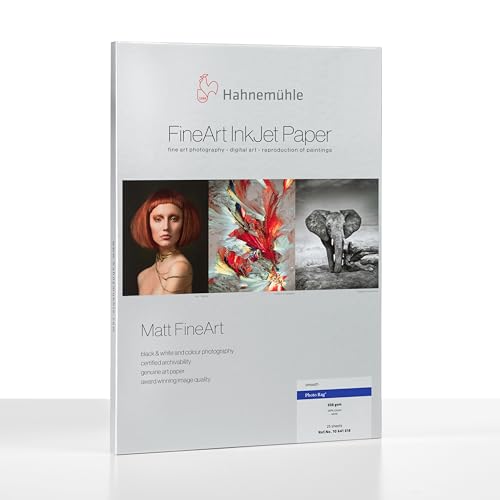
Hahnemuhle Photo Rag 308
Cotton fibre with no optical brighteners makes this 308 gsm matte rag a standard for limited edition printing. Surface tooth is soft and slightly raised, which flatters monochrome and painterly files. Snapshots lose their snap on it, so choose subjects with deliberate tonal range.
Pros
- Archival cotton base without brighteners
- Renders black and white with real depth
- Texture adds body to painterly images
Cons
- Matte finish lowers peak contrast
- Needs a pigment printer to look right

Canon Pro Luster Photo Paper LU-101
Luster is what portrait studios hand to clients, because the fine stipple shrugs off finger marks. Canon lists LU-101 at 260 gsm and profiles it for PIXMA PRO and imagePROGRAF drivers. Colour runs a shade cooler than PP-301, which keeps skin tones neutral under gallery lighting.
Pros
- Stipple texture resists fingerprints
- Neutral balance for skin tones
- Sits well behind glass without hotspots
Cons
- Less punch than a full gloss sheet
- Fewer sizes than the gloss line

Epson Premium Presentation Paper Matte
Mixed pages of photos, text and charts come out clean on this 45 lb matte stock. Ink sets almost immediately, which makes double sided handouts practical. Skin tones read flat next to gloss, so keep it away from framed family portraits.
Pros
- Dries fast with little smudge risk
- Text stays crisp beside images
- Economical for proof and draft runs
Cons
- Lower contrast than photo gloss
- Not an archival cotton base
How they stack up
| # | Model | Weight | Best for | Score | Price |
|---|---|---|---|---|---|
| 1 | Canon Photo Paper Plus Glossy II PP-301 | 265 gsm | Best overall | 9.4 | Check price |
| 2 | Epson Ultra Premium Photo Paper Glossy | 10.4 mil | Best value | 9.2 | Check price |
| 3 | Koala Glossy Photo Paper | 200 gsm | Best budget | 9.0 | Check price |
| 4 | Ilford Galerie Prestige Smooth Pearl | 310 gsm | Best for pearl finish prints | 8.7 | Check price |
| 5 | Hahnemuhle Photo Rag 308 | 308 gsm | Best for fine art prints | 8.5 | Check price |
| 6 | Canon Pro Luster Photo Paper LU-101 | 260 gsm | Best for portrait proofs | 8.3 | Check price |
| 7 | Epson Premium Presentation Paper Matte | 45 lb | Best for charts and mixed pages | 8.0 | Check price |
What matters most
What to look for in photo paper Weight in gsm tells you how a sheet feels and whether it curls as ink dries. At 250 gsm and above, a print handles like something from a lab counter. Coating does the other half of the work. Resin coated stock dries fast and blocks bleed, while uncoated cotton rag absorbs ink for a softer edge. Read the stated ink support before buying, since dye and pigment bond to those surfaces differently. Size matters too, because 13×19 sheets need a printer with a wide carriage.
Glossy vs matte vs luster Gloss delivers the deepest blacks and the widest colour range, then charges for it in glare and fingerprints. Matte scatters light, keeping prints readable under office ceiling panels while giving up shadow depth. Luster and pearl land between the two, using a fine texture that hides handling marks. Studios default to luster on client proofs for that single reason. Product shots and landscapes usually look best on gloss behind glass.
How to match paper to dye and pigment inks Dye ink settles into the coating and rewards glossy resin coated sheets. Pigment ink rests nearer the surface, which is why fine art matte papers are sold for pigment machines. Run rag paper through a dye printer and blacks often come out dull and slightly muddy. Canon and Epson both publish media settings in their drivers, so select the name printed on the pack instead of a generic photo option. Getting that one dropdown right fixes more colour complaints than any editing step.
Choosing paper for albums, framing and gallery prints Album pages get touched constantly, so luster or pearl outlast high gloss inside a binder. Behind glass the handling problem disappears and gloss becomes the safe pick. Work meant to hang for decades belongs on cotton rag without optical brighteners, which hold their white point as brighteners fade. Anyone selling prints should buy one small pack of two candidates and run the same file on both. That comparison settles the question faster than any spec sheet.
Common questions
What is the best photo paper for home inkjet printers?
Canon Photo Paper Plus Glossy II PP-301 suits most home machines, especially PIXMA models that already carry its profile. Epson owners get closer colour from Epson Ultra Premium Photo Paper Glossy.
Does photo paper weight really matter?
Yes. Sheets under about 200 gsm feel flimsy and cup as ink dries. From 260 gsm upward a print holds flat and survives handling, which is why lab prints use heavy stock.
Can you use photo paper in a laser printer?
No. Inkjet coatings can melt or blister against a laser fuser and foul the rollers. Laser machines need paper labelled for laser or colour laser use.
Glossy or matte photo paper, which is better for framed prints?
Gloss wins behind glass, because the glass takes the fingerprints and the extra contrast shows. Matte earns its place on prints that hang unglazed under bright lights.
What is luster photo paper used for?
Portrait proofs and album pages, mainly. A fine stipple such as Canon LU-101 resists finger marks while keeping more contrast than matte.
Why do prints look darker than the screen?
Screens emit light and paper only reflects it, so blacks close up on the page. Picking the correct media type in the driver closes most of the gap. Monitor calibration closes the rest.
Is cotton rag photo paper worth it for snapshots?
Rarely. Hahnemuhle Photo Rag 308 shines on artwork and monochrome, while casual phone images read flat on its matte surface. Keep it for files with deliberate tonal range.
How should photo paper be stored?
Leave sheets flat in the original bag, away from humidity and direct sun. Moisture swells the coating and causes feed jams. Let a cold pack reach room temperature before loading.
How long should prints dry before framing?
Gloss and pearl need a short air dry before stacking. Owners report pigment prints benefit from a day before going behind glass, since stacking early transfers ink between sheets.
Can you print on both sides of photo paper?
Only on stock labelled double sided. Most glossy photo paper coats one face and leaves the reverse plain, so the second pass looks washed out and smudges easily.
The verdict
Canon Photo Paper Plus Glossy II PP-301 takes the top spot, since 265 gsm stock, a factory driver profile and strong shadow separation cover nearly every home printing job. Epson printer owners should buy Epson Ultra Premium Photo Paper Glossy instead, because the coating and ink chemistry were engineered together. Printing artwork or black and white editions? Skip both and start with Hahnemuhle Photo Rag 308 on a pigment machine.
Marcus Chen
Marcus covered consumer electronics for enthusiast tech publications for six years before joining ChoiceCrest. He specializes in translating manufacturer spec sheets into plain-language buying advice, with a focus on audio, computing accessories and smart-home gear.
You might also need
Nintendo Game & Watch: Super Mario Bros Review: Still Worth It as a Collectible?

Ray-Ban Meta (Gen 2) Wayfarer Smart Glasses: Worth $379 for Clear Lenses?
AlyKets Nikon UC-E6 Replacement USB Cable: Does a $7.95 Cord Work as Well as the Original?
