Premium Internal Hard Drives for Serious Storage Needs
The WD Black 8TB stands out as the top pick for most users, offering a blend of high capacity, solid performance, and proven reliability. It is ideal for gamers and content creators who need fast access to large files. Its main limitation is that it runs warmer than some competitors, so adequate cooling is necessary.
When your data matters, a premium internal hard drive offers the performance and durability that budget drives can’t match. These drives are built for heavy workloads, with higher rotational speeds and longer warranties.
We have analyzed the specifications and user reviews of the leading models to help you choose the right one. Whether you need massive storage for video editing or speedy access for gaming, this guide highlights the best options.
The best picks, ranked

WD Black 8TB Performance Desktop Hard Disk Drive
The WD Black 8TB delivers top-tier performance with a 7200 RPM spindle speed and 256MB cache. It is designed for demanding applications, offering a 5-year limited warranty and a workload rating of 550TB per year.
Pros
- Excellent performance for gaming and creative work
- High workload rating for heavy usage
- Backed by a 5-year warranty
Cons
- Runs warmer than some competitors
- Can be noisy during intensive operations

Seagate IronWolf Pro 10TB NAS Internal Hard Drive
The IronWolf Pro is engineered for multi-bay NAS enclosures, offering high endurance and reliability. With a 7200 RPM speed and 256MB cache, it handles continuous operation well. It includes AgileArray technology for optimized RAID performance.
Pros
- Built for 24/7 NAS operation
- High endurance with 300TB/year workload
- Rescue data recovery services included
Cons
- Higher price per TB
- Slightly louder than desktop drives

Seagate FireCuda 4TB Performance SSHD
The FireCuda combines a 7200 RPM hard drive with 8GB of NAND flash to accelerate frequently accessed files. This hybrid design offers a performance boost over traditional HDDs, making it a cost-effective alternative to SSDs for large libraries.
Pros
- Faster load times for games and apps
- Higher capacity than most SSDs at similar price
- Good value for performance seekers
Cons
- Hybrid performance not as fast as SSD
- Limited flash cache size

WD Gold 12TB Enterprise Class Hard Drive
The WD Gold is designed for enterprise environments with a 2.5 million hour MTBF and a 550TB/year workload rating. Its 7200 RPM speed and 256MB cache provide consistent performance, while the helium-filled design reduces power consumption.
Pros
- Exceptional reliability for enterprise use
- High workload rating
- Helium technology reduces power draw
Cons
- Premium price tag
- Not necessary for typical desktop users
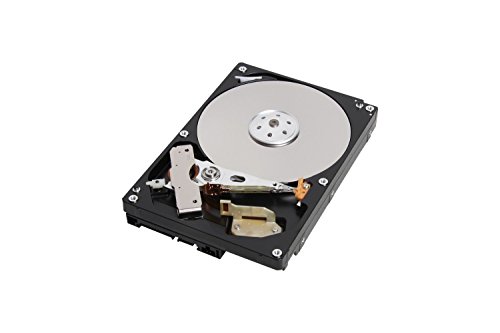
Toshiba X300 6TB Performance Desktop Hard Drive
The Toshiba X300 offers a 7200 RPM spindle and 256MB cache at a competitive price point. It features shock sensors to protect data during operation and is suitable for gaming and creative applications.
Pros
- Lower cost per GB
- Good performance for the price
- Shock sensor protection
Cons
- Shorter warranty compared to competitors
- Not designed for 24/7 operation

Seagate BarraCuda Pro 14TB Internal Hard Drive
The BarraCuda Pro is Seagate’s top-tier desktop drive, offering 14TB of storage. With a 7200 RPM speed and 256MB cache, it delivers fast data transfers. Users appreciate the 5-year warranty and high reliability.
Pros
- Massive 14TB capacity
- Fast data access for large files
- 5-year warranty for peace of mind
Cons
- High price per drive
- Heavier and runs warmer due to more platters

WD Red Pro 8TB NAS Internal Hard Drive
The WD Red Pro is built for NAS environments with up to 24 bays. It features NASware 3.0 technology for improved reliability and performance. With a 7200 RPM speed and 256MB cache, it handles multi-user workloads efficiently.
Pros
- Optimized for RAID configurations
- High workload rating
- Reliable for 24/7 operation
Cons
- Premiums price for NAS features
- May be overkill for simple desktop use
How to pick the right one
Side by side
| # | Model | Capacity | Best for | Score | Price |
|---|---|---|---|---|---|
| 1 | WD Black 8TB Performance Desktop Hard Disk Drive | 8TB | Gamers and power users who need high performance and large capacity | 9.4 | Check price |
| 2 | Seagate IronWolf Pro 10TB NAS Internal Hard Drive | 10TB | NAS systems and professional storage environments | 9.2 | Check price |
| 3 | Seagate FireCuda 4TB Performance SSHD | 4TB | Gamers and creators who want faster load times without sacrificing capacity | 8.9 | Check price |
| 4 | WD Gold 12TB Enterprise Class Hard Drive | 12TB | Enterprise servers and data centers requiring maximum reliability | 9.0 | Check price |
| 5 | Toshiba X300 6TB Performance Desktop Hard Drive | 6TB | Desktop users who need a balance of performance and value | 8.7 | Check price |
| 6 | Seagate BarraCuda Pro 14TB Internal Hard Drive | 14TB | Content creators and professionals who need massive capacity | 9.1 | Check price |
| 7 | WD Red Pro 8TB NAS Internal Hard Drive | 8TB | Small business NAS systems that require endurance and reliability | 8.8 | Check price |
Common questions
What is the difference between a desktop HDD and a NAS HDD?
NAS HDDs are designed for 24/7 operation in multi-bay enclosures. They have features like vibration tolerance and error recovery controls. Desktop HDDs are for single-user environments and may not handle continuous workloads as well.
Are hybrid drives faster than regular HDDs?
Hybrid drives, like the FireCuda, include a small amount of flash memory to cache frequently used data. This can reduce load times for repeated tasks, but they are not as fast as full SSDs. They offer a middle ground between HDD and SSD performance.
Can I use a NAS drive in a desktop PC?
Yes, NAS drives work in desktops, but they may have features that are unnecessary for desktop use, like longer error recovery times, which can cause slower performance if a read error occurs. They are also often noisier.
What does the workload rating (TB/year) mean?
It indicates the amount of data that can be written to the drive per year without degrading reliability. Higher workload ratings are suited for servers and NAS, while lower ratings are fine for typical desktop use.
Is a larger cache better?
A larger cache can help with burst write performance, but it is not the only factor. For most users, a 256MB cache is sufficient. The drive’s firmware and platter density also affect overall performance.
Do these drives come with data recovery services?
Some drives, like the Seagate IronWolf Pro and FireCuda, include rescue data recovery services for a certain period. WD drives come with a limited warranty but do not include free recovery services.
How important is rotational speed?
For large file transfers, 7200 RPM is significantly faster than 5400 RPM. However, for sequential reads, the difference may be less noticeable. If you work with huge files, opt for 7200 RPM drives.
What is the best drive for gaming?
The WD Black is specifically designed for gaming, offering fast load times and reliability. The FireCuda hybrid is also a good option for those who want a performance boost without the cost of a large SSD.
Are these drives quiet?
Noise levels vary. Drives with more platters, like the BarraCuda Pro, may produce more noise due to vibrations. Enterprise drives like the WD Gold are often louder but are designed for server rooms. Check user reviews for noise feedback.
Can I use these drives in an external enclosure?
Yes, you can install these internal drives in an external enclosure. However, ensure the enclosure supports drives of this size and speed. Some enterprise drives may require more power than a standard enclosure provides.
Our pick
For most users, the WD Black 8TB is the best premium internal hard drive overall, balancing performance, capacity, and reliability. If you need a drive for a NAS, choose the Seagate IronWolf Pro for its endurance and data recovery services. For maximum capacity, the Seagate BarraCuda Pro 14TB is unmatched.
Marcus Chen
Marcus covered consumer electronics for enthusiast tech publications for six years before joining ChoiceCrest. He specializes in translating manufacturer spec sheets into plain-language buying advice, with a focus on audio, computing accessories and smart-home gear.


