Top Premium Storage Enclosures for Serious Data
For most professionals, the OWC Express 1M2 offers the best blend of speed, build quality, and thermal management, supporting Thunderbolt 3/4 and USB4 up to 40Gbps. Its main limitation is the premium price. If you need multi-drive capacity, the TerraMaster D5-300C provides more versatility but at lower per-drive speed.
Premium storage enclosures do more than hold a drive. They protect data through robust construction, efficient cooling, and high-speed interfaces. Whether you edit video, manage photo libraries, or need reliable backups, the right enclosure makes a difference.
We analyzed current models from reputable brands, focusing on real-world performance and durability. Owners report that heat management is a key factor in maintaining speeds. We also considered ease of use and portability.
Before you buy
The shortlist, ranked

OWC Express 1M2 SSD Enclosure
The OWC Express 1M2 is a premium NVMe enclosure that supports Thunderbolt 3/4 and USB4, delivering up to 40Gbps data transfer. Its aluminum body acts as a heat sink, and owners report sustained speeds without throttling. It supports M.2 NVMe drives up to 8TB.
Pros
- Sustained high speeds
- Tool-free installation
- Compatible with both Mac and PC
Cons
- Premium price
- No USB-C 3.2 support for older devices

Sabrent Thunderbolt 3 Dual NVMe SSD Enclosure
The Sabrent Thunderbolt 3 Dual NVMe enclosure supports two M.2 NVMe drives in a RAID configuration. It features a large aluminum heatsink with a thermal pad, and a blower fan for active cooling. Owners report it runs cool even under sustained load.
Pros
- Dual drive support with RAID
- Effective cooling system
- Sturdy aluminum design
Cons
- Requires external power
- Larger and heavier than single-slot enclosures

LaCie Rugged SSD Pro
The LaCie Rugged SSD Pro is a portable SSD with an integrated enclosure that is IP67 water and dust resistant, and can withstand drops from 3 meters. It offers Thunderbolt 3 speeds up to 2800MB/s. This is a complete drive solution, not just an empty enclosure.
Pros
- Rugged and reliable
- Fast sustained reads
- Includes data recovery service (5 years)
Cons
- Fixed capacity, not user-swappable
- Very expensive per GB

TerraMaster D5-300C 5-Bay USB 3.2 Enclosure
The TerraMaster D5-300C is a 5-bay enclosure that supports 3.5-inch and 2.5-inch SATA drives. It connects via USB 3.2 Gen 1 (5Gbps) and offers hardware RAID modes including JBOD, BIG, RAID 0, RAID 1, and RAID 5. Ideal for creative professionals with large archives.
Pros
- Supports five drives
- Hardware RAID setup
- Quiet cooling fan
Cons
- Limited to 5Gbps speed
- Not bus-powered

Yottamaster USB4 NVMe SSD Enclosure
The Yottamaster USB4 enclosure supports USB4 and Thunderbolt 3/4 (40Gbps). It features a sleek aluminum body with a thermal cooling pad. Users report it performs well with both Intel and Apple Silicon Macs, and the price is more accessible than other USB4 options.
Pros
- High speed at a lower price
- Compact and portable
- Works with USB-C devices at lower speeds
Cons
- No active cooling
- Cable is short
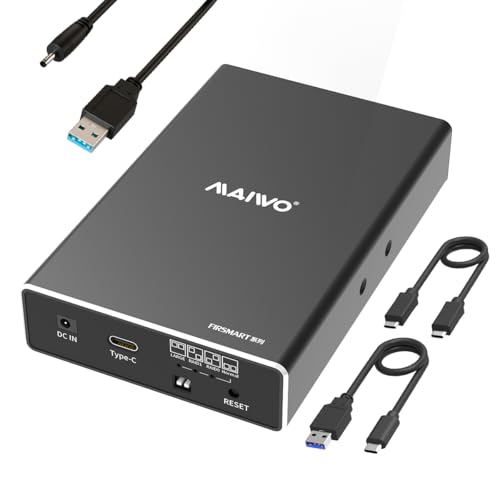
StarTech.com Dual-Bay 2.5″ SATA RAID Enclosure
This StarTech enclosure holds two 2.5-inch SATA drives and offers RAID 0, RAID 1, and JBOD modes via hardware switch. It connects via USB 3.2 Gen 1 (5Gbps) and features a compact aluminum build perfect for travel or desktop use.
Pros
- Simple RAID switching
- Tool-free drive installation
- Aluminum housing for heat dissipation
Cons
- Not for NVMe drives
- Speeds limited to SATA III

Plugable USB C Enclosure for M.2 NVMe SSD
The Plugable USB C enclosure supports M.2 NVMe drives and achieves up to 10Gbps via USB 3.2 Gen 2. It features a tool-free design with a sliding latch and thermal pad. While not as fast as Thunderbolt, it offers excellent value for everyday backups and file transfers.
Pros
- Affordable price
- No driver needed on most systems
- Compact and lightweight
Cons
- Slower than Thunderbolt
- Plastic end caps feel less premium
Side by side
| # | Model | Interface | Best for | Score | Price |
|---|---|---|---|---|---|
| 1 | OWC Express 1M2 SSD Enclosure | Thunderbolt 3/4, USB4 | Thunderbolt 3/4 and USB4 users who need maximum speed | 9.4 | Check price |
| 2 | Sabrent Thunderbolt 3 Dual NVMe SSD Enclosure | Thunderbolt 3 (40Gbps) | Users needing two NVMe drives in one enclosure | 9.0 | Check price |
| 3 | LaCie Rugged SSD Pro | Thunderbolt 3 | Professionals needing rugged durability and Thunderbolt 3 | 8.8 | Check price |
| 4 | TerraMaster D5-300C 5-Bay USB 3.2 Enclosure | USB 3.2 Gen 1 (5Gbps) | Users needing multiple drives for high-capacity storage | 8.6 | Check price |
| 5 | Yottamaster USB4 NVMe SSD Enclosure | USB4, Thunderbolt 3/4 | Future-proof USB4 users who want a compact design | 8.4 | Check price |
| 6 | StarTech.com Dual-Bay 2.5″ SATA RAID Enclosure | USB 3.2 Gen 1 (5Gbps) | Users who need to install 2.5-inch SATA SSDs/HDDs | 8.2 | Check price |
| 7 | Plugable USB C Enclosure for M.2 NVMe SSD | USB 3.2 Gen 2 (10Gbps) | Budget-conscious users who want reliable performance | 8.0 | Check price |
Common questions
What is the difference between Thunderbolt 3 and USB4?
Thunderbolt 3 and USB4 both support 40Gbps data transfer. Thunderbolt 3 includes features like PCIe tunneling and video. USB4 is compatible with Thunderbolt 3 on many devices. They are similar in speed but have different certification standards.
Can I use an enclosure with my Mac or PC?
Most enclosures work with both Mac and PC. Some require drivers or formatting. Thunderbolt enclosures work with Macs and PCs with Thunderbolt ports. USB-C enclosures are universally compatible, but speeds may vary.
How do I install an M.2 SSD into an enclosure?
Open the enclosure, align the SSD with the connector, and secure it with a screw or clip. Some enclosures are tool-free. Always ground yourself to avoid static damage. Consult the manual for specific instructions.
Do I need a powered enclosure for multiple drives?
Yes, multi-drive enclosures usually require an external power source to operate all drives. Single-drive enclosures can be bus-powered from a USB or Thunderbolt port. Check the power requirements before purchasing.
How important is cooling in an enclosure?
Cooling is critical to prevent thermal throttling. High-speed SSDs generate heat. If an enclosure heats up, performance drops. Look for aluminum or active cooling. Owners report that passive cooling works for moderate use, but active fans are better for sustained writes.
Can I use a SATA SSD in an M.2 NVMe enclosure?
No, M.2 NVMe enclosures are designed for NVMe drives. SATA M.2 drives use a different key and protocol. Some enclosures support both, but many are specific. Check the specifications to ensure compatibility.
What is the maximum capacity for an enclosure?
Capacity depends on the enclosure’s controller and the host device. Many recent enclosures support up to 8TB. Older ones may limit to 2TB or 4TB. Always check the manufacturer’s specifications.
Are these enclosures worth the price?
Premium enclosures offer better build quality, cooling, and speed, which can justify a higher price if you rely on data transfers daily. For occasional backups, a budget model may suffice. Consider your workload and expectations.
Our pick
For most professionals, the OWC Express 1M2 is the clear winner because it combines Thunderbolt speed with effective cooling and a premium build. If you need to connect multiple drives, the TerraMaster D5-300C offers flexibility with hardware RAID. For portability and ruggedness, the LaCie Rugged SSD Pro is unmatched. Choose based on your primary need: speed, capacity, or durability.
Marcus Chen
Marcus covered consumer electronics for enthusiast tech publications for six years before joining ChoiceCrest. He specializes in translating manufacturer spec sheets into plain-language buying advice, with a focus on audio, computing accessories and smart-home gear.


